
Introduction
This manual provides comprehensive instructions for the Gvyugke CT780 Wireless Gaming Headset. Please read this manual carefully before using the product to ensure proper operation and to maximize your gaming experience. This headset offers versatile connectivity options including 2.4GHz wireless, Bluetooth 5.3, and a 3.5mm wired connection, compatible with various platforms such as PS5, PS4, PC, and Nintendo Switch.
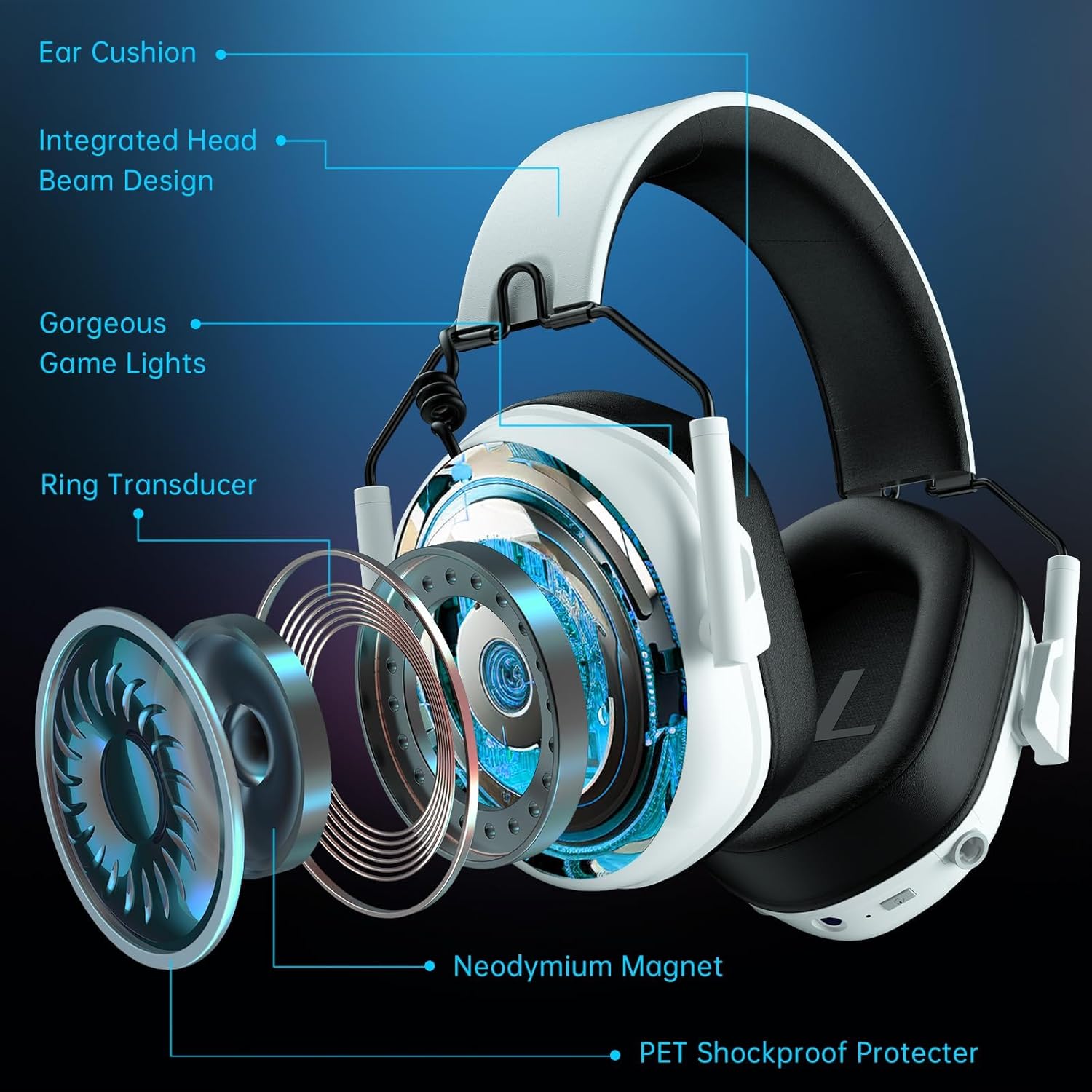
Image: The Gvyugke CT780 Wireless Gaming Headset, showcasing its light yellow design and over-ear form factor.
Пакеттин мазмуну
Пакетте бардык буюмдар бар экенин текшериңиз:
- Gvyugke CT780 Wireless Gaming Headset
- 2.4 ГГц USB зымсыз Dongle
- Ажыратылуучу ызы-чууну жокко чыгаруучу микрофон
- USB заряддоо кабели
- 3.5 мм аудио кабель
- Колдонуучунун Колдонмосу (бул документ)
Продукт бүттүview
Familiarize yourself with the components and controls of your Gvyugke CT780 headset.
Негизги өзгөчөлүктөрү:
- 50 мм аудио драйверлери: Designed for immersive 7.1 surround sound.
- Integrated Head Beam Design: Provides structural integrity and comfort.
- Ыңгайлуу кулак жаздыкчалары: Protein leather ear pads with memory foam for extended wear.
- Жөнгө салынуучу Слайдер: Allows for a customized fit for various head sizes.
- Алынуучу микрофон: Omni-directional with noise-canceling capabilities for clear communication.
- LED жарыктандыруу: Futuristic blue lighting effects along the edges of the earcups.

Сүрөт: жарылды view of the headset's internal components, highlighting the 50mm drivers and comfort features.

Image: The detachable microphone, emphasizing its flexibility and noise-canceling feature.

Image: Details on the headset's ergonomic design, highlighting breathable memory foam, soft protective elements, and adjustable sliders for comfort.
Жайгашуу
The Gvyugke CT780 headset offers multiple connection methods. Choose the one that suits your device.

Image: A compatibility chart detailing the various devices supported by each connection type (2.4GHz, Wired, Bluetooth).
1. 2.4GHz Wireless Connection (for PC, PS5, PS4, Nintendo Switch)
- 2.4 ГГц USB зымсыз донглду компьютериңиздеги, PS5, PS4 же Nintendo Switch док станцияңыздагы жеткиликтүү USB портуна сайыңыз.
- Power on the headset by pressing and holding the Power button until the LED indicator lights up.
- The headset and dongle should automatically pair. The LED indicator on the headset will show a solid light when connected.
- On your device, ensure the audio output is set to the "Gvyugke CT780" or similar headset option.
Note: For Nintendo Switch, the microphone may not be supported in 2.4GHz mode. For Xbox Series, 2.4GHz wireless is not supported.

Image: The headset connected to a PS5 console via the 2.4GHz USB dongle, demonstrating the wireless setup.
2. Bluetooth Connection (for Phones, Tablets, Bluetooth-enabled Mobile Devices)
- Гарнитура күйгүзүлгөнүн текшериңиз.
- Press and hold the Bluetooth pairing button (refer to product diagram for exact location) until the LED indicator flashes rapidly, indicating pairing mode.
- On your mobile device, go to Bluetooth settings and search for "Gvyugke CT780" or similar.
- Select the headset to pair. The LED indicator will show a solid light when connected.
Note: Bluetooth mode is not supported for Xbox All Series.

Image: A user enjoying the headset, highlighting its Bluetooth 5.3 capabilities for mobile and PC use.
3. Wired Connection (for Xbox, 3.5mm Audio Devices)
- 3.5 мм аудио кабелдин бир учун гарнитуранын 3.5 мм уячасына туташтырыңыз.
- Connect the other end of the 3.5mm audio cable to your device's 3.5mm audio jack (e.g., Xbox controller, PC audio port).
Note: For older Xbox controllers, a headset adapter (not included) may be required.
Иштөө нускамалары
Күйгүзүү/өчүрүү
- Күйгүзүү: LED индикатору күйгөнгө чейин Кубат баскычын болжол менен 3 секунд басып туруңуз.
- Өчүрүү: LED индикатору өчмөйүнчө кубат баскычын болжол менен 3 секунд басып туруңуз.
Үндү көзөмөлдөө
- Use the volume roller/buttons located on the earcup to adjust the audio output level.
Микрофонду колдонуу
- Микрофонду бекитүү: Insert the detachable microphone into the designated port on the headset.
- Үнсүз/Ачуу: Use the microphone mute button (refer to product diagram) to toggle the microphone on or off.
- Позициялоо: Adjust the flexible microphone boom for optimal voice pickup.
LED жарык башкаруу
The headset features integrated LED lighting. The lighting can be controlled via a dedicated button (refer to product diagram).
- Press the LED button to cycle through different lighting modes or to turn the lights off.

Сүрөт: Гарнитуранын көргөзмөсүasing its customizable RGB lighting effects.
Заряддоо
The headset is equipped with a 1200mAh battery, offering up to 70 hours of playtime (without LED lighting) or 15-20 hours with lighting enabled.
- Connect the USB charging cable to the headset's charging port and to a USB power source (e.g., computer, wall adapter).
- LED индикатору кубаттоо абалын көрсөтөт (мисалы, кубаттоо үчүн кызыл, өчүк же толук заряддалган үчүн көк).
- Толук кубаттоо болжол менен 2.5-3 саатка созулат.
- A quick charge feature provides approximately 2 hours of use after just 5 minutes of charging.
- A voice alert will notify you when the battery level is below 3%.

Image: Battery life and charging details, including usage times with and without LED lighting.
Техникалык тейлөө
Тийиштүү техникалык тейлөө гарнитураңыздын узак мөөнөттүү иштешин жана жакшы иштешин камсыз кылат.
- Тазалоо: Гарнитураны тазалоо үчүн жумшак, кургак чүпүрөктү колдонуңуз. Катуу химиялык заттарды же абразивдүү материалдарды колдонбоңуз.
- Сактагыч: Store the headset in a cool, dry place away from direct sunlight and extreme temperatures. The foldable design allows for easy storage.
- Нымдуулуктан качыңыз: Гарнитураны сууга же ашыкча нымдуулукка дуушар кылбаңыз.
- Кабельге кам көрүү: Зыян келтирбөө үчүн кабелдерди этият кармаңыз.
Проблемаларды чечүү
Гарнитураңызга байланыштуу көйгөйлөргө туш болсоңуз, төмөнкү жалпы чечимдерди караңыз:
| Көйгөй | Чечим |
|---|---|
| Гарнитурадан үн жок |
|
| Микрофон иштебей жатат |
|
| Гарнитура зымсыз туташпай жатат |
|
| Батареянын иштөө мөөнөтү кыска |
|
Техникалык шарттар
Detailed technical specifications for the Gvyugke CT780 Wireless Gaming Headset.
| Өзгөчөлүк | Деталь |
|---|---|
| Бренд | Gvyugke |
| Модель аты | CT780 |
| Модель номери | Капитан 5 |
| Түс | Ачык сары |
| Кулак жайгаштыруу | Кулак үстүндө |
| Байланыш технологиясы | Wired, Wireless (2.4GHz, Bluetooth 5.3) |
| Зымсыз технология | 2.4 ГГц, Bluetooth 5.3 |
| Bluetooth диапазону | 33 Фут (10 метр) |
| 2.4GHz Wireless Range | 49 Фут (15 метр) чейин |
| Аудио кечигүүсү (2.4 ГГц) | Less than 20 Milliseconds |
| Audio Latency (Bluetooth) | Less than 120 Milliseconds |
| Аудио драйверинин өлчөмү | 50 миллиметр |
| Импеданс | 32 Ом |
| Frequency Response | 20 Гц - 20 КГц |
| Микрофон | Omni-directional, Noise-Canceling, Detachable |
| Батарея сыйымдуулугу | 1200mAh |
| Battery Life (Gaming) | Up to 70 hours (lights off), 15-20 hours (lights on) |
| Заряддоо убактысы | Болжол менен 2.5 - 3 саат |
| Тез кубаттоо | 2 саат колдонуу үчүн 5 мүнөт кубаттоо керек |
| Материал | ABS Plastic, Metal, Leather |
| Шайкеш түзмөктөр | PS5, PS4, PC, Nintendo Switch, Mac, USB-compatible devices, Xbox Series (wired) |
Кепилдик жана колдоо
Gvyugke products are manufactured with quality and reliability in mind. For specific warranty information, please refer to the warranty card included with your purchase or visit the official Gvyugke website. If you require technical assistance or have questions not covered in this manual, please contact Gvyugke customer support through their official channels.
Сураныч, кепилдик дооматтар үчүн сатып алуу далилиңизди сактап коюңуз.