
DinoFire X17
DinoFire Rechargeable Presentation Clicker X17 User Manual
Модели: X17
Introduction
Thank you for choosing the DinoFire Rechargeable Presentation Clicker, Model X17. This device is designed to enhance your presentations with its wireless control, integrated laser pointer, and user-friendly features. This manual provides detailed instructions for setup, operation, maintenance, and troubleshooting to ensure optimal performance.
Пакеттин мазмуну
Пакетиңизде бардык буюмдар бар экенин текшериңиз:
- DinoFire Rechargeable Presentation Clicker (X17)
- USB Receiver (stored inside the clicker)
- Микро USB заряддоо кабели
- Колдонуучунун Колдонмосу (бул документ)
Продукт бүттүview
The DinoFire X17 Presentation Clicker features an ergonomic design with intuitive controls for seamless presentation delivery. Familiarize yourself with the device's components and button functions.
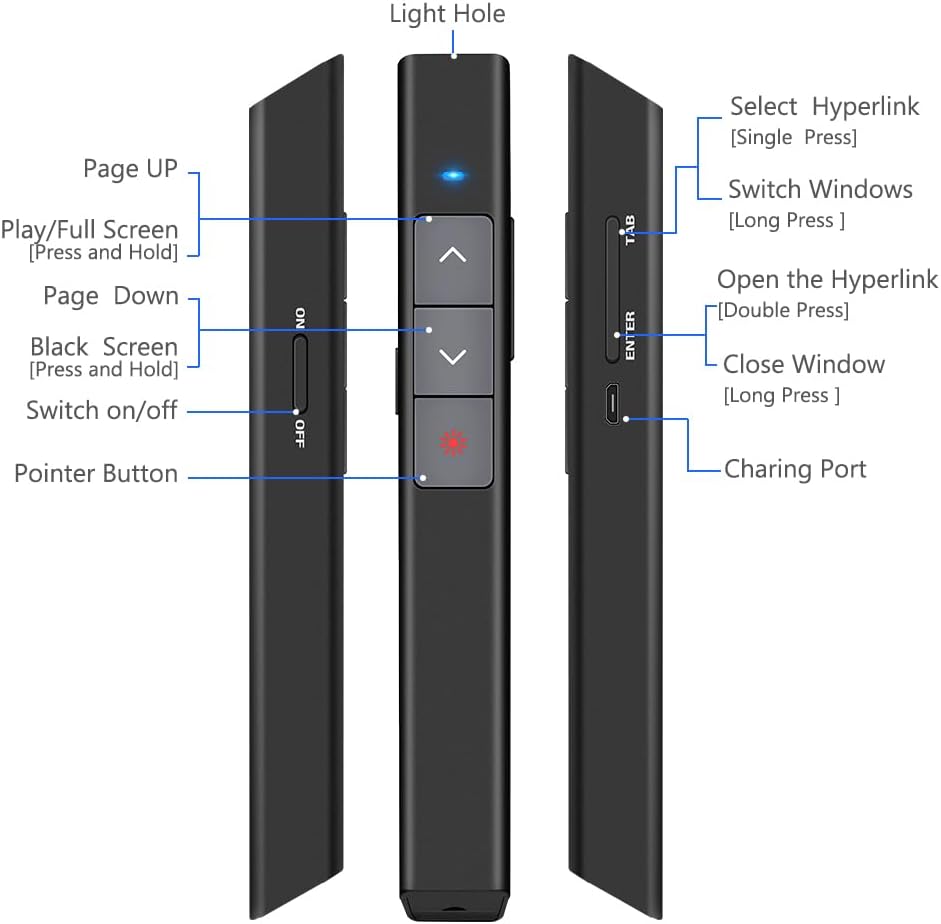
1-сүрөт: Деталдаштырылган view of the DinoFire X17 Presentation Clicker showing button functions and port locations.
Баскыч функциялары:
- Page Up (▲): Advances to the previous slide.
- Page Down (▼): Advances to the next slide.
- Pointer Button: Activates the red laser pointer.
- Play/Full Screen (Press and Hold): Толук экрандуу презентация режимин баштайт же чыгат.
- Black Screen (Press and Hold): Toggles a black screen during presentation.
- Күйгүзүү/өчүрүү: Түзмөк үчүн кубат которгучу.
- Select Hyperlink (Single Press): Selects a hyperlink on the slide.
- Open the Hyperlink (Double Press): Opens the selected hyperlink.
- Switch Windows (Long Press): Cycles through open application windows.
- Close Window (Long Press): Closes the active window.
- Заряддоо порту: Micro USB port for recharging the device.
- Light Hole: Location of the laser emitter.
Орнотуу колдонмосу
1. Баяндамачыны кубаттоо
Before initial use, fully charge the presentation clicker. A full charge typically takes approximately one hour and provides power for over one week of use.
- Connect the provided Micro USB charging cable to the charging port on the side of the presenter.
- Кабелдин экинчи учун USB кубат булагына туташтырыңыз (мисалы, компьютердин USB порту, USB дубал адаптери).
- The charging indicator light will illuminate (refer to "Low Power Indicator" section for details).
- Толук заряддалгандан кийин, кабелди ажыратыңыз.

2-сүрөт: The presentation clicker being charged via its Micro USB port, connected to a laptop.
2. USB кабылдагычты туташтыруу
The USB receiver is stored magnetically within the presentation clicker for convenience and to prevent loss.
- Gently pull out the USB receiver from the bottom end of the presentation clicker.
- Insert the USB receiver into an available USB port on your computer (laptop or desktop).
- The system will automatically detect and install the necessary drivers. No manual driver installation is required.

3-сүрөт: The magnetic storage for the USB receiver, demonstrating its removal and insertion into a computer's USB port.
3. Күйгүзүү / Өчүрүү
- Locate the "Switch on/off" button on the side of the clicker.
- Түзмөктү күйгүзүү үчүн которгучту "ON" абалына жылдырыңыз.
- Батареянын иштөө мөөнөтүн үнөмдөө үчүн колдонулбай турганда которгучту "OFF" абалына жылдырыңыз.
4. System and Software Compatibility
The DinoFire X17 is widely compatible with various operating systems and presentation software.
- Колдоого алынган системалар: Windows 2003, XP, Windows Vista, Windows 7, 8, 10, Linux, Android, Mac OS.
- Колдоого алынган программалык камсыздоо: Keynote, Prezi, MS Word, Excel, PowerPoint, ACD See, website browsers, iWork, Google Slides, etc.
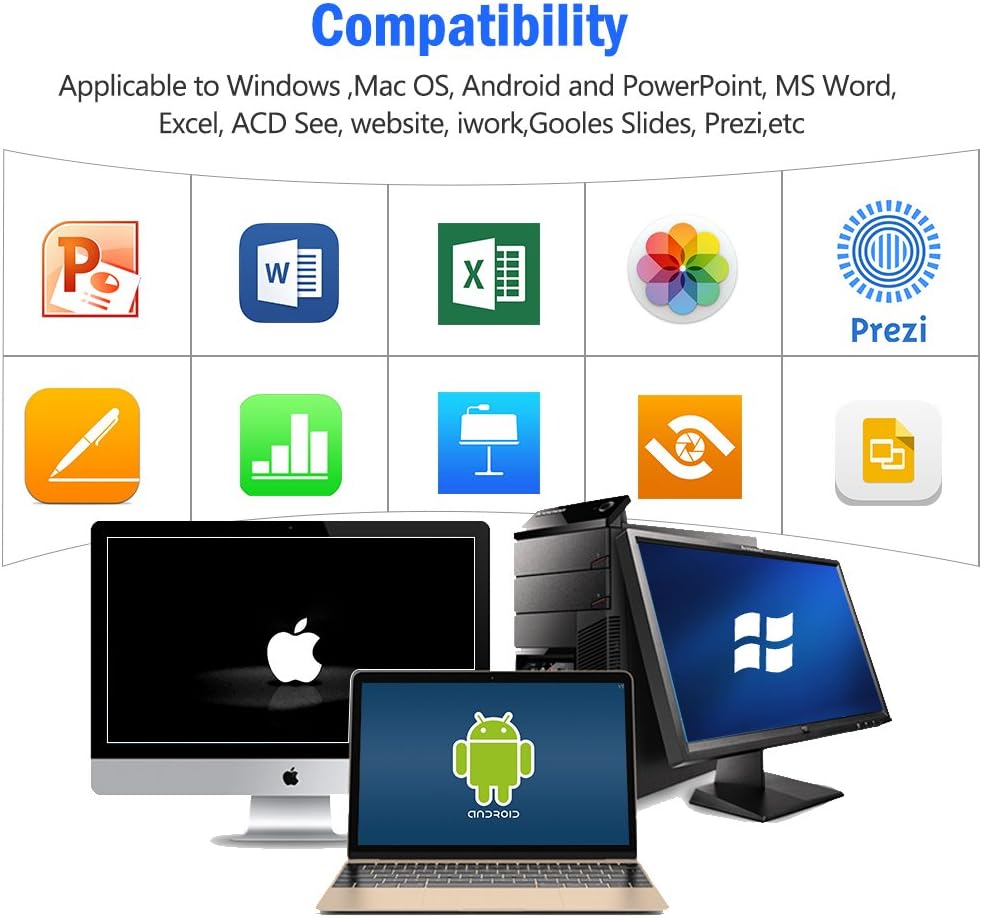
4-сүрөт: Visual representation of the broad compatibility of the presentation clicker with different operating systems and presentation applications.
Иштөө нускамалары
Basic Presentation Control
- Кийинки слайд: Press the "Page Down" (▼) button.
- Мурунку слайд: Press the "Page Up" (▲) button.
- Start/Exit Full Screen: Press and hold the "Page Up" (▲) button.
- Кара экран: Press and hold the "Page Down" (▼) button to toggle a black screen.
Лазердик көрсөткүчтү колдонуу
The integrated red laser pointer allows you to highlight specific content on your screen or projection.
- Press and hold the "Pointer Button" (red dot icon) to activate the laser.
- Release the button to turn off the laser.
- The laser has a range of up to 300 feet (91 meters).
- Абайлаңыз: Do not point the laser directly at people's eyes or at highly reflective surfaces.

5-сүрөт: The red laser pointer in operation, highlighting its visibility and including a safety warning.
Өркүндөтүлгөн функциялар
- Select Hyperlink: Single press the "ENTER" button.
- Open Hyperlink: Double press the "ENTER" button.
- Switch Windows: Long press the "TAB" button to cycle through open applications.
- Терезени жабуу: Long press the "ENTER" button to close the active window.
Зымсыз башкаруу диапазону
The DinoFire X17 offers a wireless control range of up to 100 feet (30 meters), allowing you freedom of movement during your presentation.

6-сүрөт: Illustration of the presentation clicker's effective long control range in a presentation setting.
Техникалык тейлөө
Заряддоо көрсөтмөлөрү
- Charge the device when the low power indicator flashes continuously.
- Avoid overcharging by disconnecting the cable once fully charged.
- Use the provided Micro USB cable or a certified equivalent for charging.
USB Receiver Storage
Always store the USB receiver inside the magnetic compartment of the clicker when not in use to prevent loss and damage.
Тазалоо
Аппаратты жумшак, кургак чүпүрөк менен сүртүңүз. Суюк тазалагычтарды же абразивдүү материалдарды колдонбоңуз.
Проблемаларды чечүү
| Көйгөй | Мүмкүн себеп | Чечим |
|---|---|---|
| Түзмөк жооп бербей жатат. | Low battery; USB receiver not connected; Device is off. | Charge the device; Ensure USB receiver is securely plugged in; Turn on the device. |
| Лазердик көрсөткүч иштебей жатат. | Low battery; Laser button not pressed correctly. | Charge the device; Press and hold the laser button firmly. |
| Кыска башкаруу диапазону. | Тоскоолдуктар; Тоскоолдуктар; Батареянын заряды аз. | Ensure clear line of sight to the receiver; Move away from sources of interference; Charge the device. |
| Hyperlink function not working. | Software specific issue; Hyperlink not properly selected. | Ensure the hyperlink is active and selected (single press ENTER) before attempting to open (double press ENTER). Check software settings. |
Төмөн кубат көрсөткүчү
The device features a low power indicator to alert you when charging is needed. When the indicator flashes continuously, please charge the device. The device will enter auto-sleep mode after approximately 5 minutes of inactivity to save energy.

7-сүрөт: Explanation of the indicator light states for working, charging, and fully charged conditions.
Техникалык шарттар
- Модел: X17
- Бренд: DinoFire
- Зымсыз технология: 2.4GHz RF
- Башкаруу диапазону: 100 фут (30 метр) чейин
- Лазердик түрү: Кызыл лазер
- Лазер диапазону: 300 фут (91 метр) чейин
- Батарея түрү: 1 Литий Полимердик батарейка (кошулган)
- Заряддоо убактысы: Болжол менен 1 саат
- Колдонуу убактысы: Over one week (on a single charge)
- Өлчөмдөрү: 6.42 x 1.61 x 1.14 дюйм (16.3 x 4.1 x 2.9 см)
- Элемент Салмагы: 1.6 унция (45 грамм)
- Бири-бирине шайкеш системасы: Windows 2003/XP/Vista/7/8/10, Linux, Android, Mac OS
- Шайкеш программалык камсыздоо: Keynote, Prezi, MS Word, Excel, PowerPoint, ACD See, web browsers, iWork, Google Slides
Кепилдик жана колдоо
Кепилдик маалымат
The DinoFire Rechargeable Presentation Clicker X17 typically comes with a 3-year warranty. Please refer to your purchase documentation or the manufacturer's official webатайын кепилдик шарттары жана шарттары үчүн сайт.
Кардарларды колдоо
For technical assistance, troubleshooting beyond this manual, or warranty claims, please contact DinoFire customer support through their official website or the retailer where the product was purchased. Keep your purchase receipt or order number handy for faster service.
Ask a question about this manual
Ask about setup, troubleshooting, compatibility, parts, safety, or missing instructions. Manuals+ will review the question and use this page’s manual context to help answer it.