
1. Киришүү
This manual provides comprehensive instructions for the installation, operation, and maintenance of your TAFFIO LMGQ9899-BO Android Head Unit. This 9-inch multimedia system is specifically designed for Porsche Cayenne models manufactured between 2003 and 2010, including compatibility with the Bose amplifier system. It features an Android 12 operating system, GPS navigation, integrated CarPlay, and Android Auto functionalities.
2. Коопсуздук маалыматы
Орнотуудан жана иштетүүдөн мурун бардык коопсуздук көрсөтмөлөрүн кунт коюп окуп чыгыңыз. Бул көрсөтмөлөрдү аткарбоо жаракат алууга же түзмөккө же унаага зыян келтирүүгө алып келиши мүмкүн.
- Кесиптик орнотуу сунушталат: Due to the complexity of vehicle electronics, professional installation is highly recommended.
- Электр энергиясын өчүрүү: Always disconnect the vehicle's battery before beginning any installation work to prevent electrical shorts and damage.
- Зымдар: Ensure all wiring connections are secure and properly insulated to prevent short circuits. Do not modify the wiring harness.
- Айдоо коопсуздугу: Аппаратты айдоодон алаксыта тургандай иштетпеңиз. Ар дайым жол коопсуздугун биринчи орунга коюу.
- Вентиляция: Ensure the unit has adequate ventilation and is not obstructed by other components.
3. Пакеттин мазмуну
Төмөндө тизмеленген нерселердин баары пакетиңизге камтылганын текшериңиз. Эгерде кандайдыр бир буюмдар жок же бузулуп калса, сатуучуга кайрылыңыз.

3.1-сүрөт: Бүттүview of included components. This image displays the main head unit, frame, MOST adapter, USB cables, GPS antenna, 4G antenna, RCA plugs, SIM card slot, backup camera cable, power cable with CAN BUS, antenna adapter, and mounting screws.
- 1x TAFFIO 9-inch Multimedia + Navigation System
- 1x Frame for Porsche Cayenne (2003-2010)
- 1x Power Cable with CAN BUS Decoder
- 1x MOST Adapter for BOSE AMP (for vehicles with Bose sound system)
- 1x GPS антеннасы
- 1x 4G Antenna
- 2x USB кабели
- 1x RCA Audio/Video Cables Set (including video input, audio input, subwoofer output)
- 1x Backup Camera Input Cable
- 1x Antenna Adapter
- Монтаждоо бурамалар
- 1x User Manual (English, PDF available for download)
4. Орнотуу жана орнотуу
The TAFFIO LMGQ9899-BO is designed for Plug & Play installation, minimizing the need for additional adapters or mounting frames. However, careful attention to wiring is crucial.
4.1 Электр өткөргүч схемасы
Refer to the following diagram for proper connection of the head unit components.

4.1-сүрөт: Connection points for the TAFFIO LMGQ9899-BO. This diagram illustrates the rear panel connections and the main wiring harness, detailing inputs for GPS, 4G, video, audio, camera, USB, power, CAN-BUS, and connections to the original car cables.
- GPS антеннасы: Навигация функциясы үчүн GPS антеннасын туташтырыңыз.
- 4G антенна: Connect the 4G antenna for mobile data connectivity.
- Video Plugs: Connect external video sources or outputs.
- Audio Plugs: Connect external audio sources or outputs (e.g., subwoofer).
- Camera IN: Connect a backup camera here. The unit supports automatic switching when reversing.
- USB (1 & 2): Медиа ойнотуу же кубаттоо үчүн USB түзмөктөрүн туташтырыңыз.
- Кубат кабели: Негизги кубат кабелин унаанын зымына туташтырыңыз.
- CAN-BUS Connector: Connect the CAN-BUS decoder for vehicle communication.
- Connect to Original Car Cable (1 & 2): These are primary connections to the vehicle's existing wiring.
- Connect to TAFFIO Radio Cable: Specific connection for the radio antenna.
4.2 Bose AMP Интеграция
For Porsche Cayenne models equipped with the Bose sound system, utilize the included MOST Adapter. This adapter ensures proper audio signal transmission and compatibility with the factory ampөмүрлүү.
4.3 Баштапкы кубаттуулук
After installation, reconnect the vehicle's battery. The unit should power on automatically with the ignition. Follow any on-screen prompts for initial setup, such as language selection and time zone.
5. Иштөө нускамалары
The TAFFIO head unit features an intuitive Android interface with a capacitive multi-touch screen.
5.1 Негизги интерфейсview
The main screen provides quick access to core functions like Clock, Music, Navigation, and Radio.

5.1-сүрөт: Main user interface with shortcuts to essential applications.
5.2 Колдонмо башкаруу
Access the full list of installed applications by swiping up or tapping the app drawer icon. You can download additional apps from the Play Store.

5.2-сүрөт: App drawer showing available applications.
5.3 GPS навигациясы
The unit supports various navigation applications. Use the pre-installed navigation software or download your preferred app from the Play Store. The 2-Zone function allows navigation in the front while other media plays in the back.
5.4 CarPlay жана Android Auto
The head unit features integrated Wireless CarPlay and Android Auto functionality, eliminating the need for external adapters.

5.3-сүрөт: Wireless CarPlay interface.

5.4-сүрөт: Android Auto interface.
To activate: Connect your smartphone via Bluetooth or USB. Follow the on-screen prompts to enable CarPlay or Android Auto.
5.5 Bluetooth функциялары
Pair your mobile phone via Bluetooth for hands-free calling and A2DP music streaming.
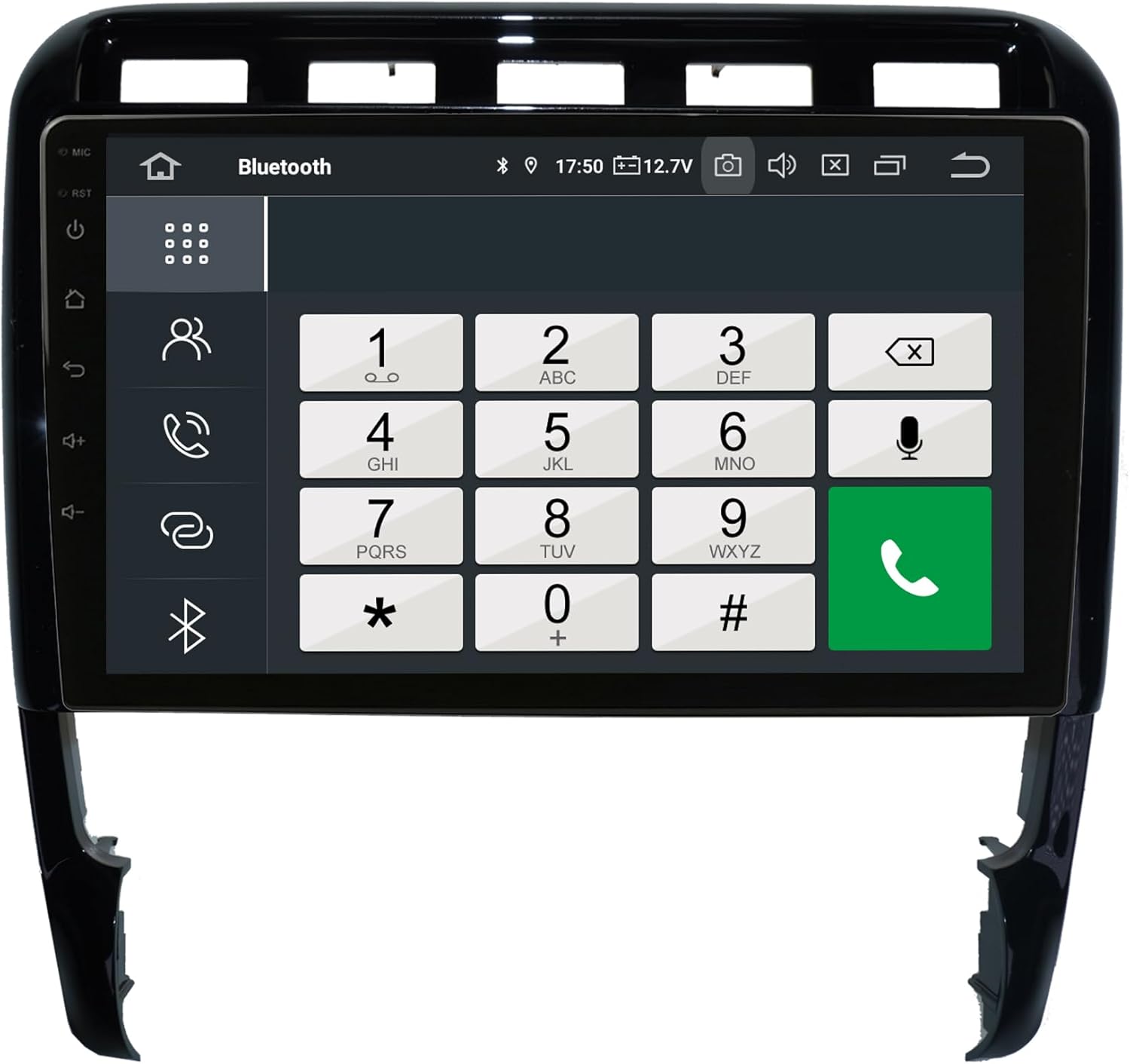
5.5-сүрөт: Bluetooth phone dialer interface.
Жупташтыруу: Go to Bluetooth settings on the head unit and your phone. Издөө available devices and select the head unit. Confirm the pairing code.
5.6 Radio (FM/AM)
The unit includes an FM/AM tuner with RDS (Radio Data System) for displaying station information.

5.6-сүрөт: Radio tuner interface.
Скандоо: Use the scan function to find available stations. Save your favorite stations to presets.
5.7 Audio Settings (Equalizer)
Adjust audio output using the integrated equalizer. Preset options (Pop, Classic, Rock, Jazz) and custom user settings for Bass/Treble/Balance are available.

5.7-сүрөт: Amplifier and audio balance settings.
5.8 Башка өзгөчөлүктөр
- Медиа ойнотуу: Play music, pictures, and videos directly from USB/SD/SDHC slots.
- WIFI: Connect to WLAN hotspots or your smartphone's hotspot for internet access.
- Арткы камера: Automatic switching to the rear camera view артка кайтканда.
- Автоматтык эс тутум: All saved settings and positions are automatically retained.
- Day and Night Display: Automatic or manual adjustment of display brightness.
6. Техникалык тейлөө
Proper care ensures the longevity and optimal performance of your head unit.
- Экранды тазалоо: Экранды акырын сүртүү үчүн жумшак, түксүз чүпүрөктү колдонуңуз. өжөр тактар үчүн, бир аз гampкездемени суу же экранга арналган тазалоочу каражат менен сүртүңүз. Катуу химиялык заттардан же абразивдүү материалдардан алыс болуңуз.
- Жалпы тазалоо: Keep the unit and surrounding area free of dust and debris. Use a soft brush or compressed air for vents and crevices.
- Температура: Аппаратты экстремалдык температурага тийгизүүдөн сактаңыз.
- Программалык камсыздоо жаңыртуулары: Оптималдуу иштөөнү жана жаңы функцияларга жетүүнү камсыз кылуу үчүн программалык камсыздоонун жаңыртууларын мезгил-мезгили менен текшерип туруңуз. Өндүрүүчүнүн көрсөтмөлөрүнө кайрылыңыз website or the unit's settings for update procedures.
7. Кыйынчылыктарды
If you encounter issues, refer to the following common problems and solutions before contacting support.
| Көйгөй | Мүмкүн себеп | Чечим |
|---|---|---|
| Түзмөк күйбөйт. | Электр менен камсыздоо жок; Сактагыч күйүп кеткен; Зымдар туура эмес туташтырылган. | Check power connections and vehicle fuses. Ensure wiring is correct as per diagram. |
| Үн жок же үн сапаты начар. | Incorrect audio settings; Loose speaker wires; MOST adapter issue (for Bose systems). | Check volume and equalizer settings. Verify speaker connections. Ensure MOST adapter is correctly installed and functioning. |
| GPS сигналы начар же так эмес. | GPS антеннасы тосулган же туура эмес орнотулган. | GPS антеннасынын таза болушун текшериңиз view асмандын жана коопсуз байланышта. |
| Bluetooth байланышы көйгөйлөрү. | Phone not in pairing mode; Interference; Incorrect pairing process. | Bluetooth эки түзмөктө тең иштетилгенин текшериңиз. Мурунку жупташтырууларды жок кылып, кайра аракет кылыңыз. Бирдикке жакыныраак жылыңыз. |
| CarPlay/Android Auto туташпай жатат. | Incorrect phone settings; USB cable issue; Software glitch. | Ensure your phone is compatible and has the latest OS. Try a different USB cable. Restart both the head unit and your phone. |
| Сенсордук экран жооп бербейт. | Убактылуу программалык камсыздоо көйгөйү; Экрандын бузулушу. | Perform a soft reset (refer to device settings for reset option). If issue persists, contact support. |
For issues not covered here, please consult the PDF manual available for download or contact customer support.
8. Техникалык шарттар
| Өзгөчөлүк | Спецификация |
|---|---|
| Модель номери | LMGQ9899-BO |
| Операция системасы | Android 12 |
| CPU | Octa-Core 1.6Ghz |
| RAM | 4 ГБ |
| Ички сактагыч | 64 ГБ Flash |
| Дисплей өлчөмү | 9 дюйм |
| Дисплей түрү | Capacitive Multi-Touch Screen |
| Резолюция | FULL HD |
| Байланыш | Bluetooth, WIFI, USB, 4G (via antenna) |
| Навигация | GPS (Worldwide map support) |
| Өзгөчөлүктөр | Integrated CarPlay & Android Auto, RDS Radio, 2-Zone Function, Back-Zone Function, Rear Camera Input, Play Store access |
| Аудио чыгаруу режими | AUX, 4x Audio Outputs, 1x Subwoofer Output |
| Өндүрүүчү | Real Media GmbH & Co. KG - Germany |
9. Кепилдик жана колдоо
Your TAFFIO LMGQ9899-BO head unit comes with a 2 жылдык кепилдик сатып алынган күндөн тартып. Бул кепилдик өндүрүштүк кемчиликтерди жана нормалдуу колдонуудагы бузулууларды камтыйт.
For warranty claims, technical support, or further assistance, please contact your retailer or the manufacturer directly. Ensure you have your proof of purchase and product model number readily available.
Өндүрүүчү: Real Media GmbH & Co. KG - Germany