
Introduction
This manual provides instructions for the setup, programming, and operation of your JKZTJOF K-1028E Universal Air Conditioner Remote Control. This remote is designed for compatibility with over 1000 brands of air conditioners. Please note, it is not compatible with window or portable air conditioner units.

Фронт view of the K-1028E Universal Air Conditioner Remote Control, highlighting its compatibility with over 1000 brands.
Жайгашуу
1. Батареяны орнотуу
The remote control requires two (2) AAA batteries (not included). To install:
- Пульттун арт жагында жайгашкан батарея бөлүкчөсүнүн капкагын ачыңыз.
- Туура полярдуулукту (+ жана -) камсыз кылуу менен эки AAA батарейкасын салыңыз.
- Батарея уясынын капкагын бекем жабыңыз.
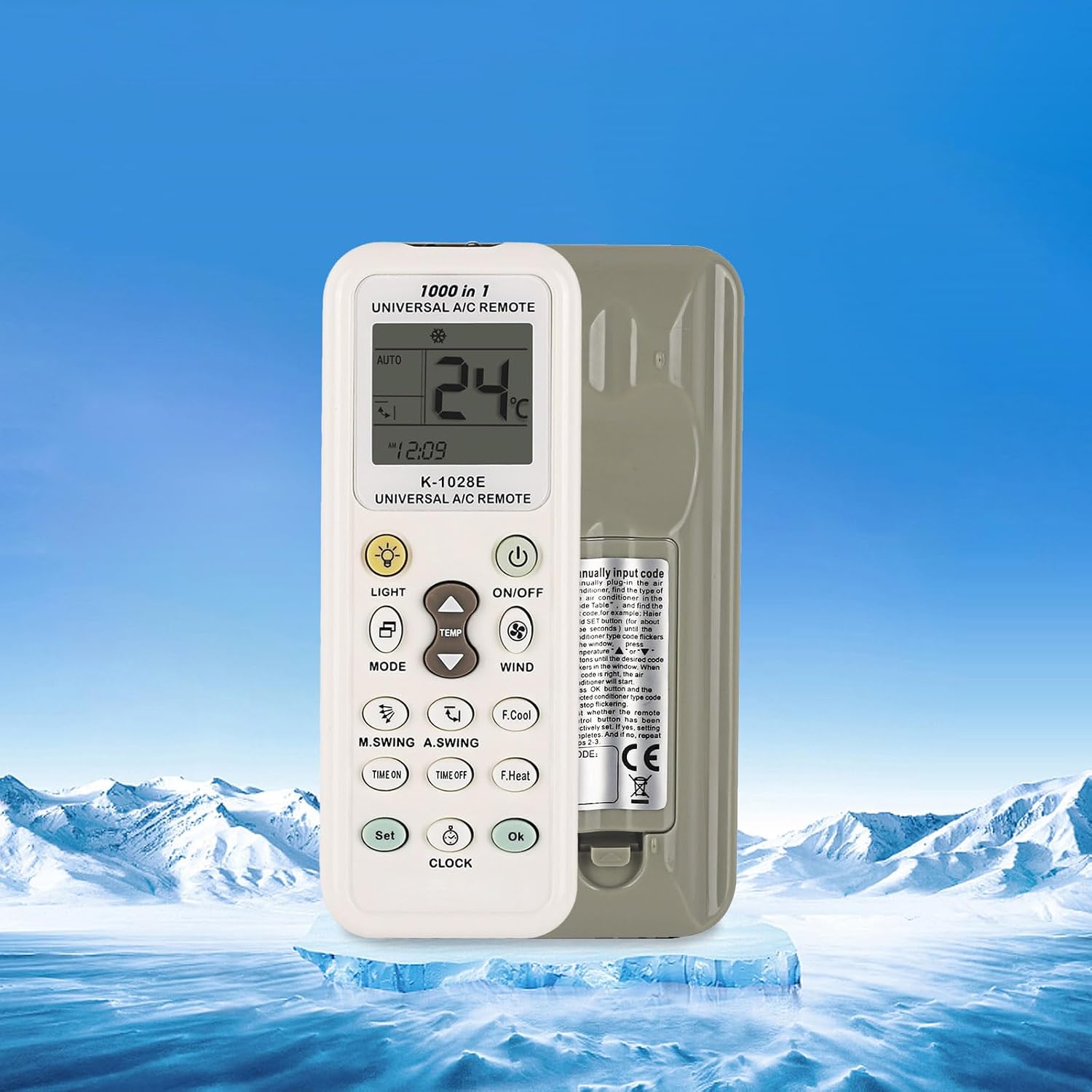
Арткы view of the K-1028E remote control, indicating the battery compartment location.
Программалоо методдору
The K-1028E remote control offers four methods for programming to your air conditioner. If the remote does not work directly, follow one of these programming procedures.
1. Brand Button Programming
This method uses a dedicated button for specific brands.
- Кондиционериңиз күйүп турганын текшериңиз.
- Press and hold the brand-specific button (if available for your AC brand) on the remote.
- Release the button when your air conditioner responds (e.g., beeps or turns on/off).
- Test basic functions like ON/OFF and temperature adjustment. If successful, programming is complete.
2. Automatic Search Programming
This method scans through codes automatically.
- Кондиционериңиз күйүп турганын текшериңиз.
- Press and hold the 'SET' button for approximately 3-5 seconds until the code on the remote's display starts flashing.
- The remote will automatically transmit codes. Point the remote at your air conditioner.
- When your air conditioner responds (e.g., beeps or turns on/off), immediately press the 'OK' button to confirm the code.
- Test basic functions. If successful, programming is complete.
3. Manual Code Input Programming
This method requires you to manually enter a known code for your AC brand.
- Кондиционериңиз күйүп турганын текшериңиз.
- Refer to the code list provided with your remote (not included in this manual) to find the code(s) for your air conditioner brand.
- Press and hold the 'SET' button for approximately 3-5 seconds until the code on the remote's display starts flashing.
- Use the 'Temperature +' or 'Temperature -' buttons to input the 3-digit code.
- Once the code is entered, press the 'OK' button to confirm.
- Test basic functions. If successful, programming is complete. If not, try the next code for your brand.
4. Manual Code Search Programming
This method allows you to manually cycle through codes.
- Кондиционериңиз күйүп турганын текшериңиз.
- Press and hold the 'SET' button for approximately 3-5 seconds until the code on the remote's display starts flashing.
- Repeatedly press the 'SET' button (or 'Temperature +' button) to advance through the codes one by one. Point the remote at your air conditioner.
- When your air conditioner responds (e.g., beeps or turns on/off), immediately press the 'OK' button to confirm the code.
- Test basic functions. If successful, programming is complete.
Иштөө нускамалары
Familiarize yourself with the remote's buttons and display for optimal use.

Detailed diagram of the K-1028E remote control, labeling each button and display element for easy identification and operation.
Баскыч функциялары:
- КҮЙГҮЗҮҮ/ӨЧҮРҮҮ: Кондиционерди күйгүзөт же өчүрөт.
- РЕЖИМ: Иштөө режимдери боюнча циклдерди жүргүзөт (мисалы, Авто, Муздатуу, Кургатуу, Вентилятор, Жылуулук).
- ТЕМПЕРАТУРА ▲/▼: Температуранын жөндөөлөрүн өйдө же ылдый тууралайт.
- ШАМАЛ: желдеткич ылдамдыгын тууралайт.
- ЖАРЫК: Turns the remote's backlight or AC display light on/off.
- F.Cool (Fast Cool): Тез муздатуу функциясын иштетет.
- F.Heat (Fast Heat): Activates a rapid heating function.
- УБАКЫТ КҮЙҮК: Кондиционерди күйгүзүү үчүн таймерди орнотот.
- ӨНҮКТҮҮ УБАКЫТ: Кондиционерди өчүрүү үчүн таймерди орнотот.
- ЖӨНДӨӨ: Used for programming and setting various functions.
- СААТ: Sets the current time on the remote.
- OK: Тандоолорду же жөндөөлөрдү ырастайт.
- M.SWING (Manual Swing): Controls the horizontal swing of the air conditioner's louvers.
- A.SWING (Auto Swing): Activates or deactivates automatic vertical swing of the air conditioner's louvers.
Дисплей көрсөткүчтөрү:
- Температура дисплейи: Shows the current or set temperature.
- Wind Strength Display: Indicates the fan speed setting.
- Машина коду: Displays the currently selected or programmed code.
- Саат: Учурдагы убакытты көрсөтөт.
- Mode Icons: Indicate the active operating mode (e.g., snowflake for cool, sun for heat).

The K-1028E remote control operating an air conditioner, illustrating its cooling and heating functionalities.
Техникалык тейлөө
Батареяны алмаштыруу:
Replace batteries when the remote's display becomes dim or the remote stops responding. Always replace both batteries at the same time with new AAA batteries. Do not mix old and new batteries or different types of batteries.
Тазалоо:
Пультту жумшак, кургак чүпүрөк менен сүртүңүз. Суюк тазалоочу каражаттарды же абразивдүү материалдарды колдонбоңуз, анткени алар пульттун бетине же ички компоненттерине зыян келтириши мүмкүн.
Проблемаларды чечүү
- Пульт кондиционердин иштөөсүнө жооп бербей жатат:
- Батареялар туура орнотулганын жана жетиштүү кубаттуулукка ээ экенин текшериңиз. Зарыл болсо, алмаштырыңыз.
- Пульт менен кондиционердин ресиверинин ортосунда эч кандай тоскоолдук жок экенин текшериңиз.
- Verify that the remote is programmed to the correct code for your air conditioner. Re-attempt programming if unsure.
- Дисплей күңүрт же бош:
- Батареяларды жаңыларына алмаштырыңыз.
- Air conditioner responds incorrectly to commands:
- The remote may be programmed with an incorrect or partially compatible code. Try re-programming using a different code for your brand.
Техникалык шарттар
| Модель номери | K-1028E |
| Бренд | JKZTJOF |
| Шайкеш түзмөктөр | Universal Air Conditioners (over 1000 brands) |
| Шайкеш келбеген түзмөктөр | Терезе жана портативдик кондиционерлер |
| Power Source | 2 x AAA Батареялар (киргизилген эмес) |
| Элемент Салмагы | 1.76 унция |
| Пакеттин өлчөмдөрү | 5.12 x 0.79 x 0.47 дюйм |
| Өзгөчө өзгөчөлүк | Ergonomic Design, Large Screen Display, LED Light |
Кепилдик жана колдоо
For warranty inquiries or product support, please contact the manufacturer or your point of purchase. If you have any questions, please feel free to reach out for assistance.