
1. Киришүү
This manual provides essential instructions for setting up, operating, maintaining, and troubleshooting your Cuifati 5G Mobile Router. This portable device offers high-speed 5G connectivity and Wi-Fi 6 (802.11ac) dual-band support (2.4GHz and 5.8GHz), allowing up to 16 users to connect simultaneously. It features a 2.4-inch TFT MIPI LCD display for status information and is powered by a built-in 4000mAh Li-ion battery.
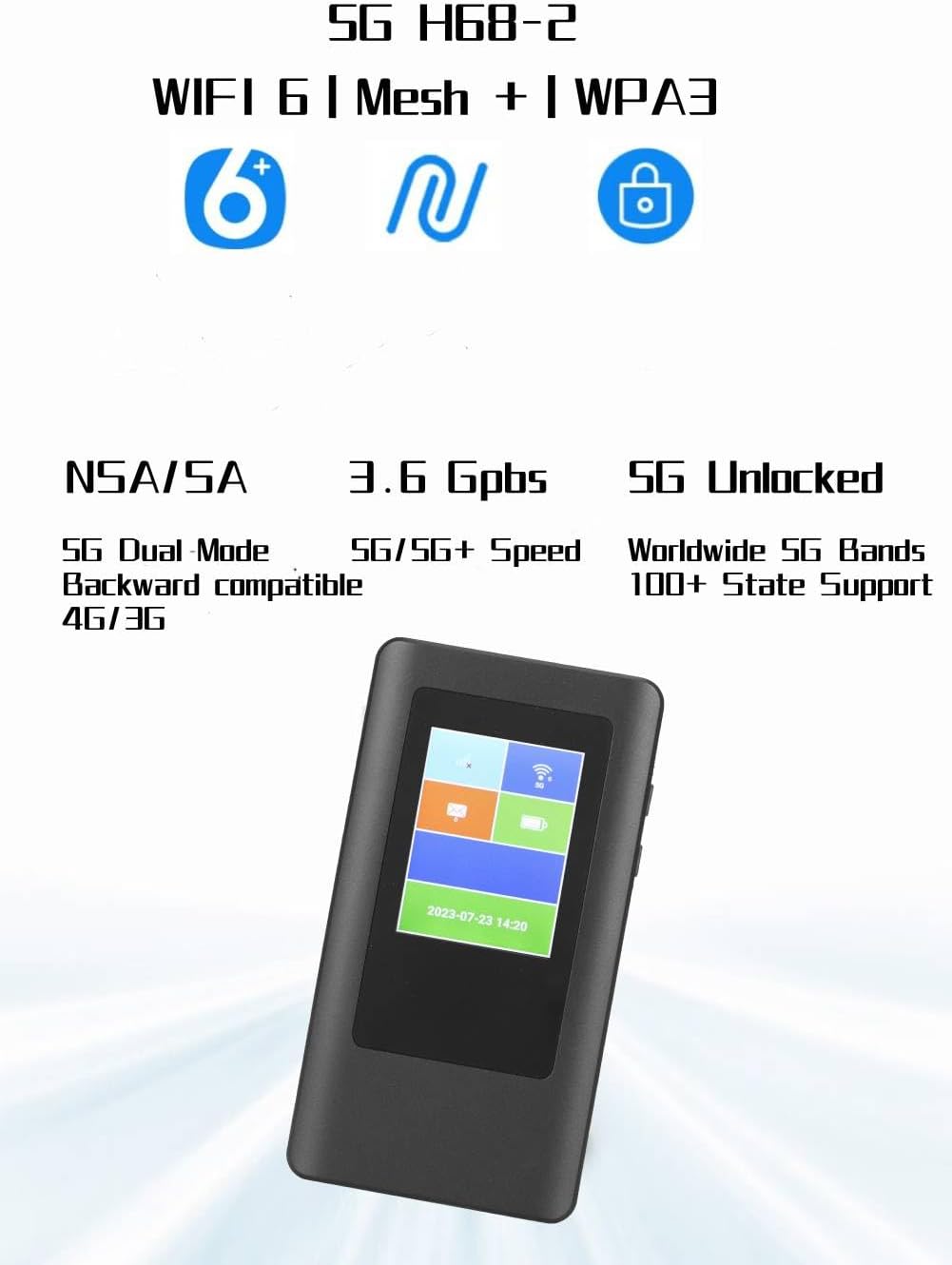
Сүрөт 1: Алдыңкы view of the Cuifati 5G Mobile Router.
2. Пакеттин мазмуну
Пакетиңизде бардык буюмдар бар экенин текшериңиз:
- 1 x Cuifati 5G Mobile Router
- 1 x заряддоо кабели
- 1 x Instruction Manual
3. Орнотуу
3.1 SIM картаны орнотуу
The device uses a Nano SIM card (not included). Ensure the device is powered off before inserting or removing the SIM card.
- Locate the SIM card slot on the side of the router.
- Gently insert the Nano SIM card into the slot with the gold contacts facing down and the notched corner aligned correctly. Push until it clicks into place.
- To remove, gently push the SIM card inward until it springs out.

2-сүрөт: Каптал view of the router, indicating the SIM card slot location.
3.2 Күйгүзүү/өчүрүү
- Күйгүзүү үчүн: Press and hold the power button (usually located on the side) for a few seconds until the display screen illuminates.
- Өчүрүү үчүн: Press and hold the power button until a power-off option appears on the screen, then confirm. Alternatively, continue holding the button until the device shuts down.
3.3 Баштапкы конфигурация
Upon first power-on or after a factory reset, the device may guide you through an initial setup process on its 2.4-inch TFT display. This typically involves setting up Wi-Fi network name (SSID) and password. Refer to the on-screen prompts for detailed steps.
4. Операция
4.1 Wi-Fi аркылуу түзмөктөрдү туташтыруу
The router supports up to 16 simultaneous connections. To connect your devices:
- Ensure the 5G Mobile Router is powered on.
- On your Wi-Fi enabled device (smartphone, laptop, tablet), open the Wi-Fi settings.
- Издөө available networks. The router's default SSID (network name) can be found on the device's display or on a label inside the battery compartment.
- Select the router's SSID and enter the Wi-Fi password (also found on the device's display or label).
- Once connected, your device will have internet access through the 5G Mobile Router.
4.2 Дисплейди түшүнүү
The 2.4-inch TFT MIPI LCD display provides real-time information about the device's status, including:
- Signal strength (5G/4G/3G)
- Батарея деңгээли
- Connected users
- Дайындардын колдонулушу
- Wi-Fi SSID and password
- Учурдагы убакыт жана дата

Figure 3: Router display showing various status indicators.
4.3 Network Bands and Compatibility
The router supports a wide range of 5G, 4G, and 3G bands, making it suitable for use in various regions including the Americas, Europe, Australia, Asia, Southeast Asia, Africa, and the Middle East. For optimal performance, ensure your Nano SIM card's network provider operates on the supported frequency bands.
5. Техникалык тейлөө
5.1 Аппаратты заряддоо
The router is equipped with a 4000mAh Li-ion battery. Use the provided charging cable to connect the device to a compatible USB power adapter (not included) or a computer's USB port. The display will indicate charging status.
5.2 Жалпы кам көрүү жана сактоо
- Аппаратты суудан, нымдан жана экстремалдык температурадан алыс кармаңыз.
- Аппаратты түшүрүүдөн же катуу таасирлерден сактаныңыз.
- Аппаратты жумшак, кургак чүпүрөк менен тазалаңыз. Суюк тазалоочу каражаттарды колдонбоңуз.
- When storing for extended periods, ensure the battery is partially charged (around 50%) to prolong its lifespan.
6. Кыйынчылыктарды
6.1 Интернет байланышы жок
- SIM картаны текшерүү: Ensure the Nano SIM card is correctly inserted and active with a data plan.
- Тармак сигналы: Verify that the device has a sufficient 5G/4G/3G signal. Move to an area with better reception if needed.
- APN Орнотуулары: In some cases, you may need to manually configure the Access Point Name (APN) settings. Refer to your mobile network provider for the correct APN details.
- Түзмөктү кайра иштетүү: Power off the router, wait a few seconds, then power it back on.
6.2 Байланыш ылдамдыгынын жайлашы
- Сигнал күчү: A weak signal can lead to slower speeds.
- Колдонуучулардын саны: Too many connected devices can reduce individual speeds.
- Тармактын тыгыны: Performance can be affected by network traffic from your service provider.
- Жыштык тилкесинин шайкештиги: Ensure your SIM card's network supports the router's bands for optimal speed.
6.3 Түзмөк күйбөй жатат
- Батарея деңгээли: Батарея заряддалганын текшериңиз. Түзмөктү кубат булагына туташтырыңыз.
- Кубаттоочу кабель/адаптер: Try a different charging cable or power adapter to rule out faulty accessories.
6.4 Frequency Band Verification
Сатып алуудан мурунasing or if experiencing connectivity issues, it is recommended to verify the frequency bands supported by your local network operators. You can often find this information on your operator's webсайт же ушул сыяктуу ресурстар аркылуу Wikipedia's List of LTE networks (note: this link is for LTE, but similar resources exist for 5G bands).
7. Техникалык шарттар
| Өзгөчөлүк | Деталь |
|---|---|
| Модель номери | CUIFATIx13eym7fuc |
| Чипсет | MTK MT6833 |
| Эс | LPDDR4X 2GB, EMMC 16GB ROM |
| Screen Size | 2.4 Inch TFT MIPI LCD |
| SIM түрү | Nano SIM (Not Included) |
| 5G тилкелери | N2, N5, N12, N25, N66, N71, N41, N48, N77, N78 |
| 4G тилкелери | B2, B4, B5, B7, B12, B13, B14, B17, B25, B26, B29, B30, B41, B46, B48, B66, B71 |
| 3G тилкелери | B1, B2, B4, B5, B8 |
| Wi-Fi стандарты | 802.11 A/B/G/N/Ac (Wi-Fi 6) |
| Wi-Fi жыштыгы | 2.4GHz, 5.8GHz (Dual-Band) |
| Колдоого алынган колдонуучулар | Бир убакта 16 колдонуучуга чейин |
| Батарея түрү | Камтылган 4000mAh Li-ion батареясы |
| Download Speed (Max) | 2.77Gbps |
| Upload Speed (Max) | 1.25Gbps |
| Элемент Салмагы | 10.4 унция |
| Өлчөмдөр | 6.69 x 4.72 x 2.36 дюйм (Пакет) |
| Операция системасы | RouterOS |
| Өзгөчө өзгөчөлүк | WPS |
| Антенна түрү | Ички |
8. Кепилдик маалыматы
The Cuifati 5G Mobile Router is covered by a 90 күндүк кепилдик from the date of purchase. This warranty covers manufacturing defects and malfunctions under normal use. Please retain your proof of purchase for warranty claims. The warranty does not cover damage caused by misuse, accidents, unauthorized modifications, or external factors.
9. Кардарларды колдоо кызматы
If you encounter any issues not covered in this manual or require further assistance, please contact Cuifati customer support through the retailer's platform where the product was purchased. Provide your model number (CUIFATIx13eym7fuc) and a detailed description of the problem for efficient support.
Video: Detailed overview and usage guide for the 5G Mobile Router. This video provides visual instructions and demonstrations of the device's features and functions.