
1. Киришүү
This manual provides detailed instructions for the installation, operation, and maintenance of your UNITOPSCI Single Din Car Stereo, Model A3460. This unit features a 6.86-inch HD touch screen, Apple CarPlay, Android Auto, Bluetooth 5.0, FM radio, mirror link functionality, and support for a backup camera and DVR. Please read this manual thoroughly before use to ensure proper functionality and safety.
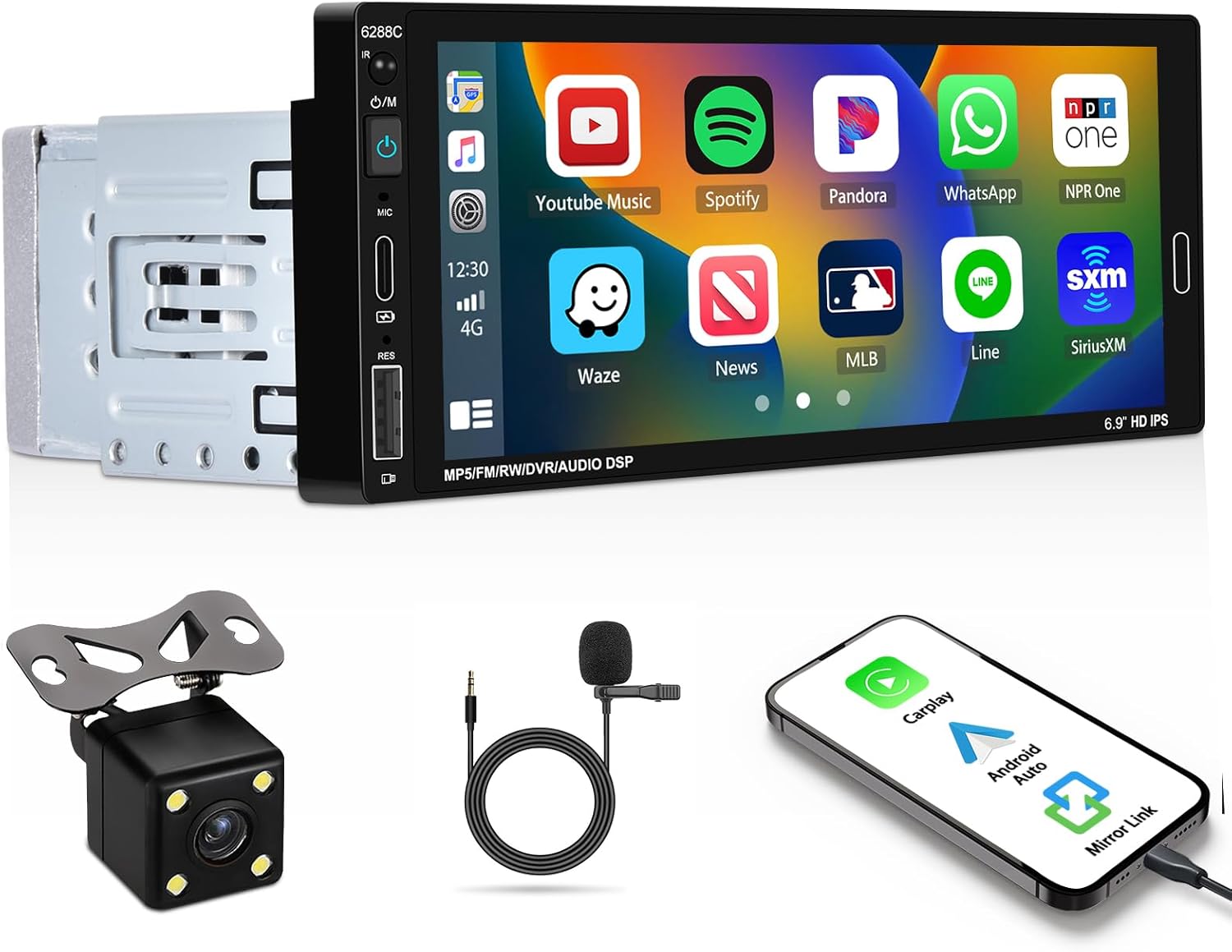
Image 1.1: UNITOPSCI Single Din Car Stereo with backup camera, microphone, and smartphone showing CarPlay/Android Auto connection.
2. Кутуда эмне бар
Төмөндө тизмеленген нерселердин баары пакетиңизге камтылганын текшериңиз:
- 1 x Унаа стереосу
- 1 х Камера
- 1 x Remote Control (Battery Not included)
- 1 x Steering Wheel Control (Battery Not included)
- 1 x Кубат кабели
- 1 x Horn Cable
- 1 x User Manual
- 1 x Микрофон
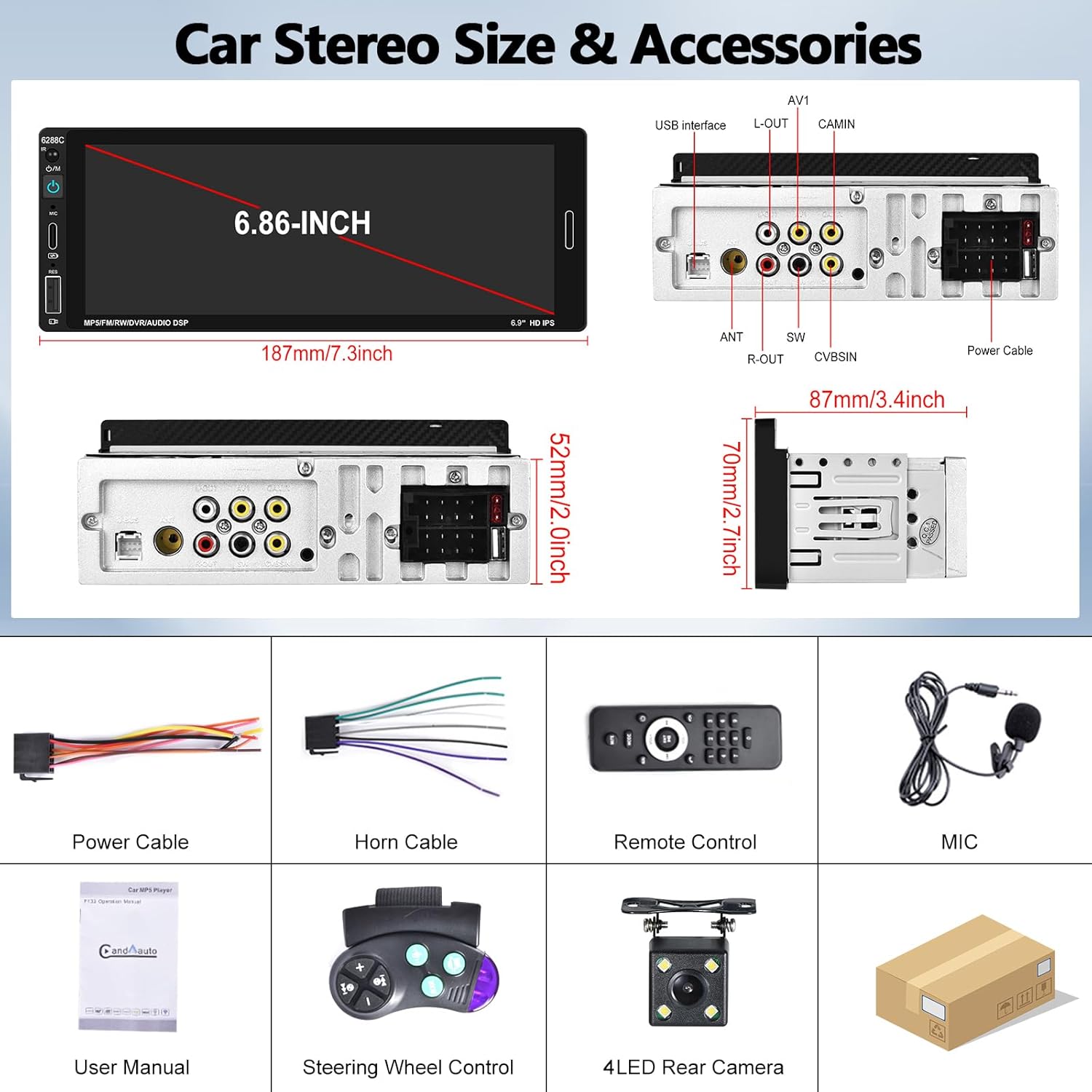
Image 2.1: Visual representation of the car stereo unit, power cables, remote control, microphone, user manual, steering wheel control, and 4-LED rear camera.
3. Техникалык шарттар
| Өзгөчөлүк | Деталь |
|---|---|
| Модель номери | A3460 |
| Система | УЙКУ |
| CPU чип | F133 |
| Screen Size | 6.86 дюйм |
| Screen Resolution | 1280 x 480 |
| Power Output | 45W х 4 |
| Bluetooth версиясы | 5.0 |
| Bluetooth аты | CAR BT |
| Радио чип | QN8035 |
| Күч Ampкөтөргүч чип | TDA7388 |
| Байланыш | Bluetooth, USB, Type-C |
| Өзгөчөлүктөр | Apple CarPlay, Android Auto, Mirror Link, FM Tuner, Backup Camera Input, DVR Function, DSP Sound, Steering Wheel Control, Colorful Backlight |
| Аудио форматтары | MP3 / WMA / WAV / APE / FLAC |
| Видео форматтары | RM/RMVB/AVI/MP4/MKV/3GP |
| Picture Жылдар | JPG BMP PNG |
| Колдоого алынган тилдер | Англис, кытай, испан, португал, орус, италия, немис, француз, түрк, чех, араб, поляк, иврит |
| Продукциянын өлчөмдөрү | 3.42"D x 7.4"W x 2.04"H (87мм x 187мм x 52мм) |
| Элемент Салмагы | 1.92 фунт |
| Operating Voltage | DC 12V |
| Иштөө температурасы | -10°Cден 60°Cге чейин |
4. Орнотуу жана орнотуу
4.1. Орнотууга чейинки текшерүү
Before beginning installation, ensure your vehicle has a single DIN radio opening. The unit dimensions are approximately 187mm (length) x 52mm (height) x 87mm (depth). Some vehicles may require a special wire harness, which is sold separately.

Image 4.1: Comparison of a standard car dashboard before and after installation of the UNITOPSCI 6.86-inch touch screen car stereo.
4.2. Электр схемасы
Refer to the provided wiring diagram for correct connections. Incorrect wiring can damage the unit or vehicle electrical system. The pink wire is typically for the reverse trigger signal.
Сүрөт 4.2: Арткы view of the car stereo showing various ports and a detailed wiring diagram for power, horn, USB, AV, camera, and steering wheel control connections.
- Кубат кабели: Унаанын кубат булагына туташтырыңыз (ACC, B+, Ground).
- Horn кабели: Унаанын динамик чыгыштарына туташтырыңыз.
- Камдык камера: Connect the camera's video output to the CAMIN port and the power to the reverse light circuit. The pink wire on the stereo is the reverse trigger.
- Руль башкаруусу (SWC): Connect the SWC wires to your vehicle's steering wheel control interface.
- Микрофон: Plug the external microphone into the dedicated MIC input for improved call quality.
4.3. Камдык камераны орнотуу
The included backup camera should be mounted at the rear of the vehicle. Ensure the camera is securely fastened and its view is unobstructed. Connect the camera's power to the vehicle's reverse light circuit so it activates when the vehicle is in reverse gear. Connect the video cable to the "CAMIN" input on the stereo. The stereo's pink wire must be connected to the reverse trigger signal from the vehicle.

Image 4.3: Illustration of a backup camera mounted on a vehicle and its connection to the car stereo for displaying reversing images.
5. Иштөө нускамалары
5.1. Apple CarPlay жана Android Auto
Connect your iOS or Android smartphone to the stereo via a USB cable. The unit will automatically detect and launch Apple CarPlay or Android Auto. This allows voice control for navigation, calls, messages, and music playback, enhancing driving safety and convenience.
- Үн менен башкаруу: Use "Hey Siri" or "Hey Google" to issue commands.
- Навигация: Access your phone's navigation apps directly on the stereo screen.
- Байланыш: Make calls and send messages hands-free.
- Медиа: Play music and podcasts from your phone.

Image 5.1: The car stereo displaying Apple CarPlay and Android Auto interfaces, demonstrating voice control commands for navigation and communication.
5.2. Bluetooth байланышы
The stereo features Bluetooth 5.0 for hands-free calling and wireless audio streaming (A2DP).
- Жупташтыруу: Стереодогу жана телефонуңуздагы Bluetooth жөндөөлөрүнө өтүңүз. Издөө "CAR BT" and pair.
- Hands Free Чалуу: Use the built-in microphone or external microphone for clear calls.
- Аудио агым: Play music from your phone wirelessly through the car stereo.

Image 5.2: The car stereo's Bluetooth setup screen for connecting a phone and the FM radio interface with station presets.
5.3. FM радиосу
Access FM radio stations with 18 preset memory slots. The DSP sound effect feature can enhance audio quality.
- тюнинг: Use the touch screen controls to scan for stations or manually tune.
- Алдын ала орнотуулар: Тез жетүү үчүн сүйүктүү станцияларыңызды сактаңыз.
- Жыштык диапазону: 87.5-108 МГц.
5.4. Күзгү шилтеме функциясы
Connect your iOS or Android phone via USB cable to mirror its screen onto the stereo display. This allows you to view maps, videos, or other content from your phone. Note: Mirror Link functionality may not be compatible with all Samsung phone models.
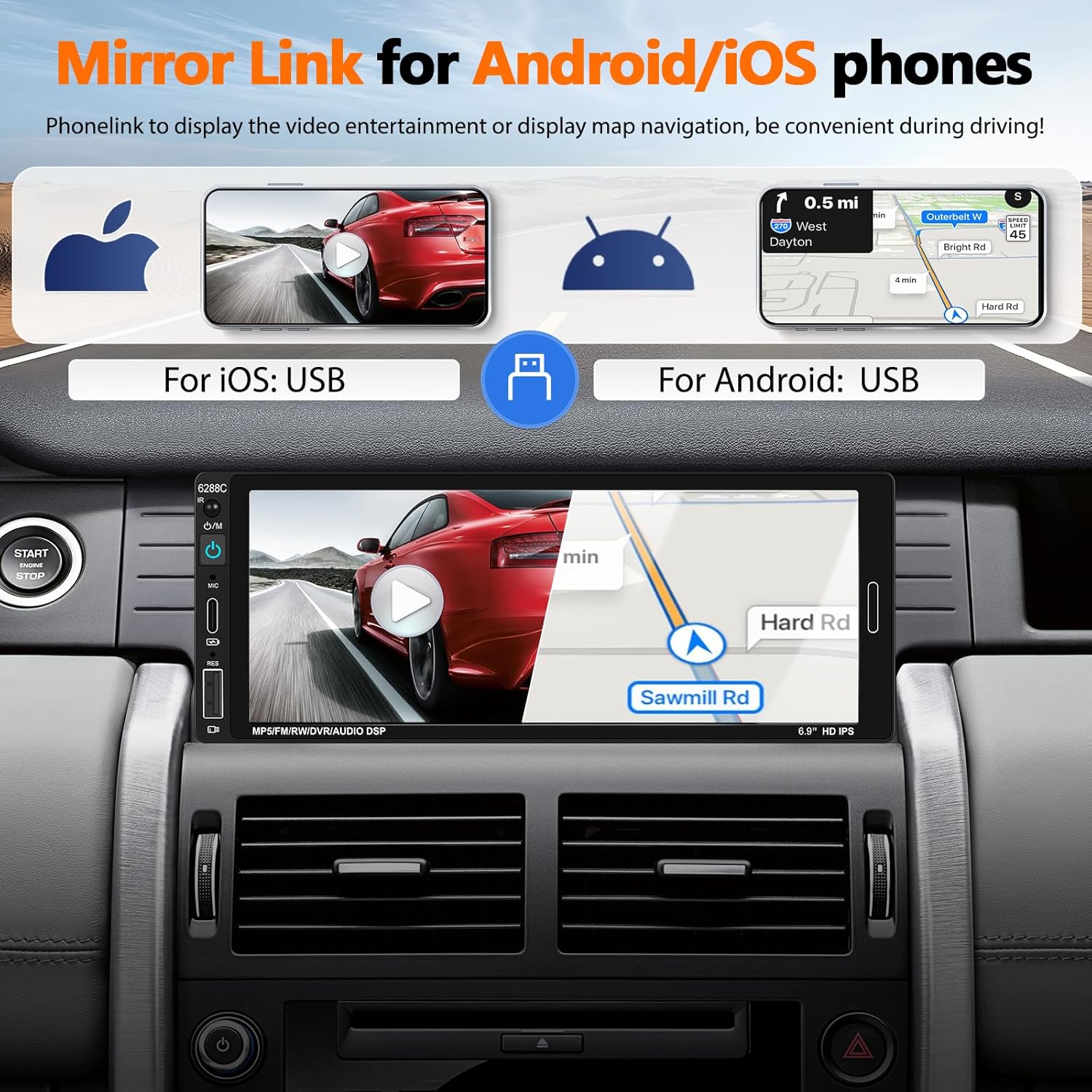
Image 5.3: The car stereo screen showing a mirrored smartphone display, illustrating navigation and video playback via Mirror Link.
5.5. Камеранын резервдик дисплейи
When the vehicle is shifted into reverse gear, the stereo will automatically switch to display the live feed from the connected backup camera. The camera provides a wide-angle view, night vision, and is waterproof, assisting with safer parking maneuvers. Parking guidelines are displayed on the screen.
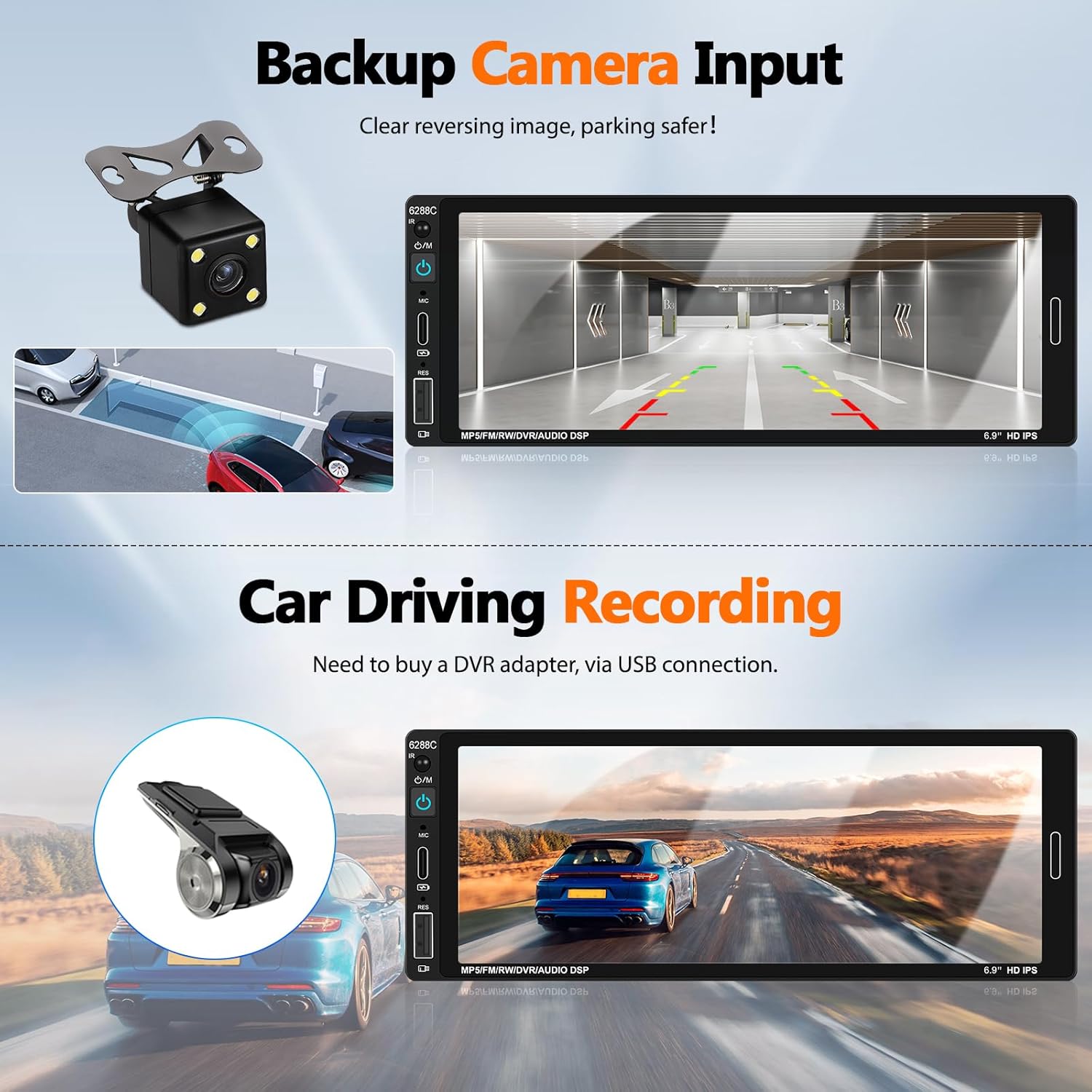
Image 5.4: The car stereo screen showing a clear reversing image from the backup camera with parking assistance lines.
5.6. DVR функциясы (кошумча)
The unit supports a DVR (Driving Video Recorder) function. To use this, connect a compatible USB DVR adapter (purchased separately) to the rear USB slot. This enables recording of your driving footage directly through the head unit.
5.7. Рулду башкаруу (SWC)
If your vehicle supports steering wheel controls, connect the provided SWC module. This allows you to easily control functions such as volume, track skipping, and answering calls directly from your steering wheel, reducing distractions while driving.
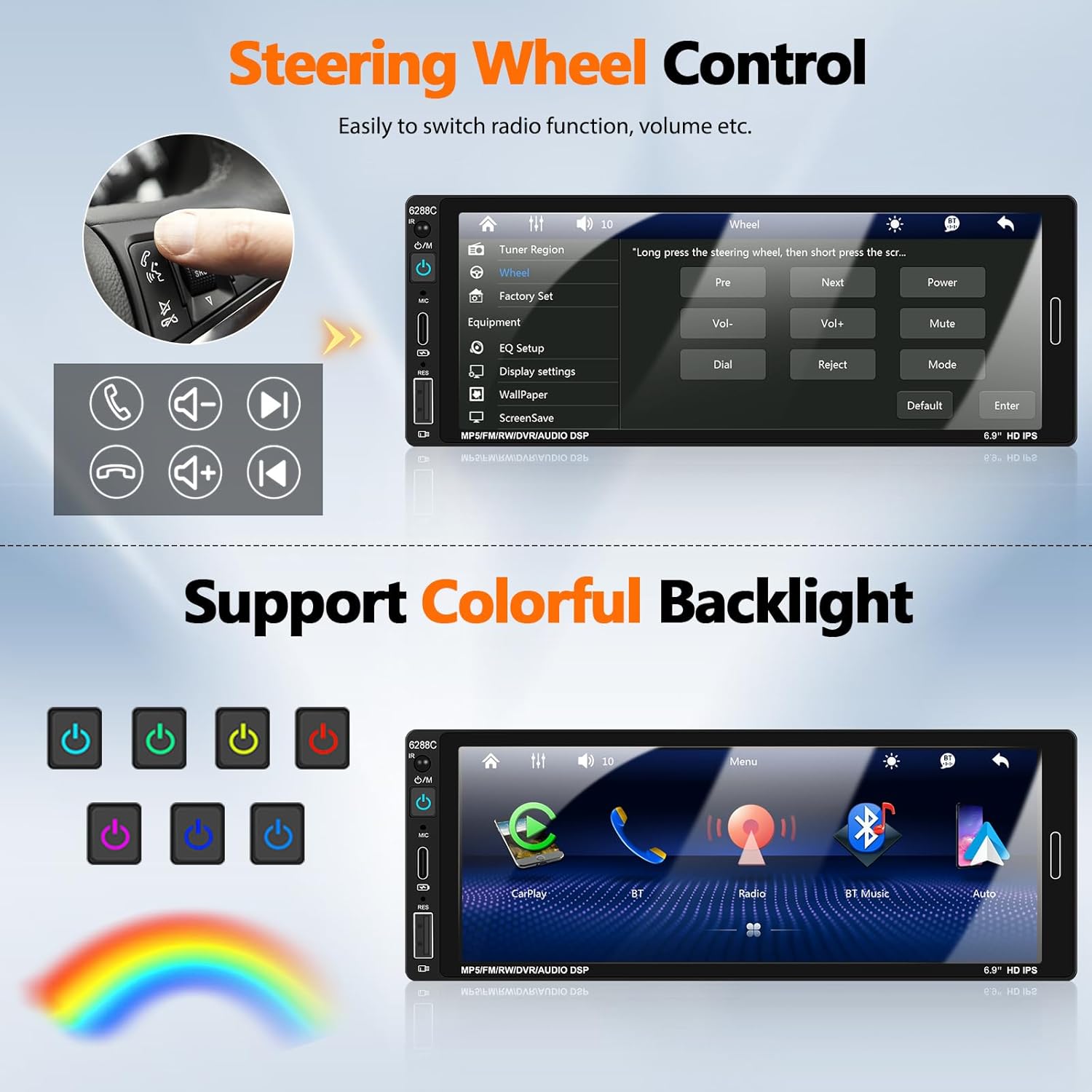
Image 5.5: Illustration of steering wheel controls and the corresponding settings screen on the car stereo for mapping functions.
5.8. DSP үн жөндөөлөрү
The Digital Sound Processor (DSP) allows you to customize the audio output. Access the EQ settings to adjust bass, treble, balance, and other sound parameters to your preference.

Image 5.6: Various user interface screens, including detailed EQ settings for audio customization.
5.9. Colorful Backlight
The unit features 7-color backlight buttons. You can customize the button illumination color to match your vehicle's interior lighting or your personal preference.
6. Техникалык тейлөө
- Тазалоо: Экранды жана аппаратты тазалоо үчүн жумшак, кургак чүпүрөктү колдонуңуз. Абразивдүү тазалагычтардан же эриткичтерден качыңыз.
- Температура: Operate the unit within the recommended temperature range (-10°C to 60°C).
- Байланыштары: Мезгил-мезгили менен бардык зымдарды байланыштарды текшерип, алардын коопсуз экендигин текшерип туруңуз.
7. Кыйынчылыктарды
| Көйгөй | Мүмкүн болгон себеп / Чечим |
|---|---|
| Түзмөк күйбөйт. | Check power cable connections (ACC, B+, Ground). Ensure vehicle's fuse is intact. |
| Динамиктерден үн жок. | Verify speaker wire connections. Check volume level and mute settings. Ensure "Horn Cable" is correctly connected. |
| Apple CarPlay / Android Auto not connecting. | Ensure a genuine USB cable is used. Check phone settings for CarPlay/Android Auto permissions. Try a different USB port if available. Restart both phone and stereo. |
| Камдык камера көрсөтүлбөй жатат. | Check CAMIN video connection. Ensure the pink reverse trigger wire is correctly connected to the vehicle's reverse light signal. Verify camera power supply. |
| Bluetooth not pairing or unstable. | Ensure Bluetooth is enabled on both devices. Forget previous pairings and try again. Ensure devices are within range. |
| Пульт иштебей жатат. | Check battery in the remote control. Ensure there are no obstructions between the remote and the stereo's IR receiver. |
| Mirror Link not working for Samsung phone. | Some Samsung phone models may not be compatible with the Mirror Link function. This is a known limitation. |
8. Кепилдик жана колдоо
UNITOPSCI is committed to providing high-quality products and satisfactory services. We offer comprehensive support for your car stereo.
- Алмаштыруу: Available within 24 months of purchase.
- Кайтаруулар: 60-day no-worry return policy.
- Техникалык колдоо: Өмүр бою сатуудан кийинки консультация жана техникалык колдоо.
- Байланыш: Бардык суроолор же колдоо үчүн биз менен байланышыңыз UNITOPSCI@126.com. We aim for a quick response within 16 hours.

Сүрөт 8.1: Бүттүview of UNITOPSCI's customer support, including replacement policy, quick response time, lifetime technical support, and contact email.