
Introduction
Thank you for choosing the Vivitar Singimals Kids Karaoke Speaker. This manual provides essential information for the safe and effective use of your new karaoke speaker. Please read it thoroughly before operation and retain it for future reference.
Кутуда эмне бар:
- Singimals Kids Karaoke Speaker (Asher The Fox)
- Зымдуу микрофон
- Заряддоо кабели
- User Manual
Продукт бүттүview
The Vivitar Singimals Kids Karaoke Speaker is designed for interactive fun, featuring a 5W speaker, Bluetooth v5.1 connectivity, and multicolor LED lighting. It offers up to 12 hours of playtime on a single charge.
Негизги өзгөчөлүктөрү:
- 5 Вт динамик: Delivers clear and crisp audio for an engaging karaoke experience.
- Bluetooth v5.1: Шайкеш келген түзмөктөргө туруктуу жана натыйжалуу зымсыз байланышты камсыз кылат.
- 12 сааттык ойноо убактысы: Enjoy extended entertainment with the built-in rechargeable battery.
- Көп түстүү LED жарыктандыруу: Dynamic lights that pulse and dance to the music, enhancing the performance atmosphere.
- Портативдик дизайн: Компакттуу жана жеңил, ал каалаган жерде ташуу жана колдонуу үчүн оңой.
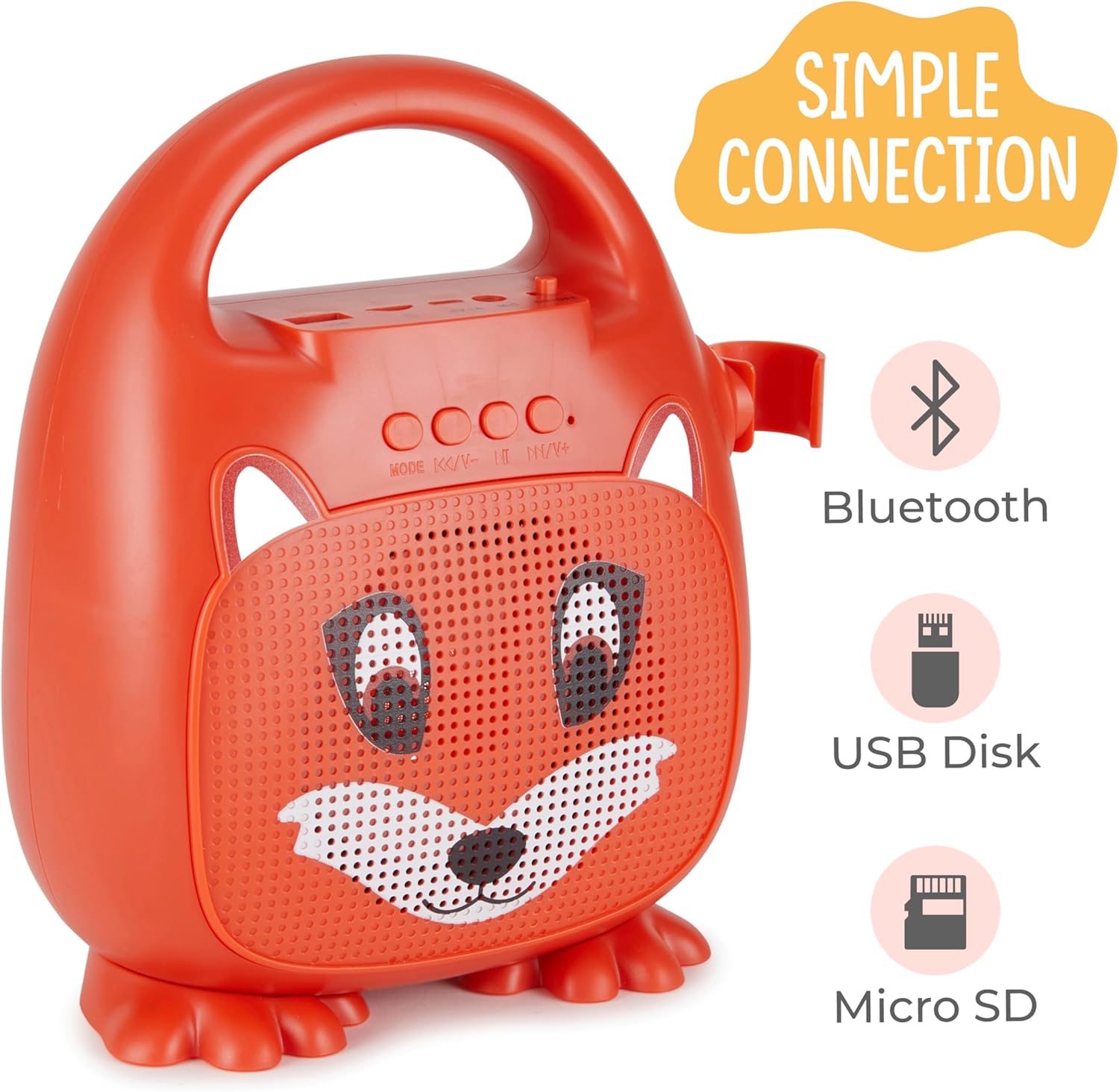
Сүрөт 1: Алдыңкы view of the Singimals Kids Karaoke Speaker (Asher The Fox).
Жайгашуу
1. Динамикти заряддоо:
Before first use, fully charge the speaker. Connect the provided charging cable to the speaker's charging port (usually labeled "5V 1A" or similar) and the other end to a USB power adapter (not included) or a computer's USB port. The charging indicator light will show the charging status.
2. Микрофонду туташтыруу:
Insert the microphone's plug into the MIC input port on the speaker. Ensure the microphone's ON/OFF switch is in the 'ON' position when in use.

Figure 2: Wired Microphone with ON/OFF switch.
3. Күйгүзүү/өчүрүү:
Locate the ON/OFF switch on the speaker. Slide it to the 'ON' position to power on the device. Slide it to 'OFF' to power down.
4. Bluetooth жупташтыруу:
- Power on the karaoke speaker. It will automatically enter Bluetooth pairing mode, indicated by a flashing LED light.
- Смартфонуңузда же башка Bluetooth иштетилген түзмөгүңүздө Bluetooth жөндөөлөрүнө өтүңүз.
- Издөө available devices and select "Singimals" (or similar name) from the list.
- Once connected, the LED indicator on the speaker will stop flashing and remain solid, and you may hear an audible confirmation.
5. USB Disk and Micro SD Card Playback:
Insert a USB flash drive or a Micro SD card (with pre-loaded audio files) into the respective ports on the speaker. The speaker will automatically detect the media and begin playback. Use the 'MODE' button to switch between input sources (Bluetooth, USB, Micro SD).

Figure 3: Control panel and input ports.
Иштөө нускамалары
Башкаруу баскычтары:
| баскыч | Функция |
|---|---|
| РЕЖИМ | Switches between input modes (Bluetooth, USB, Micro SD). |
| Мурунку трек / Көлөмүн төмөндөтүү | Мурунку трекке кыска басыңыз. Үнүн азайтуу үчүн көпкө басыңыз. |
| Ойнотуу / Тыныгуу | Plays or pauses the current audio track. |
| Кийинки Track / Volume Up | Кийинки трекке кыска басыңыз. Үнүн жогорулатуу үчүн көпкө басыңыз. |
LED жарыктандыруу:
The speaker features multicolor LED lights that illuminate the speaker grille. These lights automatically pulse and change colors with the music. There is no separate control for the LED lighting; it operates automatically when the speaker is on.
Техникалык тейлөө
- Тазалоо: Wipe the speaker and microphone with a soft, dry cloth. Do not use abrasive cleaners or solvents.
- Сактагыч: Аппаратты түз күн нурунан жана экстремалдык температурадан алыс салкын, кургак жерде сактаңыз.
- Батареяга кам көрүү: Батареянын иштөө мөөнөтүн узартуу үчүн динамикти тез-тез колдонбосо дагы, дайыма заряддаңыз. Батареяны узак убакытка толук зарядсыздандырбаңыз.
- Суу таасири: Бул аппарат суу өткөрбөйт. Аны суудан жана нымдан алыс кармаңыз.
Проблемаларды чечүү
| Көйгөй | Чечим |
|---|---|
| Динамик күйбөйт. | Ensure the ON/OFF switch is in the 'ON' position. Charge the speaker if the battery is depleted. |
| Микрофондон үн чыкпайт. | Check if the microphone is securely plugged into the MIC port. Ensure the microphone's ON/OFF switch is in the 'ON' position. |
| Bluetooth аркылуу жупташтыруу мүмкүн эмес. | Ensure the speaker is in Bluetooth mode (flashing LED). Turn off and on Bluetooth on your device. Move your device closer to the speaker. |
| Үн сапаты начар. | Ensure the audio source is of good quality. Adjust the volume on both the speaker and the connected device. Check for obstructions around the speaker grille. |
Техникалык шарттар
| Өзгөчөлүк | Деталь |
|---|---|
| Бренд | Vivitar |
| Модель номери | SNG200-FOX |
| Байланыш технологиясы | Bluetooth |
| Bluetooth версиясы | v5.1 |
| Чыгуу Wattage | 5 Ватт |
| Power Source | Батарея менен иштейт |
| Элементтин өлчөмдөрү (L x W x Y) | 4.72 x 8.7 x 9.25 дюйм |
| Элемент Салмагы | 0.94 килограмм |
| Материал | Пластик |
| Аудио киргизүү | Microphone, USB, Micro SD |
Коопсуздук маалыматы
- Аппаратты экстремалдык температурага, түз күндүн нуруна же жогорку нымдуулукка дуушар кылбаңыз.
- Аппаратты суудан жана башка суюктуктардан алыс кармаңыз.
- Аппаратты ажыратууга же өзгөртүүгө аракет кылбаңыз. Бул кепилдикти жокко чыгарат жана зыян келтириши мүмкүн.
- Берилген заряддоо кабелин гана колдонуңуз.
- Supervise young children during use to ensure safe operation.
- Угуу жөндөмүнө зыян келтирбөө үчүн катуу үн менен көпкө угуудан алыс болуңуз.
Кепилдик жана колдоо
For warranty information and customer support, please refer to the warranty card included with your product or visit the official Vivitar webсайт. Сатып алганыңыздын далили катары сатып алуу дүмүрчөгүңүздү сактаңыз.
Өндүрүүчү: Сакар Интернешнл, Инк.