
1. Киришүү
Thank you for choosing the Avalo Gaming Desk. This L-shaped corner desk (Model AP37) is designed to provide a solid, comfortable, and stylish workspace for gaming or home office use. With its generous dimensions of 160x100x75 cm, integrated LED lighting, and various storage solutions, it offers an optimal setup for your monitors, keyboard, and other accessories. This manual provides essential information for assembly, operation, maintenance, and safety to ensure you get the most out of your new gaming desk.
2. Коопсуздук эскертүүлөрү
Please read and understand all safety warnings before assembling and using the Avalo Gaming Desk. Failure to follow these instructions may result in injury or damage to the product.
- Жүктөө жөндөмдүүлүгү: The desk has a maximum load capacity of 125 кг (275 фунт). Do not exceed this weight limit to prevent structural damage or collapse.
- Туруктуу жайгаштыруу: Always place the desk on a flat, stable, and level surface to ensure stability and prevent tipping.
- Материалды иштетүү: The desk features carbon fiber look, heat-resistant ABS, and stainless steel components. Handle these materials with care during assembly and use.
- Ассамблея: Assemble the desk according to the instructions provided in Section 4. Ensure all screws and fasteners are securely tightened before use.
- Балдар жана үй жаныбарлары: Чогултуу учурунда муунуп калуу коркунучун алдын алуу үчүн майда бөлүктөр менен таңгактоочу материалдарды балдардан жана үй жаныбарларынан алыс кармаңыз.
- Электр компоненттери: The LED lighting system requires power. Ensure all electrical connections are secure and follow local electrical safety guidelines. Do not expose LED components to water.
- Тазалоо: Use only recommended cleaning methods as described in Section 6. Avoid harsh chemicals that may damage the surface.
3. Пакеттин мазмуну
Монтаждоону баштоодон мурун, төмөндө келтирилген компоненттердин бардыгы бар экенин жана бузулбаганын текшериңиз. Эгерде кандайдыр бир бөлүктөрү жок же бузулуп калса, кардарларды колдоо менен байланышыңыз.

3.1-сүрөт: Бүттүview of the Avalo Gaming Desk package contents. This includes the main desk components, the product packaging, and the user manual.
- Desk Top (L-shaped)
- Desk Legs (Metal Frame)
- LED жарык тилкеси
- LED алыстан башкаруу
- Cup Holder
- Наушник илгич
- Cable Management Grommets (2x)
- Монтаждоо жабдыктары (буроолор, болттар, шаймандар)
- User Manual
4. Монтаждоо боюнча нускамалар
The Avalo Gaming Desk is designed for quick and easy assembly. It is recommended to have two people for assembly.
- Компоненттерди таңгактан чыгаруу: Таңгактан кылдаттык менен бардык бөлүктөрүн алып салыңыз жана чийилип калбаш үчүн таза, жумшак бетке жаткызыңыз.
- Үстөлдүн буттарын бекитүү: Secure the metal desk legs to the underside of the L-shaped desk top using the provided screws and tools. Ensure all connections are firm and stable.
- LED жарыгын орнотуу: Adhere the LED lighting strip along the designated edges of the desk top. Connect the LED strip to the power source as instructed.
- Аксессуарларды тиркөө: Install the cup holder and headphone hook in their desired locations on the desk. Insert the cable management grommets into the pre-drilled holes.
- Акыркы текшерүү: Before placing any equipment on the desk, double-check all screws and connections to ensure they are tight and the desk is stable.

4.1-сүрөт: Desk dimensions for planning your setup. The desk measures 160 cm in length, 100 cm in L-shape depth, and 75 cm in height.
5. Features Overview
The Avalo Gaming Desk is equipped with several features designed to enhance your gaming or work experience.
- Жогорку сапаттагы материалдар: Constructed with a carbon fiber look surface, heat-resistant ABS, and a durable stainless steel base. This combination ensures longevity and resistance to daily wear.
- Күчтүү дизайн: Features a solid metal frame that provides excellent stability and shock resistance, supporting up to 125 kg.
- Интегралдык LED жарыктандыруу: Dynamic LED lighting with various colors and effects to create an immersive atmosphere. Controlled via an included remote.
- Ыңгайлуу сактоо: Includes a cup holder to keep your beverages secure and a headphone hook for easy access and storage of your headset.
- Кабелдик башкаруу: Two integrated cable management grommets help keep your cables organized and prevent tangles, maintaining a clean workspace.
- Узактыгы: The desk surface is water-repellent and scratch-resistant, making it easy to clean and maintain.
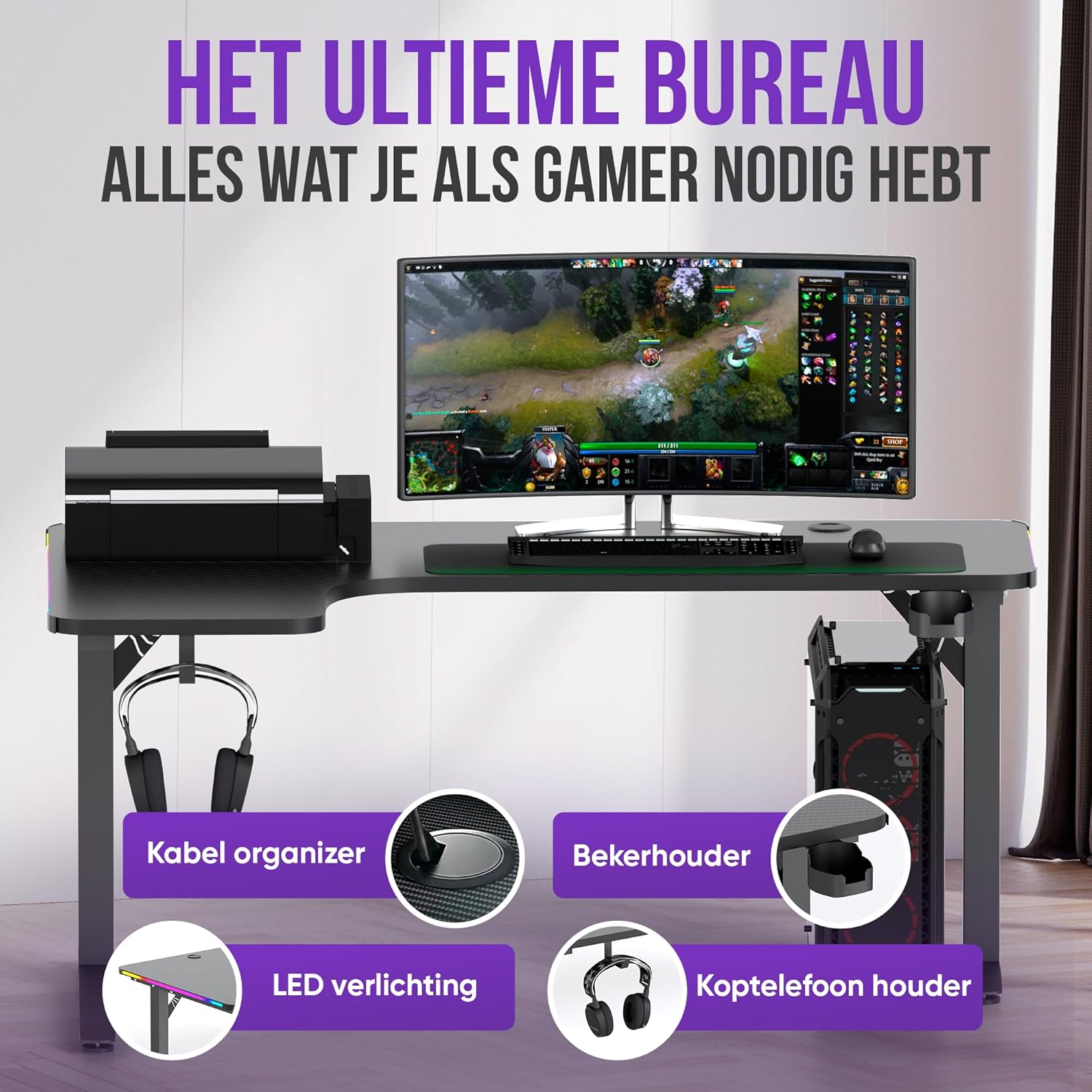
5.1-сүрөт: Key features of the Avalo Gaming Desk, including cable organizers, cup holder, LED lighting, and headphone holder.

5.2-сүрөт: The carbon fiber coating provides a durable surface that is temperature-resistant, scratch-resistant, and water-resistant.

5.3-сүрөт: The two cable cutouts (grommets) on the desk allow for neat and efficient cable management.

5.4-сүрөт: The integrated cup holder and headphone hook ensure that essential items are always within easy reach.
6. Иштөө нускамалары (LED жарыктандыруу)
The Avalo Gaming Desk features integrated LED lighting to enhance your gaming or work environment.
6.1 LED жарыктандыруу башкаруусу
The LED lighting is controlled using the included remote control.
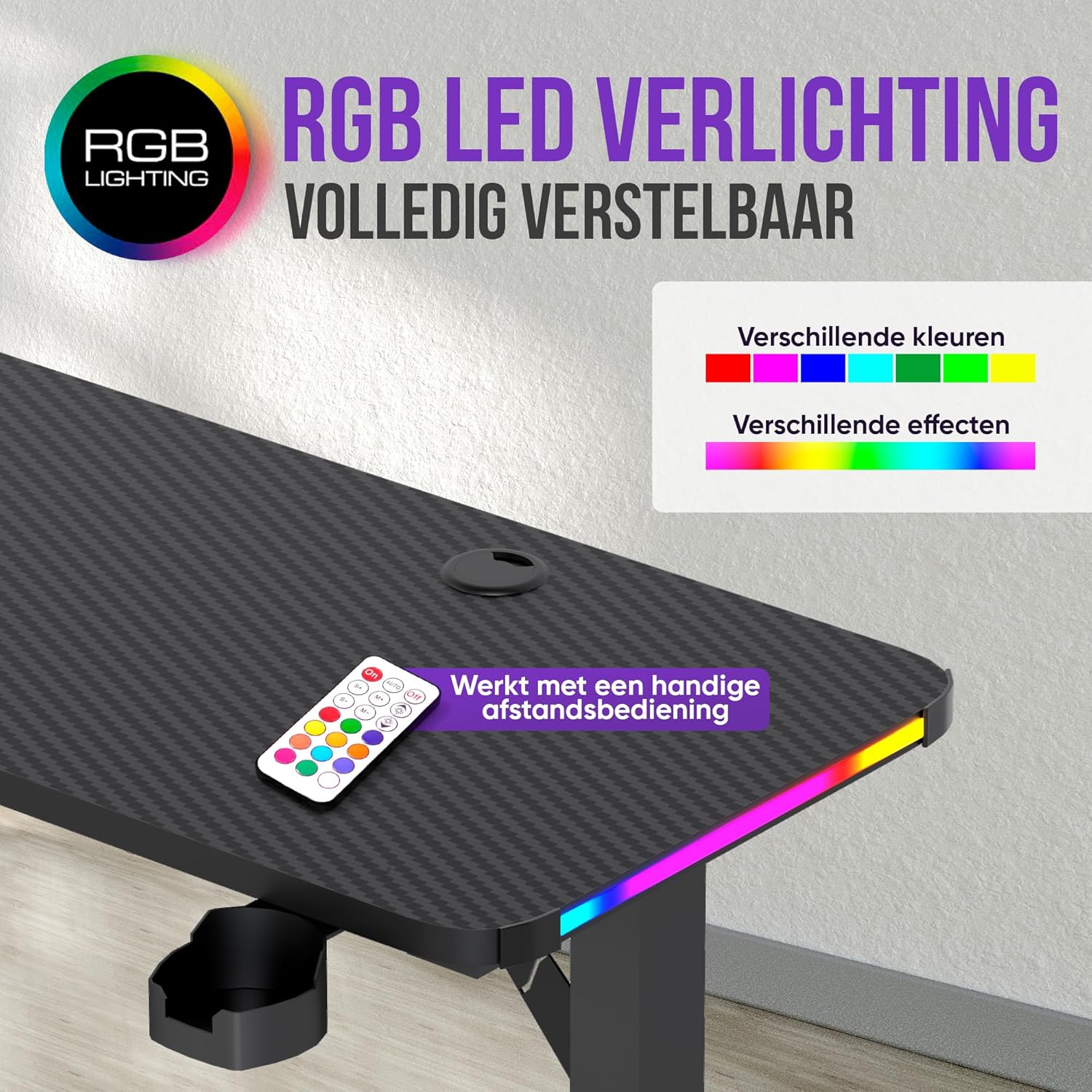
6.1-сүрөт: The RGB LED lighting is fully adjustable, offering a variety of colors and effects controlled by the remote.
- Күйгүзүү/өчүрүү: LED чырактарын күйгүзүү же өчүрүү үчүн алыстан башкаруу пультундагы кубат баскычын колдонуңуз.
- Түс тандоо: Select from a variety of static colors using the color buttons on the remote.
- Эффект режимдери: Choose from different dynamic lighting effects (e.g., flash, fade, strobe) to create your desired ambiance.
- Жарыктыкты жөндөө: Adjust the brightness level of the LEDs using the designated brightness control buttons.
- Ылдамдыкты жөндөө: For dynamic effects, adjust the speed of the effect transitions.
Refer to the remote control's specific instructions for detailed functionality.
7. Техникалык тейлөө жана кам көрүү
Proper care and maintenance will ensure the longevity and appearance of your Avalo Gaming Desk.
- Бетти тазалоо: The carbon fiber look surface is water-repellent and easy to clean. Use a soft, damp cloth with mild soap and water. Avoid abrasive cleaners, harsh chemicals, or solvents that could damage the finish.
- Төгүлүүлөр: Wipe up spills immediately to prevent staining, especially on the edges or seams.
- тырышып алдын алуу: While scratch-resistant, avoid dragging sharp or heavy objects across the surface. Use mouse pads or desk mats for protection.
- Frame Care: Металл рамканы жарнама менен тазаласа болотamp кездеме. Датты болтурбоо үчүн жакшылап кургатуу керек.
- LED кам көрүү: Do not attempt to clean the LED strip with liquids. If dusty, gently wipe with a dry, soft cloth.
- Үзгүлтүксүз текшерүүлөр: Мезгил-мезгили менен бардык бурамалар менен байланыштарды текшерип туруңуз, алар бекем бойдон калууда. Керек болсо кайра тартыңыз.
8. Кыйынчылыктарды
This section addresses common issues you might encounter with your Avalo Gaming Desk.
| Көйгөй | Мүмкүн себеп | Чечим |
|---|---|---|
| Стол чайпалып/туруксуз. | Бошогон бурамалар же тегиз эмес пол. | Ensure all assembly screws are tightened. Adjust leveling feet if present, or place on a level surface. |
| LED жарыктары иштебейт. | Электр кубатына туташуу көйгөйү, пульттун батареясы түгөндү же LED тилкеси бузулган. | Check if the LED power adapter is securely plugged in. Replace remote control batteries. Inspect LED strip for visible damage. |
| Алыстан башкаруу жооп бербей жатат. | Battery issue or remote not pointed correctly. | Replace the remote control battery. Ensure the remote is pointed towards the LED receiver. |
| Кабелдик башкаруудагы кыйынчылыктар. | Too many cables or incorrect routing. | Utilize both cable grommets. Consider using cable ties or sleeves for larger bundles. |
If you encounter an issue not listed here or if the suggested solutions do not resolve the problem, please contact Avalo customer support.
9. Техникалык шарттар
Detailed specifications for the Avalo Gaming Desk (Model AP37).
| Продукт түрү | Gaming Desk / Work Desk |
| Бренд | Avalo |
| Модель номери | AP37 |
| Өлчөмдөрү (L x W x Y) | 160 x 100 x 75 см (63 x 39.4 x 29.5 дюйм) |
| Салмагы | 26.5 кг (58.4 фунт) |
| Жүктөө жөндөмдүүлүгү | 125 кг чейин (275 фунт) |
| Материалдар | Carbon Fiber Look Coating, Heat-Resistant ABS, Stainless Steel Base, Metal Frame |
| Түс | Кара |
| Өзгөчөлүктөр | Integrated LED Lighting (RGB), Cable Management System, Cup Holder, Headphone Hook, Water-Repellent, Scratch-Resistant, Ergonomic Design |
10. Кепилдик жана колдоо
Avalo products are designed for durability and performance.
10.1 Кепилдик маалыматы
Specific warranty details are typically provided with your purchase documentation or on the product packaging. Please retain your proof of purchase for warranty claims. Avalo offers a return policy of 30 days for refund/replacement as per standard terms.
10.2 Кардарларды колдоо
For any questions, assistance with assembly, troubleshooting, or warranty inquiries, please contact Avalo customer support.
- Онлайн колдоо: Visit the official Avalo webКөп берилүүчү суроолор, колдоо макалалары жана байланыш формалары үчүн сайт.
- Электрондук почта колдоо: Кардарларды тейлөө электрондук почта дарегин сатып алуу документтериңизден караңыз.
- Телефондук колдоо: Refer to your purchase documentation for customer service phone numbers.
When contacting support, please have your product model number (AP37) and proof of purchase ready.