
1. Киришүү
Сатып алганыңыз үчүн рахматasing the PPLEE RGB Digital Alarm Clock, Model CR1008R. This clock is designed to provide accurate timekeeping, customizable alarm functions, and convenient charging options. Please read this manual thoroughly before use to ensure proper operation and to maximize your product experience.
2. Коопсуздук маалыматы
- Кубат адаптери жергиликтүү электр менен камсыздооңузга (100-240V) шайкеш келерин текшериңиз.
- Аппаратты сууга же ашыкча нымдуулукка дуушар кылбаңыз.
- Саатты жылуулук булактарынын жанына же күндүн түз тийген жерине койбоңуз.
- Берилген кубат адаптерин гана колдонуңуз.
- Балдар жетпеген жерде сактаңыз.
- Insert AAA batteries correctly for backup function (not included).
3. Пакеттин мазмуну
Пакетиңизде бардык буюмдар бар экенин текшериңиз:
- 1 x PPLEE RGB Digital Clock
- 1 х кубат адаптери
- 1 х Кубат кабели
- 1 х Колдонуучунун колдонмосу (бул документ)

Image: The package includes the RGB digital clock, power adapter, power cord, and user manual.
4. Продукт бүтүп калдыview
Ойготкуч саатыңыздын негизги компоненттери менен таанышыңыз.

Сүрөт: алдыңкы view of the PPLEE RGB Digital Alarm Clock displaying time with RGB digits and a smartphone charging via its USB port.
Алдыңкы панели: Large LED display for time, AM/PM indicator, DST indicator, Alarm indicator.
Жогорку панель: Snooze/Light bar, Hour button, Minute button.
Арткы Panel:
- DC IN Port: For power adapter connection.
- USB Charging Port: For charging external devices.
- Type-C Charging Port: For charging external devices.
- Alarm ON/OFF Switch.
- Alarm Volume Control (Low/Med/High).
- Dimmer Control (for display brightness).
- Time Format Switch (12H/24H).
- DST (Daylight Saving Time) Switch.
- Set Time Button.
- Set Alarm Button.
- Multi-Color Button (for display and night light).
- Battery Compartment (for 2x AAA backup batteries).

Сүрөт: Арткы view of the alarm clock highlighting the various control buttons and charging ports, including dimmer, alarm volume, time/alarm set, and time format switches.
5. Орнотуу
5.1 Кубат туташтыруу
- Connect the power cord to the DC IN port on the back of the clock.
- Plug the power adapter into a standard electrical outlet (AC 100-240V).
- Сааттын дисплейи күйөт.
5.2 Батареянын резервдик көчүрмөсүн орнотуу
For battery backup, which saves settings during power outages and can trigger the alarm, install 2 AAA batteries (not included) into the battery compartment on the back of the clock.
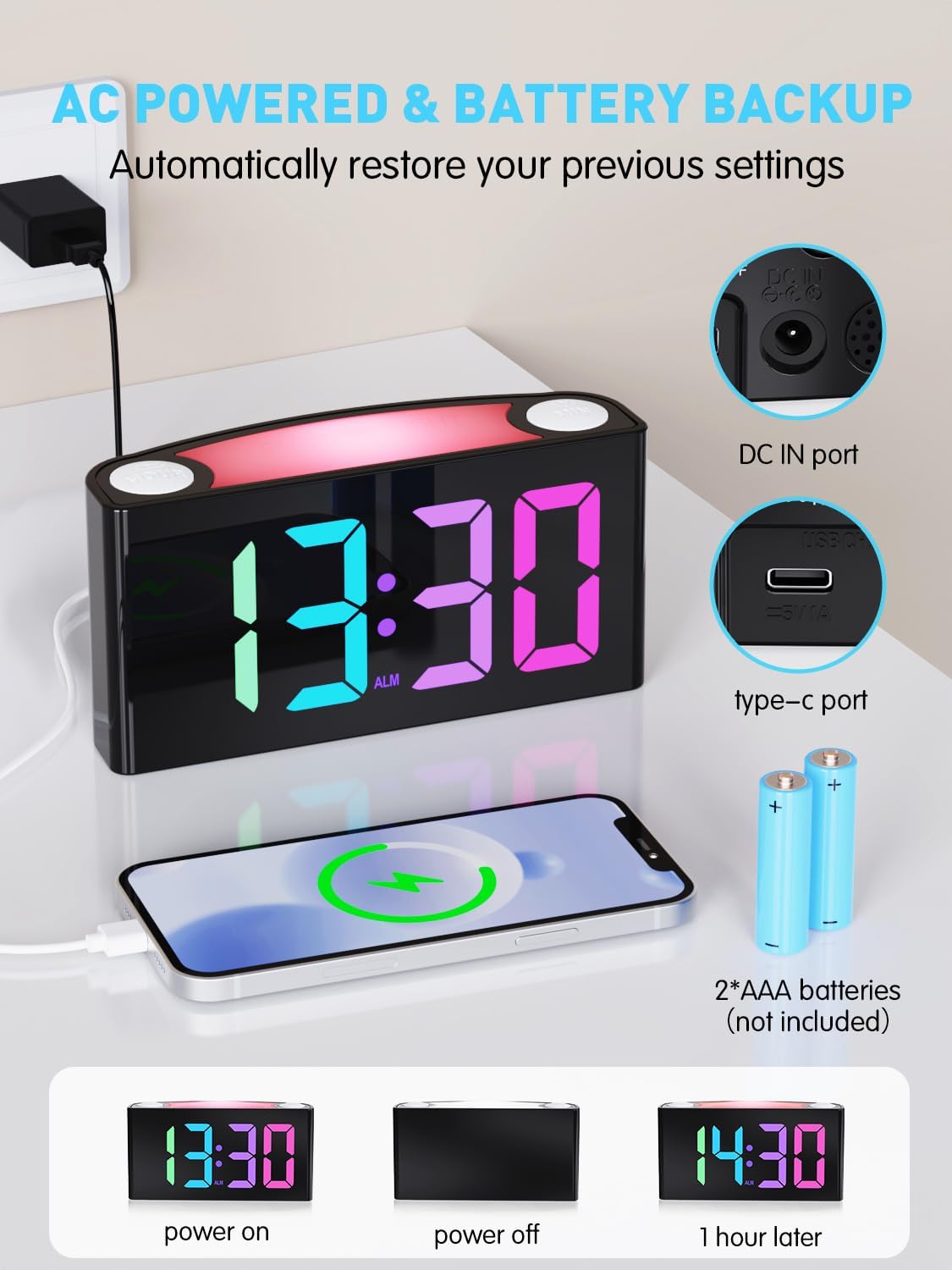
Image: The alarm clock is shown connected to AC power, with an open battery compartment indicating where to insert 2 AAA batteries for backup. The display shows "13:30" (power on), a blank screen (power off), and "14:30" (1 hour later, demonstrating time retention).
Эскертүү: The clock's main functions (display, USB charging, alarm) require AC power. Batteries only provide backup for time memory and alarm trigger during power interruptions.
6. Иштөө нускамалары
6.1 Убакытты коюу
- басыңыз "SET TIME" button on the rear panel. The display will start flashing.
- басыңыз "СААТ" button (on top) to adjust the hour.
- басыңыз "МИН" button (on top) to adjust the minute.
- Басыңыз "SET TIME" again to save, or wait 5 seconds for automatic confirmation.
Video: Demonstrates how to set the time on the PPLEE RGB Digital Alarm Clock, including adjusting hours and minutes and confirming the setting.
6.2 Сигналды коюу
- жылдырыңыз "ALARM ON/OFF" switch to the "ON" position. The alarm indicator will light up.
- басыңыз "SET ALARM" button on the rear panel. The alarm time display will start flashing.
- басыңыз "СААТ" ойготкучтун саатын тууралоо үчүн (үстүнкү бетиндеги) баскычты басыңыз.
- басыңыз "МИН" button (on top) to adjust the alarm minute.
- Басыңыз "SET ALARM" again to save, or wait 5 seconds for automatic confirmation.
To turn off the alarm, slide the "ALARM ON/OFF" switch to the "OFF" position. The alarm indicator will disappear.
6.3 Дисплейдин жарыктыгы (димер)
The clock features a 7-level dimmer for the time display (0%-100% brightness).
- колдонуу "DIMMER" button on the rear panel to cycle through brightness levels.

Image: The alarm clock display shows various brightness levels from 0% to 100%, illustrating the 7-level dimmer function.
6.4 түнкү жарык режимдери
The clock includes an 8-mode/7-color night light with 3 adjustable brightness settings.
- басыңыз "Унчуктуруу/Жарыктоо" bar on top to turn the night light on/off and cycle through colors/modes.
- To adjust night light brightness, press and hold the "Унчуктуруу/Жарыктоо" бар.

Image: A person sleeping next to the alarm clock, which emits a soft yellow night light from its top bar. Below are icons indicating 3-level adjustable brightness for the night light.
6.5 Ойготкучтун көлөмү
Adjust the alarm volume to your preference (Low, Medium, High).
- колдонуу "ALARM VOLUME" switch on the rear panel to select the desired volume level.

Image: A person reaching for the snooze bar on the alarm clock, which displays "8:30". The image also illustrates the 3-level adjustable alarm volume (90db, 103db, 110db).
6.6 Тындыруу функциясы
Сигнал чыкканда чоң баскычты басыңыз "Унчуктуруу/Жарыктоо" bar on top to activate snooze for 9 extra minutes of sleep.
The alarm will sound again after 9 minutes. To completely turn off the alarm, use the "ALARM ON/OFF" которуу.
6.7 12/24 сааттык формат жана DST
- колдонуу "TIME FORMAT" switch on the rear panel to toggle between 12-hour and 24-hour display.
- колдонуу "DST" switch on the rear panel to enable or disable Daylight Saving Time (adjusts time by 1 hour).
6.8 Dual Charging Ports
The clock is equipped with a Type-C output port and a USB output port for charging your devices.

Image: The alarm clock with its display showing "12:00" and two smartphones connected to its USB and Type-C charging ports, indicating active charging.
Simply connect your device's charging cable to the appropriate port on the back of the clock.
7. Техникалык тейлөө
- Саатты жумшак, кургак чүпүрөк менен тазалаңыз. Абразивдүү тазалагычтарды же эриткичтерди колдонбоңуз.
- Ensure the clock is unplugged before cleaning.
- Эгер көпкө чейин колдонулбаса, камдык батареяларды алып салыңыз.
8. Кыйынчылыктарды
| Көйгөй | Чечим |
|---|---|
| Сааттын дисплейи бош. | Check if the power adapter is securely plugged into both the clock and the wall outlet. Ensure the outlet has power. |
| Ойготкуч угулбайт. | Verify the "ALARM ON/OFF" switch is in the "ON" position. Check the alarm volume setting. Ensure the alarm time is correctly set. |
| Убакыт бийликтен кийин туура эмесtage. | Ensure 2 AAA batteries are installed in the battery compartment for backup. If batteries were not present or depleted, reset the time manually. |
| Devices not charging via USB/Type-C. | Confirm the clock is connected to AC power. Check the charging cable and the device being charged. |
| Түнкү жарык иштебейт. | Press the "SNOOZE/LIGHT" bar to cycle through modes and turn on the light. Check if the clock is powered. |
9. Техникалык шарттар
| Модель номери | CR1008R |
| Бренд | PPLEE |
| Дисплей түрү | Digital LED (RGB) |
| Продукциянын өлчөмдөрү | 6.46"W x 3.39"H |
| Power Source | Зымдуу электр (AC 100-240V) |
| Батареянын камдык көчүрмөсү | 2 x AAA батарейкалар (киргизилген эмес) |
| Заряддоо порттору | 1 x USB, 1 x Type-C |
| Дисплей жарыктыгы | 7 деңгээлдүү жөнгө салынуучу күңүрттөөчү |
| Night Light | 8 modes / 7 colors, 3-level adjustable brightness |
| Ойготкучтун үнү | 3-level adjustable (Low, Medium, High) |
| Тындыруунун узактыгы | 9 мүнөт |
10. Кепилдик жана колдоо
For warranty information or technical support, please refer to the contact details provided with your purchase or visit the official PPLEE webсайт. Кепилдик дооматтары үчүн сатып алуу дүмүрчөгүңүздү сактаңыз.
Электрондук почта: support@pplec.net