
1. Киришүү
This manual provides comprehensive instructions for the setup, operation, and maintenance of your Keychron V1 75% Layout Custom QMK/VIA Wired Mechanical Keyboard. Please read this manual thoroughly before using the keyboard to ensure optimal performance and longevity.
2. Продукт бүтүп калдыview
The Keychron V1 is an 81-key, 75% layout mechanical keyboard designed for a premium typing experience. It features hot-swappable switches, south-facing RGB backlighting, and support for QMK/VIA customization. The keyboard is compatible with both macOS and Windows operating systems.

2.1-сүрөт: жогорудан ылдыйга view of the Keychron V1 mechanical keyboard, showcasing its 75% layout with 81 keys, including function row, navigation cluster, and arrow keys. The keycaps are a mix of dark grey and blue-grey with red accent keys for Esc and Enter.

2.2-сүрөт: Бурчтуу view of the Keychron V1 keyboard, highlighting its compact design and the color scheme of the PBT keycaps. The keyboard rests on a white surface, emphasizing its form factor.
2.1 Пакеттин мазмуну
Пакетте бардык буюмдар бар экенин текшериңиз:
- Keychron V1 Mechanical Keyboard
- USB-C - USB-C кабели
- USB-Aдан USB-C адаптерге чейин
- Баскыч капкагын тарткыч
- Switch Puller
- Extra Keycaps for Windows/macOS
- Screwdriver

Figure 2.3: Included accessories: a keycap puller, switch puller, and additional keycaps for Windows and macOS layouts, demonstrating the keyboard's adaptability.
3. Орнотуу
3.1 Баскычтопту туташтыруу
The Keychron V1 is a wired keyboard and connects via a USB-C cable.
- USB-C портун клавиатуранын арткы бетинен табыңыз.
- Берилген USB-C кабелинин бир учун клавиатурага туташтырыңыз.
- Connect the other end of the USB-C cable to an available USB-C port on your computer. If your computer only has USB-A ports, use the included USB-A to USB-C adapter.
- Клавиатура сиздин операциялык системаңыз тарабынан автоматтык түрдө таанылат.

Figure 3.1: Close-up of the USB-C port on the Keychron V1 keyboard, indicating the connection point for the provided cable.
3.2 Коммутациялык операциялык системанын жайгашуусу
The Keychron V1 features a physical toggle switch to change between macOS and Windows layouts.
- Locate the toggle switch on the side of the keyboard, near the USB-C port.
- Slide the switch to the 'Mac' position for macOS or 'Win' position for Windows.
- For optimal experience, replace the default keycaps with the included macOS or Windows specific keycaps as needed (e.g., Command/Option for Mac, Alt/Windows for Win).

3.2-сүрөт: Каптал view of the Keychron V1 keyboard showing the physical toggle switch for selecting between Windows and macOS operating system layouts, located next to the USB-C port.
4. Иштөө нускамалары
4.1 Негизги терүү
The Keychron V1 functions as a standard 75% layout keyboard. All alphanumeric keys, modifiers, and function keys operate as expected for their respective operating systems.
4.2 Функция баскычтары (F1-F12)
The top row of keys serves as function keys (F1-F12). By default, these keys may have multimedia or system control functions. To access the standard F1-F12 functions, press the Fn каалаган функция баскычы менен бир убакта басыңыз.
4.3 RGB арткы жарыктандыруу
The Keychron V1 features south-facing RGB LED lights with multiple lighting effects. You can cycle through different lighting modes and adjust brightness directly on the keyboard.
- Жарыктандыруу режимин өзгөртүү: Use the dedicated lighting effect key (often located near the navigation cluster or accessible via Fn combinations).
- Жарыктыкты жөндөө: Use Fn + Light Brightness Up/Down keys (refer to keyboard layout for specific key assignments).

Сүрөт 4.1: Жакын пландан view of the Keychron V1's south-facing RGB backlighting, showing various colors illuminating the mechanical switches beneath the keycaps.
5. Customization (QMK/VIA)
The Keychron V1 supports QMK firmware and VIA software, allowing for extensive customization of key assignments, macros, and lighting effects.
5.1 Using VIA Software
VIA is a powerful graphical user interface (GUI) that enables real-time key remapping and macro programming without needing to flash new firmware. To use VIA:
- VIA программасын расмий Keychron сайтынан жүктөп алыңыз website or the VIA GitHub repository.
- Connect your Keychron V1 keyboard to your computer.
- Launch the VIA application. The software should automatically detect your keyboard.
- Use the intuitive interface to remap keys, create macros, and customize RGB lighting. Changes are applied instantly.

Figure 5.1: Screenshot of the VIA software interface, demonstrating its capabilities for remapping keys and programming macros on the Keychron V1 keyboard. The interface shows different layers and key assignments.
5.2 Ыкчам алмаштыруучу которгучтар
The Keychron V1 features hot-swappable sockets, allowing you to change mechanical switches without soldering. This supports both 3-pin and 5-pin MX style mechanical switches.
- Которгучту алып салуу: Use the included switch puller. Gently grip the switch from the top and bottom clips and pull straight up.
- Коммутатор орнотуу: Align the pins of the new switch with the holes on the PCB. Ensure the pins are straight. Press the switch firmly until it clicks into place. Do not force the switch if it doesn't go in easily, as bent pins can damage the socket.

Сүрөт 5.2: Жакын пландан view demonstrating the hot-swappable nature of the Keychron V1 keyboard, showing different colored switches inserted and one empty socket, indicating easy switch replacement.
5.3 Баскыч капкагын алмаштыруу
The Keychron V1 comes with double-shot PBT keycaps. You can replace them with other compatible keycaps using the included keycap puller.
- Баскычтоптун капкагын алып салуу: Use the keycap puller to gently grip the keycap from two opposite sides and pull straight up.
- Баскычтопту орнотуу: Баскычтоптун капкагынын сабын которгучтун сабы менен тегиздеп, ал отурганга чейин бекем басыңыз.
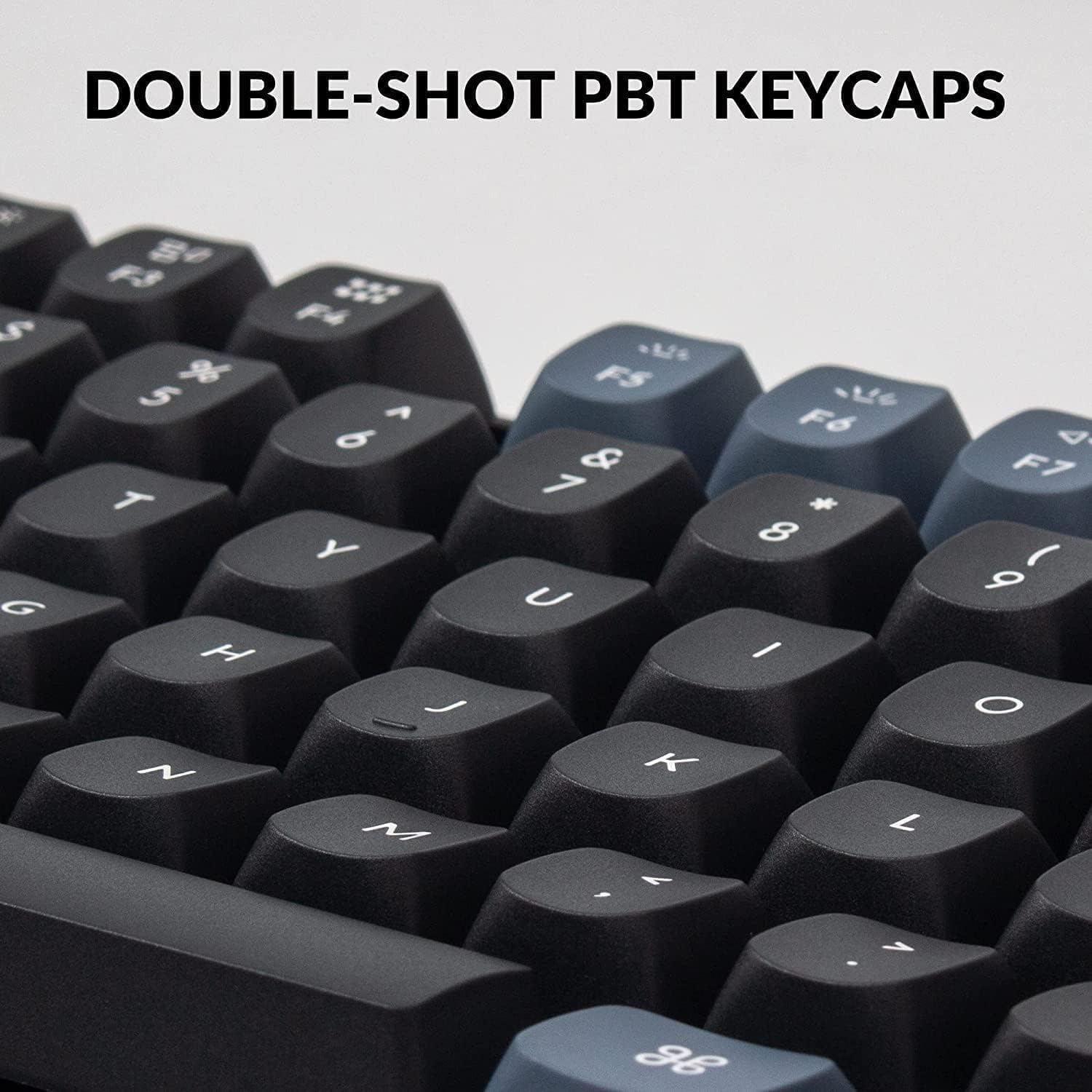
Figure 5.3: Close-up of the double-shot PBT keycaps on the Keychron V1 keyboard, highlighting their texture and legends, which are durable and resistant to shine.
6. Техникалык тейлөө
6.1 Баскычтопту тазалоо
- Тазалоодон мурун клавиатураны компьютерден ажыратыңыз.
- Баскыч капкактарынын ортосундагы чаңды жана калдыктарды тазалоо үчүн кысылган аба банкасын колдонуңуз.
- For stubborn dirt, remove the keycaps using the keycap puller and clean the plate and switches with a soft brush or microfiber cloth.
- Wipe the keycaps and keyboard case with a slightly damp, мамыксыз кездеме. Катуу химиялык заттарды же абразивдүү материалдарды колдонуудан алыс болуңуз.
6.2 Switch Lubrication
The Keychron V1 comes with factory pre-lubricated Keychron K Pro switches for a smoother typing experience. If you replace switches or wish to re-lubricate them, use a specialized switch lubricant and follow proper lubrication techniques to avoid damaging the switches.
7. Кыйынчылыктарды
| Көйгөй | Мүмкүн себеп | Чечим |
|---|---|---|
| Баскычтоп жооп бербей жатат | Бошогон кабель туташуусу, туура эмес USB порту, драйвер маселеси. | USB-C кабели клавиатурага жана компьютерге коопсуз туташтырылганын текшериңиз. Башка USB портун колдонуп көрүңүз. Компьютериңизди өчүрүп күйгүзүңүз. |
| Ачкычтар катталбайт же эки жолу терилбейт | Бузук өчүргүч, баскычтоптун капкагынын/өчүргүчтүн астындагы калдыктар. | Remove keycap and switch, clean the area with compressed air. Reinstall switch or replace with a new one if faulty. |
| RGB backlight not working or incorrect | Жарыктандыруу режимин орнотуу, программалык камсыздоонун карама-каршылыгы. | Cycle through lighting modes using keyboard shortcuts. Check VIA software settings for lighting customization. |
| Incorrect key output (Mac/Windows) | Operating system toggle switch is in the wrong position. | Ensure the Mac/Win toggle switch on the side of the keyboard is set to your current operating system. |
8. Техникалык шарттар
| Өзгөчөлүк | Деталь |
|---|---|
| Модел | HS-V1-B2 |
| Макет | 75% (81 ачкыч) |
| Байланыш | Зымдуу USB-C |
| Которгучтар | Keychron K Pro Blue Switch (Hot-swappable, 3-pin & 5-pin compatible) |
| Баскыч капкактары | Кош-атуу PBT |
| Арткы жарык | Түштүктү караган RGB LED |
| Шайкештик | macOS, Windows, Linux |
| Ыңгайлаштыруу | QMK/VIA колдоосу |
| Материал | Polybutylene Terephthalate (Keycaps) |
| Элемент Салмагы | 2.1 фунт |
| Пакеттин өлчөмдөрү | 15.7 x 5.9 x 2 дюйм |

Figure 8.1: Table detailing Keychron K Pro Switch features, including behavior (Linear, Clicky, Tactile), pre-lubrication status, sound level, and suitable applications (Office/gaming, Typist).

Figure 8.2: Exploded diagram illustrating the internal components of the Keychron V1 keyboard, including keycaps, switches, top case, sound absorbing foam, plate, PCB, silicone pad, and bottom case.
9. Кепилдик жана колдоо
Keychron products typically come with a limited warranty. For detailed warranty information, technical support, and frequently asked questions, please visit the official Keychron webсайтка же кардарларды тейлөөгө кайрылыңыз.
Расмий Keychron Webсайт: www.keychron.com
For further assistance, refer to the product page on Amazon: Keychron V1 on Amazon