
BEAVERLAB TW1
BEAVERLAB TW1 Smart Digital Astronomy Telescope
User Manual
1. Киришүү
Thank you for choosing the BEAVERLAB TW1 Smart Digital Astronomy Telescope. This advanced instrument is designed to provide an immersive and accessible astronomical observation experience, suitable for both beginners and experienced stargazers. With its 500mm long focal length, 1600x maximum magnification, and smart features, the TW1 allows you to explore the cosmos and observe distant objects with remarkable clarity.
This manual provides essential information for the proper setup, operation, and maintenance of your telescope. Please read it thoroughly before first use to ensure optimal performance and longevity of your device.
2. Коопсуздук маалыматы
- Эч качан күнгө тике караба through the telescope or its finderscope, even for an instant, without a proper solar filter. Permanent and irreversible eye damage, including blindness, can result.
- Do not leave the telescope unattended in direct sunlight. Sunlight concentrated through the telescope can cause damage to the instrument or ignite flammable materials.
- Keep the telescope away from water and high humidity to prevent damage to electronic components and optics.
- Handle the telescope with care. Avoid dropping or subjecting it to strong impacts, which can damage optical and mechanical parts.
- Keep out of reach of small children to prevent accidents.
- Use only the specified power source and accessories provided or approved by BEAVERLAB.
3. Продукт бүтүп калдыview
3.1. Components Diagram
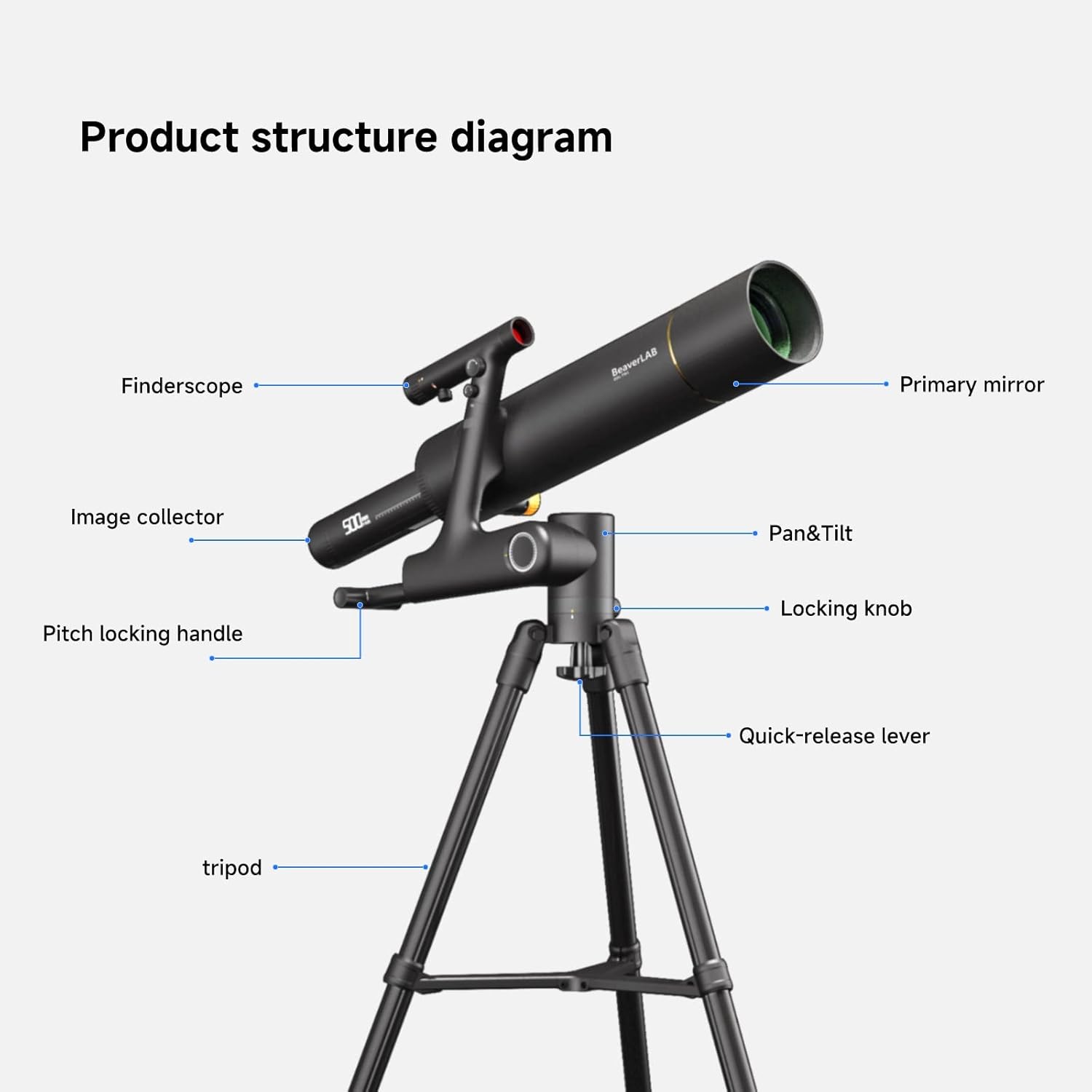
Figure 3.1: Labeled diagram illustrating the main components of the BEAVERLAB TW1 Smart Digital Astronomy Telescope, including the optical tube, finderscope, image collector, and tripod assembly with its various adjustment points.
- Негизги күзгү: The main optical element that collects light.
- Finderscope: A small auxiliary telescope used for locating objects in the sky.
- Image Collector: The digital imaging unit that captures and processes the visual data.
- Pan & Tilt Mechanism: Allows for horizontal and vertical movement of the telescope.
- Бөгөттөө баскычы: Secures the telescope's position after adjustment.
- Pitch Locking Handle: Adjusts and locks the vertical angle (pitch) of the telescope.
- Quick-release Lever: For rapid attachment and detachment of the telescope from the tripod.
- Трипод: The stable three-legged support structure for the telescope.
3.2. Пакеттин мазмуну

Figure 3.2: ашыкview of all items included in the BEAVERLAB TW1 Smart Digital Astronomy Telescope package.
Пакетти ачканда, төмөнкү нерселердин бардыгы бар экенин текшериңиз:
- BEAVERLAB TW1 Smart Digital Astronomy Telescope Optical Tube
- Жөнгө салынуучу штатив
- Finderscope
- Смартфондун адаптери
- USB заряддоо кабели
- Ташуу сумкасы
- Колдонуучунун Колдонмосу (бул документ)
- Additional accessories (e.g., lens caps, cleaning cloth)
3.3. Өлчөмдөр

Figure 3.3: Assembled dimensions of the BEAVERLAB TW1 Telescope.
The assembled telescope has approximate dimensions of:
- Бийиктиги: 55.1 дюйм (болжол менен 140 см)
- Негизги туурасы: 39.3 дюйм (болжол менен 100 см)
4. Орнотуу
Follow these steps to assemble your BEAVERLAB TW1 Telescope:
- Компоненттерди таңгактан чыгаруу: Carefully remove all components from the packaging and place them on a clean, flat surface.
- Set Up Tripod:
- Extend the tripod legs fully and spread them apart to form a stable base.
- Adjust the height of the tripod legs as desired, then secure them using the quick-release levers.
- Attach Telescope Tube:
- Align the mounting plate on the telescope tube with the quick-release mechanism on the tripod head.
- Secure the telescope tube to the tripod by engaging the quick-release lever until it clicks into place. Ensure it is firmly attached.
- Install Finderscope:
- Slide the finderscope into its bracket on the main telescope tube.
- Tighten the small screws on the bracket to hold the finderscope securely.
- Батареяны заряддоо: Before first use, ensure the internal Lithium Ion battery is fully charged using the provided USB charging cable. Connect the cable to the telescope's charging port and a standard USB power adapter (not included). The charging indicator will show status.
5. Иштөө нускамалары
5.1. Күйгүзүү / Өчүрүү
Locate the power button on the telescope's main body. Press and hold the button for a few seconds to power on the device. The indicator light will illuminate. To power off, press and hold the power button again until the light turns off.
5.2. Connecting to the App (Wi-Fi)
The BEAVERLAB TW1 is designed to connect with your smartphone via Wi-Fi for enhanced control and viewing.
- Колдонмону жүктөп алуу: Download the official BEAVERLAB app from your smartphone's app store (iOS or Android).
- Wi-Fi иштетүү: Смартфонуңузда Wi-Fi иштетилгенин текшериңиз.
- Туташуу: Open the BEAVERLAB app. The app will guide you to connect to the telescope's Wi-Fi network. Select the network named "BEAVERLAB_TW1_XXXX" (where XXXX is a unique identifier) and enter the default password if prompted (refer to app instructions or telescope label for default password).
- Live View: Once connected, you will see a live view from the telescope's camera on your smartphone screen.
5.3. Фокустоо жана чоңойтуу
The TW1 features a 500mm focal length and offers up to 1600x magnification.
- Кол менен Фокус: Adjust the focus knob on the telescope tube until the image on your smartphone screen appears sharp and clear.
- Digital Magnification: The app allows for digital zoom to achieve higher magnifications up to 1600x. Use the zoom controls within the app to adjust.
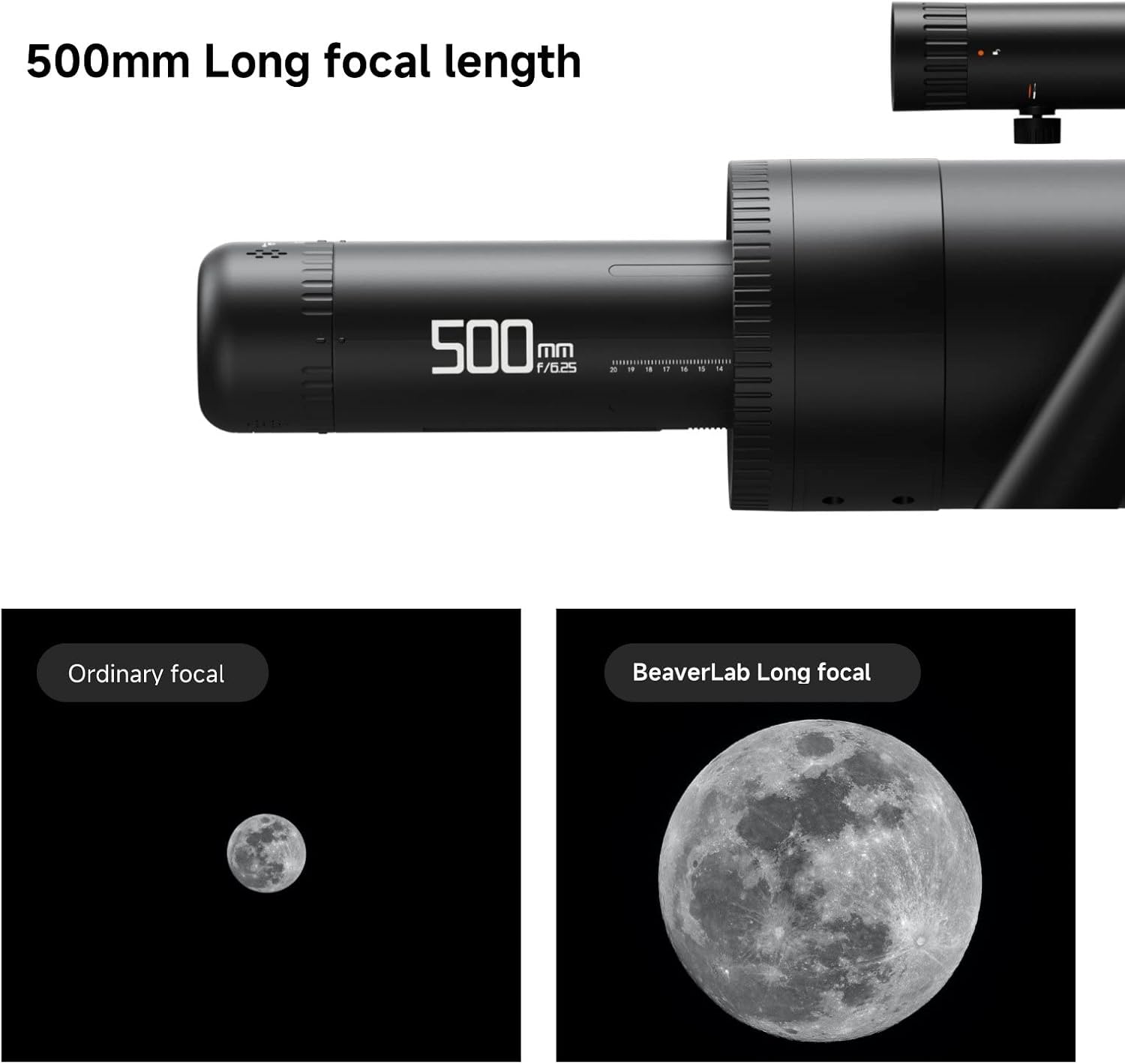
Figure 5.1: Illustration of the effect of 500mm long focal length on image size and detail.

Figure 5.2: Illustration of the f/6.1 large aperture's impact on image brightness and clarity.
5.4. Advanced App Features
The BEAVERLAB app provides several advanced features to optimize your viewтажрыйбасы:
- Automatic White Balance: Ensures accurate color representation.
- Экспозицияны көзөмөлдөө: Adjust image brightness for optimal viewар кандай жарык шарттарында өсөт.
- RGB Compensation: Real-time adjustment for primary color balance.
- Сүрөттүн жөндөөлөрү: Fine-tune color, gamma, and clarity directly from the app interface.
- Сүрөт/Видео тартуу: Record images and videos of your observations directly to your smartphone.
5.5. Observation Tips
The TW1 telescope is versatile and can be used for various types of observation:
- Астрономиялык байкоо:

Figure 5.3: Astronomical observation of the Moon.
For stargazing, choose a location away from city lights. Allow your eyes to adjust to the darkness. Use the finderscope to initially locate celestial objects, then fine-tune with the main telescope and app controls. The 500mm focal length is ideal for detailed views of the Moon, planets, and brighter deep-sky objects.
- Bird Watching & Wildlife:
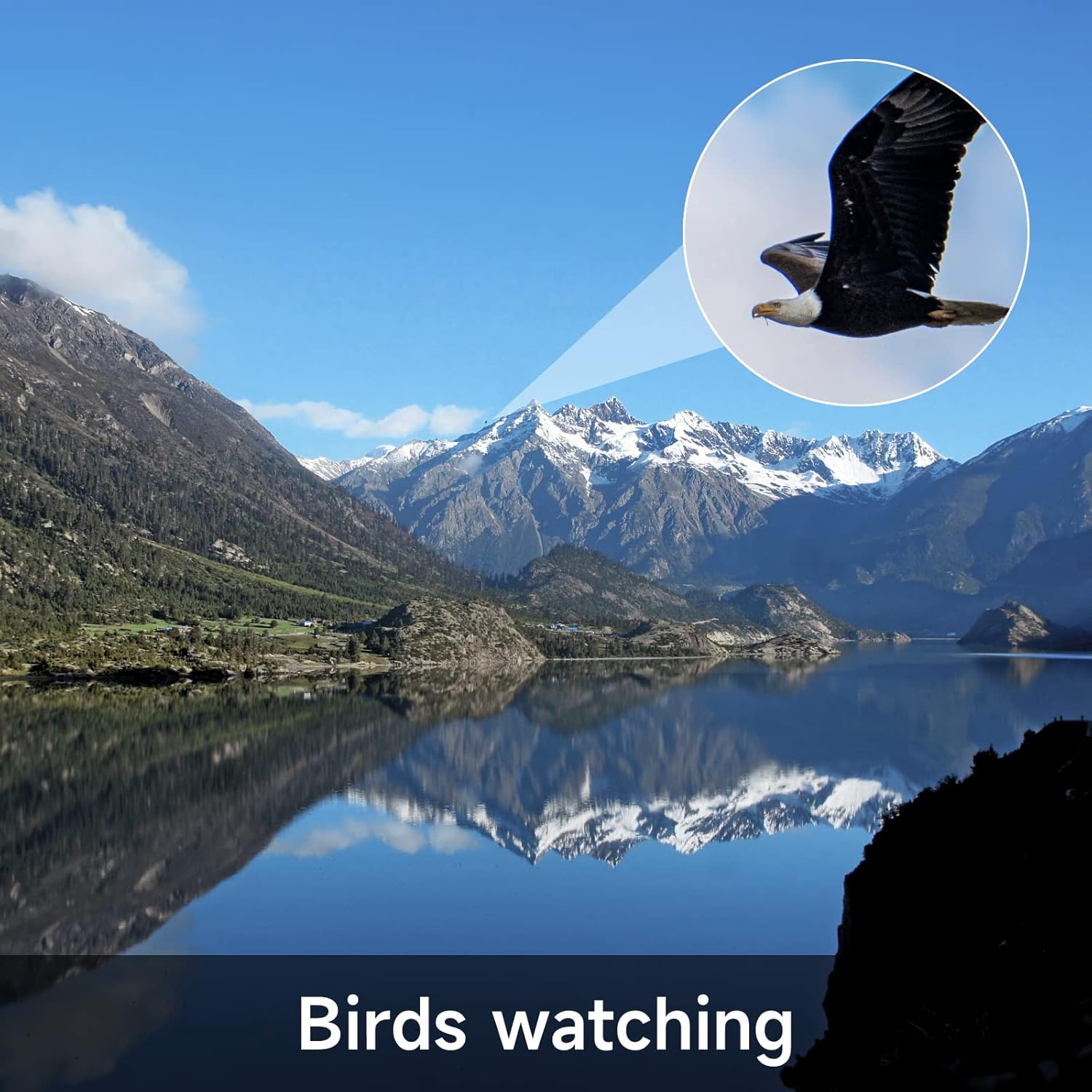
Figure 5.4: Bird watching with the BEAVERLAB TW1.
For terrestrial observations, ensure the telescope is level. Use the pan and tilt mechanism to track moving subjects. The high magnification allows for detailed observation of distant wildlife without disturbance.
- Sports Watching:

Figure 5.5: Sports event observation.
The TW1 can be used to get a closer view of distant sporting events. Set up the telescope in a stable position and use the pan and tilt controls to follow the action. The digital imaging allows for recording key moments.
6. Техникалык тейлөө
- Оптиканы тазалоо: Use a soft, lint-free cloth specifically designed for optical lenses to gently wipe dust from the primary mirror and finderscope lens. For stubborn smudges, use a small amount of optical cleaning fluid applied to the cloth, not directly to the lens.
- Тазалоочу орган: Телескоптун корпусун жана штативди жумшак менен сүртүңүз, damp кездеме. Абразивдүү тазалагычтардан же эриткичтерден качыңыз.
- Сактагыч: When not in use, store the telescope in its carrying bag in a cool, dry place, away from direct sunlight and extreme temperatures. Ensure all lens caps are in place to protect the optics from dust and scratches.
- Батареяга кам көрүү: Узак мөөнөттүү сактоо үчүн, батареянын иштөө мөөнөтүн сактоо үчүн аны бир нече ай сайын болжол менен 50% га чейин кубаттап туруңуз.
7. Кыйынчылыктарды
| Көйгөй | Мүмкүн себеп | Чечим |
|---|---|---|
| Telescope does not power on. | Батарея түгөнүп калды. | Charge the telescope battery using the provided USB cable. |
| Wi-Fi'га туташпай жатат. | Incorrect Wi-Fi password or telescope not in pairing mode. | Ensure the telescope is powered on. Verify the Wi-Fi password. Restart both the telescope and your smartphone. |
| Сүрөт бүдөмүк же фокуста эмес. | Focus knob not adjusted correctly. | Rotate the manual focus knob until the image on your smartphone screen is sharp. |
| No image on smartphone app. | App not properly connected or camera error. | Ensure Wi-Fi is connected. Close and reopen the app. Restart the telescope. |
| Image is too dark/bright. | Exposure settings in app are incorrect. | Adjust the exposure settings within the BEAVERLAB app. |
8. Техникалык шарттар
| Өзгөчөлүк | Деталь |
|---|---|
| Модель номери | TW1 |
| Фокустун узундугу | 500мм (f/6.1) |
| Максималдуу чоңойтуу | 1600x |
| Объективдүү линзанын диаметри | 100 миллиметр |
| Фокус түрү | Manual Focus |
| Finderscope түрү | Рефлекс |
| Power Source | Батарея менен иштейт (1 литий-иондук батарейка камтылган) |
| Шайкеш түзмөктөр | Smartphone (via Wi-Fi and dedicated app) |
| Продукциянын өлчөмдөрү (чогултулган) | 27 x 16 x 7 дюйм (болжол менен 68.6 x 40.6 x 17.8 см) |
| Элемент Салмагы | 13 фунт (болжол менен 5.9 кг) |
| Өндүрүүчү | Beaver Technology (Shenzhen) Co., Ltd. |
9. Кепилдик жана колдоо
BEAVERLAB products are manufactured to high-quality standards. For information regarding warranty coverage, technical support, or service inquiries, please refer to the warranty card included with your product or visit the official BEAVERLAB webсайт. Кепилдик дооматтары үчүн сатып алганыңыздын далилин сактап коюңуз.
For further assistance, you may contact BEAVERLAB customer support through the contact information provided on their official website or within the product app.