
1. Киришүү
This manual provides essential instructions for the safe and effective operation of your Andoer H8 Compact Digital Camera. Please read this manual thoroughly before using the camera and retain it for future reference.
2. Коопсуздук маалыматы
Коопсуз иштөө үчүн төмөнкү сактык чараларын сактаңыз:
- Камераны сууга же нымга тийгизбеңиз.
- Камераны жерге түшүрүүдөн же катуу тийүүдөн сактаныңыз.
- Keep the camera away from extreme temperatures.
- Камераны өз алдынча бөлүүгө же оңдоого аракет кылбаңыз. Квалификациялуу тейлөө кызматкерлерине кайрылыңыз.
- Көрсөтүлгөн кубаттоочу кабелди жана батареяны гана колдонуңуз.

Сүрөттүн сүрөттөлүшү: A red triangular warning symbol with an exclamation mark, accompanied by text in multiple languages warning to keep plastic bags away from babies and children to prevent suffocation.
3. Пакеттин мазмуну
Пакетте бардык буюмдар бар экенин текшериңиз:
- Andoer H8 Digital Camera
- Type-C кабели
- Lanyard
- User Manual

Сүрөттүн сүрөттөлүшү: A pink Andoer H8 compact digital camera, displayed with its front and back sides visible, highlighting its compact design and screen.
4. Камера бүткөнview
Камеранын компоненттери менен таанышыңыз:
- Объектив: Сүрөттөрдү жана видеолорду тартат.
- Flash: Жарык аз шарттарда жарыкты камсыз кылат.
- 2.8 дюймдук IPS дисплей: үчүн viewing menus, photos, and videos.
- Кубат баскычы: Камераны күйгүзөт/өчүрөт.
- Жабык баскычы: Сүрөткө тартат.
- Масштабды башкаруу элементтери: Adjusts 8x digital zoom.
- Чабыттоо баскычтары: Менюда навигация жана тандоо үчүн.
- Режим баскычы: Switches between photo, video, game, and music modes.
- USB-C порту: Заряддоо жана маалыматтарды өткөрүү үчүн.
- TF карта уячасы: Эстутум картасын киргизүү үчүн.

Сүрөттүн сүрөттөлүшү: An illustration showing the Andoer H8 camera in four different colors (Purple, Blue, Black, Pink) and icons representing its main functions: Photo, Video, Game, Music, and Flash lamp.
5. Орнотуу
5.1. Батареяны заряддоо
- Connect the supplied Type-C cable to the camera's USB-C port.
- Кабелдин экинчи учун USB кубат адаптерине (кошумча эмес) же компьютердин USB портуна туташтырыңыз.
- The charging indicator will illuminate. Charging typically takes 2-4 hours.
- Толук заряддалгандан кийин, индикатор жарыгы өзгөрүшү же өчүп калышы мүмкүн.
5.2. Inserting a Memory Card (TF Card)
The camera supports TF cards up to 32GB (not included).
- Камерадагы TF карта уячасын табыңыз.
- Insert the TF card with the metal contacts facing down until it clicks into place.
- Чыгаруу үчүн картаны акырын чыккыча басыңыз.
6. Иштөө нускамалары
6.1. Күйгүзүү/өчүрүү
- Күйгүзүү үчүн, Кубат баскычын басып, кармап туруңуз.
- Өчүрүү үчүн, Кубат баскычын кайра басып, кармап туруңуз.
6.2. Сүрөт тартуу
- Turn on the camera and ensure it is in Photo mode (indicated by an icon on the screen).
- 2.8 дюймдук IPS дисплейди колдонуп кадрыңызды кадрга алыңыз.
- Use the zoom controls to adjust the 8x digital zoom.
- Press the Shutter button to capture the image.

Сүрөттүн сүрөттөлүшү: A pink Andoer H8 camera showing a high-definition image on its screen, with text indicating "4800W shot in HD" and "8000x6000 HD resolution," demonstrating its photo capabilities.
6.3. Видеолорду жаздыруу
- Камераны Видео режимине которуңуз.
- Жаздырууну баштоо үчүн Жабуучу баскычын басыңыз. Экранда жаздыруу индикатору пайда болот.
- Жазууну токтотуу үчүн Жабуу баскычын дагы бир жолу басыңыз.

Сүрөттүн сүрөттөлүшү: A pink Andoer H8 camera displaying a live video recording on its screen, with "1080P Video recording" and "Recording the good times" text, illustrating its video capture function.
6.4. Ойнотуу
- In Photo or Video mode, press the Playback button (usually indicated by a triangle icon) to enter playback mode.
- Use the navigation buttons to browse through your photos and videos.
- үчүн OK/Enter баскычын басыңыз view сүрөт же видео ойнотуңуз.
6.5. Special Features: Stickers, Frames, and Filters
Enhance your photos with built-in creative options:
- Access these features through the camera's menu settings, typically found in Photo mode.
- Select from 40 kinds of head stickers, 26 photo frames, and 6 filters to customize your images before or after capture (depending on camera firmware).

Сүрөттүн сүрөттөлүшү: A collage demonstrating various creative options available on the camera, including 40 types of cute head stickers, 26 adorable photo frames, and 6 filters, applied to different child portraits.
6.6. Музыканы ойнотуу
The camera supports MP3 music playback.
- MP3 өткөрүп берүү files to the TF card.
- Switch the camera to Music mode.
- Use the navigation buttons to select and play music.
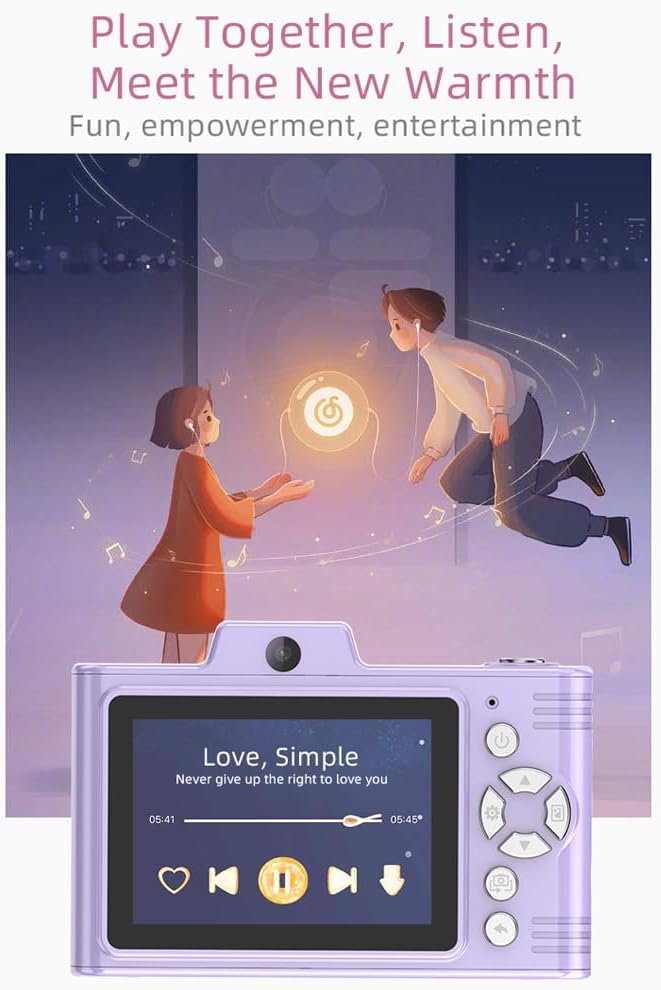
Сүрөттүн сүрөттөлүшү: A purple Andoer H8 camera showing a music player interface on its screen, with song title "Love, Simple" and playback controls, indicating its music playback capability.
6.7. Connecting to a Computer / Transferring Files
You can transfer photos and videos to a computer or phone.
- Connect the camera to your computer using the Type-C cable.
- The camera should appear as a removable disk.
- Сүйрөп барып таштаңыз fileс компьютериңизге.
- For phone transfer, use an OTG adapter (not included) if your phone supports OTG functionality.
7. Техникалык тейлөө
- Тазалоо: Use a soft, dry cloth to clean the camera body. For the lens, use a specialized lens cleaning cloth.
- Сактагыч: Store the camera in a cool, dry place away from direct sunlight and dust. Remove the battery if storing for extended periods.
8. Кыйынчылыктарды
| Көйгөй | Мүмкүн чечим |
|---|---|
| Камера күйбөйт. | Ensure the battery is charged. Reinsert the battery. |
| Сүрөткө/видео тартууга болбойт. | Check if a TF card is inserted and has sufficient space. Ensure camera is in the correct mode. |
| Сүрөттөр бүдөмүк. | Clean the lens. Ensure adequate lighting. Hold the camera steady. |
| Камера катып калат. | Камераны баштапкы абалга келтирүү үчүн батареяны чыгарып, кайра салыңыз. |
9. Техникалык шарттар
| Өзгөчөлүк | Деталь |
|---|---|
| Продукт модели | H8 |
| Экранды көрсөтүү | 2.8 дюймдук IPS |
| Сүрөт пиксел | 48 МП чейин |
| Video Resolution | 1080P HD |
| Digital Zoom | 8x |
| File Формат | JPG/AVI/MP3 |
| Заряддоо убактысы | Болжол менен 2-4 саат |
| Батарея сыйымдуулугу | 700 мАч, 3.7 В |
| Продукт Салмагы | 110г |
| Продукт өлчөмү | 105.5 x 72 x 46 мм |
| Заряддоо Voltage | DC5V 1A |
| Memory Support | TF card (max 32GB) |
| Өзгөчөлүктөр | 40 Head Stickers, 26 Photo Frames, 6 Filters |
| Байланыш | USB (Type-C) |
| Image Stabilization | Санарип |
| Сенсор түрү | CMOS |
| Skill Level | Novice |
10. Кепилдик жана колдоо
For warranty information and technical support, please refer to the documentation provided with your purchase or contact Andoer customer service directly. Keep your proof of purchase for warranty claims.