
Introduction
The FOREVER Kids Look Me KW-510 Smartwatch provides a controlled and safe way for children to engage with technology and communication. Designed as an alternative to a smartphone, it features a SIM card slot for constant contact and peace of mind. This manual will guide you through the setup, operation, and maintenance of your new smartwatch.
Коопсуздук маалыматы
- Мункунуп калуу коркунучу: Кичинекей бөлүктөрүн жаш балдардан алыс кармаңыз.
- Батареянын коопсуздугу: Do not attempt to replace the battery yourself. Use only the provided charging cable and station.
- Суу каршылык: The device is IP67 water-resistant, meaning it can withstand immersion in water up to 1 meter for 30 minutes. It is not suitable for swimming or diving. Ensure the SIM card slot cover is securely closed before exposure to water.
- Иштөө температурасы: Аппаратты экстремалдык температурага тийгизүүдөн сактаңыз.
- Көзөмөл: Parental supervision is recommended during initial setup and use.
Пакеттин мазмуну
Сураныч, төмөнкү нерселер үчүн кутучаны белгилеңиз:
- FOREVER Kids Look Me KW-510 Smartwatch
- Charging Station / Cable
- SIM Card (if included by your provider)
- Колдонуучунун Колдонмосу (бул документ)

Image: The retail packaging for the FOREVER Kids Look Me KW-510 Smartwatch, showing the watch and its features.
Жайгашуу
1. SIM картаны орнотуу
The smartwatch requires a Standard size 4G SIM card for communication features. Ensure the SIM card is active and has a data plan.
- Акылдуу саатты өчүрүңүз.
- Сааттын капталынан SIM карта уячасын табыңыз.
- Carefully open the SIM card slot cover.
- Insert the Standard size SIM card into the slot with the gold contacts facing up and the notched corner aligned correctly.
- SIM картаны ордунан чыккыча акырын түртүңүз.
- SIM картанын уячасынын капкагын суу өткөрбөй тургандай кылып бекем жабыңыз.
- Power on the smartwatch.
2. Колдонмону орнотуу жана жупташтыруу
To manage the smartwatch features, you need to install the dedicated companion application on your smartphone (compatible with iOS and Android devices).
- Download the 'Forever KidsCare' or similar companion app from your smartphone's app store.
- Register an account and follow the on-screen instructions to add your child's smartwatch. This usually involves scanning a QR code displayed on the watch screen or entering a device ID.
- Once paired, you can configure contacts, safety zones, and other settings through the app.

Image: Various screenshots of the companion mobile application, showing features like activity tracking, safety zone settings, and rewards.
3. Баштапкы конфигурация
After pairing, use the companion app to set up essential features:
- Шашылыш байланыштар: Add phone numbers for the SOS function.
- Телефондук китеп: Add trusted contacts for your child to call.
- Коопсуздук зоналары: Define geographical areas (e.g., home, school) and receive notifications when your child enters or leaves them.
- Убакыт жана дата: Ensure the watch displays the correct time and date.
Иштөө нускамалары

Image: The FOREVER Kids Look Me KW-510 Smartwatch, featuring a pink strap and a digital display with a dog face graphic.
1. Чалууларды кабыл алуу жана кабыл алуу
The smartwatch supports 4G cellular calls.
- Чакыруу: Navigate to the phonebook on the watch, select a contact, and initiate a call.
- Чалуу кабыл алуу: When a call comes in, the watch will ring. Tap the answer icon to accept or the decline icon to reject.
2. SOS функциясы
In an emergency, your child can activate the SOS function.
- SOSту иштетүү: Press and hold the designated SOS button on the watch for a few seconds.
- The watch will automatically call the pre-set emergency contacts until one answers. It will also send a location alert to these contacts.
3. GPS Tracking and Safety Zones
The integrated GPS allows for precise location tracking.
- реалдуу убакытта көз салуу: Ата-энелер болот view the child's current location on a map via the companion app.
- Коопсуздук зоналары: Receive notifications when your child enters or exits predefined safe areas.
4. Camera and Remote Monitoring
The smartwatch includes a camera and remote monitoring capabilities.
- Сүрөткө тартуу: Your child can take photos directly from the watch.
- Remote Camera Access: Parents can remotely activate the watch's camera via the app to view the child's surroundings.
- Remote Microphone Access: Parents can remotely activate the watch's microphone to listen to the child's surroundings.
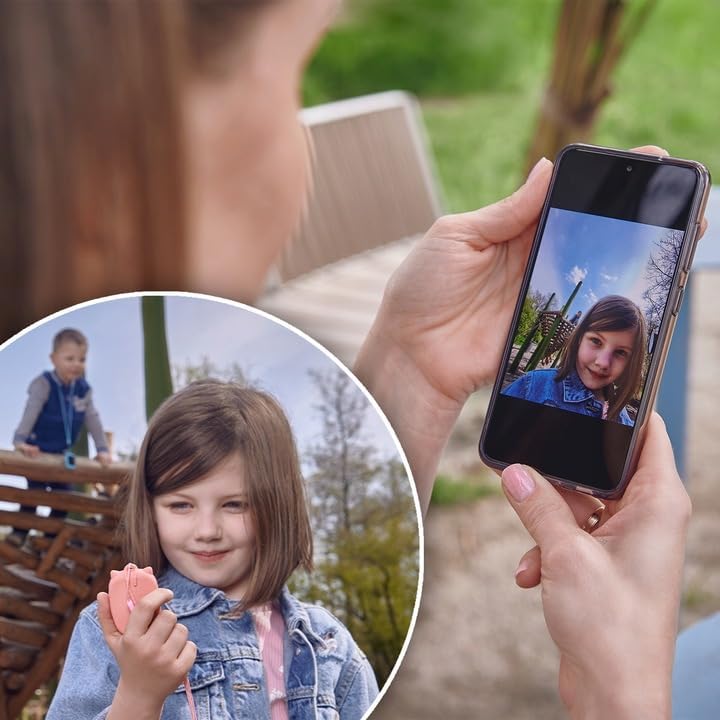
Image: A parent's hand holding a smartphone displaying a photo taken by the smartwatch, with a child playing in the background.
5. Chat Function
The watch supports a chat function for communication between the child and approved contacts.
- Кабарларды жөнөтүү: Children can send voice messages or pre-set text messages to contacts.
- Кабарларды алуу: The watch will display incoming messages.
6. Ойготкуч
Set alarms for reminders or wake-up calls through the companion app.
7. Educational Games
The smartwatch includes an educational math game designed to entertain and teach.
Техникалык тейлөө
1. Заряддоо
Акылдуу саатты кубаттоо үчүн:
- Заряддоо кабелин заряддоо станциясына туташтырыңыз.
- Place the smartwatch onto the charging station, ensuring the charging pins align correctly.
- Connect the charging cable to a compatible USB power adapter (not included) or a computer USB port.
- Сааттын дисплейи заряддын абалын көрсөтөт.
2. Сууга туруктуулук (IP67)
The KW-510 is rated IP67, meaning it is protected from dust and can withstand immersion in water up to 1 meter for 30 minutes. This makes it suitable for everyday splashes, rain, and brief accidental immersion. However, it is not designed for swimming, showering, or prolonged water exposure. Always ensure the SIM card slot cover is tightly sealed.
3. Тазалоо
To clean your smartwatch:
- Экранды жана корпусту жумшак, d менен сүртүңүзamp кездеме.
- Катуу химиялык заттарды же абразивдүү материалдарды колдонуудан алыс болуңуз.
- Заряддоодон мурун саат толугу менен кургак экенин текшериңиз.
Проблемаларды чечүү
| Көйгөй | Мүмкүн чечим |
|---|---|
| Саат күйбөйт. | Саат толук заряддалганын текшериңиз. Кубат баскычын бир нече секунд басып, кармап туруңуз. |
| Чалууларды жасоо/кабыл алуу мүмкүн эмес. | Check if the SIM card is correctly inserted and active. Verify 4G network coverage. Ensure contacts are added to the watch's phonebook via the app. |
| GPS location is inaccurate. | Сааттын таза болушун текшериңиз view of the sky. GPS accuracy can be affected by buildings, dense foliage, or indoor environments. |
| Watch not pairing with app. | Ensure the watch is powered on and has network connectivity. Restart both the watch and your smartphone. Re-attempt the pairing process. |
| Батареянын иштөө мөөнөтү кыска. | Reduce screen brightness. Limit frequent GPS updates if not necessary. Close unused applications on the watch. |
Техникалык шарттар
- Модель номери: кВт-510
- Бренд: ТҮБӨЛҮК
- Байланыш: 4G Cellular, Wi-Fi (802.11b/g)
- GPS: Интегралдык GPS
- SIM картанын өлчөмү: Стандарт
- Дисплей түрү: Санарип
- Экрандын өлчөмү: 20 сантиметр (диагоналдуу)
- Батареянын курамы: Литий-ион
- Суу каршылык: IP67 (Waterproof up to 1 meter for 30 minutes)
- Топтун материалы: Силикон
- Иштин материалы: Алюминий
- Колдоого алынган тиркеме: GPS (via companion app)
- Өзгөчөлүктөрү: Phone Calls, SOS Button, Camera, GPS, Notifications, Alarm, Chat Function, Remote Microphone, Remote Camera
- Шайкеш түзмөктөр: Смартфондор (iOS жана Android)
Кепилдик жана колдоо
For warranty information and technical support, please refer to the warranty card included with your product or visit the official FOREVER webсайт. Ар кандай кепилдик дооматтары үчүн сатып алганыңыздын далилин сактаңыз.