
1. Киришүү
Thank you for choosing the MASINGO Cantando C2 Portable Karaoke Machine. This manual provides essential information for setting up, operating, and maintaining your device to ensure optimal performance and enjoyment. Please read this manual thoroughly before use and retain it for future reference.

Image 1.1: The MASINGO Cantando C2 Portable Karaoke Machine, showcasing its compact design, integrated LED ring light, and two wireless microphones.
2. Кутуда эмне бар
Кутудан чыгарууда бардык компоненттер бар экенин текшериңиз:
- 1x МASINGO Cantando C2 Karaoke Machine
- 2x зымсыз микрофондор
- 1x 3.5 мм AUX кабели
- 1x 3.5 mm AUX-RCA TV Cable
- 1x USB-C - USB-A заряддоо кабели
- 1x Колдонуучунун колдонмосу

Image 2.1: All items included in the MASINGO Cantando C2 package, laid out for inspection.
3. Орнотуу
3.1 Алгачкы заряддоо
Before first use, fully charge the karaoke machine using the provided USB-C to USB-A charging cable. The charging port is located on the rear panel. A full charge typically takes 3-4 hours.
3.2 Microphone Battery Installation
Each wireless microphone requires 2x AA batteries (not included). Unscrew the bottom part of each microphone to insert the batteries, ensuring correct polarity. The microphones will automatically connect to the karaoke machine when powered on.
3.3 Attaching Microphone Holders
Insert the two plastic microphone holders into the designated slots on the sides of the karaoke machine for convenient storage.
4. Иштөө нускамалары
4.1 Күйгүзүү/өчүрүү
Locate the power switch on the rear panel of the karaoke machine. Slide it to the 'ON' position to power on the device. To power off, slide the switch to the 'OFF' position.
4.2 Bluetooth байланышы
Upon powering on, the machine will automatically enter Bluetooth pairing mode. Activate Bluetooth on your smartphone or other device and select 'MASINGO C2' from the list of available devices. A voice prompt will confirm successful pairing.
4.3 Микрофонду колдонуу
Press and hold the power button on each wireless microphone to turn it on. The microphones will automatically connect to the karaoke machine. Use the '+' and '-' buttons on the microphone to adjust its individual volume. To turn off a microphone, press and hold its power button until the indicator light turns off.

Image 4.1: Close-up of the two wireless microphones, highlighting their power and volume adjustment buttons.
4.4 LED жарык шоусу
The Cantando C2 features a mesmerizing ring light LED. Press the 'LED' button on the control panel to cycle through five pre-installed light patterns or turn them off.
4.5 Versatile Connectivity Options
The karaoke machine supports multiple input sources:
- Bluetooth: Смартфонуңузга же планшетиңизге зымсыз туташыңыз.
- AUX: Use the provided 3.5mm AUX cable to connect external audio devices.
- USB: Музыка менен USB дискти салыңыз fileUSB портуна киргизиңиз.
- MicroSD (TF Card): Insert a MicroSD card with music fileTF карта уячасына.
- FM радиосу: Switch to FM Radio mode to tune into local radio stations.
- TV туташуу: Use the included Aux to RCA cable to connect to your TV for audio output.

Image 4.2: The top control panel of the Cantando C2, illustrating the various ports (USB, AUX, TF Card) and control buttons for mode selection, volume, and LED lights.
4.6 Voice Changer and Echo Effects
The karaoke machine offers voice distortion and echo effects. Experiment with the 'Voice' and 'ECH' (Echo) buttons on the control panel to modify your vocal output. The 'EQ' button allows for equalization adjustments.
4.7 Көчмө дизайн
The Cantando C2 is designed for portability with a removable handle and lightweight build. This allows for easy transport to various locations.

Image 4.3: The portable design of the Cantando C2, featuring a convenient carrying handle.
4.8 Dynamic Sound Output
The Cantando C2 delivers 25W of powerful sound through a 4-inch front speaker and dual 2-inch side speakers, ensuring clear audio for all performances.
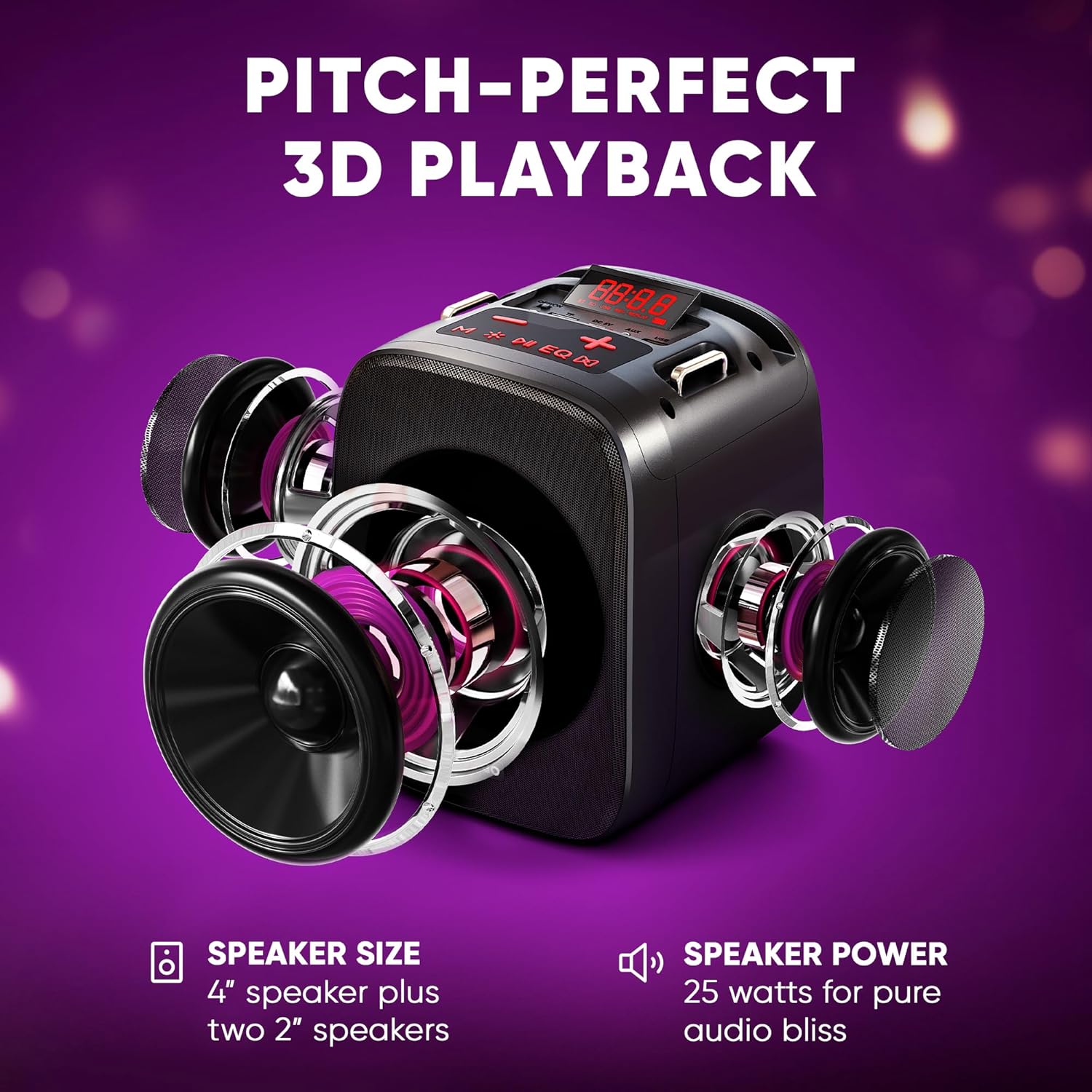
Сүрөт 4.4: Жарылып кеткен view illustrating the three-speaker system (one 4-inch, two 2-inch) for dynamic sound output.
4.9 Телевизорго туташуу
The Cantando C2 can be connected to a TV via Bluetooth or the provided Aux to RCA cable. This allows for displaying lyrics on the TV screen while using the karaoke machine for enhanced audio.

Image 4.5: The Cantando C2 connected to a TV, demonstrating how lyrics can be displayed for a full karaoke experience.
4.10 Продукт бүттүview Video
Video 4.6: An official product video from MASINGO, introducing the Cantando C2 karaoke machine and its key features.
5. Техникалык тейлөө
- Аппаратты таза, жумшак, кургак чүпүрөк менен сүртүңүз.
- Аппаратты сууга же ашыкча нымга тийгизүүдөн сактаңыз.
- Store the karaoke machine and microphones in a cool, dry place when not in use.
- Микрофондорду көпкө сактап койсоңуз, агып кетпеши үчүн батарейкаларды алып салыңыз.
6. Кыйынчылыктарды
| Көйгөй | Мүмкүн себеп | Чечим |
|---|---|---|
| Күч жок | Батарея аз; Кубат өчүк | Charge the machine; Turn on the power switch |
| Микрофон иштебей жатат | Low microphone batteries; Microphone not paired | Replace AA batteries; Power on microphone and ensure it pairs automatically |
| Динамиктен үн жок | Үнү өтө төмөн; Киргизүү режими туура эмес; Түзмөк туташкан эмес | Increase volume; Select correct input mode (Bluetooth, AUX, USB, TF); Ensure device is properly connected |
| Bluetooth жупташтырылган жок | Device too far; Bluetooth not enabled on source device | Move device closer; Enable Bluetooth on source device and re-scan |
7. Техникалык шарттар
- Элемент Салмагы: 4.74 фунт
- Продукциянын өлчөмдөрү: 10.24 x 6.93 x 10.63 дюйм
- Модель номери: C2
- Батареялар: 1 Lithium Ion battery required (included for machine), 2 AA batteries per microphone (not included)
- Түсү: Эбон
- Шайкеш түзмөктөр: Смартфон
- Туташтыргыч түрү: 3.5 мм Джек
- Спикерлердин саны: 1 (main) + 2 (side)
- Батарея түрү: Литий ион
- Медиа форматы: WAV
- Кубат булагы: Батарея менен иштейт
- Тtage: 3.7 вольт (ток)
- Ватtage: 15 watts (total 25W dynamic output)
8. Кепилдик жана колдоо
For warranty information or technical support, please refer to the contact details provided in the packaging or visit the official MASINGO webсайт. Сатып алганыңыздын далили катары сатып алуу дүмүрчөгүңүздү сактаңыз.


