
Audizio Frisco
Audizio Frisco Turntable User Manual
Model: Frisco (102.200)
1. Киришүү
Сатып алганыңыз үчүн рахматasing the Audizio Frisco Turntable. This multifunctional audio system combines vintage aesthetics with modern technology, allowing you to enjoy your vinyl collection, digital radio, and streaming services. This manual provides essential information for safe operation, setup, and maintenance of your device. Please read it thoroughly before use and retain it for future reference.
2. Коопсуздук нускамалары
- Кубат булагы: электр менен жабдууну камсыз кылуу voltage matches the rating label on the unit. Use only the provided power cable.
- Суу жана ным: Агрегатты жамгырга, нымга, тамчылатууга же чачыратууга дуушар кылбаңыз. Ваза сыяктуу суюктуктар толтурулган нерселерди аппараттын үстүнө койбоңуз.
- Вентиляция: Ensure adequate ventilation. Do not cover ventilation openings with items like newspapers, tablecloths, or curtains.
- Жылуулук: Аппаратты радиаторлор, жылуулук регистрлери, мештер же башка аппараттар (анын ичинде) сыяктуу жылуулук булактарынын жанына койбоңуз. ampкөтөргүчтөр) жылуулукту пайда кылуучу.
- Тазалоо: Кургак чүпүрөк менен гана тазалаңыз.
- Тейлөө: Агрегатты өзүңүз тейлөөгө аракет кылбаңыз. Бардык тейлөөлөрдү квалификациялуу тейлөө кызматкерлерине тапшырыңыз.
- Жайгашкан жери: Кулап түшпөшү үчүн, түзмөктү туруктуу, тегиз жерге коюңуз.
3. Пакеттин мазмуну
Carefully unpack your Audizio Frisco Turntable and ensure all items are present and in good condition.
- Audizio Frisco Turntable Unit
- Электр кабели
- Колдонуучунун Колдонмосу (бул документ)
4. Продукт бүтүп калдыview
Familiarize yourself with the various parts and controls of your Audizio Frisco Turntable.
4.1 Алдыңкы панелдин башкаруу элементтери

This image displays the front panel of the Audizio Frisco turntable, highlighting the control knobs for volume and tuning/selection, along with buttons for power, scan, menu, info, alarm, mode, and preset. The central display shows 'BBC WS WORLD SERVICE' and 'DAB', indicating DAB+ radio functionality.
- КҮЧ баскычы: Агрегатты күйгүзөт же өчүрөт.
- SCAN баскычы: Initiates scanning for radio stations.
- MENU баскычы: Меню параметрлерине жетет.
- INFO баскычы: Displays information about the current track or station.
- ALARM баскычы: Sets and manages alarm functions.
- MODE баскычы: Switches between different input modes (Phono, DAB+, FM, Bluetooth, USB, AUX).
- PRESET баскычы: Сакталган радио алдын ала орнотууларына кирет.
- VOLUME баскычы: Аудио чыгаруу деңгээлин тууралайт.
- ТҮЗӨТҮҮ / ТАНДОО баскычы: Tunes radio frequencies or navigates menu options and confirms selections.
- Дисплей экраны: Shows current mode, station information, track details, and menu options.
4.2 Айлануучу тетиктер

Бул сүрөт жакындан тартууну камсыз кылат view of the turntable's platter area, showing the speed selector switch (33, 45, 78 RPM) and the auto-stop switch (ON/OFF). These controls are essential for proper vinyl playback.
- Чаң капкагы: Колдонулбаган учурда айланма табакчаны чаңдан коргойт.
- Табак: The rotating platform where records are placed.
- Шпиндель: Пластинаны тарелкада кармап турат.
- Тонарм: Стилусту кармап, рекорддук оюктарды байкайт.
- Стилус (Ийне): The component that reads the record grooves.
- Тонеарм көтөргүч рычагы: Тонермерди көтөрөт жана түшүрөт.
- Ылдамдыкты тандоочу которгуч: Allows selection of 33, 45, or 78 RPM playback speeds.
- Auto-Stop Switch: When ON, the platter stops rotating automatically at the end of a record. When OFF, the platter continues to rotate.
4.3 Арткы байланыштар
- USB порт: For connecting USB storage devices for playback.
- AUX IN уячасы: 3.5 мм аудио кабели аркылуу тышкы аудио түзмөктөрдү туташтыруу үчүн.
- Гарнитура уячасы: Купуя угуу үчүн кулакчындарды туташтыруу үчүн.
- Кубат киргизүү: Электр кабелин туташтыруу үчүн.
5. Орнотуу
5.1 Пакеттен чыгаруу жана жайгаштыруу
- Агрегатты таңгагынан кылдаттык менен чыгарыңыз.
- Айланма табакчаны туруктуу, тегиз жерге, күндүн түз нурунан, жылуулук булактарынан жана ашыкча чаңдан же титирөөдөн алыс коюңуз.
- Желдетүү үчүн түзүлүштүн айланасында жетиштүү орун бар экенине ынаныңыз.

This image shows the Audizio Frisco turntable positioned on a cabinet in a living room, demonstrating a typical setup environment. The dust cover is open, and the unit is ready for use.
5.2 Кубат туташтыруу
- Connect the provided power cable to the Power Input on the rear of the unit.
- Электр кабелинин экинчи учуна ылайыктуу розеткага сайыңыз.
5.3 Баштапкы күйгүзүү
- басыңыз КҮЧ түзмөктү күйгүзүү үчүн алдыңкы панелдеги баскычты басыңыз.
- The display screen will illuminate.
6. Иштөө нускамалары
6.1 Vinyl Playback
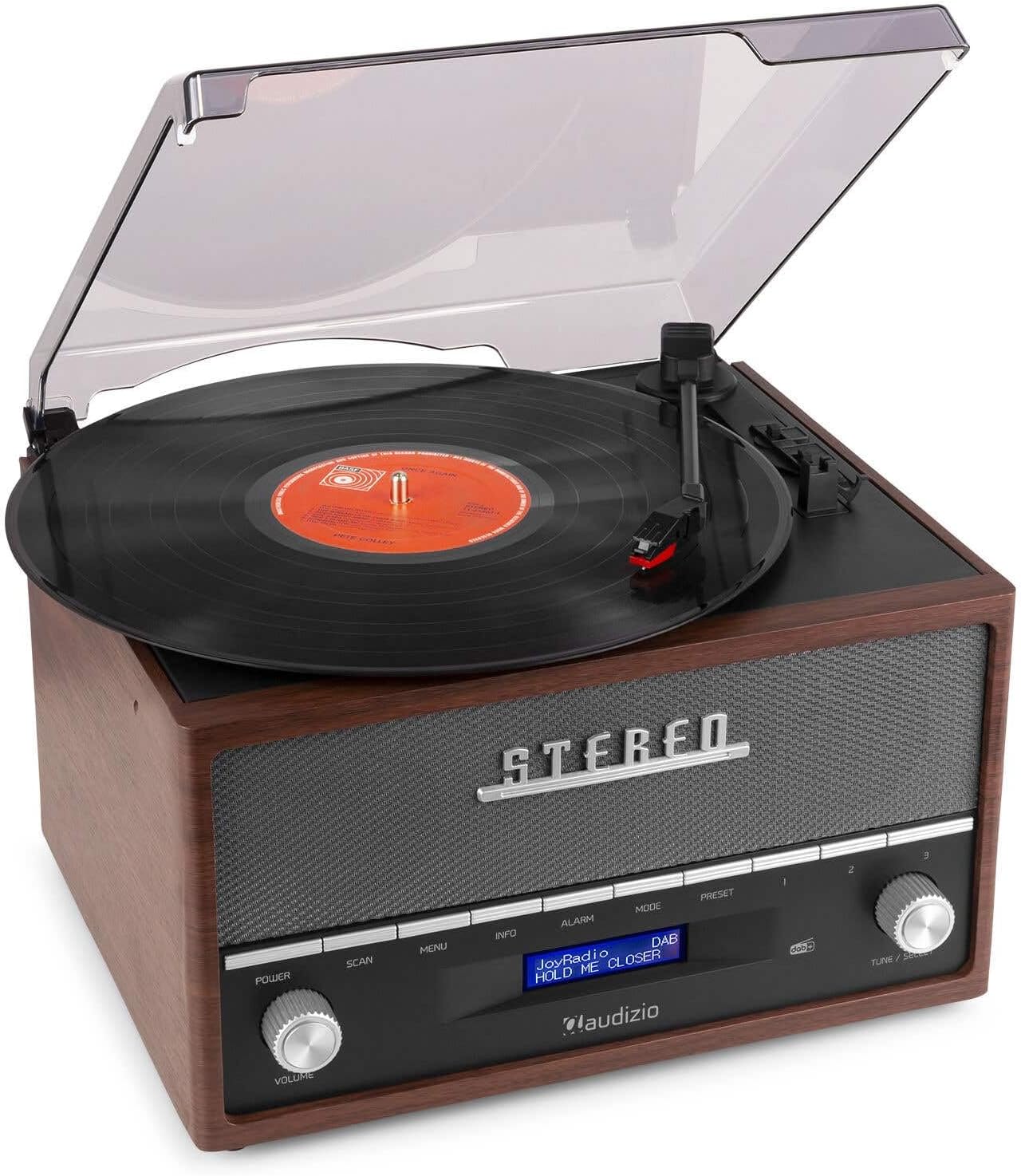
This image shows a vinyl record spinning on the Audizio Frisco turntable, with the tonearm positioned over the record, indicating active playback.
- Чаң капкагын ачыңыз.
- Табактын үстүнө винил пластинкасын коюңуз.
- Select the correct speed (33, 45, or 78 RPM) using the Ылдамдыкты тандоо которгуч. For 45 RPM records, place the included adapter on the spindle if needed.
- коюңуз Auto-Stop Switch to ON if you want the platter to stop automatically at the end of the record, or OFF for continuous rotation.
- Gently move the tonearm over the record and use the Tonearm Lift Lever to lower the stylus onto the desired track.
- Үнүн колдонуп, үнүн жөндөңүз VOLUME баскыч.
- At the end of the record, lift the tonearm using the lever and return it to its rest.
6.2 DAB+ / FM Digital Radio
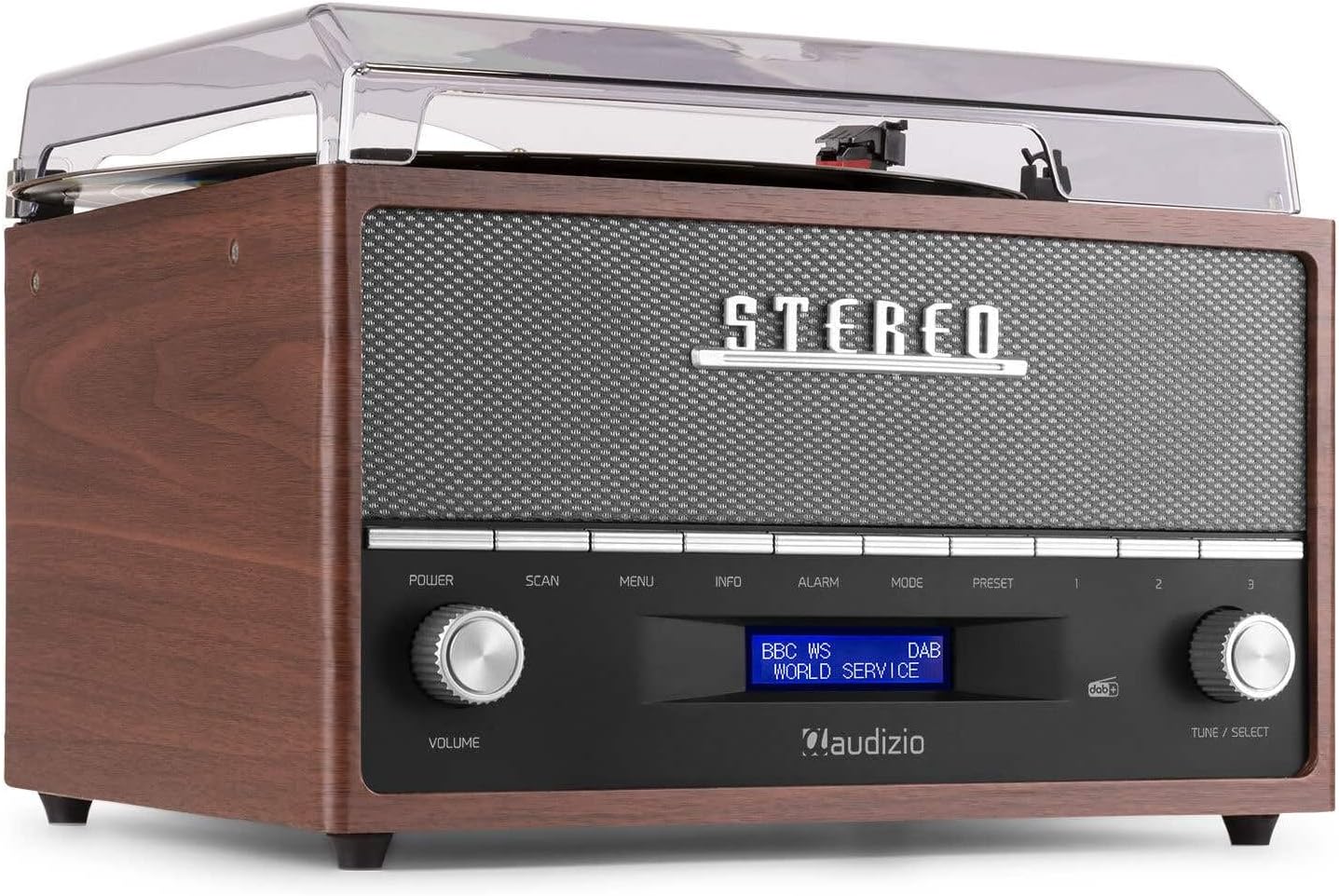
This image focuses on the display screen of the Audizio Frisco turntable, showing 'BBC WS WORLD SERVICE' and 'DAB', confirming active DAB+ radio reception and station identification.
- басыңыз РЕЖИМ button to select DAB+ or FM radio mode.
- DAB+ режиминде, басыңыз SCAN button to perform an auto-scan for available stations.
- FM режиминде, колдонуңуз ТҮЗӨТҮҮ / ТАНДОО knob to manually tune to a station or press SCAN авто-скандоо үчүн.
- To save a preset, tune to the desired station, then press and hold the АЛДЫН АЛА баскычы. колдонуу ТҮЗӨТҮҮ / ТАНДОО knob to choose a preset number, then press the knob to confirm.
- Алдын ала коюлган орнотууну кайра чакырып алуу үчүн, баскычын басыңыз АЛДЫН АЛА баскычын басып, андан кийин ТҮЗӨТҮҮ / ТАНДОО knob to select the desired preset.
6.3 Bluetooth агымы
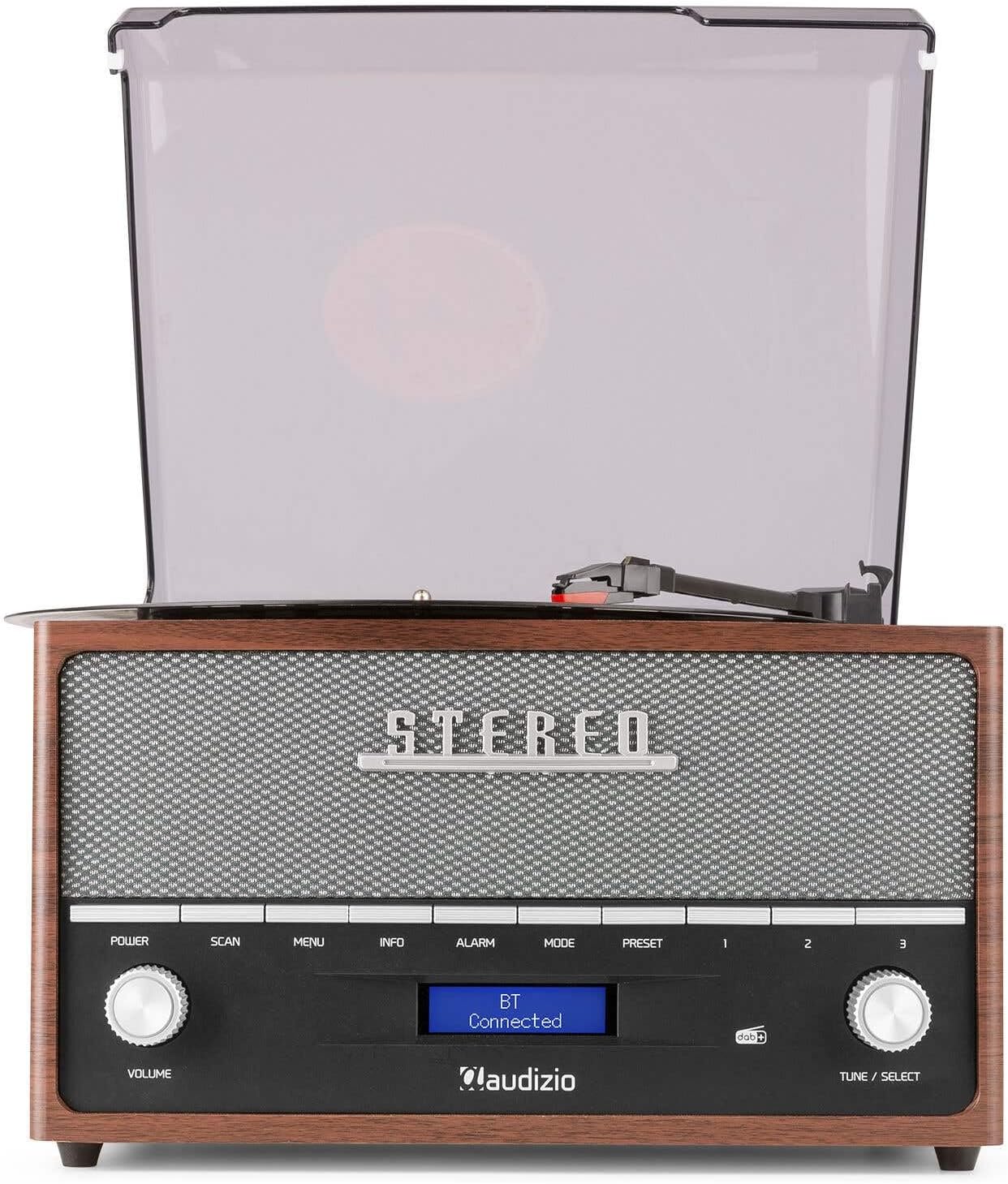
This image shows the Audizio Frisco turntable's display screen indicating 'BT Connected', signifying a successful Bluetooth connection with an external device.
- басыңыз РЕЖИМ button to select Bluetooth mode. The display will show "BT Pairing" or similar.
- Смартфонуңузда же башка Bluetooth түзмөгүңүздө Bluetooth'ту күйгүзүп, жеткиликтүү түзмөктөрдү издеңиз.
- Select "Audizio Frisco" from the list of devices.
- Once connected, the display will show "BT Connected". You can now play audio from your device through the turntable's speakers.
6.4 USB ойнотуу
- USB флэш-дискти аппараттын артындагы USB портуна салыңыз.
- басыңыз РЕЖИМ USB режимин тандоо үчүн баскыч.
- Түзмөк автоматтык түрдө шайкеш келген аудиону ойнотууну баштайт files USB дискинен.
- колдонуу ТҮЗӨТҮҮ / ТАНДОО knob to navigate tracks or folders.
6.5 AUX киргизүү
- Тышкы аудио түзмөгүн (мисалы, MP3 ойноткуч, CD ойноткуч) туташтырыңыз AUX IN jack on the rear of the unit using a 3.5mm audio cable (not included).
- басыңыз РЕЖИМ AUX режимин тандоо үчүн баскычты басыңыз.
- Play audio from your external device. The sound will be output through the turntable's speakers.
6.6 Ойготкуч саат функциясы
- басыңыз АЛАРМ ойготкуч жөндөөлөрүнө кирүү үчүн баскычты басыңыз.
- колдонуу ТҮЗӨТҮҮ / ТАНДОО knob to set the alarm time and select the alarm source (e.g., DAB+, FM, Buzzer).
- You can set alarms for daily, weekend, or specific days of the week. Follow the on-screen prompts and use the ТҮЗӨТҮҮ / ТАНДОО knob to confirm your selections.
7. Техникалык тейлөө
7.1 Агрегатты тазалоо
- Тазалоодон мурун аны дайыма электр розеткасынан сууруп алыңыз.
- Сырткы беттерди сүртүү үчүн жумшак, кургак чүпүрөктү колдонуңуз.
- Абразивдүү тазалагычтарды, момдорду же эриткичтерди колдонбоңуз, анткени алар финишке зыян келтириши мүмкүн.
- Чаңды каптоо үчүн жумшак чүпүрөктү жана зарыл болсо, жумшак, абразивдүү эмес тазалоочу каражатты колдонуңуз.
7.2 Стилуска кам көрүү
- The stylus is a delicate component. Handle it with care.
- Стилусту мезгил-мезгили менен жумшак щетка менен, артынан алдыга карай акырын сүртүп тазалап туруңуз.
- A worn or damaged stylus can harm your records and degrade sound quality. Replace the stylus when necessary.
8. Кыйынчылыктарды
| Көйгөй | Мүмкүн себеп | Чечим |
|---|---|---|
| Күч жок | Power cable not connected; Wall outlet not active | Ensure power cable is securely connected; Try a different outlet |
| Үн жок | Үнү өтө төмөн; Туура эмес режим тандалды; Кулакчындар туташтырылган | Increase volume; Select correct input mode; Disconnect headphones if using speakers |
| Айлануучу таблица айланбайт | Power off; Auto-stop engaged at end of record | Ensure unit is powered on; Check Auto-Stop switch position |
| Skipping records | Record dirty or scratched; Stylus worn or dirty; Turntable not level | Clean record; Clean or replace stylus; Place turntable on a level surface |
| Bluetooth туташпай жатат | Turntable not in Bluetooth mode; Device too far; Device already connected to another unit | Select Bluetooth mode; Move device closer; Disconnect from other devices and try again |
| Радио кабыл алуу начар | Алсыз сигнал; Антенна узартылган эмес | Adjust antenna position; Try repositioning the unit for better signal |
9. Техникалык шарттар
| Бренд | Аудизио |
| Модель аты | Frisco |
| Модель номери | 102.200 |
| Макс айлануу ылдамдыгы | 78 RPM |
| Материал | Жыгач |
| Элемент Салмагы | 3.8 килограмм |
| Өзгөчөлүктөр | DAB+ Radio, Bluetooth streaming, USB playback, Alarm Clock |
| Байланыш технологиясы | Көмөкчү, Bluetooth, USB |
| Power Source | Электр зымдары |
| Тtage | 220 вольт |
| Энергияны керектөө | 60 Ватт |
| Ызы-чуунун катышы | 60 дБ |
| Мотор түрү | DC Motor |
| Өлчөмдөрү (L x W x Y) | Refer to product packaging for accurate dimensions (Note: Provided dimensions of 2.8L x 3.18W x 2.35H meters are likely incorrect and should be verified) |
10. Кепилдик маалыматы
This product is designed and manufactured to the highest quality standards. For specific warranty terms and conditions, please refer to the warranty card included with your purchase or the retailer's policy where the product was acquired. Information regarding the availability of spare parts is typically for a period of 2 years from the date of purchase.
11. Кардарларды колдоо кызматы
If you encounter any issues or have questions regarding your Audizio Frisco Turntable that are not covered in this manual, please contact your retailer or the manufacturer's customer support for assistance. Please have your model number (Frisco, 102.200) and purchase details ready when contacting support.
Ask a question about this manual
Ask about setup, troubleshooting, compatibility, parts, safety, or missing instructions. Manuals+ will review the question and use this page’s manual context to help answer it.