
AOSHIDA AO300
SMSL AO300 User Manual
Model: AO300 | Brand: AOSHIDA
1. Продукт бүтүп калдыview
The SMSL AO300 is a versatile audio device combining a Class D power amplifier, DAC (Digital-to-Analog Converter), and headphone amplifier. It is designed to deliver clear and accurate sound output for various audio setups.

Figure 1.1: SMSL AO300 Power AmpRemote Control менен көтөргүч
Негизги өзгөчөлүктөр төмөнкүлөрдү камтыйт:
- MA5332MS & CS43131 Chips: Utilizes MA5332MS power amplifier chip and CS43131 decoding headphone amplifier chip for clear and accurate sound.
- 2.1 Channel Audio System: Supports 165W x 165W output power and 2.1 channel active audio and subwoofer output for deep bass and rich sound.
- Бир нече киргизүү жана чыгаруулар: Provides USB, Optical, Coaxial, HDMI ARC, and Aux inputs, along with 4.4mm and 6.35mm headphone outputs.
- Personalized EQ and Filter Selection: Offers 8 EQ audio modes and 5 filters to adjust audio output based on listening preferences.
- HDMI (ARC) Audio Return: Enables audio and video synchronization by connecting to a TV via HDMI (ARC).
2. Коопсуздук эскертүүлөрү
Please read the following safety notes carefully before operating the SMSL AO300 to ensure proper use and prevent damage or injury:
- Бул аппаратты жакшы желдетилген, салкын, кургак, таза жерге күн нурунан, жылуулук булактарынан, титирөөдөн, чаңдан, нымдан же сууктан алыс орнотуңуз.
- Томду колдонуңузtagБул бирдикте гана көрсөтүлгөн. Бул бирдикти жогорку көлөмдө колдонууtage than specified is dangerous and may cause fire, damage to the unit, or personal injury. Our company will not be held responsible for any damage resulting from the use of this unit with a voltage көрсөтүлгөндөн башка.
- Бул бирдикти өз алдынча өзгөртүүгө же оңдоого аракет кылбаңыз. Кандайдыр бир кызмат керек болгондо сатуучуга же кардарларды тейлөөгө кайрылыңыз. Кабинет эч качан кандайдыр бир себеп менен ачылбашы керек.
- Бул аппаратты узак убакыт бою колдонууну пландабаганыңызда (б.а. эс алууга чыкканда), электр кабелин AC розеткадан ажыратыңыз.
Маанилүү эскертүү: Бул колдонмодо айтылган продукт спецификациялары жана маалымат маалымат үчүн гана. Бул колдонмонун мазмуну эскертүүсүз өзгөртүлүшү мүмкүн.
3. Өзгөчөлүктөрү
The SMSL AO300 incorporates advanced technologies and design elements to provide a superior audio experience:
- Жаңы санариптик жогорку кубаттуулук amplifier chip from Infineon, Germany, with higher efficiency and low power consumption.
- Utilizes JRC's electronic volume control chip NJW1194 from Japan for precise volume control and ultra-low distortion.
- Supports MQA decoding and MQA-CD playback.
- New 3rd generation XMOS XU-316, supporting PCM up to 32bit/768kHz and DSD up to DSD256.
- New Bluetooth 5.0 reception for longer transmission distance and better sound quality.
- All Aluminum Alloy CNC precision processing shell, anodizing technology and chamfering process, exquisite workmanship and delicate touch.
- User-friendly operating system that is simple and easy to understand, equipped with full-featured remote control function.
- Үн тажрыйбасын жогорулатуу үчүн көптөгөн кесипкөй Hi-Fi аудио компоненттери колдонулат.
- High-quality gold-plated input and output terminals.
- Perfect коргоо схемасы ысып кетүү, ашыкча агым ж.
- Камтылган жогорку сапаттагы электр менен жабдуу, атайын аудио үчүн иштелип чыккан.

Figure 3.1: Key Features of SMSL AO300
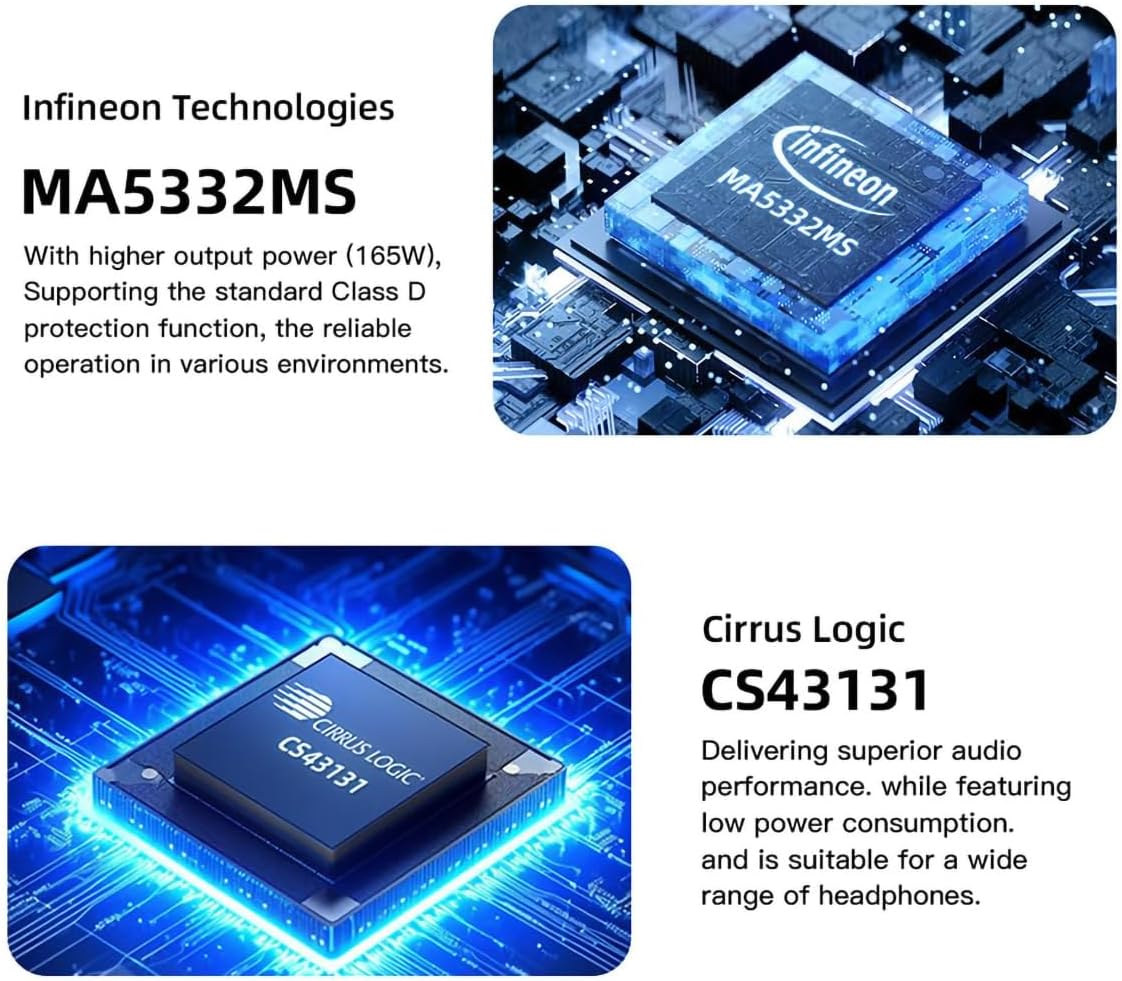
Figure 3.2: Infineon MA5332MS Ampкөтөргүч чип

Figure 3.3: Cirrus Logic CS43131 Decoder Chip
4. Техникалык шарттар
| Спецификация | Нарк |
|---|---|
| Киргизүү | HDMI(ARC)/RCA/BT/USB/Optical/Coaxial |
| THD+N | 0.003% |
| SNR | 107дБ |
| Каналдын бөлүнүшү | 98дБ |
| Киргизүү сезгичтиги / Киргизүү импедансы | 280мВ/22кΩ |
| Output Power (Stereophonic) | 165W x 2 (4Ω) / 85W x 2 (8Ω) |
| USB берүү | USB2.0 (Asynchronous Transfer) |
| USB шайкештиги | Windows 7/8/8.1/10/11, Mac OSX, Linux |
| MQA декодери | Оптикалык/коаксиалдык |
| MQA-CD декодери | Оптикалык/коаксиалдык |
| Bit Depth (USB) | 1bit, 16-32bit |
| Bit Depth (Optical/Coaxial) | 1bit, 16-24bit |
| Sampling rate (USB PCM) | 44.1-768кГц |
| Sampling rate (USB DSD) | 2.8224-11.2896 МГц |
| Sampling rate (Optical/Coaxial PCM) | 44.1-192кГц |
| Sampling rate (Optical/Coaxial DSD) | DSD64(DoP) |
| Энергияны керектөө | 40W (Normal Volume) |
| Өлчөм (WxHxD) | 219x42x185мм |
| Салмагы | 1.52 кг / 3.35 фунт |
5. Кутуда эмне бар
Пакетти ачканда, сиз төмөнкү нерселерди табышыңыз керек:
- 1 x SMSL AO300 Unit
- 1 x Алыстан башкаруу
- 1 x Bluetooth антеннасы
- 1 x AC Кубат кабели
- 1 x USB кабели
- 1 x HDMI кабели
- 1 x SMSL Repair Card
- 1 x User Manual
Video 5.1: Unboxing and Included Accessories for SMSL AO300.
6. Орнотуу жана байланыштар
Proper connection of your SMSL AO300 is crucial for optimal performance. Follow the instructions below to connect your devices.
6.1 Киргизүү байланыштары

Figure 6.1: ашыкview of SMSL AO300 Input and Output Ports
- USB киргизүү: Connect your PC or other USB audio source using the provided USB cable.
- Оптикалык киргизүү: Connect CD/DVD players, DACs, or TVs via an optical cable.
- Коаксиалдуу киргизүү: Connect TV, CD/DVD players, or DACs via a coaxial cable.
- HDMI (ARC) Input: Use a commercially available HDMI cable to connect to an ARC-compatible TV. Ensure the TV's HDMI IN port is labeled "ARC" or "eARC/ARC". The TV's audio output format must be set to PCM. This product supports digital signal input, not video input. The TV remote control cannot adjust the volume of this product via ARC, nor does it support synchronous power on/off.
- Aux (RCA) Input: Connect CD/DVD players or other analog audio sources using RCA cables.
- Bluetooth киргизүү: Connect the Bluetooth antenna to the rear panel. Pair your mobile phone, tablet, or PC via Bluetooth.
Video 6.1: Demonstrating various input connections to the SMSL AO300.
Video 6.2: Important precautions and setup for HDMI ARC connection.
6.2 Чыгуу байланыштары
- Speakers Out (L/R): Connect your passive speakers to the red (Right) and black (Left) binding posts.
- Сабвуфердин чыгышы: Connect an active subwoofer to the SW OUT RCA port for a 2.1 channel system.
- Гарнитуранын чыгышы: The AO300 features both 4.4mm and 6.35mm headphone jacks on the front panel for direct headphone connection.
7. Иштөө нускамалары
7.1 Алыстан башкаруу
The SMSL AO300 comes with a full-featured remote control for convenient operation. This remote uses 2 x R03/AAA batteries.
- Күйгүзүү/өчүрүү: Бирдикти күйгүзүү же өчүрүү үчүн кубат баскычын басыңыз.
- Навигация: Use the Up, Down, Left, Right arrows to navigate menus.
- МЕНЮ/ОК: Press to enter menus or confirm selections.
- Кайтуу: Мурунку менюга кайтуу.
- Input Select (FN): Cycle through available input sources.
- Үнсүз: Аудио чыгарууну өчүрүү же ачуу.
- Көлөм +/-: Үн деңгээлин тууралаңыз.
Video 7.1: Guide on how to use the remote control for SMSL AO300.
7.2 Меню багыттоо жана орнотуулар
Access the setup menu to customize various settings:
- Киргизүү: Select the desired audio input source (USB, Optical, Coaxial, Bluetooth, ARC IN, AUX IN).
- Чыгуу: Чыгуу орнотууларын конфигурациялоо.
- EQ жөндөөсү: Choose from 8 EQ audio modes (Direct, Tone, SDB, Bass, Super Bass, Rock, Soft, Clear) to adjust audio output.
- Үч ырды жөндөө: Adjust treble from -9dB to +9dB. When EQ mode is Direct or other EQ mode, adjusting Treble will automatically change to Tone mode.
- Басс тууралоо: Adjust bass from -9dB to +9dB. When EQ mode is Direct or other EQ mode, adjusting Bass will automatically change to Tone mode.
- Чыпка: Select from 5 filter options (Fast and Low-latency, Fast and Phase-compensated, Slow and Low-latency, Slow and Phase-compensated, Nonoversampлинг).
- Түс жөндөөлөрү: With 8 menu color settings, you can change the color of the display screen according to your own preferences.
- Bluetooth Clear: To clear the current Bluetooth paired device, press the Up and Down buttons on the remote or twist the knob.
Video 7.2: Exploring the 8 EQ audio modes and 5 filters available on the SMSL AO300.
8. Кыйынчылыктарды
If you encounter issues with your SMSL AO300, refer to the following common troubleshooting steps:
- No Sound / Device Not Recognized (HDMI ARC):
- Ensure the ARC input of the product is connected to the HDMI ARC interface of the TV.
- Verify that the output mode of the TV is set to "ARC/ARC+TV speakers" or "PCM out only".
- If the TV does not support ARC, connect the TV's audio output port to the audio IN port (Optical, Coaxial, or AUX) of the AO300.
- Үнү жетиштүү катуу эмес:
- Check the volume level on your source device and ensure it's set to the maximum.
- Check the volume on your AO300. If the sound is still not loud enough, you may need to use an amplifier with your DAC.
- DAC Not Working / Sounding as Expected:
- Ensure your DAC is properly connected and that your device's sound settings are correctly configured.
- Аудиоңузду текшериңиз files are of high quality.
- Difficulty Adjusting DAC's Filter:
- Changes made by adjusting a DAC's filter can often be subtle and may not be easily noticeable, especially if you're not using high-quality audio equipment or listening to high-resolution audio files. Experiment with different settings to see which one you prefer.
Video 8.1: General tips for HiFi DAC setup and troubleshooting.
9. Кепилдик жана колдоо
Кепилдик шарттары:
- Foshan Shuangmusanlin Technology Co., Ltd promises to offer good quality products. If the product is broken in 7 days after purchasing when you use it normally, you can choose to send it back for return, replacement or repairing (only the product does not affect the second sales can be returned).
- Repairing for free in one year if you use it normally.
- Сатып алуу датасы сатуучу колдонгон эсеп-дүмүрчөк же квитанциядагы датага ылайык, эгер сиз аны онлайн сатып алсаңыз, сооданын скриншотун көрсөтө аласыз.
- If an inappropriate usage causes the unit damaged, the warranty will be void. All damages by inappropriate use, including using it under non-normal working environment or without following the instructions, disassembling, refitting, repairing by user in private, causing damage by using some fittings instead of the designative or accredited ones, or inability to provide credible proof of purchase, are not covered.
- Кайтаруу же алмаштыруу үчүн SMSL Audio сатуучуга кайрылыңыз.
For further assistance or inquiries, please contact AOSHIDA Audio customer support.
Видео 9.1: Бүттүview of the SMSL AO300 User Manual, including safety and warranty information.
Ask a question about this manual
Ask about setup, troubleshooting, compatibility, parts, safety, or missing instructions. Manuals+ will review the question and use this page’s manual context to help answer it.