
1. Киришүү
The BAISHUN HDMI KVM USB Extender (Model CJX-062-US) allows for the transmission of high-definition video (up to 1080p@60Hz) and USB keyboard/mouse signals over a single Cat5e/6/7 Ethernet cable. This device extends control of a computer or other HDMI source up to 164 feet (50 meters) with zero latency, making it suitable for home theaters, gaming setups, and multi-room offices. It consists of a Transmitter (TX) unit and a Receiver (RX) unit.

Image 1.1: The BAISHUN HDMI KVM USB Extender includes a Transmitter (TX) and a Receiver (RX) unit, shown with a USB cable.
2. Пакеттин мазмуну
Пакетиңизде бардык буюмдар бар экенин текшериңиз:
- KVM Transmitter (TX) Unit: 1 PCS
- KVM Receiver (RX) Unit: 1 PCS
- USB Cable: 1 PCS
- Кубаттуу адаптер: 1 даана
- Колдонуучунун колдонмосу: 1 PCS
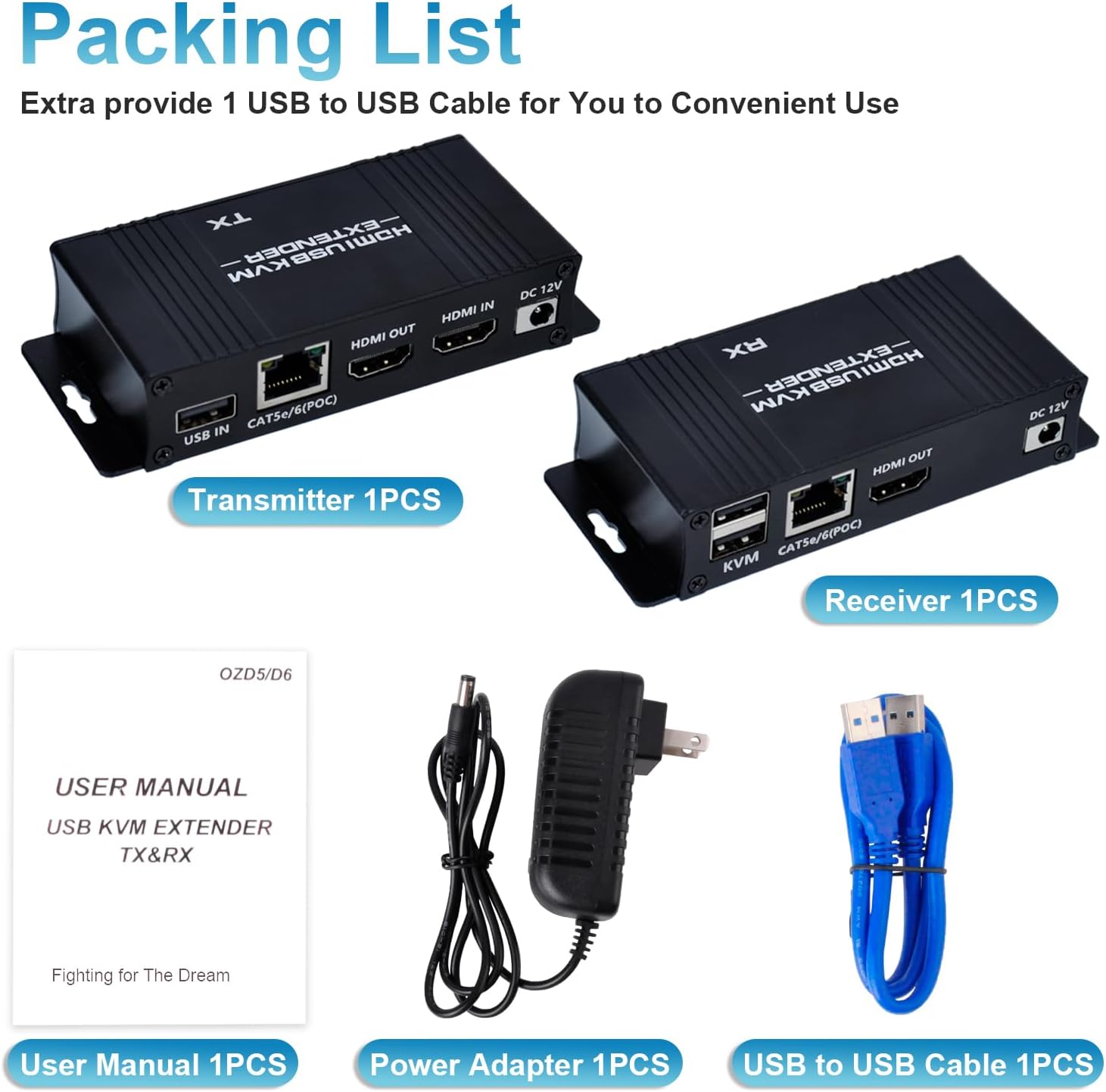
Image 2.1: The package includes the Transmitter, Receiver, USB cable, power adapter, and user manual.
3. Продукт бүтүп калдыview
The extender system comprises two main units:
3.1 Өткөргүч (TX) блогу
Connects to the source device (e.g., PC, laptop). It features:
- USB IN порту: Connects to the source PC's USB port for KVM functionality.
- CAT5e/6/7 (POC) Port: Connects to the Receiver unit via an Ethernet cable. Supports Power Over Cable (POC).
- HDMI IN порту: Connects to the source device's HDMI output.
- HDMI OUT порту: For local display monitoring (optional).
- DC 12V порт: Кубат киргизүү үчүн.
3.2 Кабыл алгыч (RX) блогу
Connects to the display and KVM peripherals. It features:
- KVM Ports (2x USB 2.0): Connects to USB keyboard and mouse.
- CAT5e/6/7 (POC) Port: Connects to the Transmitter unit via an Ethernet cable.
- HDMI OUT порту: Connects to the display device (e.g., monitor, TV).
- DC 12V порт: For power input (only one power adapter is needed for the system, typically connected to the TX unit due to POC).

Сүрөт 3.1: Детальдуу view of the input/output ports on both the Transmitter (TX) and Receiver (RX) units.
4. Орнотуу нускамалары
Follow these steps to set up your HDMI KVM USB Extender:
- Булакты туташтыруу: Connect an HDMI cable from your source device (e.g., PC, laptop) to the HDMI-IN Өткөргүч (TX) блогундагы порт.
- Connect USB to Source: Connect the provided USB-A to USB-A cable from a USB port on your source device to the USB IN Өткөргүч (TX) блогундагы порт.
- Ethernet кабелин туташтыруу: Run a single Cat5e/6/7 Ethernet cable (up to 164ft / 50m) between the CAT5e/6/7 (POC) port on the Transmitter (TX) unit and the CAT5e/6/7 (POC) port on the Receiver (RX) unit. Ensure the cable is properly terminated.
- Дисплейди туташтыруу: HDMI кабелин түзмөктөн туташтырыңыз HDMI OUT port on the Receiver (RX) unit to your display device (e.g., monitor, TV).
- Connect KVM Peripherals: USB клавиатураңызды жана чычканыңызды туташтырыңыз KVM USB 2.0 ports on the Receiver (RX) unit.
- Күчтү колдонуу: Берилген 12V DC кубат адаптерин туташтырыңыз DC 12V port on the Transmitter (TX) unit. Due to Power Over Cable (POC) functionality, only one power adapter is required for the entire system.
- Күйгүзүү: Power on your source device and display. The extender system should automatically establish connection and display the video.

Image 4.1: Connection diagram illustrating how to connect the Transmitter (TX) to the source PC and local display, and the Receiver (RX) to the remote display, keyboard, and mouse via a Cat5e/6/7 cable.

Image 4.2: The Power Over Cable (POC) function allows the entire system to be powered by a single adapter connected to the Transmitter (TX) unit.
5. Иштөө нускамалары
Once properly set up, the BAISHUN HDMI KVM USB Extender operates automatically:
- Автоматтык аныктоо: The extender will automatically detect the HDMI input and output resolutions.
- KVM башкаруу: The keyboard and mouse connected to the Receiver (RX) unit will control the source device as if they were directly connected.
- Zero Latency: The system is designed for zero latency transmission, ensuring smooth video and responsive keyboard/mouse control.
- Жергиликтүү HDMI чыгышы: The Transmitter (TX) unit includes an HDMI OUT port, allowing for a local display to be connected for monitoring the source device simultaneously.

Image 5.1: The extender provides zero latency video and audio transmission, allowing for remote control of a PC with a keyboard and mouse.

Image 5.2: Keyboard input and mouse movement are smoothly synchronized over distances up to 164 feet.
6. Техникалык тейлөө
To ensure optimal performance and longevity of your extender:
- Keep the units in a cool, dry, and well-ventilated area.
- Avoid exposing the units to direct sunlight, high temperatures, or excessive humidity.
- Түзмөктөрдү жумшак, кургак чүпүрөк менен тазалаңыз. Суюк же аэрозоль тазалагычтарды колдонбоңуз.
- Бардык кабелдик туташуулар коопсуз жана бузулбагандыгын текшериңиз.
7. Кыйынчылыктарды
Эгер көйгөйлөргө туш болсоңуз, төмөнкү жалпы чечимдерди караңыз:
- Видео чыгаруу жок:
- Ensure all HDMI cables are securely connected to both the source and display, and to the extender units.
- Verify that the Cat5e/6/7 Ethernet cable is properly connected between the TX and RX units and is not damaged.
- Confirm that the power adapter is connected to the TX unit and the unit is receiving power.
- Test with a shorter, known-good Ethernet cable to rule out cable issues.
- Ensure your display is set to the correct HDMI input.
- Баскычтоп/чычкан жооп бербейт:
- Check that the USB cable is securely connected from your source PC to the USB IN TX бирдигиндеги порт.
- Ensure your keyboard and mouse are connected to the KVM USB 2.0 ports on the RX unit.
- Avoid using 5.8GHz wireless keyboards/mice, as they may not be compatible. Wired or 2.4GHz wireless peripherals are recommended.
- Try connecting the keyboard and mouse directly to the source PC to confirm they are functional.
- Restart both the source PC and the extender units.
- Intermittent Signal/Flickering Video:
- Ensure the Cat5e/6/7 cable is of good quality and meets specifications for the distance.
- Check for any sources of electromagnetic interference near the Ethernet cable.
- Verify that the HDMI cables are not excessively long or damaged.
For further assistance, please contact BAISHUN customer support. Lifetime troubleshooting support is available for this product.
8. Техникалык шарттар
| Өзгөчөлүк | Description |
|---|---|
| Модель номери | CJX-062-US |
| Бренд | БАЙШУН |
| Өткөрмө аралык | Up to 164ft (50m) over Cat5e/6/7 Ethernet cable |
| Video Resolution | Max 1080p@60Hz, supports 3D |
| Кечигип калуу | Нөлдүк кечигүү |
| USB порттору | 2x USB 2.0 (on Receiver for KVM) |
| Электр камсыздоо | DC 12V (Single power adapter with Power Over Cable - POC) |
| Башкаруу ыкмасы | Remote (Keyboard/Mouse) |
| Connectivity Protocol | Ethernet |
| Түс | Кара |
| Өлчөмдөрү (L x W x Y) | 4.56 x 1.96 x 0.95 дюйм (бирдик үчүн) |
| Элемент Салмагы | 12.6 унция |
| Материал | Жез (байланыш материалы) |
| Сертификация | ETL |

Image 8.1: The dimensions of a single extender unit are 4.56 inches in length, 1.96 inches in width, and 0.95 inches in height.
9. Кепилдик жана колдоо
BAISHUN provides lifetime troubleshooting support for the HDMI KVM USB Extender. For any technical issues, questions, or support needs, please contact BAISHUN customer service through your purchase platform or the official BAISHUN webсайт.