
Cleyver ODHCAM360
Cleyver ODHCAM 360° Webcam User Manual
Model: ODHCAM360
1. Киришүү
Thank you for choosing the Cleyver ODHCAM 360° Webcam. This device is designed to enhance your video conferencing experience with its panoramic view, intelligent features, and high-quality audio-visual capabilities. Please read this manual carefully to ensure proper setup and operation.
2. Продукт бүтүп калдыview
The Cleyver ODHCAM 360° Webcam integrates a 5 MP Full HD CMOS sensor, omnidirectional microphones, and a 3W HD speaker into a single, compact unit. It offers a 360° field of view and intelligent features like voice tracking and automatic framing to keep participants engaged.
2.1 Пакеттин мазмуну
- Cleyver ODHCAM 360° Webcam
- USB кабели
- (Potentially) Driver/Software CD
- (Potentially) Lens Cap
2.2 Аппараттын компоненттери
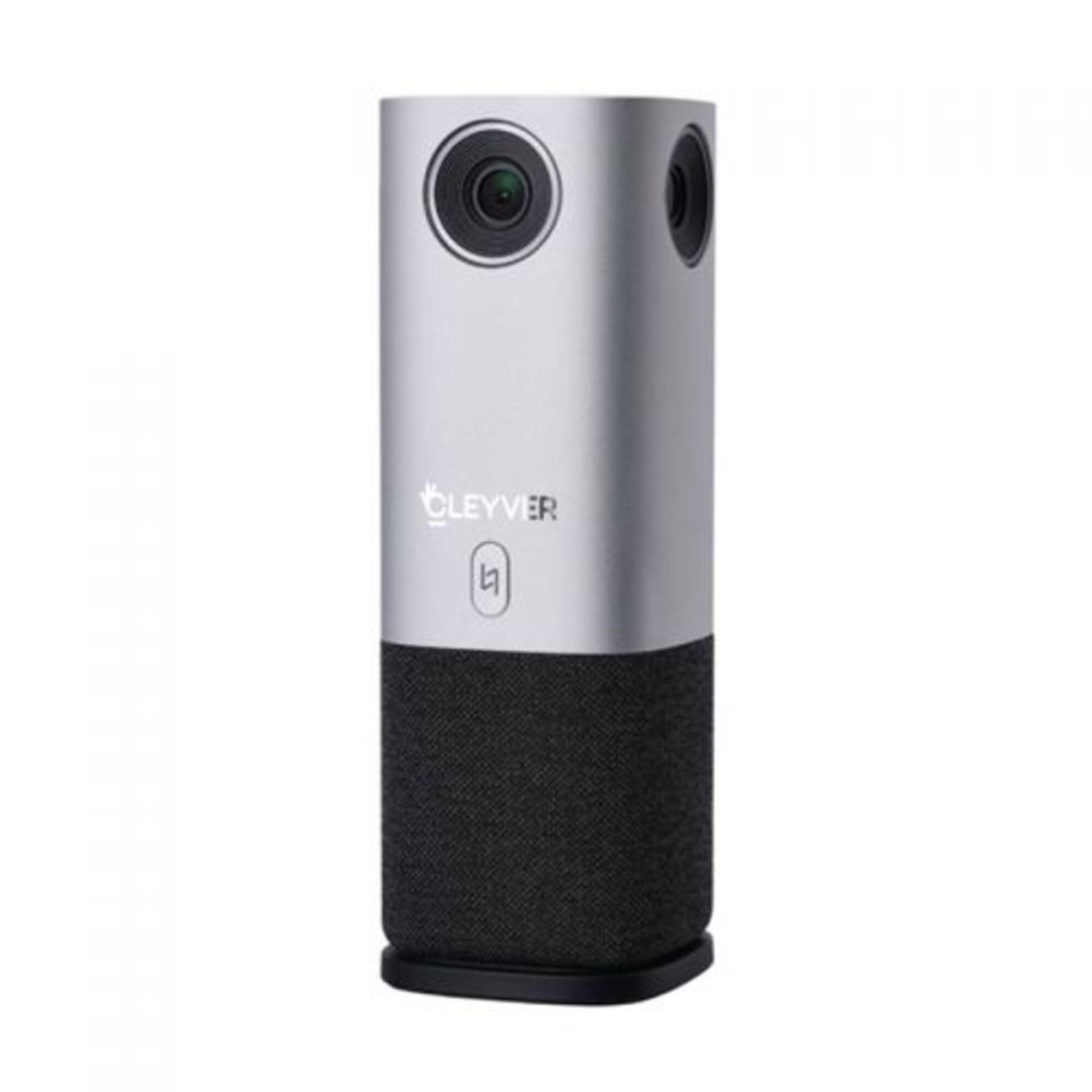
Сүрөт 1: Алдыңкы view of the Cleyver ODHCAM 360° Webcam. Shows the main camera lens, Cleyver logo, and a button.

2-сүрөт: Арткы view of the Cleyver ODHCAM 360° Webcam, highlighting the USB and power ports.

Figure 3: A hand pressing the mode selection button on the Cleyver ODHCAM 360° Webкамера
3. Орнотуу
The Cleyver ODHCAM 360° Webcam is designed for Plug & Play operation, requiring minimal setup.
3.1 Аппаратты туташтыруу
- кой webcam on a stable surface in the center of your meeting area.
- Connect the provided USB cable to the USB port on the webкамера
- USB кабелинин экинчи учун компьютериңиздеги жеткиликтүү USB портуна туташтырыңыз.
- Кубат адаптерин webcam's power input and then to a wall outlet. The device requires external power for full functionality.
- Your computer should automatically detect and install the necessary drivers. If not, refer to the (potentially) included driver CD or download drivers from the official Cleyver webсайт.

Figure 4: USB and power cables connected to the Cleyver ODHCAM 360° Webкамера
4. Иштөө нускамалары
кошулгандан кийин, webcam is ready for use with your preferred video conferencing software.
4.1 Selecting a Presentation Mode
The Cleyver ODHCAM 360° offers 6 distinct presentation modes to suit various meeting scenarios. Press the mode selection button on the device to cycle through the available modes.
- Full Screen 360°: Displays a complete panoramic view бөлмөнүн.
- Бардык Айлана View: Presents a split view with a panoramic top section and individual speaker views төмөндө.
- Host Mode: Focuses on the primary speaker while showing a panoramic view.
- Dual Host Mode: Highlights two main speakers simultaneously.
- Бойдок View 90°: Provides a standard 90-degree field of view, focusing on a specific area.
- Wide Angle View 120°: Offers a broader 120-degree field of view.
The device uses AI voice tracking and automatic framing to dynamically adjust the view based on who is speaking, ensuring optimal visibility for all participants.
4.2 Аудио өзгөчөлүктөрү
- Omnidirectional Microphones: The integrated microphones capture clear audio from all directions.
- 3W HD Speaker: Provides clear sound output for incoming audio.
- Үнсүз функция: A dedicated button on the device allows you to quickly mute/unmute the microphones. An indicator light will show the mute status (e.g., red for muted, green for active).
4.3 Шайкештик
The Cleyver ODHCAM 360° Webcam is compatible with most popular video conferencing platforms and operating systems, including Windows and macOS. It is designed to work seamlessly with applications such as Zoom, Microsoft Teams, Skype, Google Meet, and others.
Video 1: Demonstration of the Nuroum C50 Webcam (similar to Cleyver ODHCAM 360°) features, including panoramic view and voice tracking. This video illustrates how the camera automatically focuses on the active speaker during a meeting.
Video 2: Unboxing and initial setup of a CZUR Halo webcam (similar to Cleyver ODHCAM 360°). This video demonstrates the physical components and how to connect the device.
Видео 3: Бүттүview of the j5create 360-degree meeting webcam (similar to Cleyver ODHCAM 360°), showcasing its various display modes and omnidirectional microphone capabilities.
Video 4: Promotional video for Nuroum C20 (similar to Cleyver ODHCAM 360°), highlighting its all-in-one conference camera features, AI noise cancellation, and effective voice capture.
Video 5: Instructions on how to use the CZUR Halo webcam (similar to Cleyver ODHCAM 360°) with Zoom, demonstrating camera selection within the application.
5. Техникалык тейлөө жана кам көрүү
- Аппаратты таза, жумшак, кургак чүпүрөк менен сүртүңүз.
- Катуу химиялык заттарды же абразивдүү тазалагычтарды колдонуудан алыс болуңуз.
- Ensure the lens is free from dust and smudges for optimal image quality.
- сактаңыз webколдонулбаган учурда камераны салкын, кургак жерде сактаңыз.
- Аппаратты экстремалдык температурага же нымдуулукка дуушар кылбаңыз.
6. Кыйынчылыктарды
| Көйгөй | Мүмкүн себеп | Чечим |
|---|---|---|
| Сүрөт/видео чыгаруу жок |
|
|
| No audio input/output |
|
|
| Сүрөттүн сапаты начар |
|
|
7. Техникалык шарттар
| Өзгөчөлүк | Деталь |
|---|---|
| Бренд | Cleyver |
| Модел | ODHCAM360 |
| Түс | Silver |
| Өзгөчөлүктөр | 360° Video Conferencing, Voice Tracking, Automatic Framing |
| Sensor Technology | CMOS |
| Натыйжалуу дагы эле чечим | 5 мегапиксел |
| Video Resolution | 1080p |
| Байланыш технологиясы | USB |
| Микрофондор | Көп багыттуу |
| Баяндамачы | 3W HD Speaker |
| Өлчөмдөрү (L x W x Y) | 6.76 x 6.75 x 18.2 см |
| Шайкеш түзмөктөр | Laptop, Personal Computer, (potentially) Tablet, (potentially) Smartphone |
| Фокус түрү | Автофокус, кол менен фокустоо |
| Сууга туруктуулук деңгээли | Суу өткөрбөйт |
8. Кепилдик жана колдоо
For warranty information and technical support, please refer to the documentation included with your product or visit the official Cleyver webсайт. Сатып алуу квитанциясын кепилдик дооматтары үчүн сатып алуунун далили катары сактаңыз.
Ask a question about this manual
Ask about setup, troubleshooting, compatibility, parts, safety, or missing instructions. Manuals+ will review the question and use this page’s manual context to help answer it.