
Surge Gamepad Pro (Pillars of Creation)
Surge Gamepad Pro (Pillars of Creation)
Wireless Pro Controller Instruction Manual
Model: Gamepad Pro (Pillars of Creation) | Brand: Surge
Introduction
This manual provides detailed instructions for the setup, operation, maintenance, and troubleshooting of your new Surge Gamepad Pro (Pillars of Creation) Wireless Controller. Designed for multi-platform compatibility, this controller offers advanced features including dynamic lighting, programmable macro buttons, rumble vibration, and motion controls to enhance your gaming experience.
Продукт бүттүview
The Surge Gamepad Pro is engineered for extended gameplay and immersive experiences. Key features include:
- 600 мАч Батарея: Enjoy up to 18 hours of gameplay on a single charge.
- Көп платформа шайкештиги: Seamlessly connect with Nintendo Switch, Windows PC, Steam Deck, Android 10.0+, and iOS 13.4+ devices.
- Translucent Shell: A unique semi-transparent design with dynamic LED rings creates a captivating visual effect.
- 3 динамикалык жарыктандыруу режимдери: Choose from Aurora wave pattern, breathing effect, and stick follow for stunning visuals.
- Жөнгө салынуучу LED жарыктандыруу: Customize your controller's look with 8 color options and independent intensity control for button and thumbstick LEDs.
- Программалануучу макро баскычтар: Two rear macro buttons allow for custom button combinations.
- Күркүлүү титирөө: Four levels of dual rumble vibration provide immersive feedback.
- Кыймылды башкаруу каражаттары: Integrated 6-axis motion control for enhanced gameplay.
- 3.5 мм аудио порт: Connect your headset directly to the controller for audio.

Фронт view of the Surge Gamepad Pro (Pillars of Creation) Wireless Controller, showcasing its unique cosmic design and illuminated thumbsticks.

Арткы view of the controller, highlighting the programmable macro buttons (MR and ML) and the USB-C charging port.

An illustrative graphic demonstrating the 8 available LED colors and 3 dynamic lighting modes (Aurora Wave, Breathing Effect, Stick Follow) of the controller.
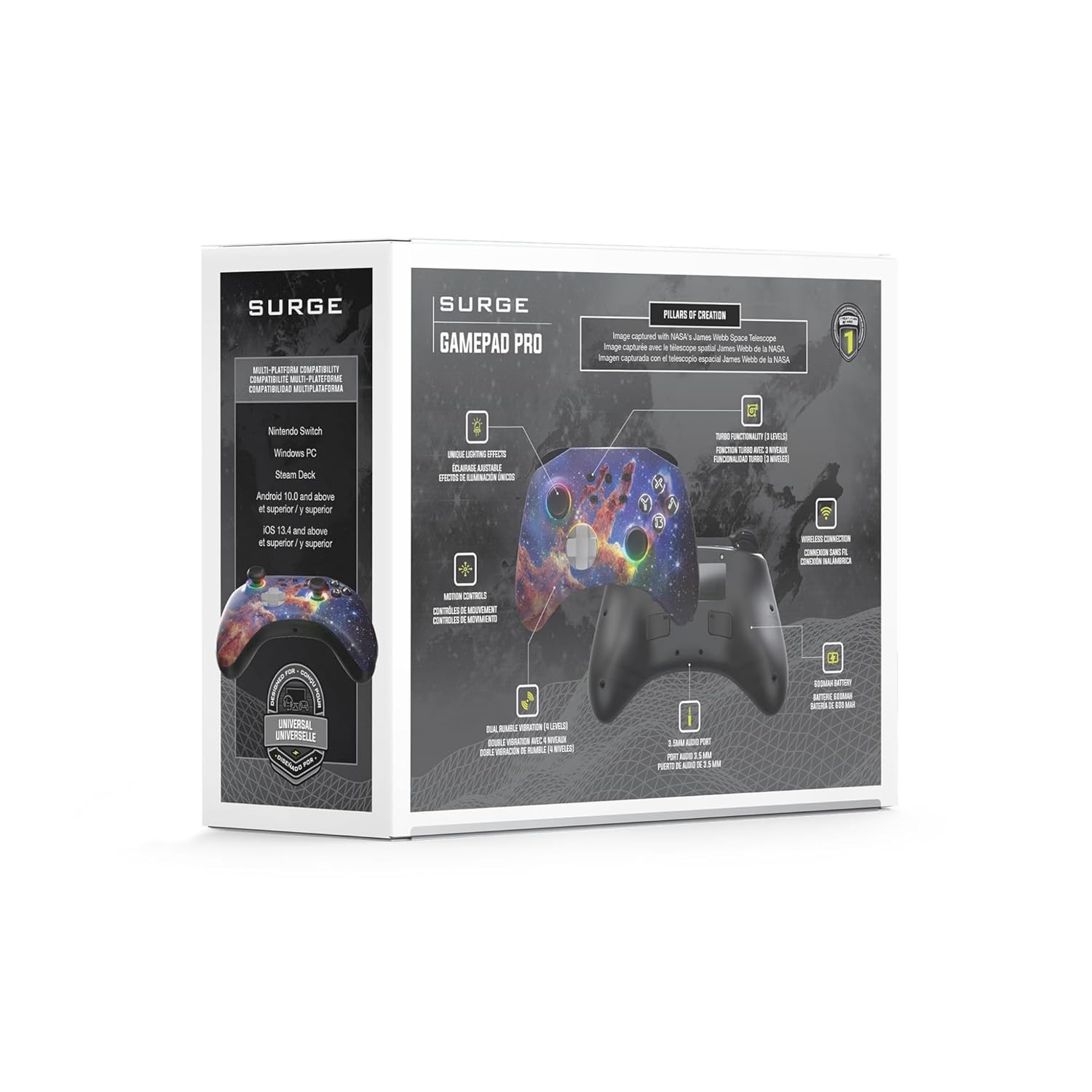
A graphic detailing key specifications: two macro buttons, a 20-foot wireless play range, and a 600mAh rechargeable battery.
Расмий продукт Videos
Video demonstrating the "Aurora Wave" lighting mode on the Surge Gamepad Pro, showcasing the dynamic color transitions around the thumbsticks and buttons.
Video illustrating the "Stick Follow" lighting mode, where the LED colors change in response to thumbstick movements.
Жайгашуу
Контроллерди заряддоо
Before first use, fully charge the controller using the provided USB-C cable. Connect the USB-C end to the controller's charging port (located on the top edge) and the USB-A end to a compatible USB power source (e.g., console, PC, USB wall adapter). The LED indicators will show charging status and turn off when fully charged.
Түзмөктөр менен жупташтыруу
The Surge Gamepad Pro supports Bluetooth connectivity across multiple platforms:
- Nintendo Switch: From the HOME Menu, select "Controllers" > "Change Grip/Order". While the screen is displaying "Press L + R on the controller", press and hold the SYNC button on the top of the Gamepad Pro until the player LEDs begin to flash. Once paired, the player LED(s) corresponding to the controller number will remain lit.
- Windows PC / Steam Deck: Ensure your PC or Steam Deck has Bluetooth enabled. Go to Bluetooth settings and select "Add a device". Press and hold the SYNC button on the controller until it appears in the list of available devices. Select "Surge Gamepad Pro" to pair.
- Android / iOS Devices: Enable Bluetooth on your mobile device. Press and hold the SYNC button on the controller. Select "Surge Gamepad Pro" from the Bluetooth device list on your phone or tablet to connect.
Иштөө нускамалары
Adjusting LED Lighting
The controller features customizable LED lighting. Use the dedicated lighting control buttons (refer to the controller diagram in the packaging) to cycle through 8 color options and 3 dynamic lighting modes (Aurora Wave, Breathing Effect, Stick Follow). You can also adjust the intensity or turn off the button and thumbstick LEDs independently.
Programming Macro Buttons
The two rear macro buttons (MR and ML) can be programmed to execute complex button sequences. Refer to the detailed programming instructions in the full user manual (usually included in the product packaging) for specific steps on how to record and assign macros.
Turbo Settings and Rumble Vibration
The controller offers 3 adjustable turbo settings for rapid-fire input and 4 levels of dual rumble vibration for enhanced haptic feedback. Consult the full user manual for instructions on how to adjust these settings to your preference.
Техникалык тейлөө
To ensure the longevity and optimal performance of your Surge Gamepad Pro:
- Clean the controller regularly with a soft, dry cloth. Avoid using harsh chemicals or abrasive materials.
- Контроллерди түз күн нурунан жана экстремалдык температурадан алыс салкын, кургак жерде сактаңыз.
- Контроллерди түшүрүүдөн же катуу таасирлерге дуушар кылуудан качыңыз.
- Do not attempt to disassemble or modify the controller, as this will void the warranty.
Проблемаларды чечүү
If you encounter issues with your Surge Gamepad Pro, try the following steps:
- Контроллер туташпай жатат: Ensure Bluetooth is enabled on your device. Try re-pairing the controller by holding the SYNC button. Make sure the controller is charged.
- Киргизүү кечигүү же ажыратуу: Move closer to your device to reduce interference. Ensure no other strong wireless signals are present nearby.
- Баскычтар жооп бербейт: Check if the controller is fully charged. Try resetting the controller (refer to the full manual for reset procedure, if available).
- Светодиоддор иштебей жатат: Ensure the lighting features are enabled and not set to minimum intensity.
For persistent issues, please refer to the official Surge support resources or contact customer service.
Техникалык шарттар
| Өзгөчөлүк | Деталь |
|---|---|
| Бренд | толкун |
| Модел | Gamepad Pro (Pillars of Creation) |
| ASIN | B0CHZ6NHT4 |
| Батарея сыйымдуулугу | 600 мАч литий |
| Батареянын иштөө мөөнөтү | 18 саатка чейин |
| Байланыш | Bluetooth (up to 20ft wireless range) |
| Шайкештик | Nintendo Switch, Windows PC, Steam Deck, Android 10.0+, iOS 13.4+ |
| Motion Control | 6-axis motion control |
| Вибрация | Dual rumble (4 levels) |
| Аудио порт | 3.5мм |
| Продукциянын өлчөмдөрү | 5.91 x 4.72 x 2.76 дюйм |
| Элемент Салмагы | 0.63 унция |
| Келип чыккан өлкө | Кытай |
Кепилдик жана колдоо
For warranty information, product registration, or technical support, please visit the official Surge website or contact their customer service. You can find more products and information at the Surge Store on Amazon.
Сураныч, кепилдик дооматтар үчүн сатып алуу далилиңизди сактап коюңуз.
Ask a question about this manual
Ask about setup, troubleshooting, compatibility, parts, safety, or missing instructions. Manuals+ will review the question and use this page’s manual context to help answer it.