
WONDOM ADAU1701
WONDOM ADAU1701 DSP Preamp: 2-In 4-Out Digital Signal Processor Instruction Manual
Model: ADAU1701
Introduction
This manual provides detailed instructions for the installation, operation, and maintenance of your WONDOM ADAU1701 DSP Preamp. This unit is designed for advanced audio signal processing, offering a 2-input, 4-output configuration with digital crossover capabilities and support for SigmaStudio programming.
Негизги өзгөчөлүктөр төмөнкүлөрдү камтыйт:
- Powered by ADAU1701 DSP, a 28/56bit Digital Signal Processor Engine.
- 24bit ADC/DAC Resolution Ratio with a 48kHz Sampling Rate.
- Unbalanced 2-Input, 4-Output Preamp бирдиги.
- USB Type-C Port for DC 5V Power.
- Four Potentiometers for High-Pass Filter (HPF), Low-Pass Filter (LPF), and Volume Control.
- Integrated Mute & Phase Switches.
- Supports SigmaStudio Programming when connected with an ICP5 programmer.
- Open-sourced Demo Program & HEX Files are provided for restoring factory settings.
Пакеттин мазмуну
Пакетте бардык буюмдар бар экенин текшериңиз:
- WONDOM ADAU1701 DSP Preamp бирдиги
- USB Type-C Cable (for power)
- Колдонуучунун Колдонмосу (бул документ)
- (Optional: ICP5 Programmer, sold separately for advanced programming)
Коопсуздук маалыматы
- Ensure the power supply matches the device's requirements (DC 5V, 1A via USB Type-C).
- Агрегатты нымдуулукка же экстремалдык температурага дуушар кылбаңыз.
- Avoid opening the enclosure unless you are a qualified technician.
- Балдар жетпеген жерде сактаңыз.
Жайгашуу
1. Физикалык байланыштар
Refer to the diagrams below for proper connection of audio inputs, outputs, and power.

1-сүрөт: Арткы панелдин туташуулары. This image shows the rear panel of the ADAU1701 DSP Preamp, highlighting the DC Input (5V, 1A), ICP Port, Line In (ADC0 Left, ADC1 Right), and Line Out (DAC0 Right, DAC1 Left, DAC2 Right, DAC3 Left) RCA jacks.
- Кубат туташуу: Connect a DC 5V, 1A power supply to the USB Type-C port labeled "DC INPUT 5V, 1A" on the rear panel.
- Аудио киргизүү: Connect your audio source (e.g., media player, pre-amplifier) to the "LINE IN" RCA jacks (ADC0 Left, ADC1 Right).
- Аудио чыгаруу: Сиздин байланышты amplifiers or powered speakers to the "LINE OUT" RCA jacks. The default configuration provides 2-channel mid-range output (DAC2 Right, DAC3 Left) and 2-channel bass output (DAC0 Right, DAC1 Left) for a 2-way digital crossover setup.
- ICP Port: This port is used for connecting an ICP5 programmer (sold separately) for advanced SigmaStudio programming.
2. Баштапкы күйгүзүү
Once all connections are secure, apply power to the unit. The "POWER" LED on the front panel should illuminate, indicating the device is operational.
Иштөө нускамалары
The WONDOM ADAU1701 DSP Preamp features several controls on its front panel for direct adjustment, as well as advanced programming capabilities via SigmaStudio.

2-сүрөт: Алдыңкы панелдин башкаруу элементтери. This image displays the front panel, showing the Power LED, Busy LED, SW1 (Mute) and SW2 (Phase) switches, and four potentiometers (POT1, POT2, POT3, POT4) for various audio adjustments.
Алдыңкы панелдин башкаруу элементтери:
- POWER LED: Бирдиктин күйгүзүлгөнүн көрсөтөт.
- BUSY LED: Indicates DSP activity.
- SW1 (Mute Switch): Toggles audio output mute on/off.
- SW2 (Phase Switch): Adjusts the phase of the audio output.
- POT1 (MP3 / ADC2): Controls the High-Pass Filter (HPF) for Bank B (3kHz-20kHz).
- POT2 (MP8 / ADC3): Controls the Low-Pass Filter (LPF) for Bank A (210Hz-3kHz).
- POT3 (MP9 / ADC0): Controls the High-Pass Filter (HPF) for Bank A (10Hz-310Hz).
- POT4 (VOL): Жалпы көлөмүн көзөмөлдөйт.
Digital Crossover Configuration:
The unit's default output is configured as a 2-way digital crossover, providing dedicated outputs for bass and mid-range frequencies.
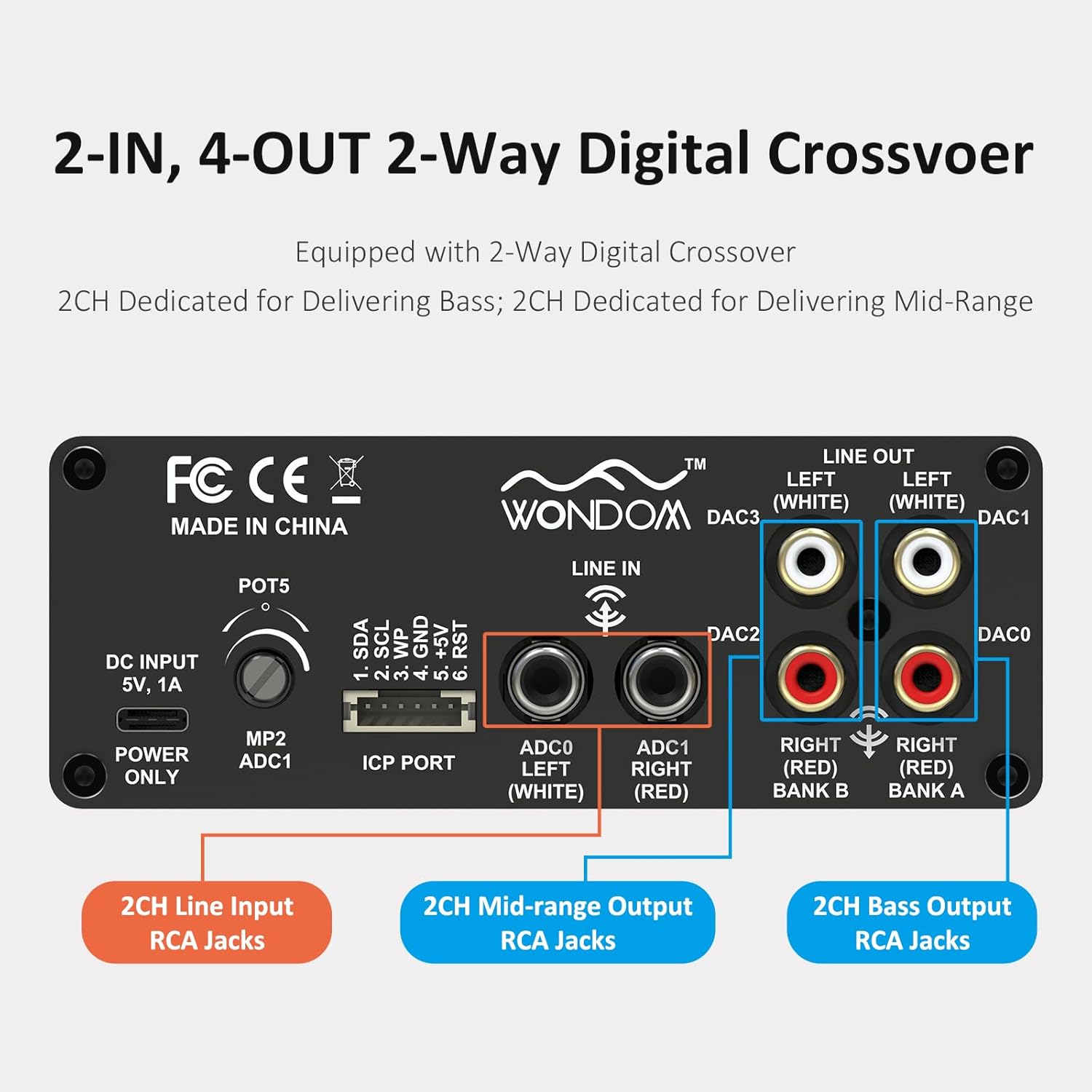
Figure 3: 2-In, 4-Out Digital Crossover. This diagram shows the RCA jack assignments for 2-channel Line Input, 2-channel Mid-range Output, and 2-channel Bass Output, facilitating a 2-way digital crossover setup.
- 2CH Line Input: ADC0 Left (White), ADC1 Right (Red).
- 2CH Mid-range Output: DAC2 Right (Red), DAC3 Left (White).
- 2CH Bass Output: DAC0 Right (Red), DAC1 Left (White).
SigmaStudio Programming:
For advanced customization and fine-tuning of the DSP functions, the unit supports programming via Analog Devices' SigmaStudio software. An ICP5 programmer (sold separately) is required to connect the DSP unit to your computer.

Figure 4: SigmaStudio Programming Setup. This image illustrates the connection between the DSP unit and an ICP5 programmer, along with a visual representation of the SigmaStudio graphical programming interface.
- Программалык камсыздоо: Download and install SigmaStudio from the Analog Devices webсайт.
- Аппараттык камсыздоо: Connect the ICP5 programmer to the ICP Port on the DSP unit and to your computer via USB.
- Программалоо: Utilize the open-sourced demo program and HEX files provided by WONDOM to get started or to restore factory settings. All terminal functions can be tailored to specific needs using SigmaStudio.
Техникалык тейлөө
- Жумшак, кургак чүпүрөк менен сүртүп, аппаратты таза кармаңыз.
- Катуу химиялык заттарды же абразивдүү тазалагычтарды колдонуудан алыс болуңуз.
- Ашыкча ысып кетүүнүн алдын алуу үчүн аппараттын айланасында жетиштүү желдетүүнү камсыз кылыңыз.
- Бардык кабелдик туташтыргычтарды такай текшерип туруңуз.
Проблемаларды чечүү
| Көйгөй | Мүмкүн себеп | Чечим |
|---|---|---|
| Кубат жок / Күйгүзүү LED өчүк | Incorrect power supply, loose connection, faulty cable. | Verify DC 5V, 1A power supply. Check USB Type-C cable connection. Try a different power source or cable. |
| Аудио чыгышы жок | Incorrect input/output connections, Mute switch engaged, volume too low, faulty audio cables. | Check all RCA connections. Ensure SW1 (Mute) is disengaged. Increase POT4 (Volume). Test with different audio cables. |
| Audible hiss or noise | Ground loop, interference, power supply noise, high gain settings. | Ensure all components are properly grounded. Use a high-quality, stable 5V power supply (a separate USB power bank/battery can help reduce noise from PC USB). Reduce gain settings if applicable. |
| Cannot connect to SigmaStudio | ICP5 programmer not connected or faulty, DSP not powered, incorrect software drivers. | Ensure ICP5 programmer is correctly connected to the DSP and computer. Verify DSP unit is powered on. Install SigmaStudio drivers in administrator mode (as suggested by user reviewс). |
Техникалык шарттар
| Өзгөчөлүк | Деталь |
|---|---|
| DSP чип | ADAU1701 (28/56bit Digital Signal Processor) |
| ADC/DAC Resolution | 24-бит |
| Sampling Rate | 48 кГц |
| Киргизүү конфигурациясы | 2-Input (Unbalanced RCA) |
| Output Configuration | 4-Output (Unbalanced RCA, default 2-way digital crossover) |
| Электр камсыздоо | DC 5V, 1A (via USB Type-C) |
| Controls | 4 Potentiometers (HPF/LPF/Volume), Mute Switch, Phase Switch |
| Programming Support | SigmaStudio (requires ICP5 programmer, sold separately) |
| Өлчөмдөрү (L x W x Y) | 4.72 x 4.72 x 1.77 дюйм |
| Салмагы | 1.23 фунт |
| Турак жай | Sleek Aluminum Enclosure |
Кепилдик жана колдоо
WONDOM products are manufactured by Sure Electronics. For warranty information, technical support, and further assistance, please refer to the official Sure Electronics webсайтка же түздөн-түз кардарларды тейлөөгө кайрылыңыз. Сатып алуу квитанциясын кепилдик дооматтары үчүн сатып алуунун далили катары сактаңыз.
Manufacturer: Sure Electronics
For additional resources and community support regarding SigmaStudio programming, online forums and tutorials can be a valuable resource.
Ask a question about this manual
Ask about setup, troubleshooting, compatibility, parts, safety, or missing instructions. Manuals+ will review the question and use this page’s manual context to help answer it.