LMT-M-F8-hei

Bluetooth кулакчын Зымсыз кулакчын сенсордук башкаруу M-F8 колдонуучу колдонмосу

Model: M-F8 (LMT-M-F8-hei)

Бренд: Жалпы

Introduction

Сатып алганыңыз үчүн рахматasing the Generic M-F8 Bluetooth Earphones. These wireless headphones are designed to provide a superior audio experience with powerful bass, clear vocals, and crisp highs, thanks to advanced chip technology and high-intensity magnetic drivers. Featuring intuitive touch controls and an ergonomic design, they offer comfort and convenience for various activities. Please read this manual carefully before using the product to ensure proper operation and to maximize its lifespan.

Маанилүү коопсуздук маалыматы

Аппаратка зыян келтирбөө жана өзүңүзгө зыян келтирбөө үчүн бул коопсуздук көрсөтмөлөрүн окуп, аткарыңыз:

Пакеттин мазмуну

Пакетте бардык буюмдар бар экенин текшериңиз:

Продукт бүттүview

The M-F8 earphones feature an ergonomic design with ear hooks for a secure and comfortable fit. Each earbud includes a touch control area and an LED indicator.

Generic M-F8 Bluetooth Earphone, black with ear hook design and blue LED indicator

This image displays the black Generic M-F8 Bluetooth Earphone, highlighting its ear hook design for secure wear and a visible blue LED indicator on the earbud body.

Жайгашуу

1. Наушникти жана капты заряддоо

Биринчи колдонуудан мурун, наушникти жана кубаттоочу кутучаны толук заряддаңыз.

Diagram showing the M-F8 earphone and charging case with battery life indicators

This image illustrates the M-F8 earphone and its charging case, indicating battery life and charging times: 1.5 hours for a full charge, 20 hours of continuous use, and 200 hours of standby time.

2. Түзмөгүңүз менен жупташтыруу

The M-F8 earphones feature one-step auto pairing for convenience.

  1. Түзмөгүңүздүн Bluetooth күйгүзүлгөнүн текшериңиз.
  2. Open the charging case and take out both earphones. They will automatically power on and enter pairing mode.
  3. On your device's Bluetooth settings, search for "M-F8" or a similar name and select it to connect.
  4. Once connected, you will hear a confirmation tone, and the earphone's LED indicator may change.
  5. After the initial pairing, the earphones will automatically connect to the last paired device when taken out of the case.
M-F8 earphone automatically connecting to a smartphone via Bluetooth

This image shows the M-F8 earphone next to a smartphone, illustrating the automatic connection process via Bluetooth after initial pairing.

Иштөө нускамалары

1. Наушник тагынуу

The M-F8 earphones are designed for a secure and comfortable fit, especially during movement.

Person wearing the M-F8 earphone, demonstrating its ergonomic fit

This image shows a person wearing the M-F8 earphone, highlighting its ergonomic design that ensures a comfortable and secure fit within the ear.

Close-up of the M-F8 earphone's ergonomic design for secure wear

Бул сүрөт жакындан тартууну камсыз кылат view of the M-F8 earphone's ergonomic design, emphasizing how it is shaped to fit securely around the ear and prevent accidental drops.

2. Башкаруу элементтерине тийүү

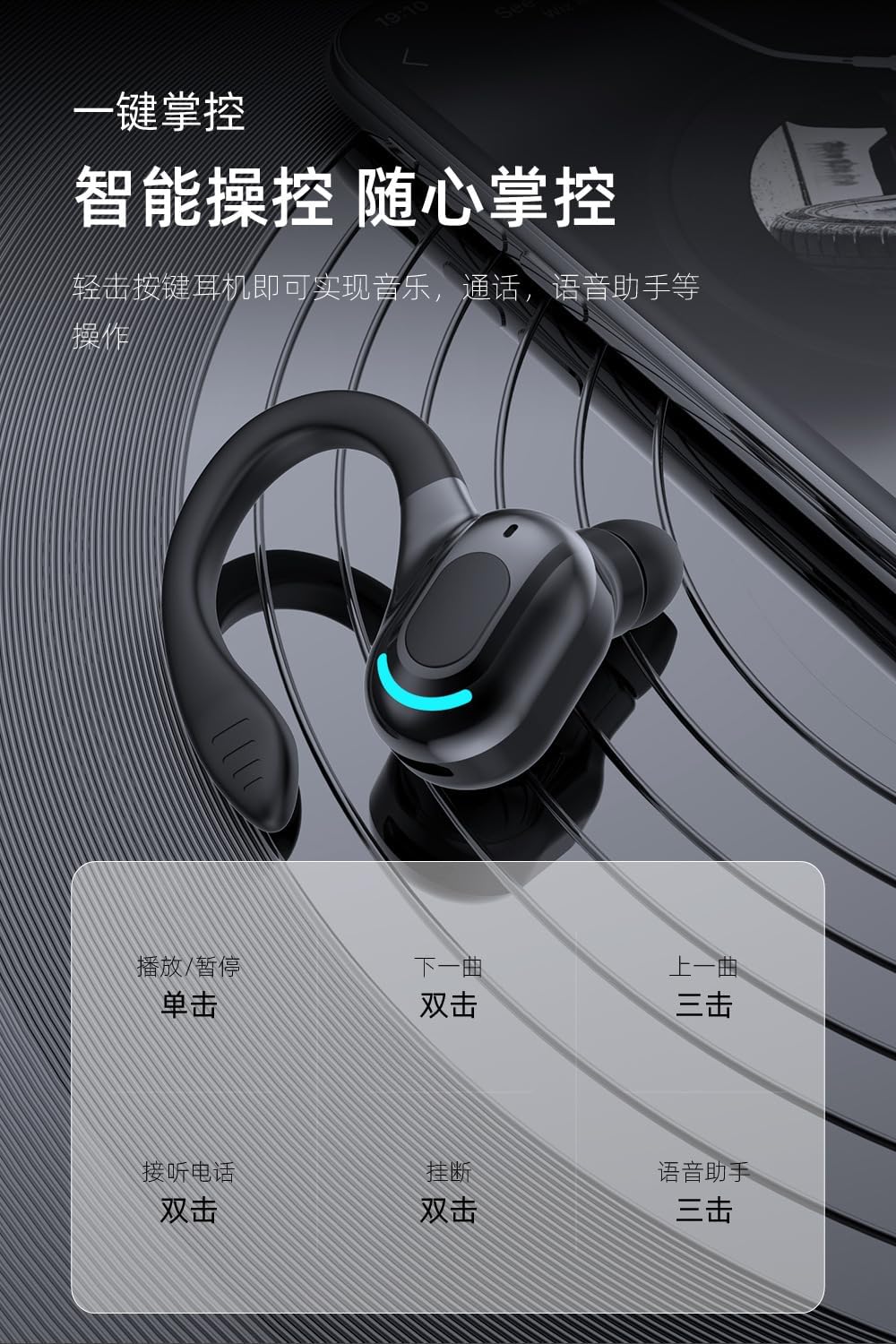
Each earbud features a touch-sensitive area for easy control of music and calls.

АкцияФункция
Single TapМузыканы ойнотуу/тындыруу
Эки жолу таптаңыз (оң кулакчын)Кийинки трек
Эки жолу таптаңыз (Сол кулакчын)Чалууга жооп берүү/аяктоо
Үч жолу таптап (оң кулакчын)Мурунку трек
Үч жолу таптап (сол кулакчын)Үн жардамчысын жандырыңыз
Узак басуу (2 секунд)Чакырууну четке кагуу
Diagram illustrating touch controls for the M-F8 earphone

This image provides a visual guide to the M-F8 earphone's touch controls, detailing actions like single tap for play/pause, double tap for next track or answering calls, and triple tap for previous track or voice assistant activation.

Техникалык тейлөө

To ensure the longevity and optimal performance of your M-F8 earphones, follow these maintenance tips:

Проблемаларды чечүү

If you encounter issues with your M-F8 earphones, refer to the following common problems and solutions:

КөйгөйМүмкүн чечим
Кулакчын жупташкан жокEnsure earphones are charged. Turn off and on Bluetooth on your device. Forget "M-F8" from your device's Bluetooth list and re-pair.
Бир гана кулакчын иштейтЭки кулакчынды тең кубаттоочу кутуга кайра салып, капкагын жаап, бир нече секунд күтүп, андан кийин кайра алып чыгыңыз. Экөө тең кубатталганын текшериңиз.
Үн жок же үнү төмөнCheck the volume on both your device and the earphones. Ensure the earphones are properly connected. Clean any debris from the earbud mesh.
Заряддоо маселелериEnsure the charging cable is securely connected. Clean the charging contacts on both the earphones and the case. Try a different charging cable or power source.
Poor call quality / Noise reductionEnsure the microphone is not obstructed. Move closer to your connected device. The earphones feature intelligent noise reduction for clearer calls.
Diagram illustrating noise reduction capabilities of the M-F8 earphone

This image visually represents the noise reduction capabilities of the M-F8 earphone, showing a comparison of sound waves before and after noise cancellation, indicating improved clarity.

Техникалык шарттар

Technical specifications for the Generic M-F8 Bluetooth Earphones:

Diagram showing Bluetooth 5.2 chip and specifications for M-F8 earphone

This image highlights the Bluetooth 5.2 upgrade for the M-F8 earphone, emphasizing low latency, stable signal, and efficient power consumption, along with a transmission distance of 25 meters.

Кепилдик жана колдоо

Кепилдик маалыматы же техникалык колдоо үчүн, сатуучуга кайрылыңыз же өндүрүүчүгө түздөн-түз кайрылыңыз. Сатып алганыңыздын далили катары сатып алуу дүмүрчөгүңүздү сактаңыз.

For further assistance, please visit the official Generic webсайтка же кардарларды тейлөөгө кайрылыңыз.

Тектеш документтер - LMT-M-F8-hei

Preview Fyllo F8 Espresso Coffee Machine Instruction Manual
Comprehensive instruction manual for the Fyllo F8 Espresso Coffee Machine, covering safety precautions, operation, cleaning, troubleshooting, and warranty information.
Preview Hilti X-SCO/N ALH37 Installation Guide
This document provides installation instructions for the Hilti X-SCO/N ALH37 fastening system, detailing the use of Hilti DX tools and appropriate fasteners for various applications.
Preview F8 Gimbal Quick Start Guide and User Instructions
A comprehensive guide to setting up and using the F8 Gimbal mobile phone stabilizer, covering installation, balancing, operation modes, and FCC compliance.
Preview Hilti X-SCH ALH32 бекиткич системасы: Колдонуу боюнча нускамалар
DX сериясындагы шаймандарды колдонуп, Hilti X-SCH ALH32 бекиткич системасын орнотуу боюнча этап-этабы менен көрсөтмө, анын ичинде коопсуздук чаралары жана орнотуунун чоо-жайы.
Preview Annovi Reverberi RC сериясындагы плунжердик насостор: Пайдалануу боюнча нускамалар жана тетиктер боюнча колдонмо
RC11.17N, RC13.17N, RCA сериясы жана RCV сериясы сыяктуу моделдерди камтыган Annovi Reverberi RC сериясындагы плунжер насостору үчүн комплекстүү иштетүү нускамалары, тетиктердин тизмеси, орнотуу көрсөтмөлөрү жана бузулууларды аныктоо боюнча кеңештер.
Preview ZFX ZP-BHP-M зымсыз гарнитура колдонуучу колдонмосу
Пакеттин мазмунун камтыган ZFX ZP-BHP-M зымсыз гарнитурасы үчүн колдонуучу колдонмоview, иштөө, Bluetooth жана Disco режимдери, LED көрсөткүчтөрү жана FCC маалыматы.