
1. Киришүү
This manual provides detailed instructions for the operation and maintenance of your FANGOR F-CD-143 Portable CD Player and Bluetooth Speaker. This device offers a versatile audio experience, functioning as a standalone portable CD player or combining with its detachable Bluetooth speaker base for enhanced sound. Please read this manual thoroughly before using the product to ensure proper function and longevity.
2. Пакеттин мазмуну
Кутучаны ачканда бардык буюмдардын бар экенин текшерүү үчүн таңгактын ичиндегисин текшериңиз.
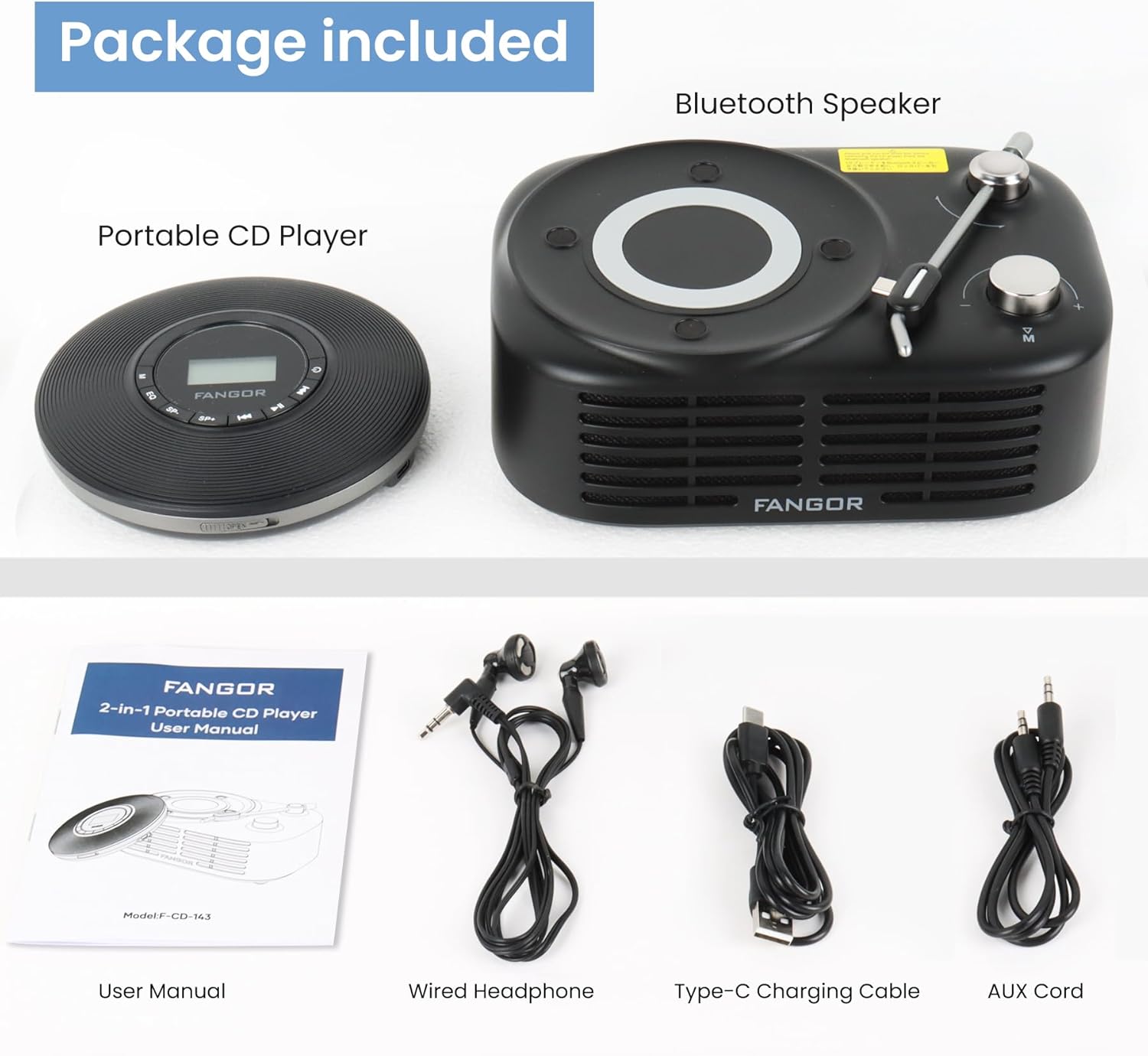
Figure 2.1: Package Contents. The image displays the portable CD player, the Bluetooth speaker base, a user manual, wired headphones, a Type-C charging cable, and an AUX cord.
- Көчмө CD ойноткуч
- Bluetooth динамик базасы
- Колдонуучунун Колдонмосу (бул документ)
- Зымдуу наушник
- C түрүндөгү кубаттоочу кабель
- AUX кабели
3. Продукт бүтүп калдыview
The FANGOR F-CD-143 is a versatile audio device designed for both personal and shared listening experiences. It features a portable CD player that can be used independently with wired headphones or connected to the included Bluetooth speaker base.

Figure 3.1: 2-in-1 Portable CD Player & Bluetooth Speaker. The top half shows a person using the portable CD player with wired headphones. The bottom half shows the Bluetooth speaker base with 'Bluetooth 5.3' indicated.
3.1 Негизги өзгөчөлүктөрү
- Бөлүнүүчү дизайн: Use the CD player independently or with the Bluetooth speaker base.
- Кеңири форматтын шайкештиги: Supports CD, MP3, CD-R, CD-RW, CD-DA, WMA (WAV must be below 128 bitrate) formats.
- TF картасын ойнотуу: Supports TF cards up to 32GB for additional music options.
- Өткөрүп жиберүүгө каршы коргоо: 60-second Electronic Skip Protection (ESP) system prevents playback interruptions.
- Жарыктандырылган LCD дисплейи: Allows clear viewing of information in various lighting conditions.
- Бир нече ойноо режимдери: Includes A-B repeat, repeat all, and repeat single track.
- Үн эффекттери: Features 5 sound effects: BBS, POP, JAZZ, ROCK, Original Sound.
- Акыркы эс тутум функциясы: Resumes playback from the last stopped position.
- Байланыш: 3.5mm AUX output for wired headphones or external speakers. Bluetooth 5.3 for wireless connection to the speaker base or other Bluetooth devices.
- Камтылган кайра заряддалуучу батарея: Provides long-lasting playtime for portable use.
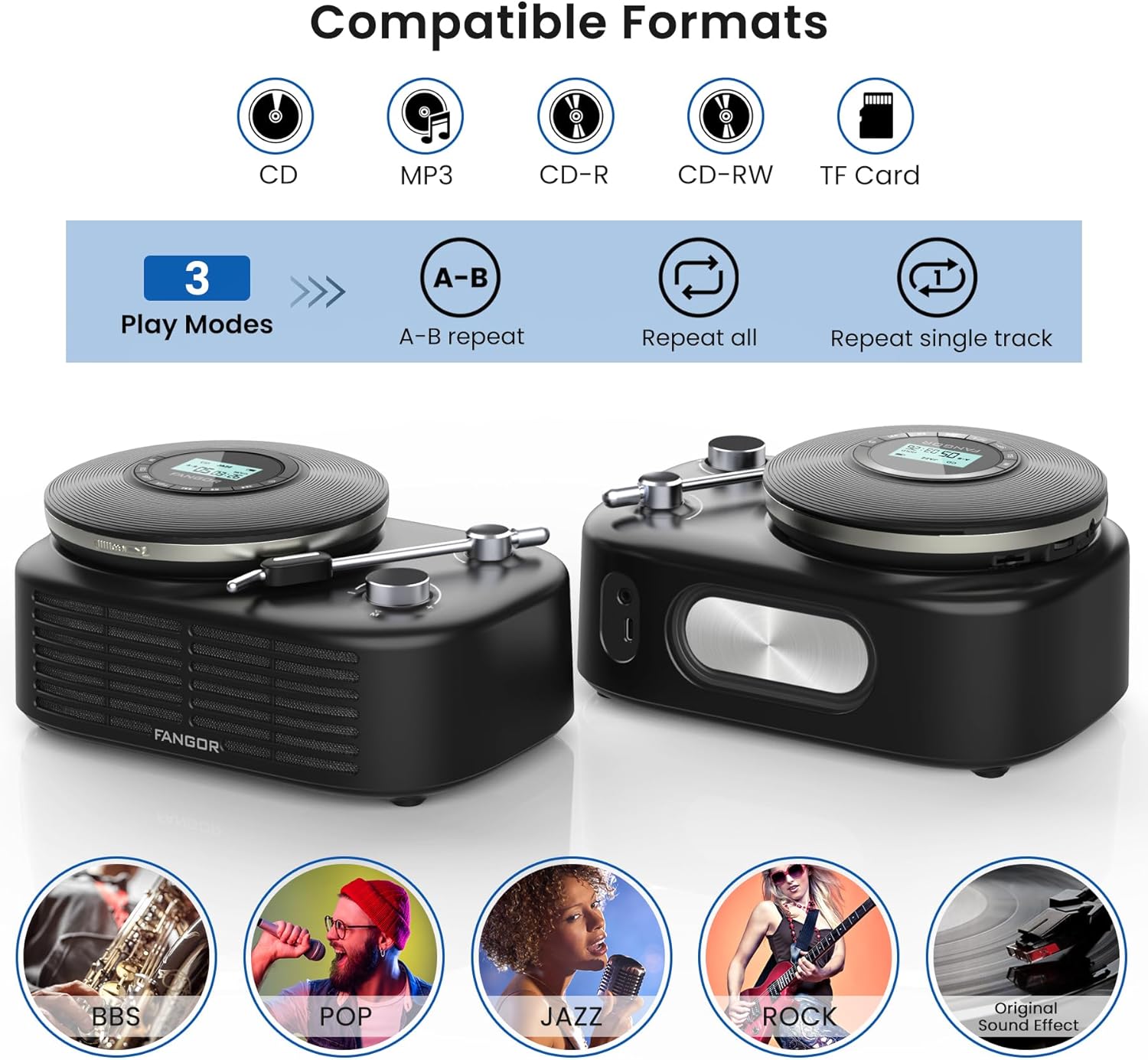
Figure 3.2: Compatible Formats, Play Modes, and Sound Effects. This image illustrates the various audio formats supported by the device, the available playback modes, and the different sound equalization options.

Figure 3.3: HIFI Stereo Sound and Connectivity. The image highlights the dual speakers of the Bluetooth base and its ability to connect via Bluetooth 5.3 or AUX to various devices like tablets, computers, and mobile phones.
4. Орнотуу
4.1 Аппаратты заряддоо
The portable CD player has a built-in rechargeable battery. Before first use, fully charge the device.
- Connect the provided Type-C charging cable to the charging port on the portable CD player.
- Connect the other end of the cable to a compatible USB power source (e.g., wall charger, power bank, computer USB port, car charger).
- Заряддоо индикатору кубаттоо учурунда күйөт жана толук заряддалганда өчөт.

Figure 4.1: Built-in Rechargeable Battery and Charging Options. This image demonstrates the flexibility of charging the portable CD player using common USB power sources.
4.2 Assembling the CD Player with Bluetooth Speaker Base
To use the CD player with the Bluetooth speaker base, align the CD player with the designated slot on the speaker base and gently press until it clicks into place. Ensure a secure connection.
4.3 CDди кыстаруу
- Open the CD compartment cover on the portable CD player.
- Carefully place the CD with the label side facing up onto the spindle.
- Gently press the center of the CD until it is securely seated on the spindle.
- CD бөлүмүнүн капкагын бекем жабыңыз.
4.4 Наушниктерди же тышкы динамиктерди туташтыруу
- Зымдуу кулакчындар: Plug the wired headphones into the 3.5mm AUX output jack on the portable CD player.
- Тышкы динамиктер (зымдуу): Use the provided AUX cord to connect the 3.5mm AUX output jack of the CD player to the AUX input of an external speaker system.
- External Speakers (Bluetooth): The Bluetooth speaker base can connect to other Bluetooth devices. Refer to section 5.3 for Bluetooth pairing instructions.
5. Иштөө нускамалары
5.1 Негизги CD ойнотуу
- Ensure a CD is properly inserted and the device is powered on.
- басыңыз ОЙНОО/ТЫНЫТТЫРУ button to start playback. The track number and elapsed time will be shown on the LCD display.
- Басыңыз ОЙНОО/ТЫНЫТТЫРУ again to pause playback. Press it once more to resume.
- басыңыз АЛГА ӨТҮҢҮЗ кийинки трекке өтүү үчүн баскычты басыңыз.
- басыңыз АРТКА ӨТКӨРҮҮ button to return to the beginning of the current track. Press it twice quickly to go to the previous track.
- басыңыз ТОКТОТ ойнотууну токтотуу үчүн баскыч.
5.2 Үндү башкаруу
Үнүн колдонуп, үнүн жөндөңүз VOL+ жана VOL- buttons on the portable CD player. If using the Bluetooth speaker base, additional volume control may be available on the speaker itself or the connected Bluetooth device.
5.3 Bluetooth Pairing (Speaker Base)
The Bluetooth speaker base can be used independently as a Bluetooth speaker.
- Ensure the Bluetooth speaker base is powered on.
- Тышкы түзмөгүңүздө (мисалы, смартфондо, планшетте) Bluetooth'ту иштетиңиз.
- Издөө available Bluetooth devices. The speaker base will appear as "FANGOR Speaker" or similar.
- Select the speaker from the list to pair. Once paired, a confirmation sound may be heard.
5.4 TF картасын ойнотуу
- Insert a TF card (up to 32GB) into the TF card slot on the portable CD player.
- The device should automatically switch to TF card mode. If not, press the РЕЖИМ button to select TF card playback.
- колдонуу ОЙНОО/ТЫНЫТТЫРУ жана ӨТКӨРҮҮ ойнотууну башкаруу үчүн баскычтар.
5.5 AB кайталоо функциясы
The A-B repeat function allows you to repeatedly play a specific segment of a track. This is particularly useful for language learning or musical practice.

Figure 5.1: Ideal for Language Learners and Audiobook Enthusiasts. This image demonstrates a practical application of the device's features, such as A-B repeat, for educational purposes.
- Ойнотуу учурунда басыңыз AB button once to set the starting point (A).
- басыңыз AB button again to set the ending point (B). The segment between A and B will now repeat.
- басыңыз AB button a third time to cancel the A-B repeat function.
5.6 Үн эффекттери (эквалайзер)
басыңыз EQ button repeatedly to cycle through the available sound effects: BBS, POP, JAZZ, ROCK, Original Sound. Select the effect that best suits your listening preference.
5.7 Last Memory Function
The device automatically remembers the last playback position. When you power on the CD player again, it will resume from where it last stopped.
6. Техникалык тейлөө
6.1 Аппаратты тазалоо
- Тазалоодон мурун ар дайым түзмөктү өчүрүп, аны каалаган кубат булагынан ажыратыңыз.
- Сырткы беттерди сүртүү үчүн жумшак, кургак чүпүрөктү колдонуңуз. Абразивдүү тазалоочу каражаттарды, момдорду же эриткичтерди колдонбоңуз.
- For the CD lens, use a specialized CD lens cleaning kit. Do not touch the lens directly.
6.2 Батареяга кам көрүү
- Батареянын иштөө мөөнөтүн узартуу үчүн, бат-баттан батарейканы толук зарядсыздандырбаңыз.
- If storing the device for an extended period, charge it to approximately 50% every few months.
- Батареянын иштешин начарлатышы мүмкүн болгон экстремалдык температуранын таасирине жол бербеңиз.
6.3 Сактоо
Store the device in a cool, dry place away from direct sunlight, dust, and moisture when not in use.
7. Кыйынчылыктарды
If you encounter issues with your FANGOR F-CD-143, please refer to the following common problems and solutions.
| Көйгөй | Мүмкүн себеп | Чечим |
|---|---|---|
| CD does not play / No sound | CD inserted incorrectly; CD is dirty or scratched; Headphones/speakers not connected; Volume too low; Device not powered on. | Ensure CD is inserted correctly (label side up); Clean or replace CD; Check headphone/speaker connection; Increase volume; Power on the device. |
| Ойнотуу учурунда өткөрүп жиберүү | CD is scratched or dirty; Device is subjected to strong vibrations; ESP system malfunction. | Clean or replace CD; Use the device on a stable surface; Ensure ESP is active (60 seconds anti-skip protection). |
| Bluetooth динамиги жупташпай жатат | Speaker not in pairing mode; Bluetooth disabled on external device; Speaker too far from external device. | Ensure speaker is powered on and in pairing mode; Enable Bluetooth on your external device; Move speaker closer to the external device (within 10 meters). |
| TF картасы таанылган жок | TF card inserted incorrectly; TF card corrupted; Unsupported file format on TF card. | Reinsert TF card correctly; Try a different TF card; Ensure music files are in supported formats (MP3, WMA). |
| Түзмөк күйбөйт | Батарея түгөнүп калды; Кубат баскычы туура басылган жок. | Charge the device fully; Press and hold the power button for a few seconds. |
8. Техникалык шарттар
| Өзгөчөлүк | Спецификация |
|---|---|
| Бренд | ФАНГОР |
| Модель номери | F-CD-143 |
| Байланыш технологиясы | Auxiliary, Bluetooth 5.3 |
| Өзгөчөлүктөр | Portable, Detachable Bluetooth Speaker Base, Anti-Skip Protection, Backlit LCD Display, A-B Repeat, Last Memory |
| Колдоого алынган аудио форматтары | CD, MP3, CD-R, CD-RW, CD-DA, WMA (WAV below 128 bitrate) |
| Медиа формат түрү | CD-АРЗАН |
| TF картасын колдоо | Макс 32 ГБ |
| Туташтыргыч түрү | 3.5mm Jack (AUX output), Type-C (Charging) |
| Дисктердин саны | 1 |
| Шайкеш түзмөктөр | Headphone, Speaker, Phones, Tablets, Smart TVs (via Bluetooth speaker base) |
| Камтылган медиа | CD ойноткуч |
9. Кепилдик жана колдоо
FANGOR is committed to providing high-quality products and services. Your FANGOR F-CD-143 Portable CD Player and Bluetooth Speaker comes with:
- 365-Day No-Reason Replacement: Эгерде сиз сатып алгандан кийин 365 күндүн ичинде кандайдыр бир көйгөйлөргө туш болсоңуз, анда сиз алмаштырууга укуктуусуз.
- Өмүр бою техникалык колдоо: Our professional after-sales team is available to provide technical assistance for the lifetime of the product.
For any inquiries or support needs, please contact our customer service team. We aim to handle all issues properly within 24 hours.