1. Киришүү
This document provides essential instructions for the operation and maintenance of your new Generic replacement remote control. This remote is designed to be compatible with Polaroid TB361 and TB361+ Wireless Bluetooth Soundbar Speaker Systems. Please ensure your original remote or soundbar model matches the compatibility listed to ensure proper functionality.
This remote functions as an infrared (IR) replacement. It is intended to replicate the primary functions of the original remote control for the specified soundbar models.
2. Пакеттин мазмуну
- 1 x Жалпы алмаштыруучу пульт
3. Батареяны орнотуу
The remote control requires two (2) CR2 batteries (not included) for operation. Follow these steps to install the batteries:
- Пульттун артындагы батарея отсегин табыңыз.
- Slide the battery compartment cover downwards or press the release tab to open it.
- Эки CR2 батарейкасын салып, оң (+) жана терс (-) терминалдары бөлүмдүн ичиндеги белгилер менен туура дал келгенин текшериңиз.
- Батарея бөлүкчөсүнүн капкагын чыкылдагыча бекем жабыңыз.

Сүрөт: Артка view of the remote control, illustrating the battery compartment and how to open it for battery insertion. The compartment indicates the required CR2 battery type.
Маанилүү: Эгерде алыстан башкаруу пульту көпкө чейин колдонулбаса, агып кетүүнүн алдын алуу үчүн батарейкаларды алып салыңыз.
4. Remote Control Layout and Functions
Familiarize yourself with the buttons on your replacement remote control. The layout is designed for intuitive control of your Polaroid TB361/TB361+ soundbar.
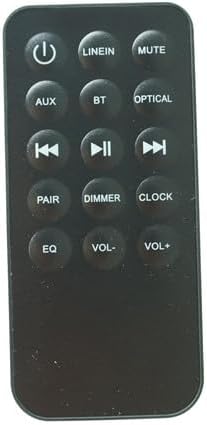
Сүрөт: алдыңкы view of the black remote control, displaying all buttons including Power, Mute, Volume, Input Selection, and Playback controls.
| баскыч | Функция |
|---|---|
| Күч (⏻) | Саундбарды күйгүзөт же өчүрөт. |
| LINEIN | Selects the Line-In audio input source. |
| БАСУУ | Саундбардын аудиосун өчүрөт же ачат. |
| AUX | Selects the Auxiliary audio input source. |
| BT | Selects the Bluetooth audio input source. |
| ОПТИКАЛЫК | Selects the Optical audio input source. |
| ⏮ (Мурунку) | Мурунку трекке өтүшөт (Bluetooth режиминде). |
| ⏯ (Ойнотуу/Тындыруу) | Plays or pauses audio playback (in Bluetooth mode). |
| ⏭ (Кийинки) | Кийинки трекке өтүшөт (Bluetooth режиминде). |
| ЖУПТАШУУ | Bluetooth жупташтыруу режимин баштайт. |
| DIMMER | Саундбардын дисплейинин жарыктыгын тууралайт. |
| СААТ | Accesses or sets the clock function on the soundbar. |
| EQ | Cycles through available equalizer presets. |
| VOL- | Үн деңгээлин төмөндөтөт. |
| VOL+ | Үн деңгээлин жогорулатат. |
5. Орнотуу жана колдонуу боюнча нускамалар
This remote control is designed as a direct replacement. No complex programming is typically required if your soundbar model is compatible.
5.1 Баштапкы орнотуу
- Ensure batteries are correctly installed in the remote control (refer to Section 3).
- Point the remote control directly at the infrared receiver on your Polaroid TB361 or TB361+ soundbar.
- басыңыз Күч button (⏻). The soundbar should respond by turning on or off.
5.2 Негизги операция
- Күйгүзүү/өчүрүү: басыңыз Күч button (⏻).
- Үндү тууралоо: Колдонуу VOL+ көлөмүн көбөйтүү жана VOL- үнүн азайтуу.
- Үнсүз: Басыңыз БАСУУ to silence the audio. Press again to restore sound.
- Киргизүүнү тандоо: Басыңыз LINEIN, AUX, BT, же ОПТИКАЛЫК to switch between different audio input sources.
- Bluetooth жупташууда: If your soundbar is in Bluetooth mode, press ЖУПТАШУУ to initiate pairing with a new device. Refer to your soundbar's original manual for detailed Bluetooth pairing instructions.
- Playback Control (Bluetooth Mode): Колдонуу ⏮ (Previous), ⏯ (Play/Pause), and ⏭ (Next) for media control when connected via Bluetooth.
- EQ алдын ала орнотуулары: Басыңыз EQ to cycle through available sound equalizer modes (e.g., Movie, Music, News).
- Дисплейдин күңүрткүсү: Колдонуу DIMMER to adjust the brightness of the soundbar's front display.
- Саат функциясы: Басыңыз СААТ to access or set the time on your soundbar, if supported.
6. Техникалык тейлөө
- Тазалоо: Пультту жумшак, кургак чүпүрөк менен сүртүңүз. Суюк тазалагычтарды же абразивдүү материалдарды колдонбоңуз.
- Батареяны алмаштыруу: Replace batteries when the remote's range decreases or it stops responding. Always replace both batteries at the same time with new ones of the same type.
- Сактагыч: Пультту күн нурунан жана экстремалдык температурадан алыс, салкын, кургак жерде сактаңыз.
7. Кыйынчылыктарды
| Көйгөй | Мүмкүн себеп | Чечим |
|---|---|---|
| Пульт жооп бербей жатат. | Dead or incorrectly installed batteries. Obstruction between remote and soundbar. Remote is out of range. | Check battery orientation and replace if necessary. Ensure a clear line of sight to the soundbar's IR receiver. Move closer to the soundbar. |
| Some functions not working. | Remote not fully compatible with all specific soundbar functions. | This is a replacement remote; some advanced or less common functions may not be supported. Verify your soundbar model is listed as compatible. |
| Soundbar not turning on/off. | Soundbar power issue. | Ensure the soundbar is plugged into a working power outlet and its main power switch (if any) is on. |
If issues persist, please refer to your original Polaroid TB361/TB361+ soundbar manual for further troubleshooting specific to the soundbar unit.
8. Техникалык шарттар
- Продукт түрү: Инфракызыл (IR) алыстан башкарууну алмаштыруу
- Шайкеш моделдер: Polaroid TB361, Polaroid TB361+ Wireless Bluetooth Soundbar Speaker Systems
- Кубат булагы: 2 x CR2 батарейкалары (кошулбайт)
- Түсү: Кара
- Өзгөчө өзгөчөлүгү: Эргономикалык дизайн, түз алмаштыруу функциясы
9. Кепилдик жана колдоо
For warranty information and customer support regarding this replacement remote control, please contact the seller directly through your purchase platform. Please retain your proof of purchase for any warranty claims.
This manual does not cover warranty or support for the Polaroid TB361/TB361+ soundbar itself. For soundbar-specific issues, please refer to the original manufacturer's documentation or support channels.

