
1. Киришүү
The XGP Bluetooth 5.2 Motorcycle Intercom is designed to provide clear communication and audio entertainment for motorcycle riders. This manual will guide you through the installation, operation, and maintenance of your intercom system, ensuring a safe and enjoyable riding experience.
2. Продукт бүтүп калдыview
2.1. Компоненттер
The XGP Motorcycle Intercom package includes the following items:

Image: XGP Motorcycle Intercom Package Contents. This image displays the main unit, instruction manual, USB-C data cable, metal bracket, 3M adhesive bracket, speaker sponges, gift box packaging, 40mm Hi-Fi speakers, soft microphone, and boom microphone.
- XGP Main Unit
- Instruction Manual
- USB-C маалымат кабели
- Металл кронштейн
- 3M Adhesive Bracket
- Speaker Sponges
- 40mm Hi-Fi Speakers
- Жумшак микрофон
- Boom микрофону
2.2. Негизги өзгөчөлүктөрү
- Ultra-thin and Lightweight Design: Weighs approximately 39g with a thickness of 15mm for minimal helmet burden.
- Өркүндөтүлгөн Bluetooth 5.2: Equipped with a Qualcomm Bluetooth 5.2 chip for stable connection and improved audio quality.
- Long-Range Intercom: Up to 1200 meters communication range, supporting 2-person simultaneous talk.
- Узартылган батареянын иштөө мөөнөтү: 1000mAh battery provides up to 30 hours of music playback, 35 hours of talk time, and 360 hours of standby on a 2-hour charge.
- IP67 Суу өткөрбөйт: Designed for all-weather use, effectively preventing water ingress.
- Музыка бөлүшүү: Share music with a fellow rider to enhance the riding experience.
- Жогорку тактыктагы аудио: 40mm speakers deliver clear sound with powerful bass, clear mids, and crisp highs.
- CVC/DSP Noise Cancellation: Reduces engine noise and wind noise for clear communication, even at speeds over 120 km/h.
- Voice Command Support: Compatible with Google Assistant and Siri for hands-free control of navigation, calls, and music.
- Кеңири шайкештик: Connects with most motorcycle intercoms, GPS navigators, and smartphones.
3. Орнотуу
3.1. Орнотуу
The XGP intercom is designed for easy and secure installation on most helmets without the need for complex tools.
- Монтаждоо ыкмасын тандоо: Select either the metal clamp bracket or the 3M adhesive bracket based on your helmet type and preference.
- Кронштейнди тиркөө: Securely attach the chosen bracket to the side of your helmet.
- Динамиктерди орнотуу: Place the 40mm Hi-Fi speakers inside the helmet, aligning them with your ears. Use the provided speaker sponges for optimal fit and comfort.
- Микрофонду орнотуу: Choose between the boom microphone (suitable for open-face helmets) or the soft microphone (suitable for full-face helmets) and position it near your mouth for clear voice pickup.
- Тоо негизги бирдиги: Slide the XGP main unit onto the installed bracket until it clicks into place.

Image: XGP Intercom installed on a helmet. This image shows the XGP intercom unit mounted on the side of a motorcycle helmet, demonstrating its low-profile дизайн.
3.2. Жупташуу
Follow these steps to pair your XGP intercom with another device (e.g., another XGP intercom, smartphone, or GPS):
- Күйгүзүү: Ensure both XGP intercom units are powered on.
- Жупташтыруу режимине кирүү: On one XGP unit, press and hold the Bluetooth talk button for approximately 2 seconds. The indicator light will flash red and blue, indicating it is in pairing mode.
- Туташуу: If pairing with another XGP intercom, repeat step 2 on the second unit. If pairing with a smartphone or GPS, enable Bluetooth on your device and select "XGP" from the list of available devices.
- Ырастоо: A single flash of the blue light and an audible alert will confirm a successful connection.

Image: Two riders pairing XGP intercoms. This image illustrates two motorcyclists on their bikes, with their XGP intercoms wirelessly connected, indicating successful pairing for communication.
4. Иштөө нускамалары
4.1. Негизги функциялар
- Күйгүзүү/өчүрүү: Түзмөктү күйгүзүү же өчүрүү үчүн кубат баскычын 3 секунд басып туруңуз.
- Үндү тууралоо: Үн деңгээлин тууралоо үчүн үндү катуулатуу (+) жана үндү азайтуу (-) баскычтарын колдонуңуз.
4.2. Домофон байланышы
Once paired, you can initiate intercom communication with another rider:
- Домофонду баштоо: Briefly press the Bluetooth talk button to initiate a conversation with the paired intercom.
- Домофондун аягы: Briefly press the Bluetooth talk button again to end the intercom conversation.
4.3. Музыка ойнотуу жана бөлүшүү
Enjoy music from your connected smartphone and share it with a paired rider:

Image: Riders sharing music via XGP intercom. This image shows two motorcyclists riding together, with a visual representation of music being shared between their XGP intercom units from a smartphone.
- Ойнотуу/тындыруу: Briefly press the multi-function button to play or pause music.
- Кийинки трек: Press the volume up (+) button for 2 seconds to skip to the next track.
- Мурунку трек: Press the volume down (-) button for 2 seconds to go to the previous track.
- Музыка бөлүшүү: With two XGP units paired, activate the music sharing function to listen to the same music simultaneously. This function is effective within a range of approximately 50 meters.
4.4. Телефон чалуулар
Manage phone calls hands-free while riding:
- Чакырууга жооп берүү: Briefly press the multi-function button when a call comes in.
- Чакырууну аяктоо: Briefly press the multi-function button during a call.
- Чакырууну четке кагуу: Press and hold the multi-function button for 2 seconds when a call comes in.
- Акыркы номерди кайра терүү: Көп функциялуу баскычты эки жолу басыңыз.
4.5. Үн буйруктары
Activate your smartphone's voice assistant for hands-free control:
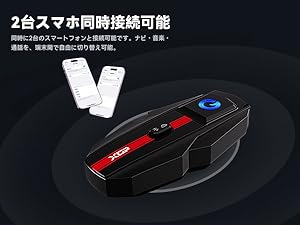
Image: Rider using voice commands with XGP intercom. This image depicts a motorcyclist using voice commands, with visual cues indicating activation of Google Assistant or Siri for tasks like navigation, music playback, and making calls.
- Үн Жардамчысын жандыруу: Briefly press the voice command button (often the multi-function button or a dedicated button, refer to specific button layout on your device) to activate Google Assistant or Siri.
- You can then use voice commands for navigation, making calls, checking weather, and controlling music.
4.6. Dual Smartphone Connection
The XGP intercom supports simultaneous connection to two smartphones, allowing you to switch between navigation, music, and calls seamlessly.
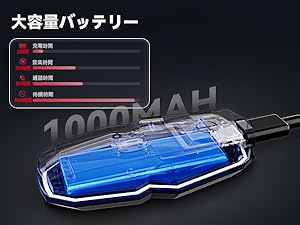
Image: XGP intercom connected to two smartphones. This image shows the XGP intercom unit wirelessly connected to two separate smartphones, illustrating its dual device connectivity feature.
5. Заряддоо жана батареянын иштөө мөөнөтү
The XGP intercom is equipped with a 1000mAh lithium battery, offering extended usage times:
- Заряддоо убактысы: Болжол менен 2 саат.
- Музыка ойнотуу убактысы: 30 саатка чейин.
- Сүйлөшүү убактысы: 35 саатка чейин.
- Күтүү убактысы: 360 саатка чейин.
5.1. Заряддоо чаралары

Image: XGP intercom charging with 5W adapter. This image shows the XGP intercom unit connected via a USB-C cable to a 5W power adapter, emphasizing the importance of using the correct charger.
Маанилүү:
- Always use a standard 5W (5V/1A) power adapter for charging.
- Using an incompatible or higher wattage adapter may damage the battery or prevent the device from starting.
- If the device cannot be charged, try charging it from a computer's USB port.
6. Техникалык тейлөө
- Тазалоо: Regularly wipe the device with a soft, dry cloth to remove dust and dirt. Avoid using harsh chemicals or abrasive cleaners.
- Гидроизоляция: The device is IP67 waterproof. Ensure the USB-C charging port cover is securely closed when not charging to maintain its waterproof integrity.
- Сактагыч: Store the intercom in a cool, dry place away from direct sunlight and extreme temperatures.
- Батареяга кам көрүү: For prolonged storage, charge the battery to about 50% every few months to prevent deep discharge.
7. Кыйынчылыктарды
If you encounter issues with your XGP intercom, refer to the following common problems and solutions:
| Көйгөй | Мүмкүн себеп | Чечим |
|---|---|---|
| Түзмөк күйбөйт | Батареянын аздыгы; Аппараттын бузулушу | Charge the device fully; Contact support if issue persists |
| Cannot pair with another device | Not in pairing mode; Devices too far apart; Already connected to another device | Ensure both devices are in pairing mode; Reduce distance; Disconnect from other devices |
| Poor audio quality / Noise interference | Improper speaker/mic placement; High wind/engine noise; Obstacles | Adjust speaker/mic position; Ensure mic is not obstructed; Noise cancellation is active; Reduce speed if necessary |
| Intercom disconnects frequently | Out of range; Obstacles between riders; Low battery | Stay within 1200m range; Avoid large obstacles; Charge battery |
| Voice commands not responding | Voice assistant not activated; Microphone issue; Poor network connection (for some commands) | Ensure voice assistant is active on smartphone; Check mic connection; Ensure good network coverage |
8. Техникалык шарттар
| Өзгөчөлүк | Деталь |
|---|---|
| Бренд | XGP |
| Модель аты | XGP |
| Байланыш технологиясы | Зымсыз (Bluetooth) |
| Зымсыз байланыш технологиясы | Bluetooth 5.2 |
| Noise Control | Noise Cancellation (CVC/DSP) |
| Frequency Response | 2402 МГц |
| Домофон диапазону | 1200 метрге чейин |
| Батарея сыйымдуулугу | 1000 мАч |
| Үзгүлтүксүз колдонуу убактысы | 35 Hours (Talk), 30 Hours (Music) |
| Күтүү убактысы | 360 саат |
| Заряддоо убактысы | 2 саат |
| Сууга туруктуулук деңгээли | IP67 суу өткөрбөйт |
| Диаметри | 40 миллиметр |
| Импеданс | 1 Ом |
| Продукциянын өлчөмдөрү | 8.3 x 4.2 x 1.3 см |
| Продукт Салмагы | 350 г |
9. Кепилдик жана колдоо
XGP is committed to providing reliable products. Your XGP Motorcycle Intercom comes with the following warranty and support:

Image: XGP Logo. The official logo for the XGP brand.
- Кепилдик мөөнөтү: A 2-year warranty is provided from the date of purchase.
- Initial Defects: For initial defects, a 30-day return/exchange service is available from the date of purchase.
- Кардарларды колдоо: If you have any questions or require assistance, please contact our customer support team. We are dedicated to ensuring your satisfaction.