
VESOGY 9158F
VESOGY Infrared Thermometer Gun User Manual
Model: 9158F | Brand: VESOGY
1. Киришүү
The VESOGY Infrared Thermometer Gun is a highly accurate and easy-to-use device designed for non-contact temperature measurement. It is suitable for a wide range of applications including cooking, industrial inspections, and home maintenance. This thermometer provides quick and reliable readings without direct contact, ensuring safety and convenience.
Important Safety Note: This thermometer is NOT suitable for measuring human or animal body temperature. It measures surface temperature only.

Figure 1: VESOGY Infrared Thermometer Gun
2. Орнотуу
2.1 Батареяны орнотуу
The thermometer requires two AAA batteries (included). To install or replace batteries:
- Locate the battery compartment cover at the base of the handle.
- Капкакты жебе көрсөткөн тарапка жылдырыңыз.
- Туура полярдуулукту (+/-) камсыз кылуу менен эки AAA батарейкасын салыңыз.
- Батарея уясынын капкагын бекем жабыңыз.

Сүрөт 2: Батареяны орнотуу
3. Иштөө нускамалары
3.1 Негизги өлчөө
Температураны өлчөө үчүн:
- Point the thermometer's laser at the desired target surface.
- Press and hold the trigger. The display will show a live temperature reading.
- Акыркы өлчөнгөн температураны дисплейде кармап туруу үчүн триггерди коё бериңиз.

Figure 3: Laser Aiming for Accurate Readings
3.2 Дисплейдин өзгөчөлүктөрү
The thermometer features an HD colorful VA display that illuminates numbers with distinct resolution, making it easy to read in low-light or no-light conditions. It also includes a 20-second auto-off function to conserve battery life and a low battery indicator.
- Скандоо режими: Активдүү өлчөөнү көрсөтөт.
- Кармоо режими: Displays the last measured temperature.
- Max/Min/Avg Mode: Shows maximum, minimum, or average temperatures during a scan.
- Emissivity Icon: Indicates the current emissivity setting.
- Temperature Unit Icon: Displays temperature in °F or °C.
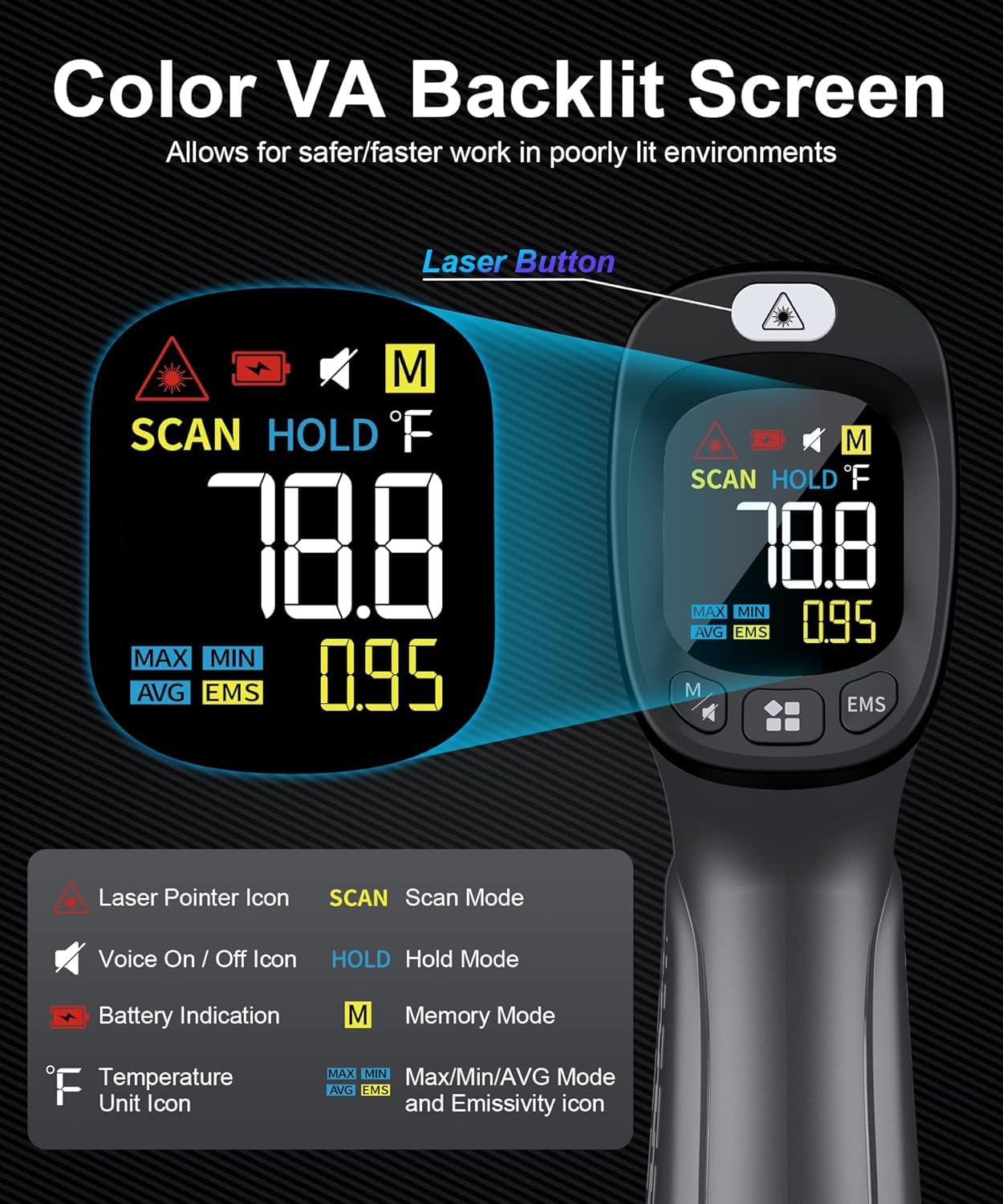
Figure 4: Detailed Display Information
3.3 Өлчөө режимдери
The device offers multiple measurement modes for comprehensive analysis:
- Макс режими: Displays the highest temperature recorded during a continuous scan.
- Минималдуу режим: Displays the lowest temperature recorded during a continuous scan.
- Average Mode: Calculates and displays the average temperature over a continuous scan.

Figure 5: Understanding Measurement Modes
3.4 Adjustable Emissivity and Distance-to-Spot Ratio (D:S)
Emissivity is crucial for accurate temperature readings, as different materials emit infrared energy differently. This thermometer allows for adjustable emissivity to ensure precise measurements on various surfaces. The D:S ratio of 12:1 means that from 12 inches away, the thermometer measures a 1-inch area.

Figure 6: Emissivity and Distance-to-Spot Ratio
Emissivity Table (Common Materials)
| Чыгаруучу | Материал |
|---|---|
| 0.98 | Limestone, frost crystals, filed surface graphite |
| 0.95 | Asbestos, asphalt, ceramic, concrete, copper, dirt, paper, black paint, rubber, candle soot, soil saturated with water, distilled water |
| 0.9 | Red brick, frozen food, sand, textile, planed wood, slight pattern red wallpaper, untreated plasterboard, black paper, lacquer enamel, untreated chipboard |
| 0.85 | Carbon, porous untreated fibre board, hard untreated fibre board, green paper, snow, common brass |
| 0.75 | Sawdust, fireclay, fused quartz, glazed grog |
4. Техникалык тейлөө
To ensure the longevity and accuracy of your thermometer, follow these maintenance guidelines:
- Тазалоо: Түзмөктү жумшак чүпүрөк менен сүртүңүз,amp кездеме. Абразивдүү тазалагычтарды колдонбоңуз же аппаратты сууга салбаңыз.
- Сактагыч: Термометрди салкын, кургак жерде, күндүн түз тийген нурларынан жана өтө жогорку температурадан алыс сактаңыз.
- Батареяга кам көрүү: Агып кетпеш үчүн аппарат узак убакыт бою колдонулбаса, батареяларды алып салыңыз.
5. Кыйынчылыктарды
If you encounter issues with your thermometer, refer to the following common solutions:
- Дисплей/кубат жок: Батареянын орнотулушун текшерип, батарейкалары түгөнүп калбагандыгын текшериңиз. Керек болсо алмаштырыңыз.
- Туура эмес окуулар: Verify the emissivity setting matches the material being measured. Ensure the target is within the optimal distance-to-spot ratio.