
1. Киришүү
This manual provides detailed instructions for the installation, operation, and maintenance of the RWRAPS TVPS1-63LW Energy Meter and Circuit Protector. This device is designed to monitor electrical parameters and provide protection against over-voltage, томдун астындаtage, over-current, and electric leakage. It also features energy metering and a timer function, with remote monitoring capabilities via a mobile application.

Сүрөт 1.1: Алдыңкы view of the RWRAPS TVPS1-63LW Energy Meter and Circuit Protector, showing the display and control buttons.
2. Коопсуздук маалыматы
Орнотуудан жана иштетүүдөн мурун бардык коопсуздук эскертүүлөрүн жана нускамаларын кунт коюп окуп чыгыңыз. Бул нускамаларды аткарбоо электр тогуна урунууга, өрткө же олуттуу жаракат алууга алып келиши мүмкүн.
- Орнотуу жергиликтүү электр эрежелерине жана эрежелерине ылайык квалификациялуу электрик тарабынан аткарылышы керек.
- Кандайдыр бир орнотуу, зымдарды өткөрүү же тейлөө иштерин жүргүзүүдөн мурун негизги электр кубаты өчүрүлгөнүн текшериңиз.
- Эгер аппарат бузулуп калса, аны иштетпеңиз.
- Бул аппарат үй ичинде колдонуу үчүн гана иштелип чыккан.
- The protector can cut off both Live (L) and Neutral (N) wires simultaneously for enhanced safety.
3. Продукциянын өзгөчөлүктөрү
The RWRAPS TVPS1-63LW offers a range of functionalities for comprehensive electrical system management:
- Жөнгө салынуучу коргоо: Configurable settings for under-voltage (140V-210V), over-voltage (230V-300V), over-current (1-63A), and electric leakage (10-99mA).
- Энергияны өлчөө: Displays power consumption (0-99999.9 kWh) and allows for data storage even after power loss.
- реалдуу убакыт мониторинг: Integrated voltage meter, ammeter, and timer functions.
- Калибрлөө: Тtage/current/kW calibration range of -9.9% to 9.9%.
- Таза дисплей: Colorful LCD HD display with backlight for visibility in various lighting conditions.
- Алыстан башкаруу: WiFi connectivity for monitoring and setting adjustments via a mobile application.
- Маалыматтарды сактоо: Electric energy data is stored and memorized during power outages, resuming accumulation upon reconnection.
4. Орнотуу жана орнотуу
The device is designed for DIN rail mounting. Follow these steps for proper installation:
- Электр энергиясын өчүрүү: Ensure the main power supply to the circuit is completely turned off before beginning installation.
- Монтаждоо: Securely mount the RWRAPS TVPS1-63LW onto a standard DIN rail within your electrical panel.
- Зымдар: Connect the incoming Live (L) and Neutral (N) wires to the 'IN' terminals at the top of the device. Connect the outgoing Live (L) and Neutral (N) wires to the 'OUT' terminals at the bottom of the device. Ensure all connections are tight and secure.
- Электр энергиясын калыбына келтирүү: Once wiring is complete and verified, restore power to the circuit. The device display should illuminate.
5. Иштөө нускамалары
5.1. Дисплей жана индикаторлор

Сүрөт 5.1: Детальдуу view of the device display, highlighting indicators and control buttons.
- V Indicator: Over/Under Voltage Alarm Indicator.
- А көрсөткүч: Over-Current Alarm Indicator.
- L Indicator: Leakage Alarm Indicator.
- WiFi көрсөткүчү: WiFi байланышынын абалын көрсөтөт.
- PULSE Indicator: Kilo-Watt Hour Meter Pulse Indicator.
5.2. Баскыч функциялары
- Кубат баскычы (⏻): Manual switch to turn the device ON/OFF.
- SET баскычы: Long press for 3 seconds to enter the setting interface.
- T Button (▲): Adjustment key for increasing values or navigating menus.
- WiFi Button (▼): Adjustment key for decreasing values or navigating menus. Long press for 5 seconds to pair with WiFi.
5.3. Дисплей режимдери
The device cycles through different display modes to show various electrical parameters:

Image 5.3: The device display cycling through KWH, KW, and Power Factor readings.
- KWH Display: Shows total accumulated energy consumption in kilowatt-hours.
- KW Display: Shows instantaneous power consumption in kilowatts.
- Power Factor Display: Shows the power factor (COSΦ).
5.4. Setting Protection Values
Protection values for under-voltage, ашыкча томtage, over-current, and leakage can be set directly on the device or via the mobile application.
- көпкө басыңыз SET button for 3 seconds to enter the setting menu.
- колдонуу T (▲) жана WiFi (▼) buttons to navigate through the settings (e.g., Under Voltage Protection, Over Voltage Protection, Over Current Protection, Leakage Protection, Reconnect Time, Calibration).
- басыңыз SET button briefly to select a parameter.
- колдонуу T (▲) жана WiFi (▼) маанисин тууралоо үчүн баскычтар.
- басыңыз SET button again to confirm the value and move to the next setting or exit the menu.
5.5. Мобилдик тиркемелерди интеграциялоо
The RWRAPS TVPS1-63LW can be connected to a mobile application for remote monitoring and control.

Image 5.5: The RWRAPS TVPS1-63LW device shown alongside a smartphone displaying its companion mobile application.

Image 5.6: Screenshot of the mobile application interface, illustrating options for setting protection values and viewing alarm records.
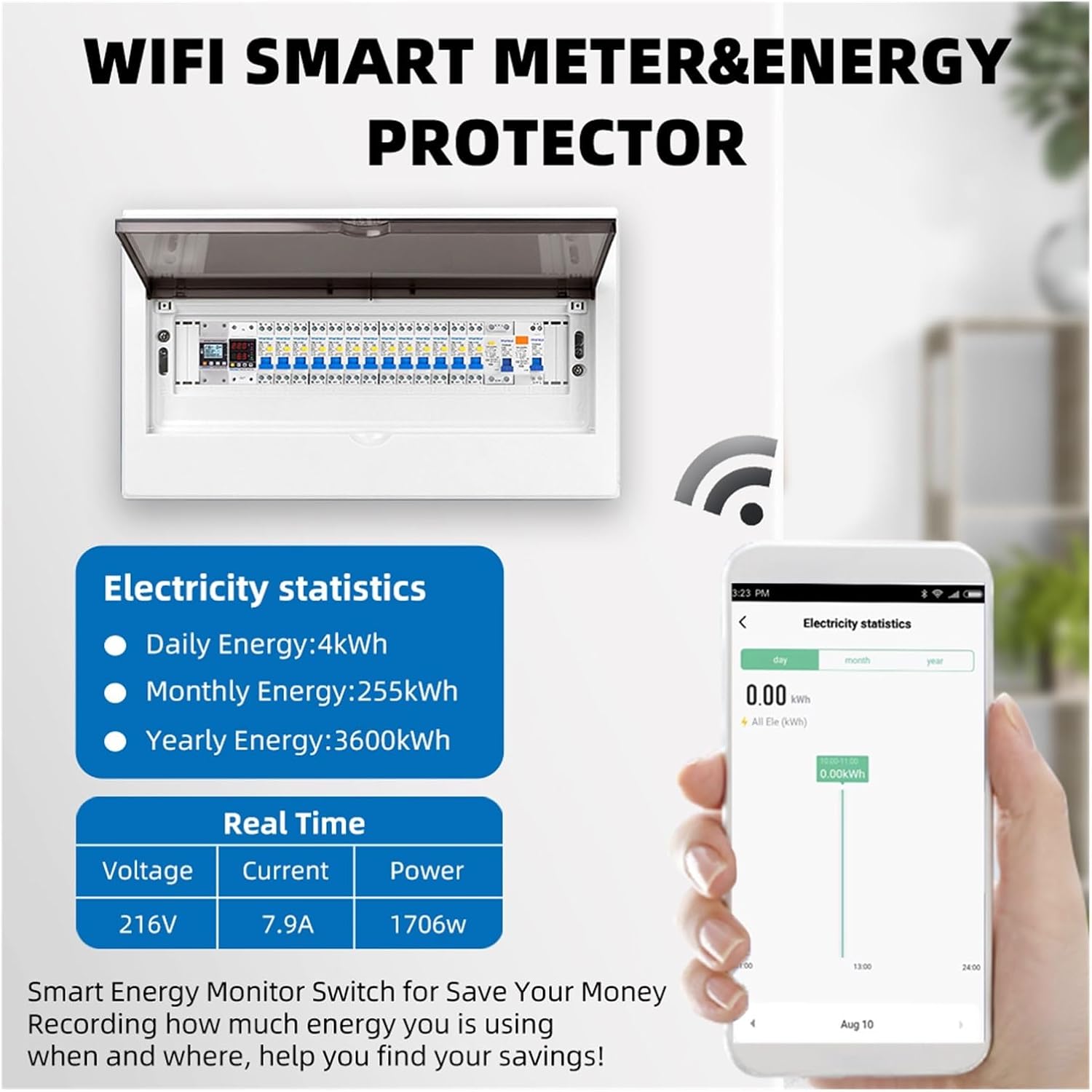
Image 5.7: The mobile application displaying detailed electricity statistics and real-time data for voltagд, ток жана күч.
- Колдонмону жүктөп алуу: Download the compatible mobile application (refer to product packaging or manufacturer's website for app name and download links).
- Жупташтыруу: көпкө басыңыз WiFi (▼) button on the device for 5 seconds to enter pairing mode. Follow the in-app instructions to connect the device to your WiFi network.
- Алыстан байкоо: Туташкандан кийин, мүмкүн view реалдуу убакыттагы көлөмtage, current, power, and energy consumption data from your smartphone.
- Алыскы орнотуулар: Adjust protection parameters (under-voltage, ашыкча томtage, over-current, leakage) and reconnect time directly from the app.
- Маалыматтарды талдоо: The app provides electricity statistics, including daily, monthly, and yearly energy usage, helping to monitor and manage consumption.
6. Техникалык шарттар
| Параметр | Нарк |
|---|---|
| Модел | TVPS1-63LW |
| Rated Voltage | 230V |
| Жыштык | 50Гц/60Гц |
| Томдун астындаtage Коргоо диапазону | 140V-210V (Демейки: 170V) |
| Voltage Коргоо диапазону | 230V-300V (Демейки: 270V) |
| Ашыкча ток коргоо диапазону | 1-63A |
| Электр агып кетүүсүнөн коргоо | 10-99мА |
| Кайра туташуу убактысы (кечигүү күйүк) | 1 секунддан 500 секундга чейин (демейки: 30 секунд) |
| Кубаттуулукту көрсөтүү диапазону | 0-99999.9 кВт/саат |
| Тtage/Current/kW Calibration | -9.9%дан 9.9%га чейин |
| Материал | ABS Flame Resistant |
| Элемент Салмагы | 200 грамм (болжол менен 7.1 унция) |
7. Кыйынчылыктарды
If you encounter issues with your RWRAPS TVPS1-63LW, refer to the following common problems and solutions:
- Түзмөк күйбөй жатат: Check main power supply and ensure all wiring connections are secure.
- No WiFi connection: Ensure your WiFi network is 2.4GHz. Long press the WiFi button for 5 seconds to re-enter pairing mode and follow app instructions. Check router distance and signal strength.
- Тез-тез баш тартуу: Review your set protection parameters (over-voltage, томдун астындаtage, over-current, leakage). These may be set too sensitively for your electrical load. Adjust values as needed, or consult an electrician.
- Туура эмес окуулар: Томду аткарыңызtage/current/kW calibration if you suspect inaccurate measurements.
- Дисплей көрүнбөйт: Check for power supply. The LCD has a backlight for visibility.
Туруктуу маселелер үчүн кардарларды колдоо кызматына кайрылыңыз.
8. Техникалык тейлөө
The RWRAPS TVPS1-63LW is designed for minimal maintenance. However, periodic checks are recommended:
- Тазалоо: Түзмөктү кургак, жумшак чүпүрөк менен акырын сүртүңүз. Абразивдүү тазалоочу каражаттарды же эриткичтерди колдонбоңуз.
- Туташуу текшерүү: Periodically inspect wiring connections to ensure they remain tight and free from corrosion. Ensure power is off before checking connections.
- Программалык камсыздоонун жаңыртуулары: Check the mobile application or manufacturer's webоптималдуу иштөөнү жана коопсуздукту камсыз кылуу үчүн жеткиликтүү болгон программалык камсыздоонун жаңыртуулары үчүн сайт.
9. Кепилдик жана колдоо
For warranty information, please refer to the documentation included with your purchase or visit the RWRAPS official website. For technical support, product inquiries, or assistance with troubleshooting, please contact RWRAPS customer service through the contact information provided on their webсайт же сатып алуу платформаңыз.