
1. Киришүү
This user manual provides detailed instructions for the Tuwei TDL401 Thermal Label Printer. It covers the setup, operation, maintenance, and troubleshooting of your device. Please read this manual thoroughly before using the printer to ensure proper function and to maximize its lifespan.
The Tuwei TDL401 is a high-speed thermal label printer designed for efficient and clear printing. It features a 203dpi resolution, a print speed of 180mm/s, and supports thermal adhesive label paper with widths ranging from 40mm to 80mm. Connectivity options include USB and Bluetooth, allowing for flexible integration with various devices.
2. Пакеттин мазмуну
Төмөндө тизмеленген нерселердин баары пакетиңизге камтылганын текшериңиз:
- 1 x Tuwei TDL401 Thermal Label Printer
- 1 х Колдонуучунун колдонмосу (бул документ)
- 1 x Power Adapter (US plug 100-240V)
- 1 x USB кабели
3. Продукт бүтүп калдыview
Familiarize yourself with the main components and interfaces of your Tuwei TDL401 printer.

3.1-сүрөт: Фронт view of the Tuwei TDL401 Thermal Label Printer, showing the sleek white casing and paper output slot.

3.2-сүрөт: Арткы view of the printer indicating the cover opening button, power interface, and data interface (USB/Bluetooth). Dimensions are also shown: 149mm (length), 79mm (width), 72mm (height).
4. Орнотуу
4.1 Пакеттен чыгаруу жана жайгаштыруу
- Принтерди жана бардык аксессуарларды таңгактан этияттык менен алып чыгыңыз.
- Принтерди туруктуу, тегиз жана жетиштүү желдетүү бар бетке коюңуз.
- Ensure there is enough space around the printer for paper loading and operation.
4.2 Кубат туташтыруу
- Connect the power adapter to the printer's power interface (refer to Figure 3.2).
- Кубат адаптерин ылайыктуу электр розеткасына (100-240 В) сайыңыз.
- The printer will typically power on automatically or indicate readiness with an LED light.
4.3 Этикетка кагазын жүктөө
The printer supports thermal adhesive label paper with a roll width of 40mm to 80mm.
- Принтердин капкагын ачуу үчүн капкакты ачуу баскычын басыңыз.
- Insert the label roll into the paper compartment, ensuring the printable side of the labels faces upwards.
- Adjust the paper guides to fit the width of your label roll snugly, allowing for free movement but preventing excessive side-to-side play.
- Pull a small length of labels out past the print head and close the printer cover firmly until it latches.

4.1-сүрөт: Printer with the top cover open, revealing the paper compartment and internal mechanisms for loading labels.
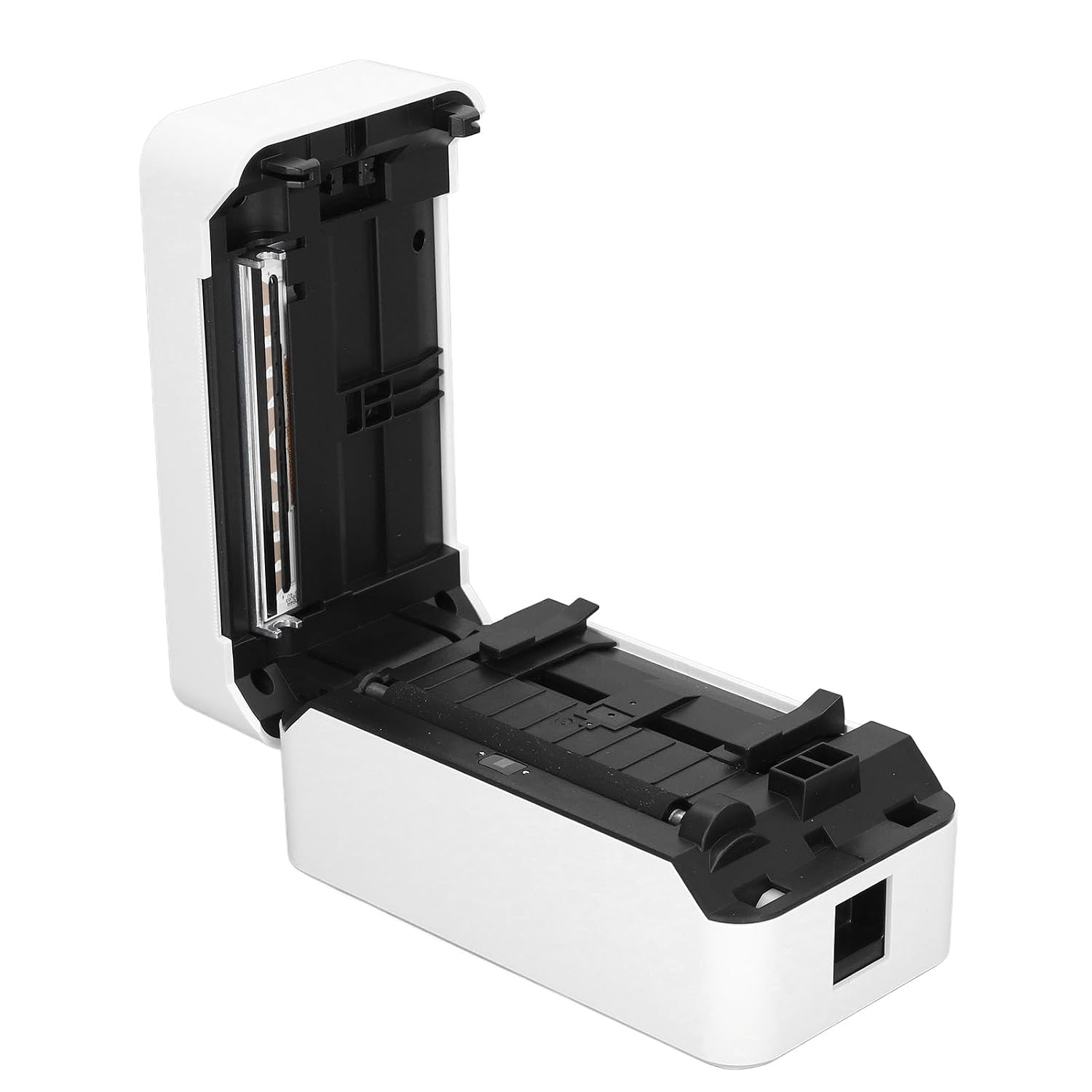
4.2-сүрөт: Деталдаштырылган view of the incisive paper cutting edge and the adjustable guides for setting the printing width.
4.4 Connecting to a Device (USB/Bluetooth)
4.4.1 USB туташуу
- Connect one end of the provided USB cable to the printer's USB port and the other end to your computer.
- Your operating system may automatically detect the printer and install basic drivers. For full functionality, it is recommended to install the official drivers from the manufacturer's webсайт (эгер бар болсо).
4.4.2 Bluetooth байланышы
- Ensure Bluetooth is enabled on your mobile device or computer.
- Turn on the printer. The Bluetooth indicator light (if present) should be blinking or solid, indicating it's ready for pairing.
- On your device, search for available Bluetooth devices and select 'TDL401' or a similar name.
- Follow any on-screen prompts to complete the pairing process. A PIN (e.g., 0000 or 1234) may be required.
- Once paired, you can print directly from compatible applications on your device.
5. Иштөө нускамалары
5.1 Негизги басып чыгаруу
- Ensure the printer is powered on and connected to your device via USB or Bluetooth.
- Open the document or label design software on your computer or mobile device.
- Колдонмоңуздагы басып чыгаруу опциясын тандаңыз.
- Choose the 'Tuwei TDL401' printer from the list of available printers.
- Adjust print settings such as label size, orientation, and number of copies as needed.
- Click 'Print' to send the job to the printer.
5.2 Print Speed and Quality
- The TDL401 printer offers a high print speed of 180мм/сек, allowing for rapid completion of printing tasks.
- With a print resolution of 203дпи, the printer produces clear images and fine text, ensuring excellent label quality.
5.3 Колдоого алынган медиа
The printer is designed for use with thermosensitive adhesive label paper. It supports roll widths from 40mm to 80mm, with a maximum paper width of 80 ± 0.5 mm.
6. Техникалык тейлөө
Үзгүлтүксүз тейлөө оптималдуу иштешин камсыз кылат жана принтериңиздин иштөө мөөнөтүн узартат.
6.1 Басып чыгаруу башын тазалоо
The print head is a critical component and should be cleaned regularly, especially if print quality degrades.
- Принтерди өчүрүп, электр кабелин ажыратыңыз.
- Принтердин капкагын ачыңыз.
- Кебезди жеңил колдонуңуз dampened with isopropyl alcohol (70% or higher) to gently wipe the print head surface. Avoid touching the print head with bare hands.
- Капкакты жаап, кубатту кайра туташтырардан мурун басып чыгаруу башынын толук кургашына жол бериңиз.

6.1-сүрөт: Жакын план view of the thermal print head, which requires careful cleaning to maintain print quality.
6.2 Жалпы тазалоо
- Принтердин сыртын жумшак менен сүртүңүз, damp кездеме. Катуу химиялык заттарды же абразивдүү тазалагычтарды колдонбоңуз.
- Remove any dust or paper debris from the paper compartment using a soft brush or compressed air.
7. Кыйынчылыктарды
This section addresses common issues you might encounter with your Tuwei TDL401 printer.
| Көйгөй | Мүмкүн себеп | Чечим |
|---|---|---|
| Принтер күйбөйт | No power supply; Faulty power adapter/cable | Ensure power cable is securely connected to printer and outlet. Test outlet with another device. Check power adapter for damage. |
| Poor print quality (faint, blank lines) | Dirty print head; Incorrect paper type; Low quality labels | Clean the print head as described in Section 6.1. Ensure you are using high-quality thermal adhesive label paper. |
| Printer not detected via USB | Loose USB cable; Driver not installed; Faulty USB port | Ensure USB cable is securely connected. Install the correct printer drivers. Try a different USB port on your computer. |
| Bluetooth аркылуу туташуу мүмкүн эмес | Bluetooth off on device; Printer not in pairing mode; Incorrect PIN | Ensure Bluetooth is enabled on your device. Restart the printer. Re-attempt pairing and ensure the correct PIN (e.g., 0000 or 1234) is entered. |
| Кагаз тыгылышы | Improper paper loading; Damaged labels | Turn off the printer and open the cover. Carefully remove any jammed paper. Reload paper correctly, ensuring it's aligned and not wrinkled. |
8. Техникалык шарттар
Detailed technical specifications for the Tuwei TDL401 Thermal Label Printer.
| Өзгөчөлүк | Спецификация |
|---|---|
| Модел | TDL401 |
| Бренд | Tuwei |
| Басма технологиясы | Термикалык |
| Print Resolution | 203 dpi (203 x 203 DPI) |
| Басып чыгаруу ылдамдыгы | 180 мм/с |
| Print Width | Approx. 72mm / 2.83 inches |
| Paper Roll Width | 40 - 80 мм / 1.57 - 3.15 дюйм |
| Maximum Paper Width | 80 ± 0.5 мм |
| Printing Medium | Thermosensitive Adhesive Label Paper |
| Байланыш | USB, Bluetooth (BT) |
| Instruction Set | TSPL |
| Материал | ABS |
| Power Input | 100-240V (US plug specification) |
| Принтердин чыгышы | Монохромдуу |
| Шайкеш түзмөктөр | Компьютерлер, смартфондор |
| Келип чыккан өлкө | АКШ |
9. Кепилдик жана колдоо
For warranty information and technical support, please refer to the documentation provided with your purchase or contact your retailer. Keep your purchase receipt as proof of purchase for warranty claims.