
1. Киришүү
This manual provides essential instructions for the installation, operation, and maintenance of your DENFOON Motorized Blackout Roller Shades. These shades are designed for convenience and light control, featuring remote operation, solar charging capabilities, and smart home integration options. Please read this manual thoroughly before installation and use to ensure proper function and safety.
Видео: Бүттүview of DENFOON Motorized Blinds functionality and design.
2. Пакеттин мазмуну
Орнотууну баштоодон мурун бардык компоненттер бар экендигин текшериңиз:
- Motorized Roller Shade (1)
- Алыстан башкаруу (1)
- Solar Panel (1)
- Installation Instructions Guide (1)
- Орнотуу жабдуулары (кронштейндер, бурамалар, анкерлер)

Image: All components included with the DENFOON Motorized Blackout Roller Shade.
3. Орнотуу
3.1 Measurement Guidelines
Accurate measurements are crucial for proper fit and function. There are two primary mounting scenarios:
- Тоо ичинде: The shade fits within the window frame. Order width = window width - 1/4 inch. Window depth must be 2 inches or 4 inches.
- Тоо сыртында: The shade is mounted outside the window frame. Order width = window width + 4 inches.

Image: Standard product measurement and purchase rules for various sizes.

Image: Custom Inside Mount measurement and purchase rules.

Image: Custom Outside Mount measurement and purchase rules.
3.2 Mounting the Shade
Refer to the included Installation Instructions Guide for detailed steps on mounting the brackets and securing the shade. Ensure the mounting surface is suitable for the weight of the shade.
Video: Unboxing and initial look at the DENFOON Motorized Blind components.
Video: Demonstration of installing the motorized blinds.
4. Иштөө нускамалары
4.1 Алыстан башкарууну жупташтыруу
To pair the remote control with your shade:
- Remove the insulator pull tab from the remote control.
- Switch the button on the remote from 'user' to 'admin'.
- Hold the 'M' key on the shade for two seconds. The motor will rotate forwards and backwards once to indicate pairing mode.
- Hold the 'S' key on the remote for two seconds. The shade will move forwards and backwards once to confirm successful pairing.
Video: Instructions on how to connect the remote control to the blinds.
4.2 Setting Upper and Lower Limits
After pairing, set the desired upper and lower limits for your shade's movement using the remote control as per the detailed instructions in the included guide.
4.3 Негизги операция
Use the remote control's up, down, and pause buttons to operate the shade. The motor operates quietly and smoothly.

Image: The included 1-channel remote control for single blind operation.
4.4 Акылдуу үй интеграциясы (милдеттүү эмес)
For voice control via Amazon Alexa or Google Assistant, and Tuya app control, a smart bridge/hub (B0CXXWL6FM) is required. An optional 15-channel remote control (B0CXXN5S4M) can control up to 15 blinds simultaneously. These accessories are compatible only with DENFOON brand products.

Image: Control options for the motorized blinds, including voice, app, and remote control.

Image: The optional Smart Bridge/Hub for controlling multiple blinds via app or voice assistant.
5. Charging and Power
The motorized shades are rechargeable and come with a complimentary solar panel for continuous charging. This reduces the need for frequent battery replacement and promotes environmental sustainability.
- Күн панелин заряддоо: Attach the solar panel to the window to continuously charge the shade's battery. This is ideal for high windows or windows without nearby power access. Ensure the Type-C interface is tightly plugged in.
- USB заряддоо: The shades can also be charged via USB. Note that the charging current of the charger should not exceed 1A. USB chargers and power banks are not included.

Image: The complimentary solar panel included with the blinds.

Image: Solar panel charging the motorized blinds, highlighting convenience and safety for high windows.

Image: Various charging methods for the motorized blinds, including solar, USB, and power bank (USB/power bank not included).
6. Продукциянын өзгөчөлүктөрү
- 100% Blackout Fabric: The advanced fabric features horizontal and vertical textures, providing complete light blockage for optimal privacy and room darkening.
- Thermal Insulation & UV Protection: The fabric offers thermal insulation to help regulate room temperature and provides UV protection.
- Silent Motor: The upgraded motor operates silently, ensuring minimal noise disruption during operation.
- Зымсыз дизайн: Enhances safety for households with children and pets by eliminating cords.

Image: Comparison showing the effectiveness of 100% blackout fabric versus ordinary blinds.
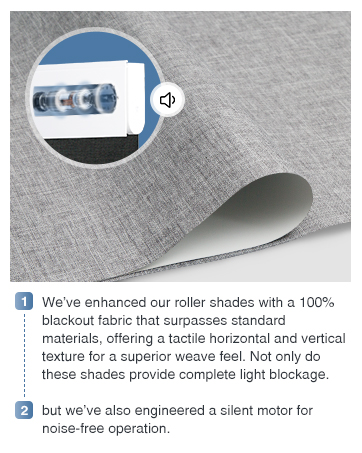
Image: Close-up of the fabric texture and silent motor mechanism.
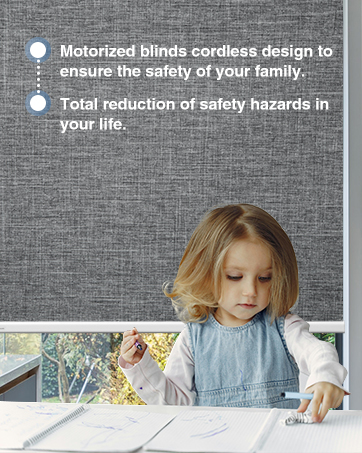
Image: Cordless design of the motorized blinds for enhanced family safety.
7. Техникалык шарттар
| Бренд | DENFOON |
| Модель номери | DENFOON-MB-CB-ESP-72 |
| Продукциянын өлчөмдөрү | 72"L x 34"W |
| Материал | Полиэстер |
| Түс | A-white (Solar Panels Charging) |
| Тунук эмес | Blackout |
| Иштөө режими | Автоматтык |
| Башкаруу түрү | Алыстан |
| Монтаж түрү | Тоонун ичинде |
| Камтылган компоненттер | Solar Panel, Remote Control |
| Батареялар | 1 литий-иондук батарейкалар талап кылынат (кошулган) |
8. Техникалык тейлөө
To ensure the longevity and optimal performance of your DENFOON Motorized Blackout Roller Shades, follow these maintenance guidelines:
- Тазалоо: Spot clean the fabric only. Use a soft, damp cloth with mild soap if necessary. Avoid harsh chemicals or abrasive materials.
- Мотор багуу: The motor is included within the shade. Do not attempt to pull the shade by hand, as this can damage the internal mechanism.
- Күн панели: Күн панелин таза жана чаңдан же таштандылардан таза кармаңыз, бул натыйжалуу кубаттоону камсыз кылат.
- Батарея: The shade uses a rechargeable Lithium Ion battery. Ensure it is regularly charged via the solar panel or USB to maintain functionality.
9. Кыйынчылыктарды
If you encounter issues with your motorized shades, consider the following common solutions:
- Shade Not Responding: Check the remote control battery. Ensure the remote is properly paired with the shade (refer to Section 4.1). Verify the shade's battery is charged.
- Ыйгарымсыз кыймыл: Re-calibrate the upper and lower limits of the shade (refer to the detailed instructions in your included guide).
- Smart Home Connectivity Issues: Ensure your smart bridge/hub is properly set up and connected to your Wi-Fi network. Check the Tuya app for device status and network connection.
- Күн батареясы кубатталбай жатат: Ensure the solar panel is clean and receiving direct sunlight. Verify the Type-C cable connection is secure.
For persistent issues, please consult the full installation instructions or contact DENFOON customer support.
10. Кепилдик жана колдоо
Specific warranty details are provided with your product documentation. Please retain your proof of purchase for any warranty claims. For technical support, troubleshooting assistance, or inquiries regarding your DENFOON Motorized Blackout Roller Shades, please refer to the contact information provided in your product packaging or visit the official DENFOON webсайт.