
1. Киришүү
The EITIPOK SoundSync Pro is a versatile 2-in-1 Bluetooth audio adapter designed to enhance your audio experience. It functions as both a transmitter (TX) and a receiver (RX), allowing you to wirelessly connect non-Bluetooth audio devices to Bluetooth headphones/speakers, or stream audio from your Bluetooth-enabled devices to wired audio systems. Featuring a clear LED display, dual pairing capability, and Qualcomm AptX Low Latency technology, it provides high-quality, synchronized audio for various scenarios, including air travel, home entertainment, and fitness activities.

Image 1.1: EITIPOK SoundSync Pro Bluetooth Transmitter & Receiver.
2. Кутуда эмне бар
- EITIPOK SoundSync Pro Bluetooth Adapter
- USB-C заряддоо кабели
- 3.5 мм аудио кабель
- RCA аудио кабели
- User Manual
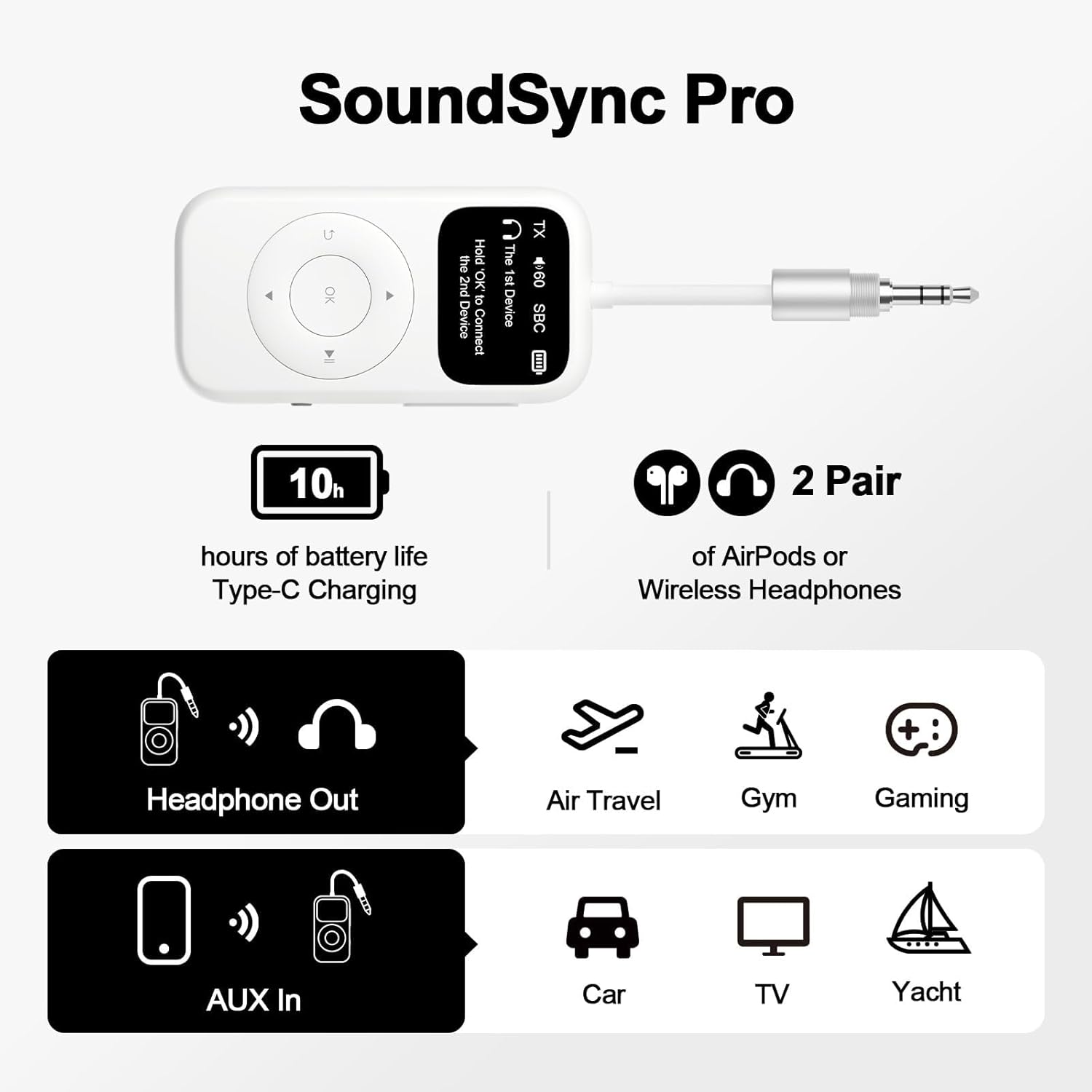
Image 2.1: Package contents including the SoundSync Pro, charging cable, and audio cables.
3. Продукт бүтүп калдыview
The SoundSync Pro features a compact design with an intuitive LED display and easy-to-use controls. It supports both Transmitter (TX) and Receiver (RX) modes, allowing for flexible audio connectivity.
3.1 Негизги өзгөчөлүктөрү
- Bigger LED Display: Shows visible Bluetooth pairing list for easy device selection.
- TX and RX Mode: Supports both transmission and reception of audio signals.
- Qualcomm чипсети: Incorporates AptX Low Latency technology for reduced audio delay (paired device must also support AptX LL).
- Кош жупташтыруу: Connects up to two Bluetooth devices simultaneously.
- Үндү көзөмөлдөө: Integrated buttons for adjusting audio levels.
- Узак ойноо убактысы: Батареянын иштөө мөөнөтү 10 XNUMX саатка чейин.
3.2 Башкаруу каражаттары жана порттор

Сүрөт 3.1: алдыңкы жана каптал view of the SoundSync Pro highlighting its controls and ports.
- 3.5 мм аудио туташуу: Flexible cable for various audio sources.
- Visible Screen: Displays pairing information and status.
- Көлөм +/-: Buttons for adjusting volume.
- TX/RX Power Button: Switch between modes and power on/off.
- Жупташтыруу баскычтары: For connecting one or two headphones.
- Type-C заряддоо порту: Аппаратты заряддоо үчүн.
4. Орнотуу
4.1 Аппаратты заряддоо
Before first use, fully charge the SoundSync Pro using the provided USB-C charging cable. Connect the USB-C end to the device's charging port and the USB-A end to a compatible USB power adapter (not included).
4.2 Аудио булактарына туташуу
The SoundSync Pro can connect to audio sources via its integrated 3.5mm audio jack or the included RCA cable for devices like TVs or stereo systems.
4.3 Switching Between TX (Transmitter) and RX (Receiver) Modes
Locate the TX/RX switch on the side of the device. Slide the switch to the desired mode:
- TX (Өткөргүч) режими: To send audio from a non-Bluetooth device (e.g., airplane entertainment, TV) to Bluetooth headphones or speakers.
- RX (кабыл алуучу) режими: To receive audio from a Bluetooth-enabled device (e.g., smartphone) and play it through a wired audio system (e.g., car stereo, home speakers).
5. Иштөө нускамалары
5.1 Pairing in TX (Transmitter) Mode
- Switch the device to TX mode.
- Plug the 3.5mm audio jack into the audio output of your non-Bluetooth device (e.g., airplane seat, TV headphone jack).
- The SoundSync Pro's LED display will show available Bluetooth devices.
- Bluetooth гарнитураңызды же динамигиңизди жупташтыруу режимине коюңуз.
- Select your desired device from the list on the SoundSync Pro's screen and press 'OK' to connect.
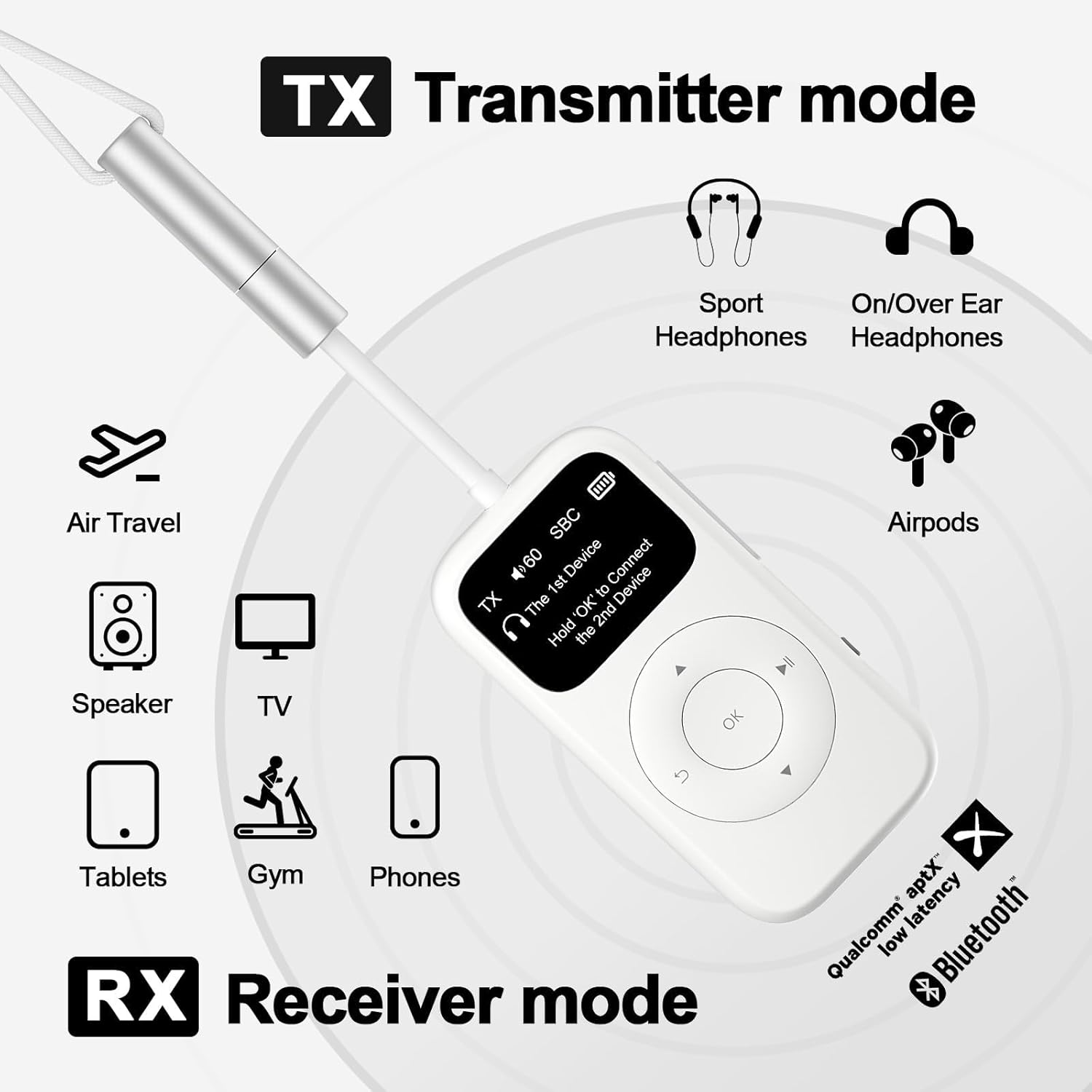
Image 5.1: SoundSync Pro operating in Transmitter (TX) mode, connecting to headphones and various audio sources.
5.2 Pairing in RX (Receiver) Mode
- Switch the device to RX mode.
- Connect the SoundSync Pro to your wired audio system's input (e.g., AUX-in port of a car stereo or home speaker) using the 3.5mm or RCA cable.
- The SoundSync Pro will enter pairing mode, and its name (e.g., AD-BA200) will appear on your Bluetooth-enabled device (e.g., smartphone).
- Select the SoundSync Pro from your device's Bluetooth settings to connect.
5.3 Кош жупташтыруу
The SoundSync Pro can connect to two Bluetooth headphones or speakers simultaneously in TX mode. After successfully pairing the first device, hold the 'OK' button on the SoundSync Pro to connect the second device. This allows two users to listen to the same audio source wirelessly.
5.4 Үндү башкаруу
Use the '+' and '-' buttons on the side of the SoundSync Pro to adjust the audio volume.
5.5 Clearing Bluetooth History
To clear the Bluetooth pairing history, which is useful when replacing paired devices or troubleshooting connection issues:
- Түзмөк күйгүзүлгөнүн текшериңиз.
- Simultaneously press and hold the '+' and '-' buttons for 5 seconds.
- The screen will display "cleared pairing history" to confirm.
Video 5.1: Demonstration of how to clear the Bluetooth pairing history on the SoundSync Pro.
6. Колдонуу сценарийлери
6.1 Airplane Entertainment
Connect the SoundSync Pro to the 3.5mm audio jack of an airplane's in-flight entertainment system to enjoy movies or music with your personal Bluetooth headphones.
Video 6.1: Short demonstration of using the SoundSync Pro as a Bluetooth transmitter for airplane entertainment.
6.2 TV Audio Transmission
Use the SoundSync Pro in TX mode to connect your TV (via 3.5mm or RCA) to Bluetooth headphones, allowing for private listening without disturbing others, especially late at night.
Video 6.2: Demonstration of using the SoundSync Pro to transmit TV audio to Bluetooth headphones.

Image 6.1: SoundSync Pro enabling private TV viewing with Bluetooth headphones.
6.3 Home Stereo/Car Audio Reception
In RX mode, connect the SoundSync Pro to your home stereo or car's AUX input. You can then stream music wirelessly from your smartphone or other Bluetooth devices to your audio system.
7. Техникалык тейлөө
- Заряддоо: Always ensure the device is fully charged before each use to maximize battery life and performance. If the adapter is left idle for a long time, charge it promptly.
- Тазалоо: Түзмөктү тазалоо үчүн жумшак, кургак чүпүрөктү колдонуңуз. Катуу химиялык заттарды же абразивдүү материалдарды колдонуудан алыс болуңуз.
- Сактагыч: Аппаратты түз күн нурунан жана экстремалдык температурадан алыс салкын, кургак жерде сактаңыз.
8. Кыйынчылыктарды
| Маселе | Мүмкүн чечим |
|---|---|
| Түзмөк күйбөйт. | Түзмөктүн толук заряддалганын текшериңиз. Кубат булагына туташтырып, кайра аракет кылыңыз. |
| Bluetooth түзмөгү менен жупташтыруу мүмкүн эмес. | 1. Ensure the SoundSync Pro is in the correct TX/RX mode. 2. Make sure the target Bluetooth device is in pairing mode. 3. Clear the Bluetooth history on the SoundSync Pro (see Section 5.5). 4. Ensure no other devices are interfering with the Bluetooth signal. |
| Audio latency or poor sound quality. | 1. Ensure both the SoundSync Pro and your paired device support AptX Low Latency for optimal performance. 2. Reduce the distance between the SoundSync Pro and the paired device. 3. Check for any physical obstructions or interference. |
| Cannot connect to a second device. | After connecting the first device in TX mode, hold the 'OK' button on the SoundSync Pro to initiate pairing for the second device. |
9. Техникалык шарттар
- Модел: B0CL6GL3C7
- Бренд: EITIPOK
- Байланыш технологиясы: Bluetooth
- Кубат булагы: Батарея менен иштейт
- Элемент Салмагы: 3.52 унция (0.1 килограмм)
- Пакеттин өлчөмдөрү: 5.98 x 3.43 x 0.67 дюйм
- Өзгөчөлүктөр: Bigger LED Screen, Pair to 2 Headphones, RCA Cable for TVs, Volume Control
- Өндүрүүчү: EITIPOK
- Биринчи жеткиликтүү болгон күнү: 17-октябрь, 2023-жыл
10. Кепилдик жана колдоо
The EITIPOK SoundSync Pro comes with a бир жылдык кепилдик. Additionally, lifetime technical support is available to assist with any product-related inquiries or issues. Please refer to the contact information provided with your purchase for support details.
10.1 Коопсуздук маалыматы
For safe and proper use, please follow these instructions:
- Please fully charge the adapter before usage for longer battery life.
- Please charge it promptly if the adapter is left idle for a long time.
- Please consult the user manual for more detailed safety information.