
1. Киришүү
This manual provides detailed instructions for the proper use, setup, and maintenance of your Yealink W59R Ruggedized DECT Handset. Please read this manual thoroughly before operating the device to ensure optimal performance and safety. The Yealink W59R is designed for environments requiring a durable and reliable communication solution.
2. Продукт бүтүп калдыview
The Yealink W59R is a professional ruggedized DECT handset built to withstand challenging environments. It features an IP67 rating for dust, splash, and water resistance, along with integrated Bluetooth and a vibration alarm. This handset is fully compatible with the Yealink W80 Multi-Cell System, enabling seamless roaming and call handover.
Негизги өзгөчөлүктөрү:
- IP67 рейтинги: Shock, dust, and water resistant for reliable operation in harsh conditions.
- Жакшыртылган туруктуулук: Tough rubberized surface protects against drops, slips, and scratches.
- Үзгүлтүксүз мобилдүүлүк: Compatible with Yealink W80 Multi-Cell System for extensive coverage.
- Bluetooth байланышы: Allows use with Bluetooth headsets for hands-free communication.
- Дирилдөө сигналы: Ensures calls are not missed in noisy environments.
- Optimal HD Audio: Features FNR (Flexible Noise Reduction), full duplex, and Opus codec for clear sound.
- Comprehensive Alarm Functions: Includes push-button, no-movement, man-down, and running alarms for occupational safety.
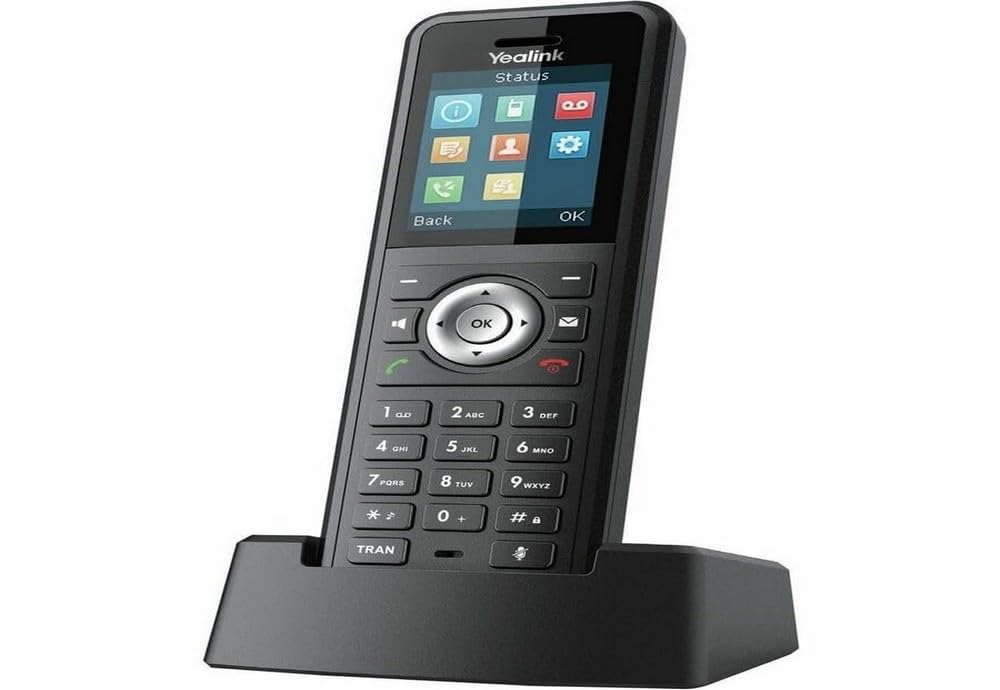
Figure 2.1: Yealink W59R Ruggedized DECT Handset. This image displays the front view of the handset, highlighting its robust design.
3. Орнотуу
3.1. Пакеттин мазмуну
Улантуудан мурун, пакетте бардык элементтер бар экенин текшериңиз:
- Yealink W59R Ruggedized DECT телефону
- Заряддоо бешиги
- Заряддалуучу батарея
- Кубаттуу адаптер
- Декоративдик капкак
- Quick Start Guide
3.2. Батареяны орнотуу
- Телефондун артындагы батарея бөлүкчөсүнүн капкагын табыңыз.
- Этияттык менен капкакты алып салыңыз.
- Кайра заряддалуучу батареяны салыңыз, контакттар туура тегизделгенин текшериңиз.
- Replace the battery compartment cover and secure it firmly to maintain the IP67 rating.
3.3. Телефонду заряддоо
- Кубат адаптерин заряддоочу бешикке туташтырыңыз.
- Кубат адаптерин розеткага сайыңыз.
- Place the handset into the charging cradle. The charging indicator on the handset will illuminate.
- Алгачкы жолу колдонуудан мурун, телефонду кеминде 4 саат кубаттаңыз.
3.4. Телефонду каттоо
The W59R handset must be registered to a Yealink DECT base station (e.g., W80 Multi-Cell System) to function. Refer to your DECT base station's manual for specific registration procedures. Generally, this involves:
- DECT базалык станциясын каттоо режимине коюңуз.
- On the W59R handset, navigate to the registration menu (typically Меню > Орнотуулар > Каттоо > Телефонду каттоо).
- Select the desired base and enter the system PIN (default is 0000).
- Ийгиликтүү каттоодон өткөндөн кийин телефондо ырастоо билдирүүсү көрсөтүлөт.
4. Иштөө нускамалары
4.1. Негизги чалуу функциялары
- Чакыруу: Телефон номерин киргизип, баскычын басыңыз Чалуу ачкыч.
- Чалууга жооп берүү: басыңыз Чалуу key when the handset rings.
- Чалууну аяктоо: басыңыз Чакырууну аяктоо ачкыч.
- Үндү тууралоо: Use the navigation keys during a call to adjust the earpiece volume.
4.2. Bluetooth колдонуу
The W59R supports Bluetooth for connecting wireless headsets. To pair a Bluetooth device:
- Enable Bluetooth on your headset and set it to pairing mode.
- On the W59R, navigate to Меню > Орнотуулар > Bluetooth.
- Bluetooth'ду күйгүзүңүз On жана тандаңыз Paired Devices > Add Device.
- Select your headset from the list of available devices and enter the PIN if prompted (usually 0000 or 1234).
4.3. Ойготкучтун функциялары
The W59R includes several alarm features designed to enhance user safety in hazardous environments. These alarms can be configured by an administrator.
- Push-Button Alarm: Activates an emergency alert when a dedicated button is pressed.
- No-Movement Alarm: Triggers an alert if the handset detects no movement for a configurable period.
- Адам кулаган учурда сигнализация: Activates if the handset detects a sudden change in orientation, indicating a fall.
- Running Alarm: Can be configured to alert if the user is running or moving rapidly beyond a set threshold.

Figure 4.1: Detail of the Yealink W59R handset, showing a button that can be configured for alarm functions.
5. Техникалык тейлөө
5.1. Тазалоо
To maintain the handset's IP67 rating and overall performance:
- Wipe the handset with a soft, damp кездеме.
- Катуу химиялык заттарды, тазалоочу эриткичтерди же күчтүү жуучу каражаттарды колдонбоңуз.
- Ensure all port covers are securely closed after cleaning to maintain water and dust resistance.
5.2. Батареяга кам көрүү
- Батареяны экстремалдуу температурага тийгизүүдөн сактаңыз.
- Charge the battery regularly to prolong its lifespan.
- If the handset will not be used for an extended period, fully charge the battery before storage.
6. Кыйынчылыктарды
This section addresses common issues you may encounter with your W59R handset.
| Көйгөй | Мүмкүн себеп | Чечим |
|---|---|---|
| Телефон күйгүзүлбөйт. | Батарея орнотулган эмес же заряды бүтө элек. | Ensure battery is correctly installed and fully charged. |
| Cannot register handset to base. | Base station not in registration mode; incorrect PIN. | Verify base station is in registration mode. Check the PIN. Ensure handset is within range. |
| Терүү обону жок же чалууларды жасай албайт. | Handset not registered; network issue. | Confirm handset is registered. Check network connection of the base station. |
| Аудио сапаты начар. | Interference; handset out of range. | Move closer to the base station. Avoid sources of interference (e.g., microwaves, Wi-Fi routers). |
If the problem persists after attempting these solutions, please contact Yealink technical support.
7. Техникалык шарттар
| Өзгөчөлүк | Деталь |
|---|---|
| Бренд | Yealink |
| Модель номери | W59R |
| Түс | Кара |
| Телефон түрү | Зымсыз |
| Power Source | Батарея менен иштейт |
| Элементтин өлчөмдөрү (L x W x Y) | 7.6 x 4.4 x 3.7 дюйм |
| Элемент Салмагы | 14.4 унция |
| Шайкеш түзмөктөр | Yealink W80 Multi-Cell System, Bluetooth devices |
| DECT технологиясы | CAT-iq2.0 (not compatible with third-party DECT devices) |
| IP рейтинги | IP67 (Shock, dust, and water resistant) |
| Жаздыруу мүмкүнчүлүгү | 30 Minutes (Answering System Type: Digital) |
| UPC | 841885104410 |
8. Кепилдик жана колдоо
Кепилдик маалыматы: The product specifications indicate that warranty information is not available. Please refer to your purchase documentation or contact your vendor for specific warranty details.
Техникалык колдоо: For technical assistance, troubleshooting beyond this manual, or inquiries regarding your Yealink W59R, please contact Yealink customer support or visit the official Yealink webколдоо булактары үчүн сайт.