
1. Киришүү
Thank you for choosing the MAIRDI M890DBTC Wireless Headset. This manual provides detailed instructions for setting up, operating, and maintaining your headset to ensure optimal performance and longevity. Please read this manual thoroughly before use.

Детальдуу фронт view of the MAIRDI M890DBTC Wireless Headset, showcasing its over-ear design, adjustable headband, and microphone boom.
2. Пакеттин мазмуну
Пакетиңизде бардык буюмдар бар экенин текшериңиз:
- MAIRDI M890DBTC Bluetooth Headset x1
- USB кубаттоо кабели x1
- Колдонуучунун колдонмосу x1
3. Продукт бүтүп калдыview
3.1 Гарнитуранын компоненттери
- Жөнгө салынуучу баш боосу
- Padded Earmuffs
- Rotatable Microphone Boom (330-degree)
- Кубат баскычы
- Үндү жогорулатуу/төмөн баскычтары
- Көп функциялуу баскыч (MFB)
- Үнсүз баскыч
- LED көрсөткүч жарыгы
- Charging Port (Mini USB)
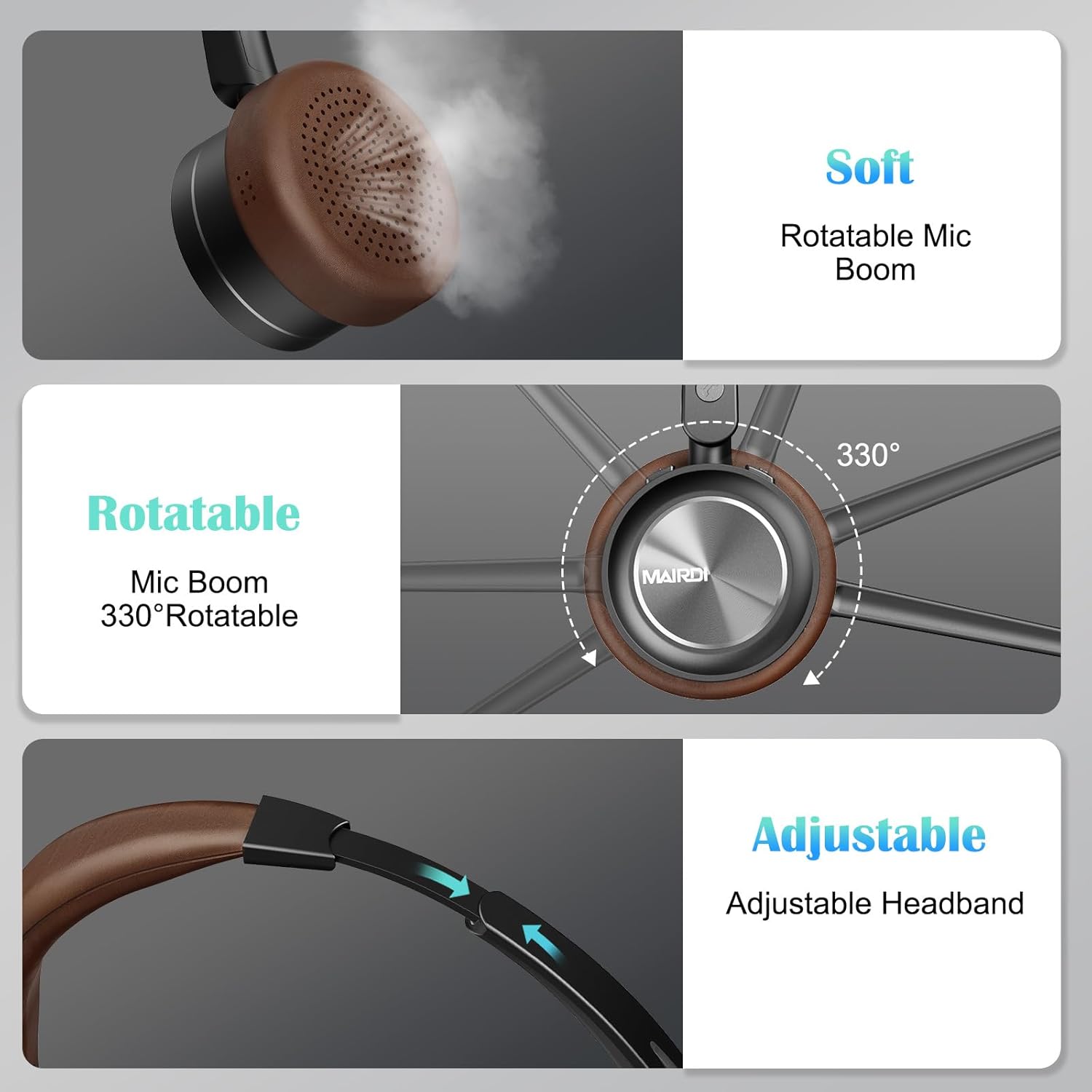
A visual breakdown of the MAIRDI M890DBTC headset's comfort features, including soft earpads, a 330-degree rotatable microphone boom, and an adjustable stainless steel headband.
4. Орнотуу жана заряддоо
4.1 Баштапкы төлөм
Before first use, fully charge the headset. Connect the provided USB charging cable to the headset's Mini USB port and a power source (e.g., computer USB port or USB wall adapter). The LED indicator will show charging status and turn off or change color when fully charged (approximately 2 hours).
4.2 Күйгүзүү/өчүрүү
- Күйгүзүү: LED индикатору көк түстө күйүп-өчкөнгө чейин Кубат баскычын 3 секунд басып туруңуз.
- Өчүрүү: Press and hold the Power Button for 3 seconds until the LED indicator flashes red and then turns off.
5. Иштөө нускамалары
5.1 Bluetooth жупташтыруу
- Гарнитура өчүрүлгөнүн текшериңиз.
- Press and hold the Power Button for approximately 5-7 seconds until the LED indicator flashes red and blue alternately. This indicates pairing mode.
- On your device (smartphone, PC, laptop), enable Bluetooth and search for available devices.
- Select "MAIRDI M890DBTC" from the list of found devices.
- Туташтырылгандан кийин, LED индикатору акырындык менен көк болуп жанат.
5.2 Көп чекиттүү туташуу
The MAIRDI M890DBTC supports connecting to two Bluetooth devices simultaneously.
- Pair the headset with the first device (e.g., smartphone) as described in Section 5.1.
- Disable Bluetooth on the first device. The headset will re-enter pairing mode.
- Pair the headset with the second device (e.g., laptop).
- Биринчи түзмөктө Bluetooth'ту кайра иштетиңиз. Гарнитура эки түзмөккө тең автоматтык түрдө туташышы керек.

The MAIRDI M890DBTC headset connected simultaneously to a smartphone and a laptop, illustrating its multipoint pairing capability for stable connection with two devices.
5.3 Чалууларды башкаруу
- Чалууга жооп берүү/аяктоо: Көп функциялуу баскычты (MFB) бир жолу басыңыз.
- Чакырууну четке кагуу: MFBди 2 секунд басып туруңуз.
- Акыркы номерди кайра терүү: MFBди эки жолу басыңыз.
- Микрофондун үнүн басуу/ачуу: Press the Mute Button once during a call. The LED indicator on the microphone will illuminate when muted.

An image depicting a person wearing the MAIRDI M890DBTC headset, highlighting the noise-canceling microphone feature and the mute button functionality. Visual representation of sound waves before and after noise cancellation is included.
5.4 Үндү башкаруу
- Көлөмү: Үнүн жогорулатуу (+) баскычын басыңыз.
- Үнүн азайтуу: Үндү азайтуу (-) баскычын басыңыз.
6. Техникалык тейлөө
- Гарнитураны дайыма жумшак, кургак чүпүрөк менен тазалаңыз.
- Avoid exposing the headset to extreme temperatures, humidity, or corrosive substances.
- Колдонбогондо гарнитураны салкын, кургак жерде сактаңыз.
- Гарнитураны өз алдынча бөлүп алууга же оңдоого аракет кылбаңыз, анткени бул кепилдикти жокко чыгарат.
7. Кыйынчылыктарды
7.1 Headset Does Not Power On
- Гарнитуранын толук заряддалганын текшериңиз. Аны кубат булагына туташтырып, кайра күйгүзүүдөн мурун кеминде 30 мүнөт заряддап коюңуз.
7.2 Түзмөк менен жупташуу мүмкүн эмес
- Ensure the headset is in pairing mode (LED flashing red and blue alternately).
- Make sure Bluetooth is enabled on your device and it is within 10 meters (33 feet) of the headset.
- Гарнитураны да, түзмөгүңүздү да өчүрүп-күйгүзүп көрүңүз.
- Clear the Bluetooth pairing list on your device and attempt to pair again.
7.3 Аудио жок же аудио сапаты начар
- Гарнитурадагы жана туташкан түзмөгүңүздүн үнүнүн деңгээлин текшериңиз.
- Гарнитура түзмөгүңүзгө туура туташтырылганын текшериңиз. Зарыл болсо кайра жуптаңыз.
- Тоскоолдуктарды же аралыкка байланыштуу көйгөйлөрдү болтурбоо үчүн түзмөгүңүзгө жакыныраак жылыңыз.
- If using with a PC, ensure the MAIRDI M890DBTC is selected as the default audio input/output device in your sound settings.
7.4 Микрофон иштебейт
- Ensure the microphone is not muted (check the LED indicator on the microphone boom).
- Verify that the microphone boom is positioned correctly towards your mouth.
- Гарнитуранын микрофоны киргизүү түзмөгү катары тандалганын текшерүү үчүн түзмөгүңүздүн аудио жөндөөлөрүн текшериңиз.
8. Техникалык шарттар
| Модел | M890DBTC |
| Байланыш технологиясы | Зымсыз (Bluetooth 5.1) |
| Bluetooth диапазону | 20 метрге чейин (60 фут) |
| Батареянын иштөө мөөнөтү (сүйлөшүү убактысы) | 30 саатка чейин |
| Battery Life (Standby Time) | 200 саатка чейин |
| Заряддоо убактысы | Болжол менен 2 саат |
| Микрофон | Advanced Noise-Canceling |
| Динамиктин айдоочусунун өлчөмү | 40мм |
| Жыштык диапазону | 20 Гц - 20 000 Гц |
| Салмагы | 0.21 килограмм (7.4 унция) |
| Материал | Булгаары, Пластик, Дат баспас болот |

The MAIRDI M890DBTC headset positioned over a circuit board, illustrating its advanced Bluetooth 5.1 technology and 40mm speaker drivers for high-definition audio.
9. Кепилдик жана колдоо
MAIRDI products are designed for reliability and performance. For warranty information or technical support, please refer to the contact details provided on the MAIRDI official webсайт же сатып алуу документтери. Кепилдик дооматтар үчүн сатып алганыңыздын далилин сактаңыз.
Кошумча жардам алуу үчүн, сураныч, баш багыңыз MAIRDI Store on Amazon.