
1. Киришүү
The BTMETER BT-1600APP is a high-precision digital infrared thermometer gun designed for non-contact temperature measurement in various industrial applications. It features a wide temperature range, dual laser pointers for accurate targeting, multiple measurement modes, and Bluetooth connectivity for data logging and remote monitoring via a mobile application. This manual provides essential information for safe and effective use of the device.
2. Коопсуздук маалыматы
WARNING: This device is not intended for human temperature measurement.
- Лазерди түздөн-түз көзгө же кыйыр түрдө чагылдыруучу беттерге багыттабаңыз.
- Exercise caution when measuring high-temperature surfaces. The device measures surface temperature, and objects may remain hot long after the measurement.
- Түзмөктү жарылуучу газ, буу же чаң бар чөйрөлөрдө колдонбоңуз.
- Аппаратты күчтүү электромагниттик талаалардан алыс кармаңыз.
- Колдонуудан мурун батареянын туура орнотулганын текшериңиз.
3. Пакеттин мазмуну
Пакетте бардык буюмдар бар экенин текшериңиз:
- Digital Thermometer Gun (BT-1600APP)
- USB заряддоо кабели
- Кичинекей отвертка (батарея бөлүмү үчүн)
- Портативдик куту
- User Manual

3.1-сүрөт: Пакеттин мазмуну
4. Продукт бүтүп калдыview жана өзгөчөлүктөрү
The BT-1600APP thermometer is designed for precision and ease of use in demanding environments.
- Precise and Rapid Response: Measures temperatures from -50℃ to 1600℃ (-58℉ to 2912℉) with an accuracy of ±4℃/7.2℉ or ±(2% of reading +2℃/3.6℉) and a response time under 0.25 seconds.
- 30:1 Distance-to-Spot Ratio: Allows accurate measurement of high temperatures from a safe distance using dual infrared laser pointers.
- Жөнгө салынуучу эмиссивдүүлүк: Features 0.1 to 1.0 adjustable emissivity for accurate readings on various surface types.
- Multifaceted Measurement Modes: Includes REC (Record), MAX (Maximum), MIN (Minimum), DIF (Difference), AVG (Average), HAL (High Alarm), and LAL (Low Alarm).
- Маалыматтарды каттоо жана экспорттоо: Built-in Bluetooth module for mobile phone/tablet connectivity, remote control, monitoring, and data export in TXT format.
- Колдонуучуга ыңгайлуу дизайн: Backlit screen, dual laser with on/off function, sensitive touchscreen buttons, Celsius/Fahrenheit switching, and USB rechargeable.

Figure 4.1: Key Features of the BT-1600APP

Figure 4.2: Distance-to-Spot Ratio (30:1)
5. Орнотуу
5.1 Батареяны туташтыруу
Before first use, connect the internal rechargeable battery:
- Unscrew the battery cover using the provided screwdriver.
- Connect the battery line to the designated port inside the compartment.
- Tighten the battery cover securely.

Figure 5.1: Battery Connection Steps
5.2 Аппаратты заряддоо
The device is USB rechargeable. Connect the provided USB charging cable to the device's USB-C port and a suitable USB power source.
Видео 5.1: Бүттүview of the BTMETER Digital Infrared Thermometer Gun BT-1600APP, demonstrating its features and charging process.
6. Иштөө нускамалары
6.1 Негизги температураны өлчөө
To take a temperature reading, press the 'TEST' button. Briefly pressing it will take a single reading, while holding it down will continuously scan the temperature. The measured temperature will be displayed on the backlit LCD screen.
6.2 Баскыч функциялары
The device features sensitive touchscreen buttons for various functions:
- Laser Pointer Button: Toggles the dual laser pointers on/off for precise targeting.
- MODE баскычы: Selects different measurement modes (REC, MAX, MIN, DIF, AVG, HAL, LAL).
- E/Flash Button: Adjusts emissivity settings or activates the flashlight function.
- TEST баскычы: Температураны өлчөөнү баштайт.
- T/DN Button: Switches between Celsius (℃) and Fahrenheit (℉) temperature units.
- UP баскычы: Activates the backlight for the LCD display.
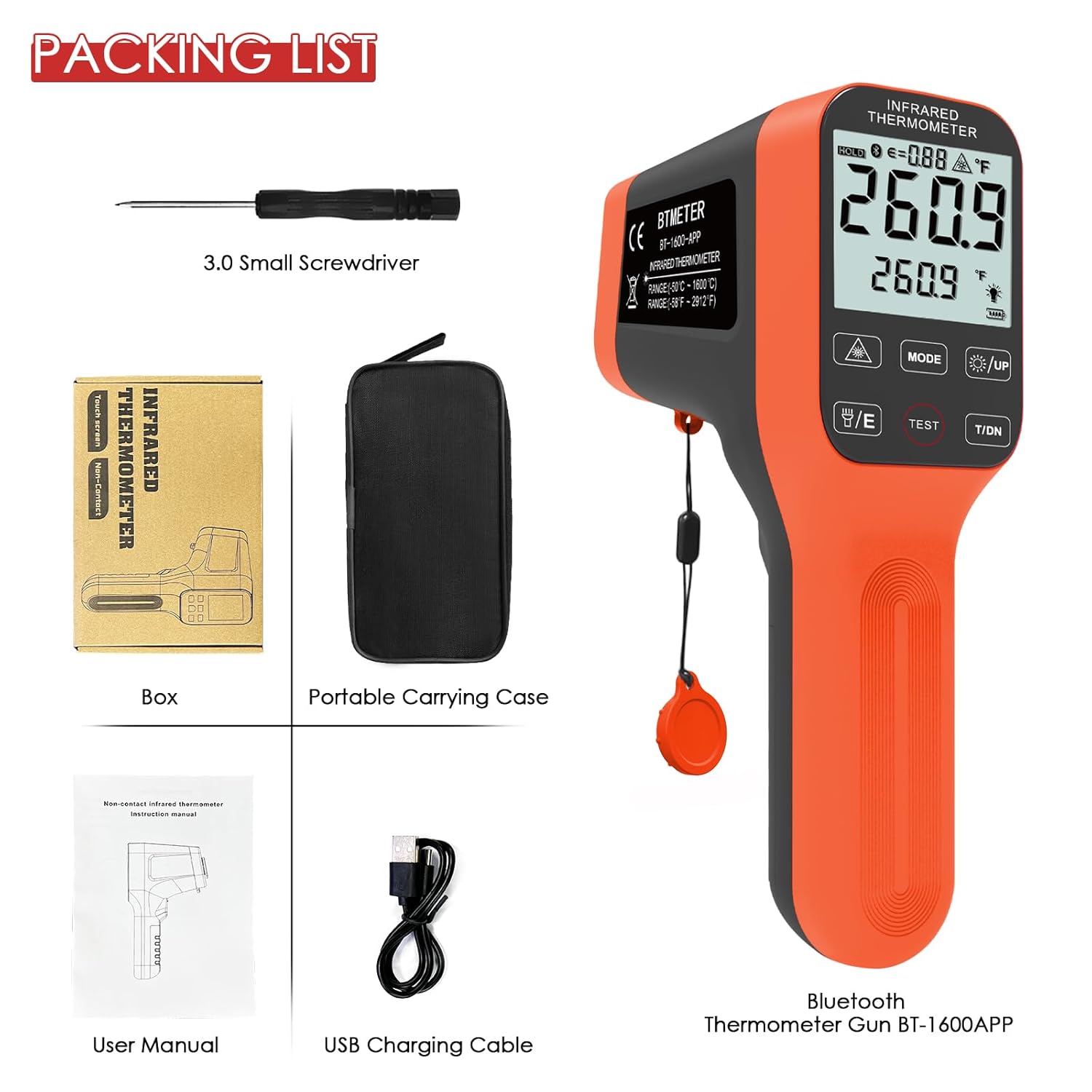
Figure 6.1: Device Buttons and Functions
7. Өлчөө режимдери
The BT-1600APP offers several measurement modes for comprehensive temperature analysis:
- МАКС/МИН: Measures and displays the maximum and minimum temperatures detected during a scan.
- AVG: Calculates and displays the average temperature.
- DIF: Shows the difference between the maximum and minimum temperatures.
- HAL (High Temperature Alarm): Alerts the user if the measured temperature exceeds a preset high limit.
- LAL (Low Temperature Alarm): Alerts the user if the measured temperature falls below a preset low limit.
- REC (Record): Stores temperature readings, supporting up to 12 sets of data.
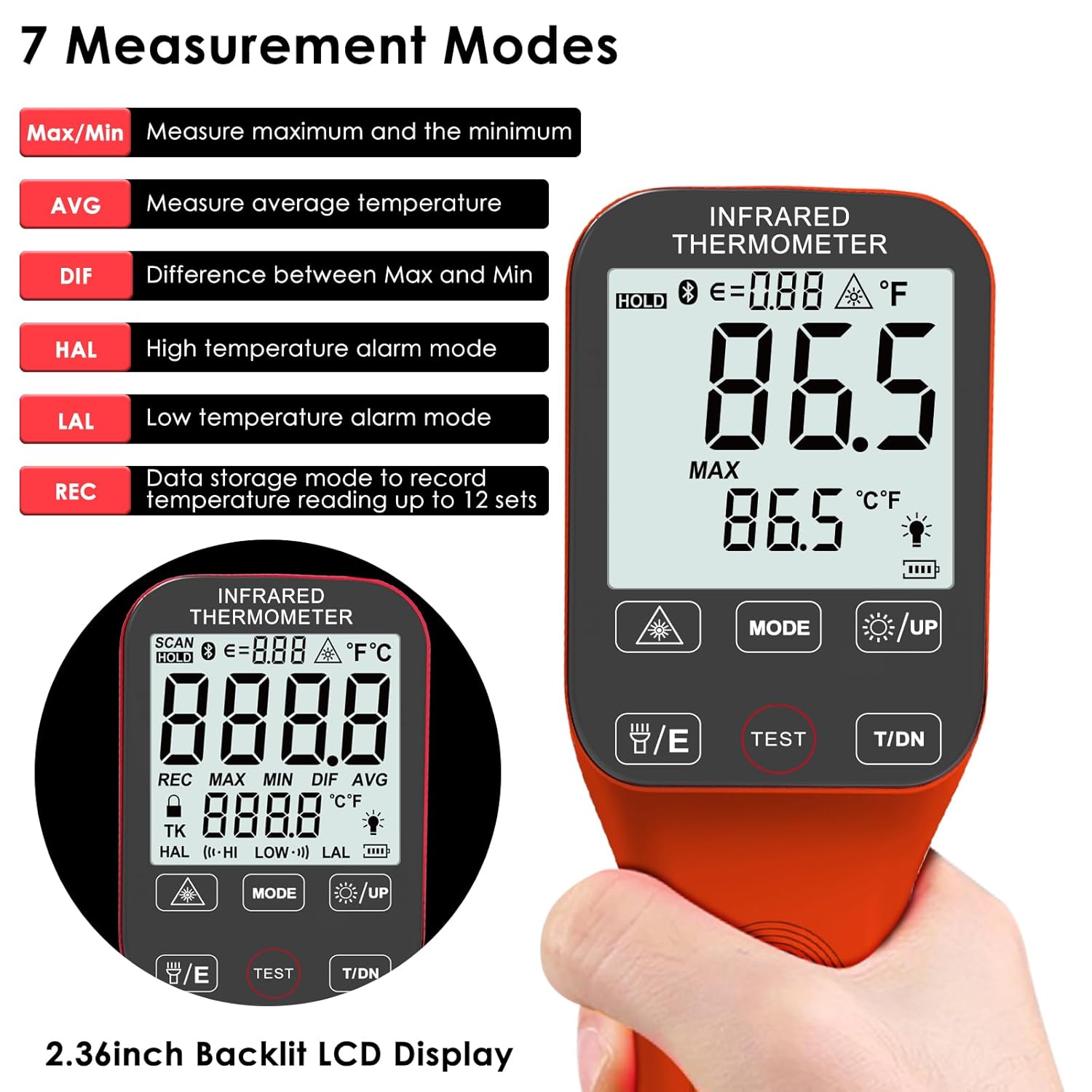
Figure 7.1: Seven Measurement Modes
8. Эмиссияны тууралоо
Emissivity (ε) is a crucial factor for accurate infrared temperature measurement. The BT-1600APP allows adjustment from 0.1 to 1.0 to match the surface being measured. Different materials have different emissivities (e.g., oil: 0.94, asphalt: 0.9, water: 0.96). Adjusting this setting ensures higher accuracy.

Figure 8.1: Emissivity Adjustment Examples
9. Bluetooth Connectivity and Data Logging
The BT-1600APP includes a Bluetooth module for connecting to a mobile phone or tablet. This allows for remote control, real-time monitoring, and data export in TXT format. Download the companion app (refer to the user manual for app details and QR code) to utilize these features.

Figure 9.1: Bluetooth Connectivity and App Interface
10. Техникалык тейлөө
To ensure the longevity and accuracy of your BTMETER BT-1600APP thermometer:
- Түзмөктү жумшак чүпүрөк менен сүртүңүз,amp кездеме. Абразивдүү тазалагычтарды же эриткичтерди колдонбоңуз.
- Keep the lens clean and free from dust or debris. Use a soft brush or compressed air for cleaning.
- Store the device in its portable carrying case when not in use to protect it from damage.
- Ensure the battery is charged regularly, especially if not used frequently, to prevent deep discharge.
11. Кыйынчылыктарды
If you encounter issues with your BT-1600APP thermometer, consider the following:
- Түзмөк күйбөй жатат: Ensure the internal battery is properly connected and charged. Connect the USB charging cable and allow it to charge for at least 30 minutes.
- Туура эмес окуулар: Verify the emissivity setting matches the material being measured. Ensure the target is within the optimal distance-to-spot ratio. Check for obstructions or damage to the lens.
- Батарея бат эле түгөнөт: The device may have internal leakage causing faster battery drain when not in use. Ensure the device is fully charged before each use, especially if it has been stored for a period.
- Bluetooth байланыш көйгөйлөрү: Ensure Bluetooth is enabled on your mobile device and the thermometer. Restart both devices and try pairing again. Refer to the app's instructions for specific pairing steps.
- Түзмөк күтүлбөгөн жерден өчөт: The device has an automatic shutdown function. If it shuts off too quickly, check the automatic shutdown time settings in the mobile app.
12. Техникалык шарттар
| Өзгөчөлүк | Спецификация |
|---|---|
| Бренд | BTMETER |
| Модель аты | BT-1600APP |
| Өзгөчө өзгөчөлүк | Байланышсыз |
| Түс | Ачык күрөң |
| Дисплей түрү | Санарип |
| Байланыш технологиясы | Bluetooth |
| Power Source | Батарея менен иштейт (USB кайра заряддалуучу) |
| Өлчөө диапазону | -50℃ден 1600℃ге чейин (-58℉ден 2912℉ге чейин) |
| Тактык | ±4℃/7.2℉ or ±(2% of reading +2℃/3.6℉) |
| Жооп убактысы | 0.25 секунд |
| Дистанциядан такка катышы | 30:1 |
| Чыгаруучу | 0.1 ~ 1.0 Жөнгө салынуучу |
| Элемент Салмагы | 8.1 унция |
| Элементтин узундугу | 7 дюйм |
| Ички/тышкы колдонуу | Indoor |
| Камтылган компоненттер | Digital Thermometer Gun |
13. Кепилдик жана колдоо
The BTMETER BT-1600APP Digital Infrared Thermometer Gun comes with a 365-day quality warranty and lifetime technical support. For assistance, please refer to the contact information provided in your product packaging or visit the official BTMETER webсайт.