
1. Киришүү
This manual provides detailed instructions for the installation, operation, and maintenance of your EBTOOLS T20 4K Dash Cam. Please read this manual thoroughly before using the device to ensure proper functionality and safety.
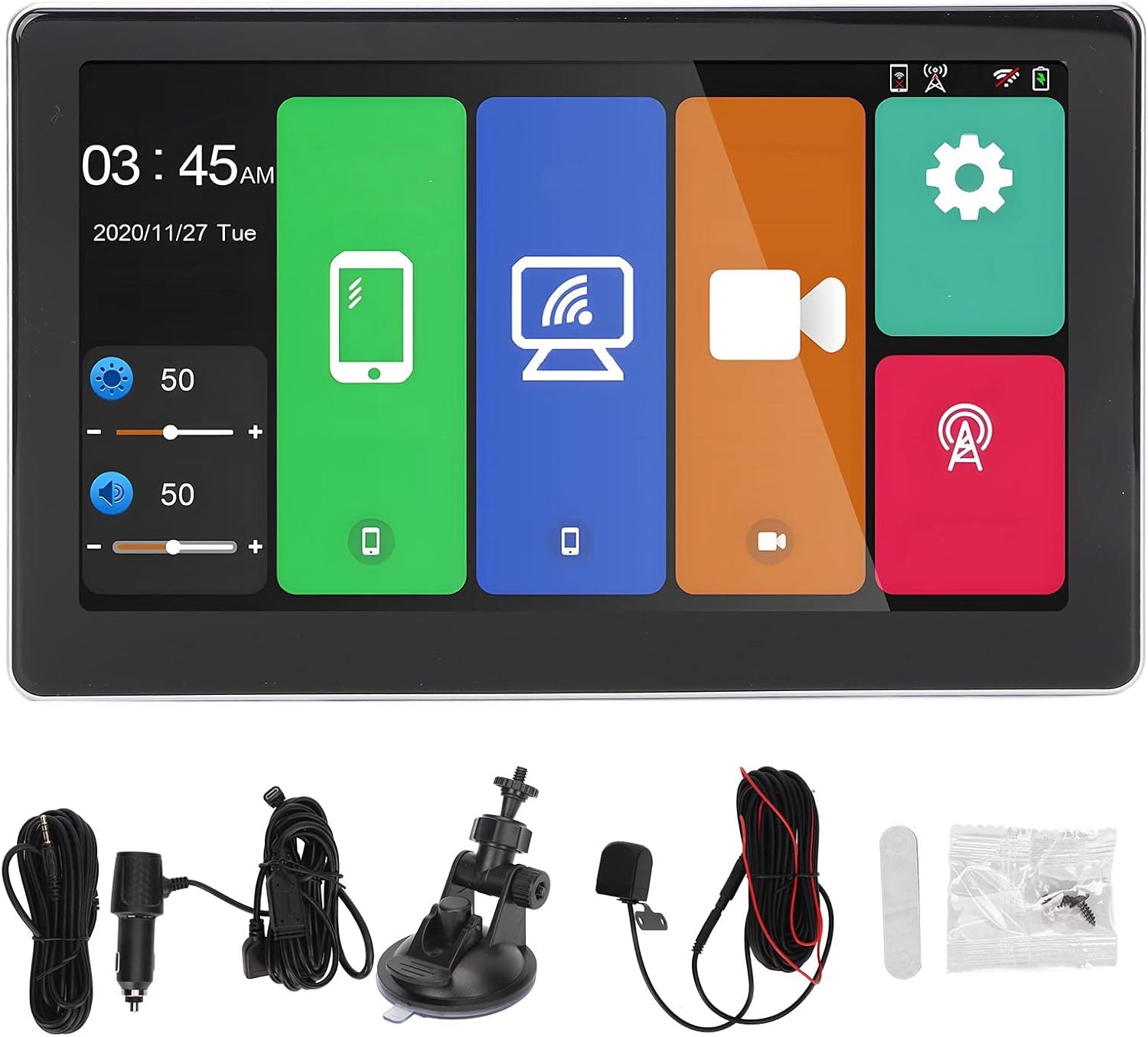
Пакеттин мазмуну:
- Dash Cam (Main Unit)
- Charging Line (Type-C)
- Backup Camera with Line
- Car Charger with Line
- Илмек
- Screw Pack
- White Adhesive
- User Manual
1.1-сүрөт: Included components of the EBTOOLS T20 Dash Cam package. This image displays the main dash cam unit, charging cable, backup camera, car charger, mounting hook, screw pack, and adhesive pad.
2. Техникалык шарттар
| Өзгөчөлүк | Description |
|---|---|
| Процессор | Allwinner V535, DDR32GB |
| Зымсыз модуль | 2.4/5 ГГц |
| Bluetooth | BT5.0 Support |
| FM өткөргүч | Supports original car audio output |
| Screen Size | 7 дюйм |
| Screen Resolution | 1024 x 600 |
| Электр камсыздоо | Type-C, Car Charger, Line (standard car charger) |
| Сактагыч | Memory card (up to 256GB, C10 U1 recommended, not included) |
| Камералар | Dual external AHD camera (5V) |
| Батарея | Камтылган 500mAh литий батареясы |
| Өзгөчөлүктөр | Multi-language support, Parking Monitoring, Mobile App Control, G-Sensor Collision Locking, Intelligent Voice Control, Carplay, Android Auto, Automatic App Reconnection. |
3. Орнотуу жана орнотуу
3.1 Негизги блокту орнотуу
- Куралдар тактаңызда же алдыңкы айнекте сизге тоскоолдук кылбаган ылайыктуу жерди тандаңыз view же коопсуздук жаздыкчаларына тоскоол болот.
- Монтаждоо бетин кылдат тазалаңыз.
- Attach the dash cam to the chosen location using the provided adhesive mount or suction cup mount (if included). Ensure it is securely fastened.
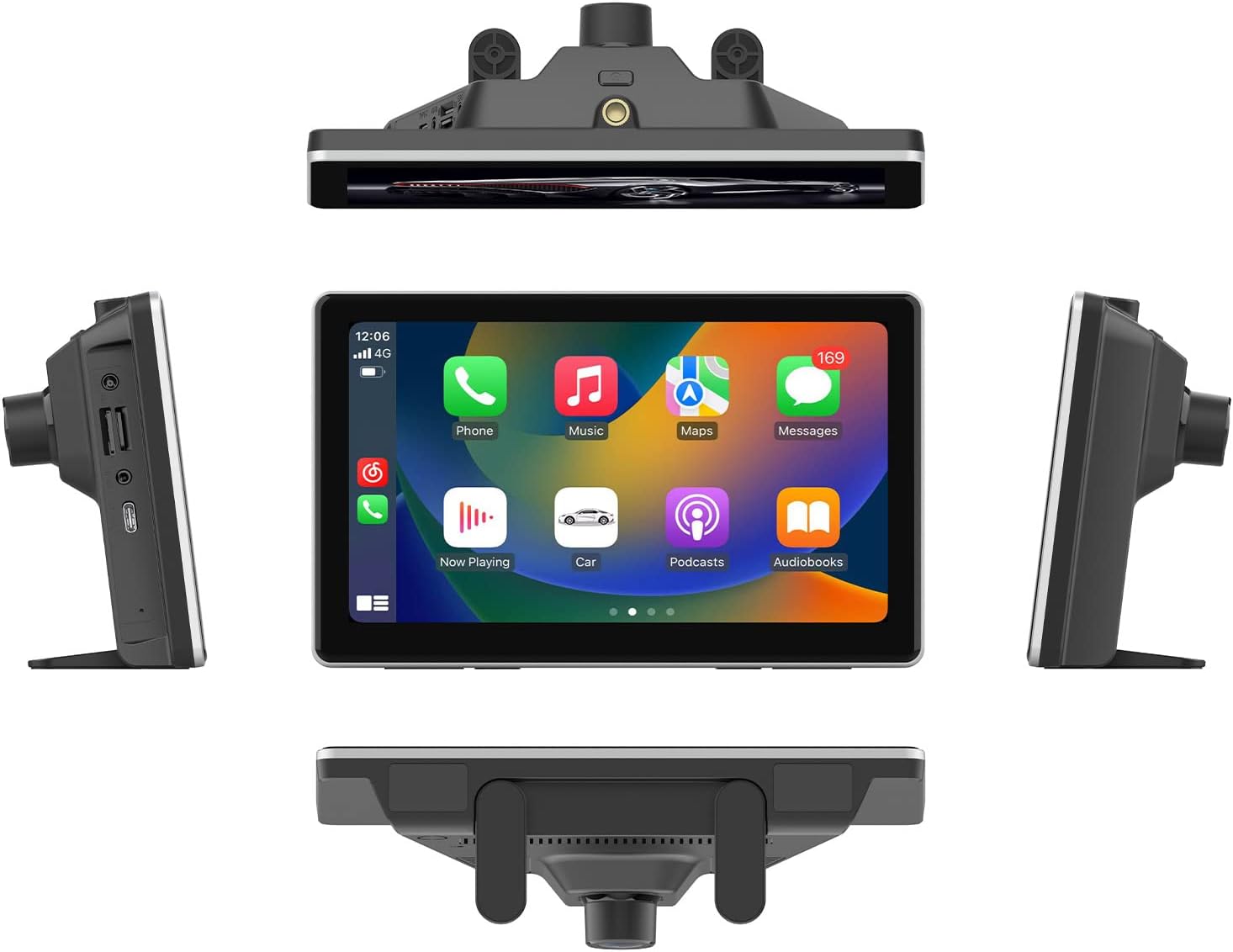
3.1-сүрөт: The EBTOOLS T20 Dash Cam mounted on a vehicle dashboard, shown from multiple perspectives to illustrate its placement and screen orientation.
3.2 Кубат туташтыруу
- Connect the Type-C charging line to the dash cam.
- Унааңыздын кубаттагычын унааңыздын 12 В кубаттоочу розеткасына (тамеки күйгүзгүчтүн розеткасы) сайыңыз.
- Айдоо башкаруу элементтерине тоскоолдук жаратпоо үчүн кабелди тыкан өткөрүңүз.
3.3 Камдык камераны орнотуу (милдеттүү эмес)
- Mount the backup camera at the rear of your vehicle, typically above the license plate or on the rear bumper.
- Route the backup camera cable to the main dash cam unit. Ensure the cable is securely tucked away and protected from external elements.
- Connect the backup camera cable to the designated input port on the main dash cam unit.

3.2-сүрөт: Display of the reverse image function on the dash cam screen, featuring dynamic parking guidelines to assist with vehicle maneuvering in reverse.
3.4 Эстутум картасын салуу
- Камера өчүрүлгөнүн текшериңиз.
- Insert a compatible memory card (up to 256GB, C10 U1 recommended) into the designated slot.
- Format the memory card through the dash cam's settings menu upon first use to ensure optimal performance.
4. Иштөө нускамалары
4.1 Күйгүзүү/өчүрүү
The dash cam will automatically power on when your vehicle starts and power off when the ignition is turned off (if connected to a switched power source).
4.2 Негизги интерфейсview

4.1-сүрөт: The main user interface of the EBTOOLS T20 Dash Cam, featuring a 7-inch screen with intuitive icons for various functions such as phone connectivity, Wi-Fi, camera recording, and system settings.
4.3 Жазуу режимдери
- Цикл жаздыруу: The dash cam continuously records video in segments. When the memory card is full, the oldest fileлар үстүнөн жазылган.
- G-Sensor Collision Locking: In the event of a sudden impact or collision, the G-sensor will automatically lock the current video segment to prevent it from being overwritten.
- Паркинг мониторинги: When enabled, the dash cam will automatically start recording if it detects motion or impact while the vehicle is parked. This feature requires a continuous power supply (hardwire kit, sold separately, may be required for extended parking monitoring).
4.4 Байланыш өзгөчөлүктөрү
4.4.1 Carplay / Android Auto
The dash cam supports both Carplay (for iOS devices) and Android Auto (for Android devices). Connect your smartphone via Bluetooth or USB to access navigation, music, calls, and other compatible apps directly on the dash cam screen.

4.2-сүрөт: The Carplay interface displayed on the EBTOOLS T20 Dash Cam screen, illustrating access to common smartphone applications like phone, music, and navigation.
4.4.2 Mobile App Control (Roadcam App)
Download the Roadcam app on your smartphone to control the dash cam, view жаша фооtage, download recorded videos, and adjust settings wirelessly. The app supports independent and automatic back connection.
4.4.3 FM берүү
Transmit audio from the dash cam to your vehicle's original car audio system via FM radio. Adjust the FM frequency on the dash cam and tune your car radio to the same frequency.

4.3-сүрөт: Illustration of the FM signal transmission feature, where the dash cam's audio is broadcast to the vehicle's FM radio, allowing playback through the car's speakers.
4.4.4 AUX Audio Output
For a wired audio connection, use an AUX cable to connect the dash cam to your car's AUX input. This provides a direct audio signal to your car's sound system.

4.4-сүрөт: Connection diagram for AUX audio output, detailing how to link the dash cam to a car's audio system using an AUX cable for direct sound transmission.
4.5 Акылдуу үн менен башкаруу
The dash cam supports intelligent voice commands for hands-free operation of certain functions. Refer to the on-screen prompts or app for available commands.
5. Техникалык тейлөө
- Тазалоо: Use a soft, dry cloth to clean the dash cam screen and lens. Avoid abrasive cleaners or solvents.
- Эстутум картасы: Regularly format the memory card (e.g., once a month) to maintain optimal recording performance and prevent data corruption. Back up important files форматтоодон мурун.
- Программалык камсыздоонун жаңыртуулары: Өндүрүүчүнү текшериңиз website or the Roadcam app for available firmware updates to ensure your device has the latest features and improvements.
- Температура: Видеорегистраторду узак убакыт бою өтө жогорку температурага дуушар кылбаңыз, анткени бул батареянын иштөө мөөнөтүнө жана түзмөктүн иштешине таасир этиши мүмкүн.
6. Кыйынчылыктарды
- Видеорегистратор күйбөй жатат:
- Унаа кубаттагыч камера камерасына жана унаанын электр розеткасына туура туташтырылганын текшериңиз.
- Check if the vehicle's 12V power outlet is functioning correctly.
- Verify the Type-C cable is securely connected.
- Recording issues (e.g., freezing, skipped frames):
- Format the memory card. A corrupted card can cause recording problems.
- Ensure you are using a high-speed memory card (Class 10, U1 or higher).
- Try a different memory card to rule out card malfunction.
- Сүрөттүн сапаты начар:
- Камера линзаларын жумшак чүпүрөк менен тазалаңыз.
- Линзалардагы коргоочу пленка алынып салынганын текшериңиз.
- Check settings for video resolution and WDR (Wide Dynamic Range) to ensure they are configured optimally.
- Carplay/Android Auto туташпай жатат:
- Ensure Bluetooth is enabled on both the dash cam and your smartphone.
- Try reconnecting your phone via USB cable.
- Камераны да, смартфонуңузду да өчүрүп күйгүзүңүз.
- FM transmission static/interference:
- Adjust the FM frequency on the dash cam to an unused frequency in your area.
- Ensure your car radio is tuned to the exact same frequency.
- Minimize other electronic devices that might cause interference.
7. Кепилдик жана колдоо
For warranty information and technical support, please refer to the official EBTOOLS webсайтка же кардарларды тейлөөгө кайрылыңыз. Сатып алганыңыздын далили катары сатып алуу дүмүрчөгүңүздү сактаңыз.
Өндүрүүчү: EBTOOLS
Модель номери: T20
ASIN: B0CLH3T8TX
Биринчи жеткиликтүү болгон күнү: 18-февраль, 2025-жыл