
1. Киришүү
This manual provides detailed instructions for the proper setup, operation, and maintenance of your Wantek 783F Headset. Please read this manual thoroughly before using the product to ensure optimal performance and longevity. Keep this manual for future reference.
2. Продукт бүтүп калдыview
The Wantek 783F Headset is a versatile single-ear headphone designed for clear communication and audio. It features a noise-cancelling microphone and multiple connectivity options for broad compatibility.
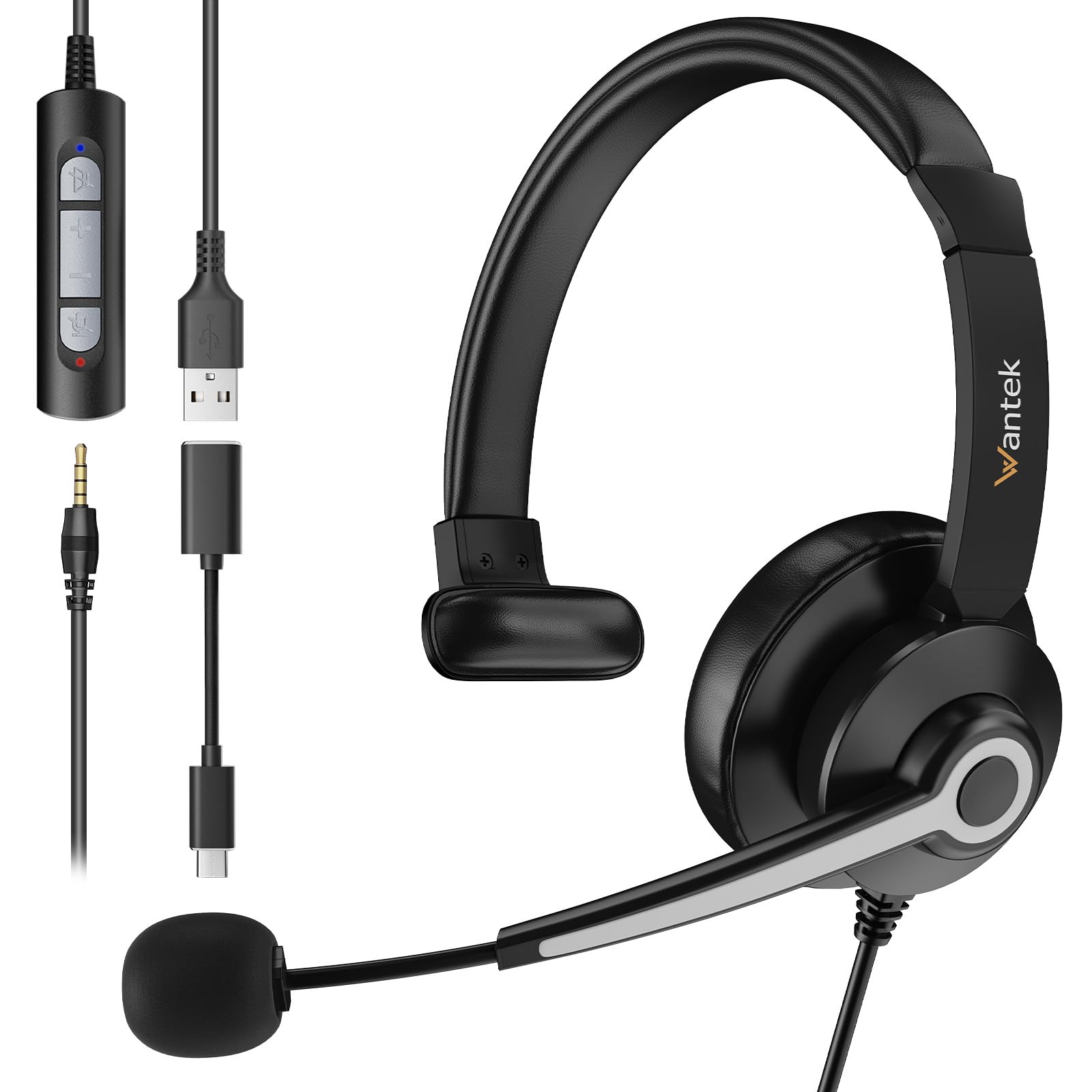
Image 2.1: Wantek 783F Headset with its inline controller and multiple connection options (3.5mm, USB, Type-C).
Негизги өзгөчөлүктөр төмөнкүлөрдү камтыйт:
- Кеңири шайкештик: Connects via USB, 3.5mm, and Type-C.
- Crystal Clear Чалуулар: Noise-cancelling microphone reduces background noise by up to 97%.
- Ыңгайлуу дизайн: Lightweight with a soft faux leather headband and 270° rotatable microphone boom.
- Easy Inline Control: Physical buttons for speaker mute, volume up/down, and microphone mute.
3. Орнотуу нускамалары
The Wantek 783F Headset offers plug-and-play functionality, requiring no additional drivers for most operating systems.
3.1 Гарнитураны туташтыруу
Your headset can be connected to various devices using one of the three provided interfaces:
- 3.5 мм Jack: Connect the 3.5mm jack directly to devices such as smartphones, tablets, or laptops with a compatible audio port.
- USB-A туташтыргычы: Use the USB-A adapter to connect the headset to computers, laptops, or gaming consoles (e.g., PlayStation, Xbox) with a USB-A port.
- USB Type-C Adapter: Attach the Type-C adapter to the USB-A connector, then plug it into devices with a USB Type-C port, such as newer laptops, MacBooks, or Android phones.

Image 3.1: Connection diagram illustrating how to connect the headset using 3.5mm, USB, and Type-C interfaces to different devices.
3.2 Initial Device Recognition
After connecting, your device should automatically recognize the headset. You may need to select the headset as the default audio input and output device in your operating system's sound settings or within your communication application (e.g., Zoom, Skype, Microsoft Teams).
4. Иштөө нускамалары
The Wantek 783F Headset features an inline control unit for convenient audio management.
4.1 Inline Control Functions

Сүрөт 4.1: Детальдуу view of the inline controller, highlighting its buttons and their functions.
- Speaker Mute Button: Press to mute or unmute the headset's speaker audio. An indicator light may show the mute status.
- Үнүн жогорулатуу (VOL+): Угуу үнүн жогорулатуу үчүн басыңыз.
- Үнүн төмөндөтүү (VOL-): Угуу үнүн азайтуу үчүн басыңыз.
- Микрофондун үнүн басуу баскычы: Press to mute or unmute the microphone. An indicator light may show the mute status.
4.2 Микрофонду тууралоо
The microphone boom can be rotated 270 degrees. Position the microphone approximately 1-2 inches from your mouth for optimal voice pickup. The flexible design allows for precise positioning.
4.3 Колдонуу сценарийлери
The headset is suitable for various applications, including:
- Online meetings (Zoom, Skype, Webex, Google Meet)
- Call center operations
- Online learning and tutoring
- Voice chat and gaming
- General audio listening

Сүрөт 4.2: Мисamples of the headset in use across different environments, demonstrating its versatility.
5. Техникалык тейлөө
Тийиштүү кам көрүү жана техникалык тейлөө гарнитураңыздын иштөө мөөнөтүн узартат.
5.1 Тазалоо
- Use a soft, dry cloth to wipe the headset and inline controller.
- өжөр кир үчүн, бир аз гampчүпүрөктү суу менен. Катуу химиялык заттарды же абразивдүү тазалагычтарды колдонуудан алыс болуңуз.
- Do not immerse the headset or any of its components in water.
5.2 Сактоо
- Гарнитураны күн нурунан жана экстремалдык температурадан алыс салкын, кургак жерде сактаңыз.
- Avoid tangling the cable. Use the small clip on the wire to manage the cable and prevent damage.
6. Кыйынчылыктарды
Гарнитураңызга байланыштуу көйгөйлөргө туш болсоңуз, төмөнкү жалпы чечимдерди караңыз:
- Үн жок:
- Гарнитура түзмөгүңүзгө бекем туташтырылганын текшериңиз.
- Үндү катуулатуу баскычын текшерип, катуулатыңыз.
- Verify that the speaker mute button on the inline controller is not active.
- Confirm the headset is selected as the default playback device in your computer's sound settings.
- Микрофон иштебейт:
- Ensure the microphone mute button on the inline controller is not active.
- Check that the microphone boom is properly positioned.
- Confirm the headset is selected as the default recording device in your computer's sound settings or communication application.
- Микрофонду башка колдонмо же түзмөк менен сынап көрүңүз.
- Бурмаланган аудио:
- Гарнитурада да, түзмөгүңүздө да үнүн азайтыңыз.
- Ensure the connection is stable and free from interference.
- Башка аудио булагы же түзмөк менен сынап көрүңүз.
7. Техникалык шарттар
Below are the technical specifications for the Wantek 783F Headset:
| Өзгөчөлүк | Спецификация |
|---|---|
| Бренд аты | Wantek |
| Элемент моделинин номери | XUC783 |
| Продукциянын өлчөмдөрү | 12 x 12 x 5 см |
| Элемент Салмагы | 182 грамм |
| Түс | Кара |
| Байланыш технологиясы | Зымдуу |
| Наушник уясы | 3.5 мм Джек |
| Noise Control | Пассивдүү ызы-чууну жокко чыгаруу |
| Башкаруу түрү | Voice Control (via inline controller) |
| Кабель өзгөчөлүгү | Detachable (adapters) |
| Материал | Polycarbonate (PC), Aluminum, Faux Leather |
| Шайкеш түзмөктөр | Cellphones, Desktops, Laptops, Music Production Equipment, Tablets |
| Сунушталган Колдонуулар | Calling, Gaming, Motorcycling, Running |
8. Кепилдик жана колдоо
Wantek products are manufactured to high-quality standards. For information regarding warranty coverage, terms, and conditions, please refer to the warranty card included with your purchase or visit the official Wantek webсайт.
For technical support, troubleshooting assistance beyond this manual, or to inquire about replacement parts, please contact Wantek customer service through their official support channels.