
1. Киришүү
This manual provides detailed instructions for the installation, operation, and maintenance of your RWRAPS Tm618N-2 Digital Programmable Timer Switch. This device is designed to automatically control the power supply to various electrical equipment according to a preset schedule, offering convenience and energy efficiency. Please read this manual thoroughly before use to ensure proper functionality and safety.
2. Коопсуздук маалыматы
- Ensure the power supply is disconnected before installation or maintenance to prevent electric shock.
- This device operates on 220V AC. Incorrect voltage can damage the unit and connected appliances.
- Орнотуу квалификациялуу электрик же билимдүү адам тарабынан жүргүзүлүшү керек.
- Do not expose the timer to moisture, extreme temperatures, or corrosive environments.
- Түзмөктү өз алдынча бөлүктөргө бөлүүгө же оңдоого аракет кылбаңыз. Тейлөө үчүн квалификациялуу адистерге кайрылыңыз.
- The maximum load capacity must not be exceeded (16A/250VAC or 20A@30VDC).
3. Продукциянын өзгөчөлүктөрү
- 1.6-inch LCD digital display for clear visibility.
- 7-day programmable timer with up to 16 ON/OFF settings per day.
- Integrated relay for high-power switching.
- Countdown time function.
- Clock correction/calibration function for high accuracy (less than 1s error per day).
- Keyboard lock function to prevent accidental operations.
- Manual ON/OFF override.
- Long-life silicone buttons.
4. Пакеттин мазмуну
Пакетти ачкандан кийин, бардык компоненттер бар экенин жана бузулбаганын текшериңиз.
- 1 x RWRAPS Tm618N-2 Digital Programmable Timer Switch
- 1 х Колдонуучунун колдонмосу (бул документ)
5. Продукт бүтүп калдыview

Сүрөт 5.1: Алдыңкы View of the Timer Switch. This image displays the front of the RWRAPS Tm618N-2 timer switch, showing the LCD screen, control buttons (WEEK, HOUR, MIN, RECALL, CLOCK, PROG, MANUAL), and the 'R' reset button. The screen shows "MO AM 6:18 18 AUTO".
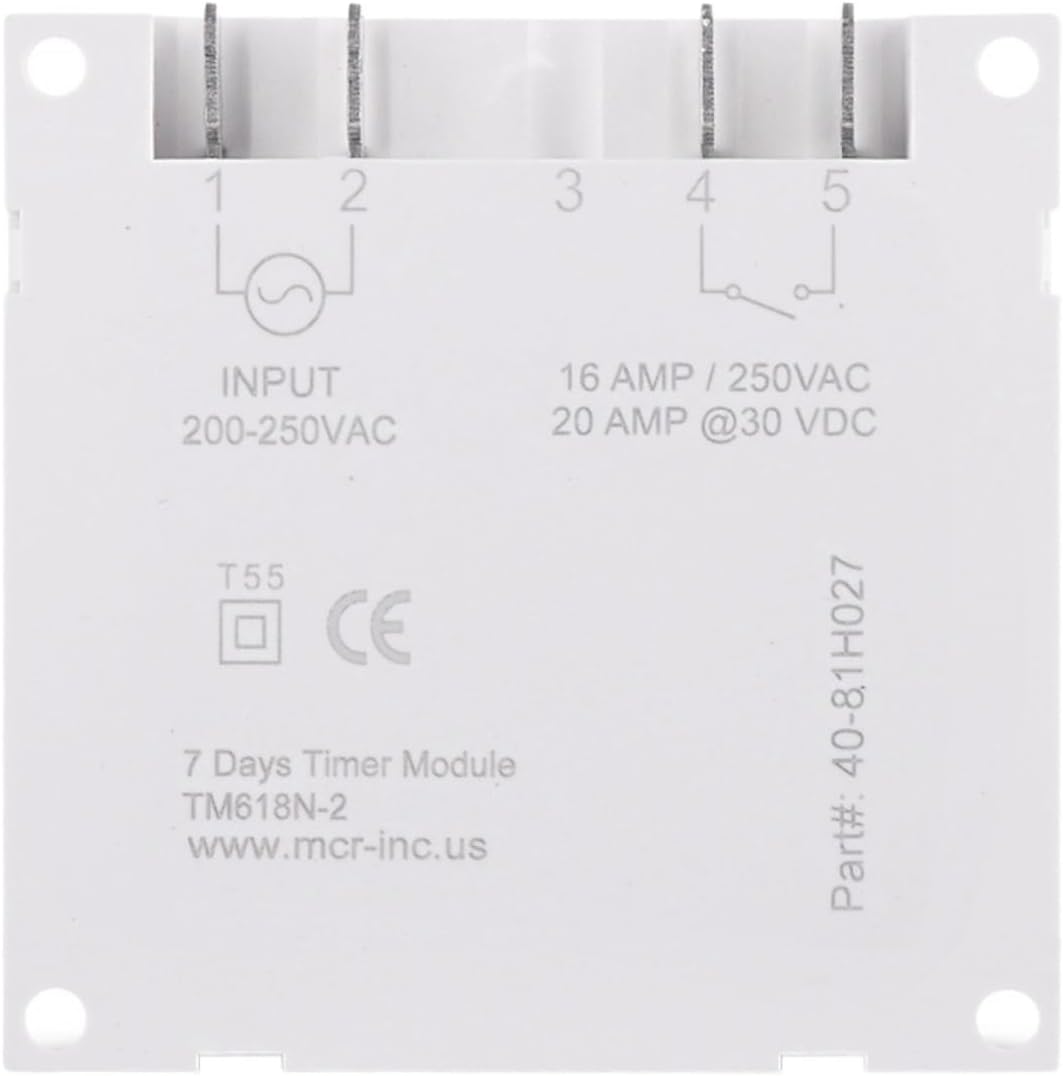
5.2-сүрөт: Артка View and Wiring Diagram. This image shows the rear of the timer switch, detailing the input and output terminals. It indicates "INPUT 200-250VAC" on terminals 1 and 2, and "16 AMP / 250VAC, 20 AMP @30 VDC" on terminals 4 and 5, which are the relay contacts. Terminal 3 is not used. The model number "TM618N-2" is also visible.
6. Орнотуу жана зымдар
Маанилүү: Ensure power is disconnected before proceeding with installation. Incorrect wiring can cause damage or injury. If you are unsure, consult a qualified electrician.
- Монтаждоо: The timer switch is designed for panel mounting or DIN rail mounting (if an adapter is used, not included). Secure the unit in a suitable enclosure or panel.
- Power Input (200-250VAC): Connect the live (L) and neutral (N) wires of your 220V AC power supply to terminals 1 жана 2 on the back of the timer. Refer to Figure 5.2.
- Load Output (Relay Contacts):
- Connect the live wire from your load (e.g., light, fan) to terminal 4.
- Connect the live wire from your power source (the same 220V AC supply or a separate DC supply) to terminal 5.
- The neutral wire of your load should be connected directly to the neutral of your power source, bypassing the timer switch.
Эскертүү: Terminals 4 and 5 are dry contacts (voltage-free relay contacts). They can switch either AC (up to 250V, 16A) or DC (up to 30V, 20A) loads. Ensure your load's power requirements do not exceed these ratings. Terminal 3 is not used.
- Баштапкы кубаттоо: After wiring, restore power. The LCD screen should illuminate. If it does not, check your wiring.
7. Иштөө нускамалары
7.1. Initial Setup and Clock Setting
- Кайтаруу: Press the 'R' button (recessed, use a pointed object) to clear all settings and reset the timer. The display will show "0:00".
- Учурдагы убакытты коюу:
- басып, кармап туруңуз СААТ баскычы.
- Кармап жатканда СААТ, басыңыз ЖУМА аптанын учурдагы күнүн коюу үчүн (ДС, СШ, БС, СШ, ЖШ).
- Кармап жатканда СААТ, басыңыз HOUR to set the current hour (0-23 for 24-hour format).
- Кармап жатканда СААТ, басыңыз MIN учурдагы мүнөттү коюу үчүн (0-59).
- 12/24 саат форматы: Басыңыз СААТ жана ПРОГ simultaneously to toggle between 12-hour (AM/PM) and 24-hour formats.
7.2. КҮЙГҮЗҮҮ/ӨЧҮРҮҮ Убакыттарын программалоо
The timer allows for up to 16 ON/OFF programs.
- басыңыз ПРОГ button once. The display will show "1 ON" and the time will flash.
- Басыңыз ЖУМА to select the day(s) for this program. You can choose a single day, weekdays, weekends, or various combinations.
- Басыңыз HOUR каалаган КҮЙГҮЗҮҮ саатын коюу үчүн.
- Басыңыз MIN каалаган КҮЙГҮЗҮҮ МҮНӨТҮН коюу үчүн.
- Басыңыз ПРОГ again. The display will show "1 OFF" and the time will flash.
- Repeat steps 2-4 to set the desired OFF time for the first program.
- Басыңыз ПРОГ to cycle through "2 ON", "2 OFF", and so on, up to "16 OFF". Repeat the setting process for each desired program.
- Программалоо режиминен чыгуу үчүн баскычты басыңыз СААТ баскычы.
Эскертүү: If you need to cancel a program, press ЧАКЫРУУ while viewing the specific ON or OFF program. This will replace the time with "--:--", effectively disabling that program step.
7.3. Кол менен өзгөртүү
басыңыз КОЛ төмөнкү режимдер аркылуу айлануу үчүн баскычты басыңыз:
- АВТО КҮЙҮҮ: The timer is currently ON and will follow the programmed OFF times.
- АВТО ӨЧҮРҮҮ: The timer is currently OFF and will follow the programmed ON times.
- КҮЙҮК: The timer output is continuously ON, overriding all programs.
- ӨЧҮК: The timer output is continuously OFF, overriding all programs.
For automatic operation, ensure the timer is set to either "AUTO ON" or "AUTO OFF".
7.4. Артка саноо функциясы
The countdown function allows you to set a specific duration after which the timer will switch its state (ON to OFF, or OFF to ON).
- While in normal clock display mode, press and hold the ПРОГ button for approximately 3 seconds. The display will show "d ON" or "d OFF" and the time will flash.
- Басыңыз HOUR жана MIN to set the desired countdown duration (up to 99 hours and 59 minutes).
- Басыңыз ПРОГ again to start the countdown. The display will show the remaining time.
- Артка саноону жокко чыгаруу үчүн, баскычын басыңыз ПРОГ кайра.
8. Техникалык тейлөө
- Таймердин которгучун таза жана чаңсыз кармаңыз. Тазалоо үчүн жумшак, кургак чүпүрөк колдонуңуз.
- Абразивдүү тазалагычтарды же эриткичтерди колдонбоңуз.
- Зымдардын туташууларынын бекемдигин текшерүү үчүн аларды мезгил-мезгили менен текшерип туруңуз.
- The internal battery (for timekeeping during power outages) is not user-replaceable. If the timer loses time frequently, the battery may need professional service.
9. Кыйынчылыктарды
| Көйгөй | Мүмкүн себеп | Чечим |
|---|---|---|
| Дисплей бош. | Электр менен камсыздоо жок; ички батареясы түгөндү. | Check power connections. If power is present, the internal battery may need charging (leave connected to power for several hours) or replacement (professional service). |
| Timer does not switch ON/OFF as programmed. | Incorrect program settings; timer in manual ON/OFF mode; incorrect wiring. | Verify program settings (ON/OFF times, days). Ensure the timer is in "AUTO ON" or "AUTO OFF" mode. Check wiring connections. |
| Убакыт так эмес. | Internal clock drift; internal battery issue. | Reset and re-set the clock. If the issue persists, the internal battery may be failing. |
| Баскычтар жооп бербейт. | Keyboard lock engaged; unit malfunction. | Басып кармап туруңуз СААТ for 3 seconds to unlock the keyboard. If still unresponsive, try resetting the unit. |
10. Техникалык шарттар
| Модел | Tm618N-2 |
| Бренд | RWRAPS |
| Киргизүү көлөмүtage | 200-250VAC |
| Output (Relay) Capacity | 16A / 250VAC, 20A @ 30VDC |
| Programmable Cycles | 16 ON/OFF programs per day/week |
| Дисплей | 1.6 дюймдук LCD |
| Убакыт катасы | Less than 1 second per day |
| Материал | Пластик |
| Салмагы | Болжол менен 200 грамм (7.1 унция) |
11. Кепилдик маалыматы
As per product specifications, this RWRAPS Tm618N-2 Digital Programmable Timer Switch comes with Кепилдик жок. Please refer to your retailer's return policy for details on product returns or exchanges.
12. Кардарларды колдоо кызматы
For any questions, technical assistance, or issues not covered in this manual, please contact your product retailer or the manufacturer, RWRAPS, through their official support channels.