
aonus A7
aonus A7 480W Cordless Vacuum Cleaner User Manual
Модел: A7
1. Продукт бүтүп калдыview
The aonus A7 480W Cordless Vacuum Cleaner is designed for efficient and versatile cleaning of various surfaces, including carpets and hard floors. It features a powerful brushless motor, intelligent dust detection, and a user-friendly touchscreen display.

Image: The aonus A7 vacuum cleaner showcasing its main unit, extension wand, floor brush, and various attachments, along with a detailed view of its intelligent touchscreen display.
2. Коопсуздук нускамалары
Сураныч, шайманды колдонуудан мурун бардык коопсуздук нускамаларын кылдат окуп чыгыңыз. Бул нускамаларды аткарбоо электр шокуна, өрткө же олуттуу жаракатка алып келиши мүмкүн.
- Чаң соргучту сыртта же нымдуу жерде колдонбоңуз.
- Балдарга чаң соргучту иштетүүгө уруксат бербеңиз. Балдардын жанында колдонулганда тыкыр көзөмөл керек.
- Бензин сыяктуу тез күйүүчү же күйүүчү материалдарды албаңыз жана алар болушу мүмкүн болгон жерлерде колдонбоңуз.
- Тамеки, ширеңке, ысык күл сыяктуу күйүп жаткан же чылым чеккен нерселерди албаңыз.
- Колдонуудан мурун чыпка туура орнотулганын текшериңиз.
- Бул колдонмодо сүрөттөлгөндөй гана колдонуңуз. Өндүрүүчү сунуштаган тиркемелерди гана колдонуңуз.
- Turn off the appliance before making any adjustments, changing accessories, or storing the vacuum cleaner.
3. Пакеттин мазмуну
Пакетте бардык компоненттер бар экенин текшериңиз:
- Негизги вакуумдук агрегат
- Кеңейтүүчү таякча
- Floor Brush with Anti-Tangle Roller
- Узун жалпак сопло
- 2-жылы-1 Brush
- Дубал заряддагыч
- Дубалга орнотуу
- User Manual

Image: All components of the aonus A7 vacuum cleaner, including the main unit, various attachments, wall mount, and charger, laid out with the product packaging.
4. Чогултуу жана орнотуу
4.1 Ассамблея
- Insert the extension wand into the main vacuum unit until it clicks into place.
- Attach the floor brush to the other end of the extension wand, ensuring it locks securely.
- For handheld use, attach desired accessories (long flat nozzle or 2-in-1 brush) directly to the main vacuum unit.
4.2 Батареяны заряддоо
Before first use, fully charge the vacuum cleaner's battery. The battery can be charged while attached to the main unit or separately.
- Connect the wall charger to a power outlet and to the charging port on the main vacuum unit or the wall mount.
- The touchscreen display will indicate the charging status. A full charge typically takes approximately 4-5 hours.

Image: The aonus A7 vacuum cleaner mounted on its wall charging station, illustrating the charging process and battery capacity details.
5. Иштөө нускамалары
5.1 Күйгүзүү/өчүрүү жана режимди тандоо
- Чаң соргучту иштетүү же өчүрүү үчүн туткадагы кубат баскычын басыңыз.
- Use the touchscreen display to switch between different suction modes (e.g., Eco, Standard, Max) or activate the Automatic Mode.

Сүрөт: Жакын план view of the aonus A7's all-in-one LED touchscreen, displaying battery level, current mode, and warnings for blockages.
5.2 Automatic Dust Detection
In Automatic Mode, the intelligent dust sensor automatically adjusts the suction power based on the amount and size of dust detected on the surface, optimizing cleaning efficiency and battery life.

Image: Illustration of the aonus A7's automatic mode, showing how the vacuum adjusts suction power (20KPa, 30KPa, 40KPa) based on the detected dust level on the floor.
5.3 Ар кандай тиркемелерди колдонуу
The aonus A7 comes with various attachments for different cleaning needs:
- Пол щетка: Ideal for both hard floors and carpets, featuring an anti-tangle roller and LED lights to illuminate dust.
- Long Flat Nozzle: Тар боштуктарга, бурчтарга жана тар мейкиндиктерге жетүү үчүн идеалдуу.
- 2-бирде щетка: Suitable for cleaning upholstery, keyboards, car interiors, and delicate surfaces.

Image: A collage demonstrating the versatility of the aonus A7, showing it used with the extension wand for high areas, as a floor vacuum, and with handheld attachments for furniture and electronics.
6. Техникалык тейлөө
6.1 Таштанды кутусун бошотуу
Empty the dustbin regularly to maintain optimal suction power. The dustbin features a one-click release mechanism.
- Негизги блокту таштанды челектин үстүнө кармаңыз.
- Төмөнкү капкагын ачып, ичиндегилерди бошотуш үчүн, таштанды челектин чыгаруу баскычын басыңыз.
- Капкакты бошоткондон кийин бекем жабыңыз.

Image: A hand demonstrating the one-click dust removal feature of the aonus A7, showing the dustbin being emptied directly into a trash can.
6.2 Чыпкаларды тазалоо
The aonus A7 features a multi-stage filtration system, including a HEPA filter, for 99.9% filtration efficiency. Regular cleaning of filters is crucial for performance.
- Twist and pull to remove the dustbin from the main unit.
- Remove the internal filters (cyclone, steel mesh, HEPA, and foam filters).
- Tap off loose dust. For washable filters, rinse under cold running water until the water runs clear.
- Allow all filter components to air dry completely for at least 24 hours before reassembling. Do not use a dryer or direct heat.
- Чыпкаларды жана таштанды челектерин тескери тартипте кайра чогултуңуз.
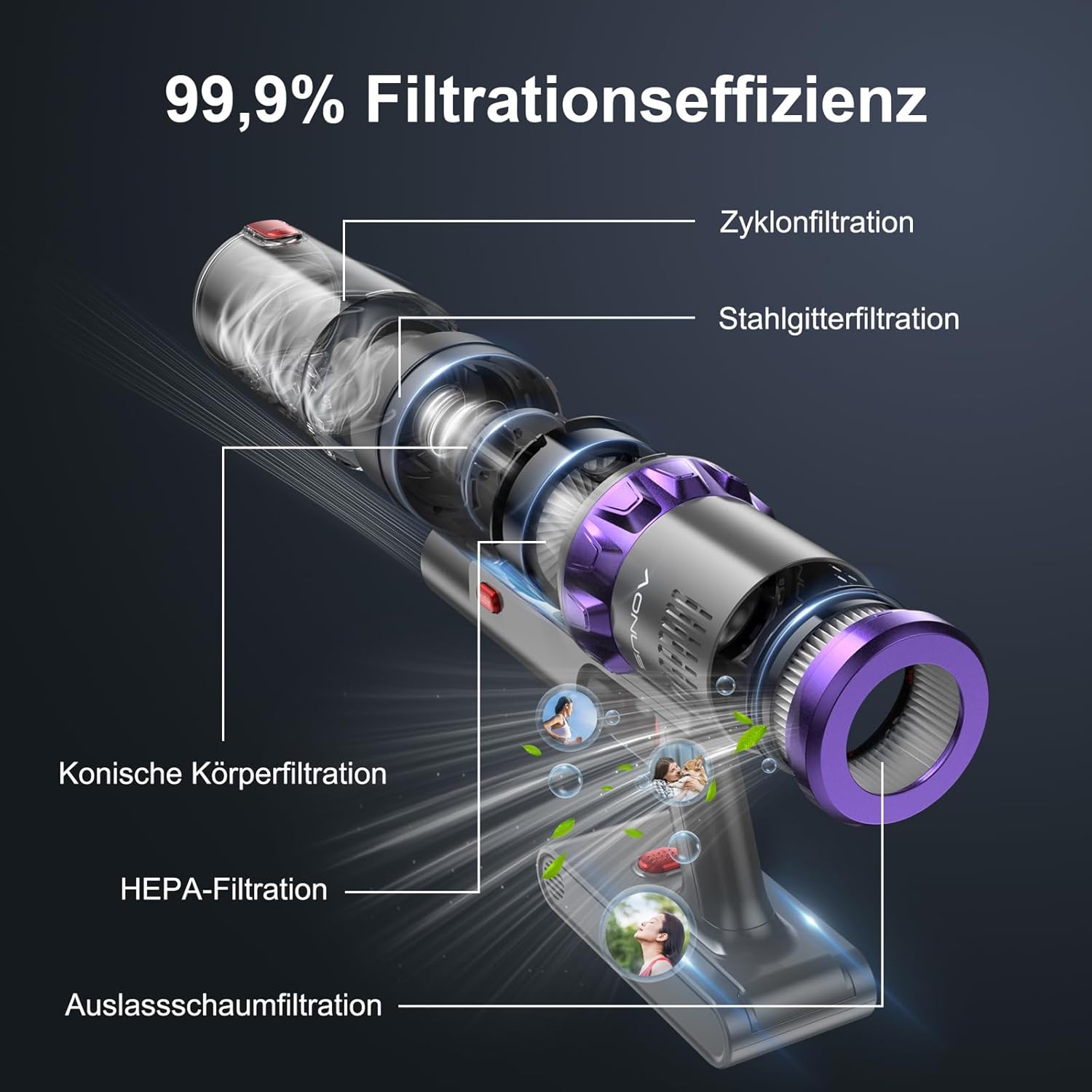
Сүрөт: жарылган view of the aonus A7's multi-stage filtration system, highlighting the cyclone, steel mesh, conical, HEPA, and outlet foam filters, designed for 99.9% filtration efficiency.
6.3 Щетка түрмөгүн тазалоо
Periodically check the brush roll for tangled hair or debris. While the brush roll is designed to be anti-tangle, occasional cleaning may be necessary.
- Чаң соргучту өчүрүп, полдун щеткасын ажыратыңыз.
- Locate the brush roll release mechanism (may require unscrewing a few screws as mentioned in a review, but the image doesn't show this, so I'll keep it general).
- Щетканын рулонун алып салып, чаташкан чачтарды же талчаларды кайчы менен кылдаттык менен кесип салыңыз.
- Щетка ролик корпусундагы бардык таштандыларды тазалаңыз.
- Щетка ролигин кайра салып, бекитиңиз.

Image: The innovative floor brush of the aonus A7, designed to prevent hair tangles, shown cleaning a floor with debris, alongside a small dog.
7. Кыйынчылыктарды
| Көйгөй | Мүмкүн себеп | Чечим |
|---|---|---|
| Вакуум күйбөйт | Батарея аз же түгөнүп калган. | Батарейканы толугу менен кубаттаңыз. |
| Соруу күчү төмөн | Dustbin is full; Filters are clogged; Brush roll is tangled or blocked. | Empty the dustbin; Clean or replace filters; Clean the brush roll. |
| Щетка түрмөгү айланбайт | Brush roll is blocked by debris or hair. | Turn off the vacuum and remove any obstructions from the brush roll. |
| Адаттан тышкаркы ызы -чуу | Obstruction in the air path or brush roll. | Check for and remove any blockages in the nozzle, wand, or brush head. |
| Батарея заряддалбай жатат | Заряддоочу түзүлүш туура эмес туташтырылган; Бузулган заряддоочу түзүлүш же батарейка. | Ensure charger is securely plugged in; Contact customer support if issue persists. |
8. Техникалык шарттар
| Өзгөчөлүк | Деталь |
|---|---|
| Бренд | aonus |
| Модель номери | A7 |
| Мотор күчү | 480W щеткасыз мотор |
| Соруу күчү | 40KPa чейин |
| Runtime | 60 мүнөткө чейин (1-режимде) |
| Батарея сыйымдуулугу | 7*2500mAh High-Capacity Batteries |
| Фильтрация системасы | Multi-filtration with HEPA filter (99.9% efficiency) |
| Өзгөчөлүктөр | Intelligent Touchscreen, Automatic Dust Detection, Anti-Tangle Brush Roll, Cordless |
| Продукциянын өлчөмдөрү | 29 x 19 x 40 см |
| Элемент Салмагы | 3.67 килограмм |
9. Кепилдик жана колдоо
aonus products are manufactured to the highest quality standards. For warranty information, technical support, or any questions regarding your aonus A7 Cordless Vacuum Cleaner, please refer to the warranty card included in your package or contact aonus customer service directly.
You can often find contact information on the official aonus webсайты же продуктуну сатып алган сатуучу аркылуу.
Ask a question about this manual
Ask about setup, troubleshooting, compatibility, parts, safety, or missing instructions. Manuals+ will review the question and use this page’s manual context to help answer it.