
Callez C01
Callez Bluetooth Single Ear Headset User Manual
Model: C01
Бренд: Каллез
1. Продукт бүтүп калдыview
The Callez Bluetooth Single Ear Headset (Model C01) is designed for clear, hands-free communication and high-quality audio playback. It features advanced noise cancellation technology, comfortable ear-hook design, and multi-device connectivity, making it ideal for various uses including online meetings, driving, and daily tasks.

The Callez Bluetooth single ear headset, shown with its compact charging case. The headset features an ear-hook design and an extended microphone boom.
2. Пакеттин мазмуну
Сураныч, пакетте төмөнкү нерселерди текшериңиз:
- Callez C01 Wireless Headset
- USB заряддоо кабели (Type-C)
- Коргоочу кап
- Колдонуучунун колдонмосу
- Ear Tips (L, M, S sizes)
- Sponge Ear Cushions (2 pieces)
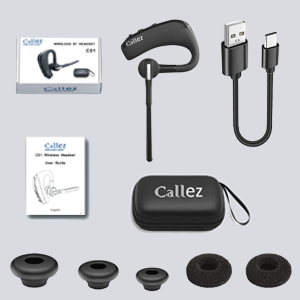
An image displaying the complete package contents: the Callez C01 wireless headset, a USB charging cable, a protective case, a user guide, and various sizes of ear tips and sponge ear cushions.
3. Продукциянын схемасы жана башкаруу элементтери
Гарнитуранын компоненттери жана башкаруу баскычтары менен таанышып алыңыз:

Detailed diagram showing the multi-function button (MFB) for power, call control, music playback, and redial. Also highlights volume controls, mute button, voice assistant activation, and the Type-C charging port with dust cover.
- Көп функциялуу баскыч (MFB): Power On/Off, Answer/End/Reject Call, Play/Pause Music, Redial.
- Көлөм + баскычы: Үнүн катуулатуу, кийинки трек.
- Үндүн көлөмү - баскычы: Үндү азайтуу, мурунку трек.
- Үнсүз баскычы: Mute/unmute microphone during calls, Activate Voice Assistant.
- Type-C заряддоо порту: For charging the headset, with a dust cover.
- LED көрсөткүчү: Shows pairing status, charging status, and power.
4. Орнотуу
4.1 Гарнитураны заряддоо
Before first use, fully charge the headset. Connect the provided USB Type-C cable to the headset's charging port and the other end to a USB power source (e.g., computer, wall adapter). The LED indicator will show charging status and turn off when fully charged.
- Заряддоо убактысы: толук кубаттоо үчүн болжол менен 1.5 саат.
- Сүйлөшүү убактысы: 16 саатка чейин.
- Music Playback Time: Up to 20 hours.
- Күтүү убактысы: 195 саатка чейин.

An infographic detailing the impressive battery life: 16 hours talk time, 20 hours music playback, and 195 hours standby time, with a fast charge time of 1.5 hours.
4.2 Bluetooth түзмөгү менен жупташтыруу
Follow these steps to pair your headset with your smartphone, tablet, or computer:
- Жупташтыруу режимине кирүү: With the headset powered off, press and hold the Multi-Function Button (MFB) for approximately 5-7 seconds until the LED indicator flashes blue and red alternately. This indicates the headset is in pairing mode.
- Түзмөгүңүздө Bluetooth иштетүү: Go to the Bluetooth settings on your smartphone, tablet, or computer and ensure Bluetooth is turned on.
- Издөө жана туташуу: In the list of available Bluetooth devices, search for and select "C01".
- Туташуу ырастоо: Once connected, the LED indicator on the headset will stop flashing and remain solid blue (or turn off, depending on the model). A voice prompt may also confirm the connection.

A visual guide to pairing the headset: 1. Press and hold the multi-function button until the LED indicator flashes blue and red alternately (pairing mode). 2. Издөө 'C01' on your phone's Bluetooth list and select it. 3. The LED indicator stops flashing, indicating successful connection.
Эскертүү: The headset supports simultaneous connection with two Bluetooth devices. To connect a second device, repeat the pairing process after the first device is connected. The headset will automatically connect to the last paired device when powered on, if it is within range.

This image demonstrates the headset's ability to connect to various Bluetooth devices, including iOS, Android, and Windows devices. It highlights the ease of pairing with two Bluetooth devices simultaneously.
5. Иштөө нускамалары
5.1 Күйгүзүү/өчүрүү
- Күйгүзүү: MFBди 3 секунд басып туруңуз.
- Өчүрүү: MFBди 5 секунд басып туруңуз.
5.2 Чалууларды башкаруу
- Чакырууга жооп берүү: MFBди кыска басыңыз.
- Чакырууну аяктоо: Чалуу учурунда MFB баскычын кыска басыңыз.
- Чакырууну четке кагуу: Press and hold the MFB for 2 seconds during an incoming call.
- Акыркы номерди кайра терүү: MFBди эки жолу басыңыз.
- Микрофондун үнүн басуу/ачуу: Short press the Mute button during a call.

A woman is shown using the Callez headset, emphasizing the microphone mute function during calls and compatibility with voice assistants like Siri and Android. This feature allows for hands-free communication, freeing up both hands for other tasks.
5.3 Музыканы ойнотуу
- Ойнотуу/тындыруу: MFBди кыска басыңыз.
- Кийинки трек: Үнү + баскычын узакка басыңыз.
- Мурунку трек: Үн көлөмү - баскычын узакка басыңыз.
5.4 Үндү башкаруу
- Көлөмүн жогорулатуу: Көлөмү + баскычын кыска басыңыз.
- Көлөмдү азайтуу: Үн баскычын кыска басыңыз.
5.5 Voice Assistant (Siri/Android)
Activate your device's voice assistant by short pressing the Mute button when not on a call. This allows for voice commands and hands-free operation.
5.6 Гарнитураны тагынуу
The headset is designed for comfortable wear on both the left and right ears. The ear hook can rotate 180 degrees, and the microphone boom can rotate 270 degrees to adjust for optimal positioning.
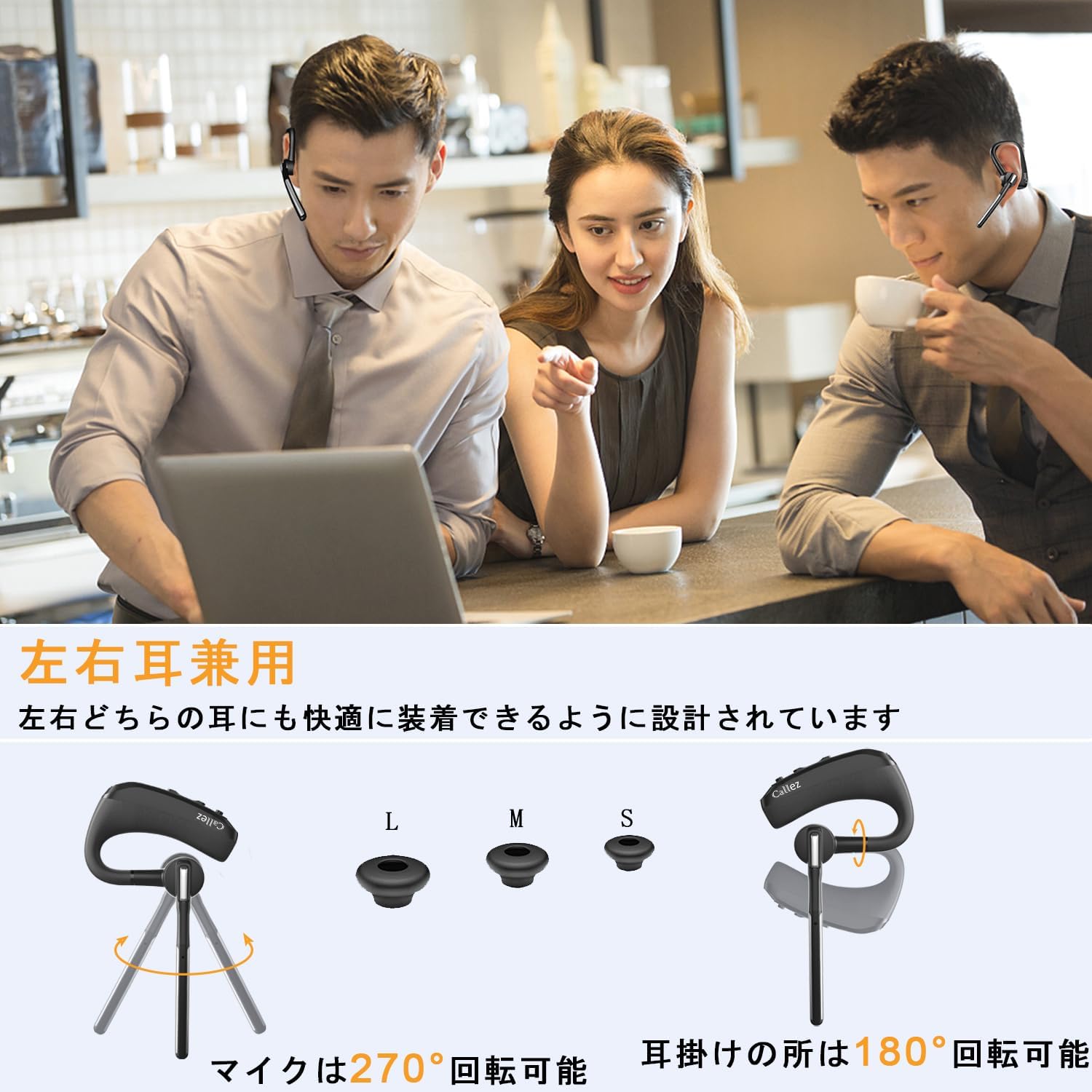
This image illustrates the headset's versatility, showing it can be comfortably worn on either the left or right ear. It also highlights the included L, M, S ear tips and the 270° microphone rotation and 180° ear hook rotation for optimal fit and positioning.
For an unstable fit, two sponge ear cushions are included. These can be attached to the outside of the L/M/S ear tips to improve stability and comfort.
6. Техникалык тейлөө
To ensure the longevity and optimal performance of your Callez headset, follow these maintenance guidelines:
- Тазалоо: Гарнитураны жумшак, кургак чүпүрөк менен сүртүңүз. Абразивдүү тазалагычтарды же эриткичтерди колдонбоңуз.
- Сактагыч: Store the headset in its protective case when not in use to prevent damage from dust, moisture, and impacts.
- Температура: Avoid exposing the headset to extreme temperatures (hot or cold) or direct sunlight for extended periods.
- Нымдуулук: Keep the headset dry. Do not immerse it in water or expose it to excessive humidity. The charging port has a dust cover for protection.
- Батареяга кам көрүү: For long-term storage, charge the headset at least once every three months to maintain battery health.
7. Кыйынчылыктарды
If you encounter issues with your headset, please refer to the following common problems and solutions:
| Көйгөй | Мүмкүн себеп | Чечим |
|---|---|---|
| Cannot find headset on phone's Bluetooth list | Headset not in pairing mode; Bluetooth error on phone. | Ensure MFB is pressed until LED flashes blue/red. Reset headset (press Volume - and Mute simultaneously until red/blue LED flashes twice, then powers off). Delete existing pairing data on phone and restart phone. |
| Гарнитурадан үн жок | Headset not properly connected; out of range; connected to another device. | Verify headset is correctly connected to your phone. Ensure headset and phone are within 10m. Check if phone is connected to another Bluetooth device. |
| Call quality issues (e.g., dropped calls) | Interference from Wi-Fi; high-quality sound effect settings. | Bluetooth is wireless communication, recording is not recommended. If high-quality sound effects are selected in phone settings, calls may be interrupted due to Wi-Fi interference. This is not a product defect. |
| Microphone mute not working on computer | Mute function not supported on computer devices. | The microphone mute function is not supported when connected to computer devices. |
| Volume adjustment issues | Volume synchronization differences between devices. | For iOS: Headset and iOS device volumes are synchronized. Adjust from either. For Android: Headset and Android device volumes are not synchronized. You can increase Android volume even if headset volume is max. |

A man wearing the Callez headset in an office setting, demonstrating the effectiveness of the dual microphone ENC and CVC8.0 noise cancellation technology for clear communication.
8. Техникалык шарттар
| Өзгөчөлүк | Спецификация |
|---|---|
| Модель номери | C01 |
| Noise Control | Hybrid Noise Cancelling (ENC + CVC8.0 Dual Mic) |
| Байланыш технологиясы | Зымсыз (Bluetooth) |
| Зымсыз байланыш технологиясы | Bluetooth |
| Аудио кодек колдоо | aptX HD, SBC |
| Камтылган компоненттер | Cable, Protective Case, Instruction Manual |
| Максаттуу жаш | бойго жеткен |
| Продукт Салмагы | 100 грамм |
| Батарея түрү | Литий Полимер (1 камтылган) |
| Түс | Кара |
| Кулак жайгаштыруу | In-Ear (Ear-hook style) |
| Импеданс | 32 Ом |
9. Кепилдик жана колдоо
Callez is committed to providing excellent after-sales service. Your product comes with the following assurances:
- 45-Day Refund Period: If you are not satisfied with the product, you may be eligible for a refund within 45 days of purchase.
- 24-Month Quality Warranty: The product is covered by a 24-month warranty against manufacturing defects.
If you encounter any issues with the product, please contact our after-sales service team before initiating a return or leaving a review. We are dedicated to resolving any problems you may experience.
For support, please visit the Callez store on Amazon or contact us through the Amazon messaging system.
Ask a question about this manual
Ask about setup, troubleshooting, compatibility, parts, safety, or missing instructions. Manuals+ will review the question and use this page’s manual context to help answer it.