
1. Киришүү
Thank you for choosing the Monster Airmars XKT06 Wireless Gaming Headphones. These True Wireless Stereo (TWS) earbuds are designed to provide a high-quality audio experience for both music listening and gaming, featuring low-latency performance and stable Bluetooth 5.2 connectivity. Please read this manual carefully to ensure proper use and maintenance of your new headphones.
2. Пакеттин мазмуну
- Monster Airmars XKT06 Wireless Earbuds (Left and Right)
- Заряддоо кутусу
- USB Type-C кубаттоочу кабель
- User Manual
- Наушниктер (ар кандай өлчөмдөгү)
3. Продукт бүтүп калдыview
Familiarize yourself with the components of your Monster Airmars XKT06 headphones.

3.1-сүрөт: Monster Airmars XKT06 Wireless Gaming Headphones in their charging case, showcasing the earbuds and the case with illuminated accents.
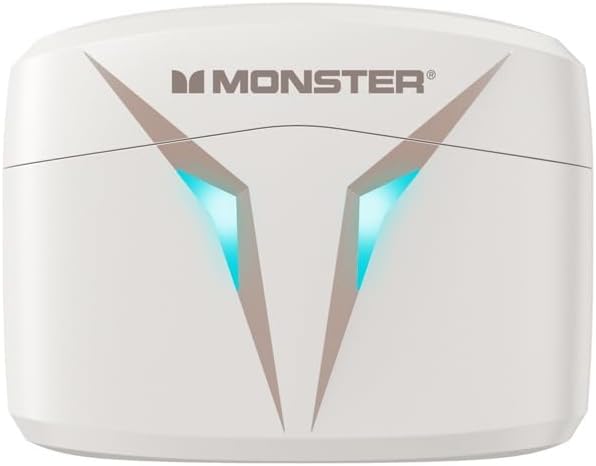
3.2-сүрөт: Жогорку view of the Monster Airmars XKT06 charging case, highlighting the Monster logo and the distinctive V-shaped light indicators.
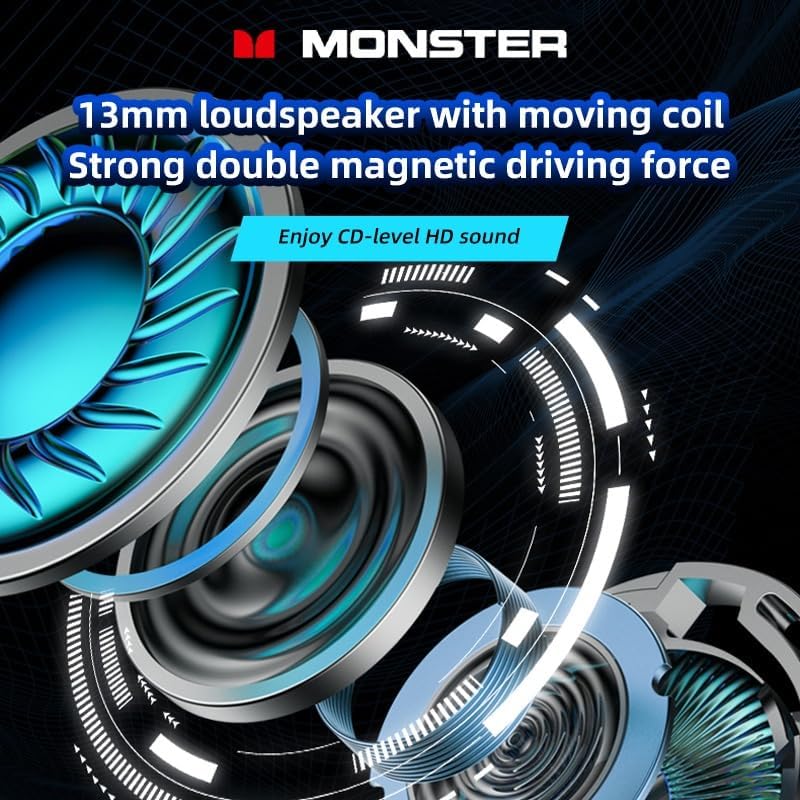
3.3-сүрөт: An exploded diagram illustrating the internal structure of the 13mm loudspeaker, emphasizing its moving coil and strong double magnetic driving force for enhanced audio quality.
4. Орнотуу
4.1. Наушникти жана капты заряддоо
Биринчи колдонуудан мурун, наушникти жана кубаттоочу кутучаны толук заряддаңыз.
- Connect the provided USB Type-C cable to the charging port on the case.
- Кабелдин экинчи учун USB кубат адаптерине (кошумча эмес) же компьютердин USB портуна туташтырыңыз.
- Корпустагы индикатор жарыктары кубаттоо абалын көрсөтөт. Толук заряддалгандан кийин, жарыктар аяктагандыгын көрсөтүп турат же өчөт.
- Place the earbuds into the charging case. They will automatically begin charging. The earbuds' indicators will show charging status and turn off when fully charged.
4.2. Түзмөгүңүз менен жупташтыруу
The Monster Airmars XKT06 headphones support Bluetooth 5.2 for a stable connection.
- Кубаттоочу кутучаны ачыңыз. Кулакчындар автоматтык түрдө жупташтыруу режимине өтөт (кулакчындардагы жаркылдаган жарыктар менен көрсөтүлөт).
- Түзмөгүңүздө (смартфон, планшет, компьютер) Bluetooth жөндөөлөрүнө өтүңүз.
- Bluetooth күйгүзүү.
- Издөө available devices and select "MONSTER Airmars XKT06" from the list.
- Туташтырылгандан кийин, кулакчындын индикатор жарыгы күйүп-өчүүнү токтотот.
Эскертүү: Эгер аппаратта Bluetooth иштетилген болсо, гарнитура корпусунан чыгарылганда акыркы жупташтырылган түзмөккө автоматтык түрдө кайра туташат.
5. Иштөө нускамалары
5.1. Башкаруу элементтерине тийүү
The Monster Airmars XKT06 headphones feature intuitive touch controls on each earbud.
| Акция | Сол кулакчын | Оң кулак |
|---|---|---|
| Ойнотуу/Тыныгуу | Single Tap | Single Tap |
| Кийинки трек | Эки жолу таптаңыз | |
| Мурунку трек | Эки жолу таптаңыз | |
| Чалууга жооп берүү/аяктоо | Single Tap | Single Tap |
| Чакырууну четке кагуу | Узак басуу (2сек) | Узак басуу (2сек) |
| Үн жардамчысын жандырыңыз | Үч жолу таптаңыз | Үч жолу таптаңыз |
| Оюн режимин күйгүзүңүз | Узак басуу (2сек) | Узак басуу (2сек) |
5.2. Оюн режими
The Monster Airmars XKT06 features a dedicated gaming mode that reduces audio latency for a more immersive gaming experience. To activate or deactivate gaming mode, long press the touch area on either earbud for approximately 2 seconds. You will hear an audio prompt indicating the mode change.

5.1-сүрөт: The Monster Airmars XKT06 charging case, illustrating the low-latency feature for an immersive experience, ideal for gaming.
5.3. Бир кулакчын колдонуу
Both earbuds can be used independently. Simply take one earbud out of the case, and it will automatically connect to your device. The other earbud can remain in the case or be used by another person.

5.2-сүрөт: The Monster Airmars XKT06 headphones demonstrating the free switching capability, allowing either earbud to be used independently.
6. Техникалык тейлөө
6.1. Тазалоо
- Кулакчындарды жана кубаттоочу кутуну тазалоо үчүн жумшак, кургак, түксүз чүпүрөктү колдонуңуз.
- Абразивдүү тазалагычтарды, спиртти же химиялык эриткичтерди колдонбоңуз.
- Туура кубаттоо үчүн кулакчындардагы жана корпустагы заряддоо контакттарын акырын тазалаңыз.
6.2. Сактоо
- Кулакчындарды коргоо жана кубаттоо үчүн колдонулбаган учурда аларды кубаттоо кутучасында сактаңыз.
- Салкын, кургак жерде, экстремалдык температурадан жана түз күндүн нурунан алыс сактаңыз.
7. Кыйынчылыктарды
If you encounter issues with your Monster Airmars XKT06 headphones, please refer to the following common solutions:
| Көйгөй | Мүмкүн чечим |
|---|---|
| Кулакчындар жупташкан жок | Кулакчындардын кубатталганын текшериңиз. Түзмөгүңүздөгү Bluetooth'ду өчүрүп, күйгүзүңүз. Bluetooth жөндөөлөрүнөн түзмөктү унутуп, кайра жупташтырыңыз. |
| Бир кулактын үнү чыкпайт | Place both earbuds back in the case, close it, then open it again. Ensure both earbuds are charged. |
| Заряддоо маселелери | Check the USB cable and power adapter. Clean the charging contacts on earbuds and case. Ensure earbuds are correctly seated in the case. |
| Көлөмү төмөн же үн сапаты начар | Adjust volume on your device. Ensure earbuds are clean and free of debris. Try different sized eartips for a better seal. |
| үзгүлтүктүү байланыш | Ensure no obstacles between headphones and device. Stay within the 10-meter Bluetooth range. Avoid strong electromagnetic interference. |
If the problem persists, try resetting the headphones (refer to manufacturer's webБул жерде толук эмес болсо, конкреттүү баштапкы абалга келтирүү нускамалары үчүн сайт) же кардарларды колдоо менен байланышыңыз.
8. Техникалык шарттар
- Продукт түрү: TWS Esports Headset
- Модел: XKT06
- Бренд: Monster
- Түсү: Ак
- Bluetooth версиясы: Bluetooth 5.2
- Bluetooth өткөрүү аралыгы: 10 метр
- Мүйүздүн көлөмү: 13 мм
- Жыштык Жооп диапазону: 20Гц-20КГц
- Horn Impedance: 32 Ом ±15%
- Сезимталдуулук: 106дБ±3дБ
- Заряддоо интерфейси: Type-C
- Кулак жайгаштыруу: Кулакта
- Форма фактору: Кулакта
- Келип чыккан өлкө: Кытай
9. Кепилдик жана колдоо
For warranty information and customer support, please refer to the documentation provided with your purchase or visit the official Monster webсайт. Кепилдик дооматтар үчүн сатып алганыңыздын далилин сактаңыз.
For technical assistance or further inquiries, please contact Monster customer service through their official channels.