
UNITOPSCI 2G+32G
UNITOPSCI 10.1 Inch Android Car Stereo User Manual
For Honda Accord 2003-2007 (Model: 2G+32G)
Бренд: UNITOPSCI
Продукт бүттүview
The UNITOPSCI 10.1 Inch Android Car Stereo is specifically designed for Honda Accord models from 2003 to 2007. This advanced head unit features a quad-core Android 13.0 system with 2GB RAM and 32GB ROM, ensuring fast and smooth operation. It boasts a 10.1-inch HD capacitive touchscreen with 1024*600 resolution, supporting 1080p video playback and delivering a clear visual experience.
Key features include built-in Wireless Apple CarPlay and Android Auto for seamless smartphone integration, Mirror Link functionality for both Android and iOS devices, and integrated GPS navigation with support for online and offline maps. The unit also offers Bluetooth 4.2 for hands-free calling and audio streaming, FM/RDS radio, and support for steering wheel controls. A backup camera is included for enhanced safety during reversing maneuvers.

Figure 1: UNITOPSCI 10.1 Inch Android Car Stereo Main Unit
Орнотуу жана орнотуу
This car stereo is designed for plug-and-play installation with the appropriate wire harness for your Honda Accord 2003-2007. It is recommended to confirm your car's specific model and year, and provide photos of your car's center console and original radio's rear CD connectors to ensure compatibility and the correct wire harness is used.
Пакеттин мазмуну:
- Android унаа стерео блогу
- AHD арткы камера
- Электр кабели
- Орнотуу куралы
- GPS антеннасы
- RCA кабели
- 2 USB кабели
- Микрофон
- User Manual
- Accessories (Mounting brackets, etc.)

Figure 2: Package Contents and Unit Dimensions
Орнотуу кадамдары (Жалпы):
- Carefully remove the original car radio unit from the dashboard.
- Connect the provided power cable, RCA cables, USB cables, GPS antenna, and microphone to the new Android car stereo unit.
- If installing the backup camera, route the camera cable to the rear of the vehicle and connect it to the designated camera input on the stereo.
- Secure the new stereo unit into the dashboard using the provided accessories and installation tools.
- Башкаруу панелинин жасалгасын толугу менен кайра чогултуудан мурун, бардык функцияларды текшериңиз.

Сүрөт 3: Орнотууга чейин жана кийин View
Иштөө нускамалары
Зымсыз Apple CarPlay & Android Auto:
The unit supports both wireless and wired connections for Apple CarPlay and Android Auto. This allows you to access phone contacts, GPS navigation, music, and other apps directly from the stereo's display. Activate Siri or Google Assistant for voice control.
- Wireless CarPlay үчүн: Enable Bluetooth on your iPhone and pair it with the car radio. Then, open the 'ZLink 5' app on the car stereo.
- Wireless Android Auto үчүн: Ensure the Android Auto app is installed on your phone. Connect your phone via Bluetooth or the original USB cable. Open the 'ZLink 5' app on the car stereo. Note: Android Auto may not be compatible with some Samsung phones.
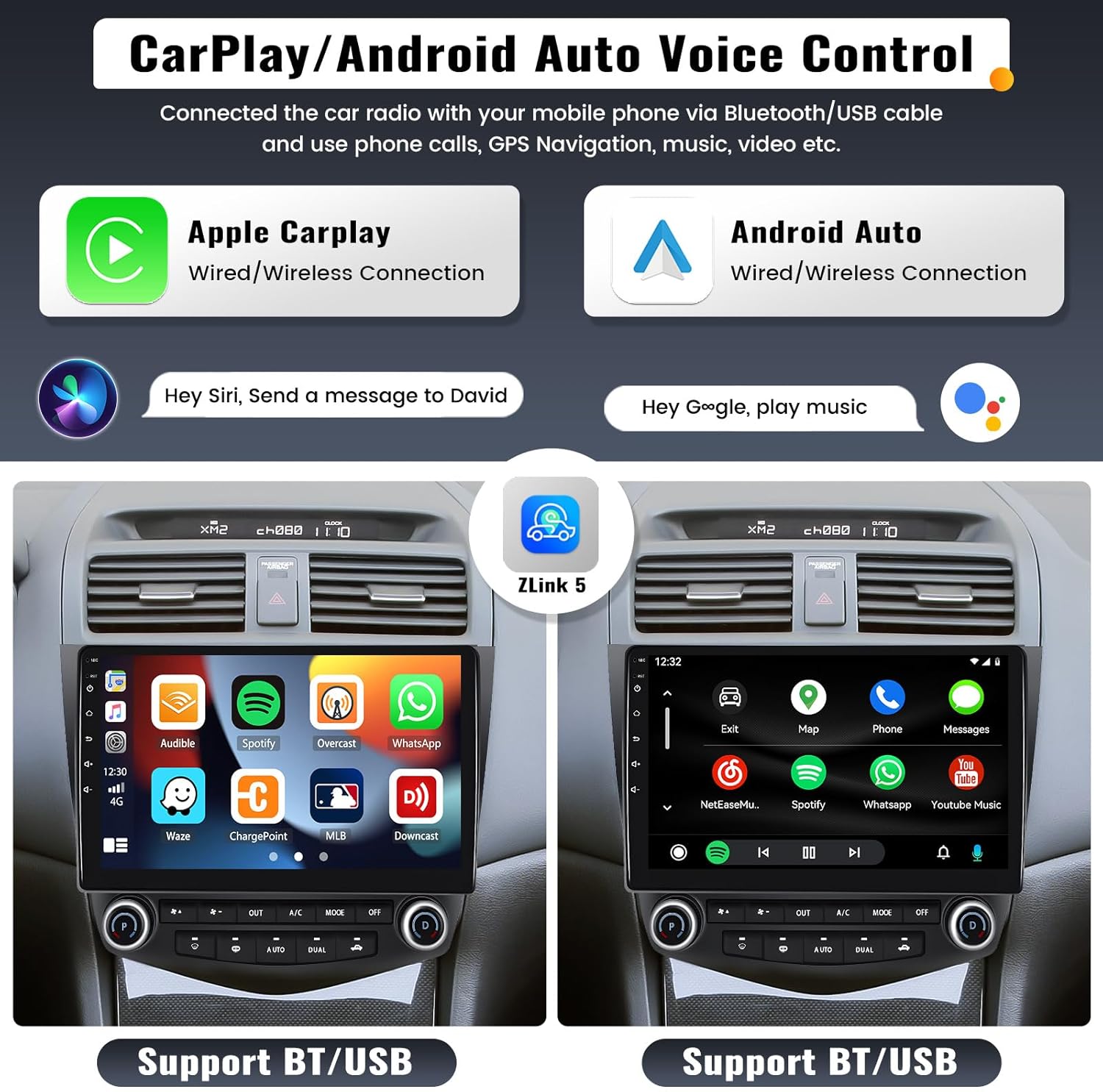
4-сүрөт: CarPlay жана Android Auto интерфейси
Mirror Link функциясы:
The Mirror Link function projects your smartphone screen onto the car stereo display, allowing you to view maps, videos, and games. For iOS phones, screen mirroring is via WiFi. For Android phones, it can be via WiFi or USB cable. Note: This function may not work with some Samsung phones.
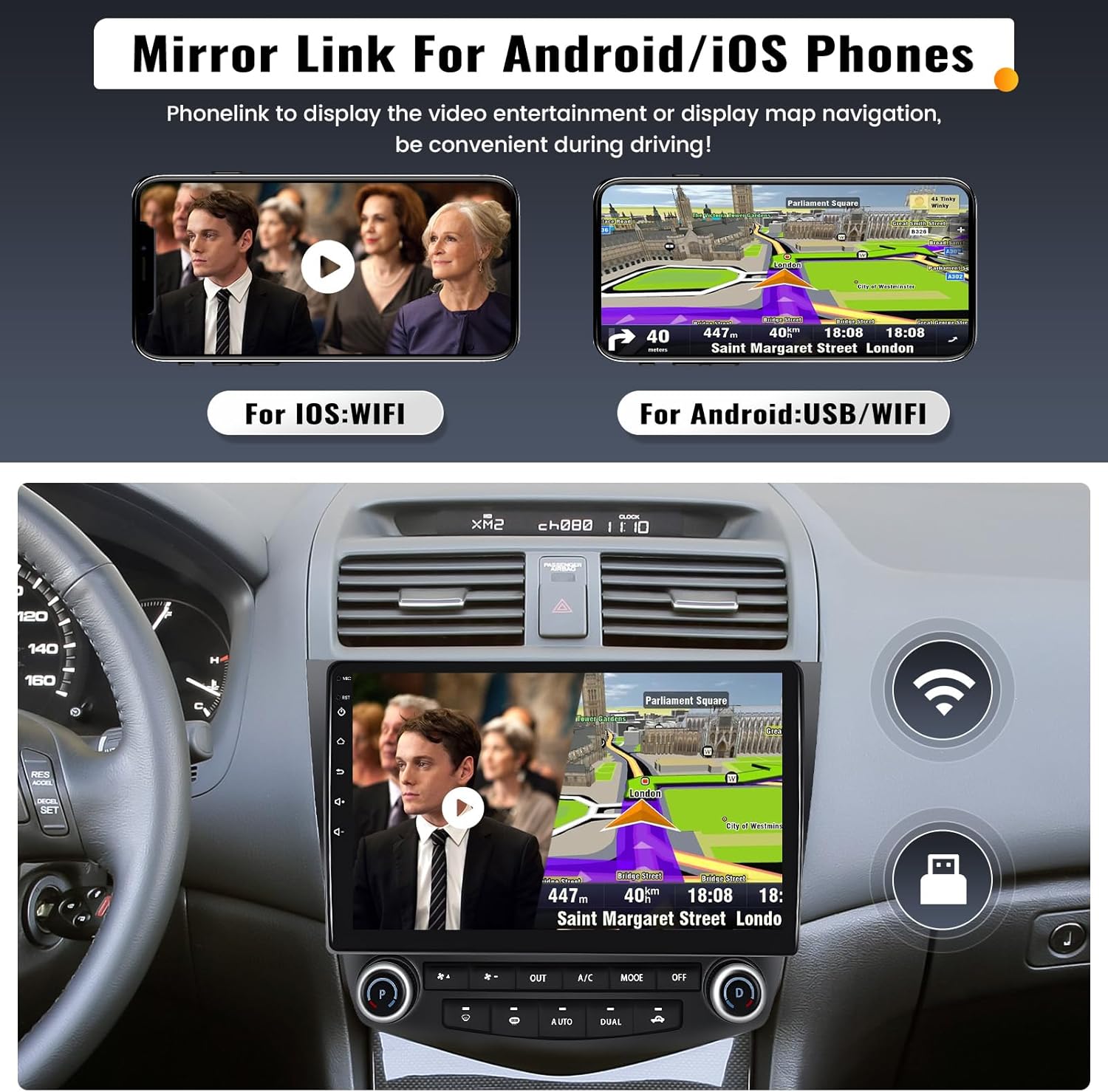
Сүрөт 5: Mirror Link Functionality
Bluetooth & Voice Control Assistant:
Built-in Bluetooth 4.2 with A2DP allows for stable hands-free calling and audio streaming. You can also download your phone book to the unit. The integrated voice control assistant helps manage calls and music while driving.

Figure 6: Bluetooth and Voice Control Features
GPS навигациясы жана Wi-Fi:
The unit includes a built-in GPS receiver and WiFi module. It supports both online and offline navigation. Offline maps (e.g., HERE WEGO) can be downloaded via WiFi. Connect to a WiFi hotspot from your smartphone to access online functions like video streaming, music, and app downloads.

7-сүрөт: GPS навигациясы жана WiFi туташуусу
Steering Wheel Control (SWC) & Backup Camera:
The stereo supports your vehicle's existing steering wheel controls, allowing you to conveniently adjust volume, change songs, and manage calls without taking your hands off the wheel. An AHD backup camera is included, providing a clear reversing image that automatically displays on the screen when the car is put into reverse gear, enhancing parking safety.

Figure 8: Steering Wheel Control and Backup Camera Display
Башка функциялар:
- FM/RDS радиосу: Tune into your favorite FM stations with 18 preset options.
- EQ Audio Setting: Customize your audio experience with various equalizer settings (Classic, Pop, Rock, Jazz, Flat) and audio balance adjustments.
- Бөлүнгөн экран дисплейи: Экранда бир убакта эки тиркемени иштетиңиз, мисалы, навигация жана музыка ойнотуу.
- DVR киргизүүсү: Connect an optional car driving recorder (DVR) to capture driving footage.
Техникалык тейлөө
To ensure the longevity and optimal performance of your UNITOPSCI car stereo, follow these maintenance guidelines:
- Экранды тазалоо: Сенсордук экранды акырын сүртүү үчүн жумшак, түксүз чүпүрөктү колдонуңуз. өжөр тактар үчүн, бир аз гampчүпүрөккө суу же экранды тазалоочу каражат. Абразивдүү материалдардан же катуу химиялык заттардан алыс болуңуз.
- Температураны көзөмөлдөө: Avoid exposing the unit to extreme temperatures (very hot or very cold) for extended periods, as this can affect electronic components and the display.
- Программалык камсыздоо жаңыртуулары: Periodically check for software updates from UNITOPSCI to ensure your system has the latest features and bug fixes. Updates can often improve performance and compatibility.
- Туташуу текшерүүлөрү: Occasionally check all cable connections to ensure they are secure, especially after any vehicle maintenance or modifications.
Проблемаларды чечүү
Эгерде сиз унааңыздын стереосу менен көйгөйлөргө туш болсоңуз, төмөнкү жалпы көйгөйлөрдү чечүү кадамдарын караңыз:
- Кубат жок:
- Бардык электр кабелдик байланыштарын текшериңиз.
- Унаанын радиосунун сактагычынын бүтүндүгүн текшериңиз.
- Ensure the car battery has sufficient charge.
- Үн жок:
- Динамиктин зым байланыштарын текшериңиз.
- Үндүн үнү өчүп же өтө төмөн коюлбагандыгын текшериңиз.
- Стерео менюсунда аудио чыгаруу жөндөөлөрүн текшериңиз.
- GPS Signal Weak/Lost:
- Ensure the GPS antenna is properly connected and placed in an unobstructed location (e.g., on the dashboard with a clear view асман).
- Түзмөктү кайра иштетип көрүңүз.
- Bluetooth туташуу маселелери:
- Телефонуңузда да, стерео системаңызда да Bluetooth күйгүзүлгөнүн текшериңиз.
- Эки түзмөктөгү мурунку жупташтырууларды өчүрүп, кайра жупташтырып көрүңүз.
- Телефонуңузду стереого жакыныраак жылдырыңыз.
- Сенсордук экран жооп бербейт:
- Perform a soft reset by pressing the reset button (if available) or turning the car ignition off and on.
- Экран таза жана таштандылардан таза экенин текшериңиз.
If these steps do not resolve the issue, please contact UNITOPSCI customer support for further assistance.
Техникалык шарттар
| Өзгөчөлүк | Деталь |
|---|---|
| Модел | 2G+32G |
| Операция системасы | Android 13.0 |
| RAM | 2 ГБ |
| ROM | 32 ГБ |
| Screen Size | 10.1 дюйм |
| Display Resolution | 1024*600 |
| Video ойнотуу | 1080p колдоо |
| Power Output | 4*45 Вт |
| Bluetooth версиясы | 4.2 |
| Радио тобу | FM/RDS (87.5-108.0MHZ) |
| Байланыш | Bluetooth, WiFi |
| Камтылган компоненттер | Android Car Stereo, Backup Camera |
| Элемент Салмагы | 4.26 фунт |
| Продукциянын өлчөмдөрү | 0.39 x 0.39 x 0.39 дюйм |
Кепилдик жана колдоо
Your UNITOPSCI car stereo comes with a 2 жылдык Өндүрүүчүнүн Кепилдиги сатып алынган күндөн тартып. Бул кепилдик нормалдуу колдонуудагы материалдардагы жана жасалгадагы кемчиликтерди камтыйт.
For technical support, troubleshooting assistance, or warranty claims, please contact UNITOPSCI customer service:
- Электрондук почта: UNITOPSCI@126.com
- Онлайн колдоо: Refer to the contact information provided with your purchase or visit the official UNITOPSCI store page on Amazon.
UNITOPSCI is committed to providing high-quality products and satisfactory services. Lifetime after-sales consultation and technical support are available.
Ask a question about this manual
Ask about setup, troubleshooting, compatibility, parts, safety, or missing instructions. Manuals+ will review the question and use this page’s manual context to help answer it.