
1. Киришүү
This manual provides detailed instructions for the installation, operation, and maintenance of your UNITOPSCI Double Din Apple CarPlay & Android Auto Car Stereo. Please read this manual thoroughly before using the product to ensure proper functionality and safety.
2. Кутуда эмне бар
- 1 x Унаа стереосу
- 1 х Камера
- 1 x Remote Control (Battery Not included)
- 1 x Steering Wheel Control (Battery Not included)
- 1 x Кубат кабели
- 1 x Динамик кабели
- 1 x User Manual
- 1 x Микрофон
3. Негизги өзгөчөлүктөрү
- Compatible with Apple CarPlay & Android Auto via USB cable connection.
- 7-inch HD Capacitive Touch Screen for clear visuals and smooth operation.
- Built-in Bluetooth 5.1 for hands-free calling and music streaming.
- FM Radio with 18 preset stations.
- Mirror Link function for screen mirroring from smartphones (Android/iOS).
- Includes Backup Camera for safer parking.
- Supports Steering Wheel Control for convenient operation.
- EQ Sound settings (Classic, Pop, Rock, Flat, DSP).
- Multiple playback options: USB, AUX, TF Card input.
- 7 colorful backlight display options.
4. Орнотуу жана орнотуу
Proper installation is crucial for optimal performance. It is recommended to have this unit installed by a professional if you are unfamiliar with car audio wiring.
4.1 General Wiring Diagram
Refer to the following diagram for the general wiring connections of the car stereo. Ensure all connections are secure and correctly matched to your vehicle's wiring harness.

1-сүрөт: Жалпы зым схемасы
4.2 Камеранын резервдик зымдары
The included backup camera requires specific wiring for proper functionality. Connect the red power cable of the camera to the positive back battery supply and the black cable to the negative battery supply. The yellow video input port of the camera connects to the CAM IN port on the rear of the car radio. Locate the wire labeled "BACK" on the car radio's harness and connect it to the positive power supply (typically the reverse light trigger wire). This ensures the display automatically switches to the reversing image when the car is in reverse gear.

Figure 2: Backup Camera Wiring Diagram
5. Иштөө нускамалары
5.1 Apple CarPlay жана Android Auto
Connect your smartphone to the car stereo via a USB cable. The unit will automatically detect and launch Apple CarPlay or Android Auto, allowing you to access navigation, music, calls, and messages directly from the stereo's screen. Voice control functions are supported for hands-free operation.

Сүрөт 3: CarPlay & Android Auto Interface
5.2 Bluetooth 5.1
Enable Bluetooth on your smartphone and search for available devices. Select the car stereo from the list to pair. Once connected, you can make and receive hands-free calls and stream audio directly to the stereo. The built-in microphone ensures clear call quality.

Figure 4: Bluetooth Hands-free Calls
5.3 FM радиосу
Access the FM radio function to listen to your favorite stations. The unit supports a radio range of FM 87.5-108.0MHZ and allows you to save up to 18 preset stations for quick access to news, sports, and music.

Figure 5: Stable FM Radio Operation
5.4 Mirror Link
Utilize the Mirror Link function by connecting your smartphone via USB. This feature allows you to mirror your phone's screen content, including videos and navigation maps, directly onto the car stereo's display.

Сүрөт 6: Mirror Link Functionality
5.5 Эквалайзердин үн жөндөөлөрү
Adjust the audio output to your preference using the built-in EQ sound settings. Choose from predefined modes like Classic, Pop, Rock, Flat, or customize your sound with DSP settings.

Figure 7: Digital Sound Effect Adjustment
5.6 Рулду башкаруу
Connect the steering wheel control wires to enable convenient control of the stereo directly from your steering wheel. This allows you to easily switch songs, adjust volume, and manage phone calls without taking your hands off the wheel.

8-сүрөт: Рул дөңгөлөгүн башкарууну орнотуу
5.7 USB/AUX/TF Card Playback
The unit supports multiple input sources for audio and video playback. Insert a USB drive, TF card, or connect an external device via the AUX input to enjoy your media files.
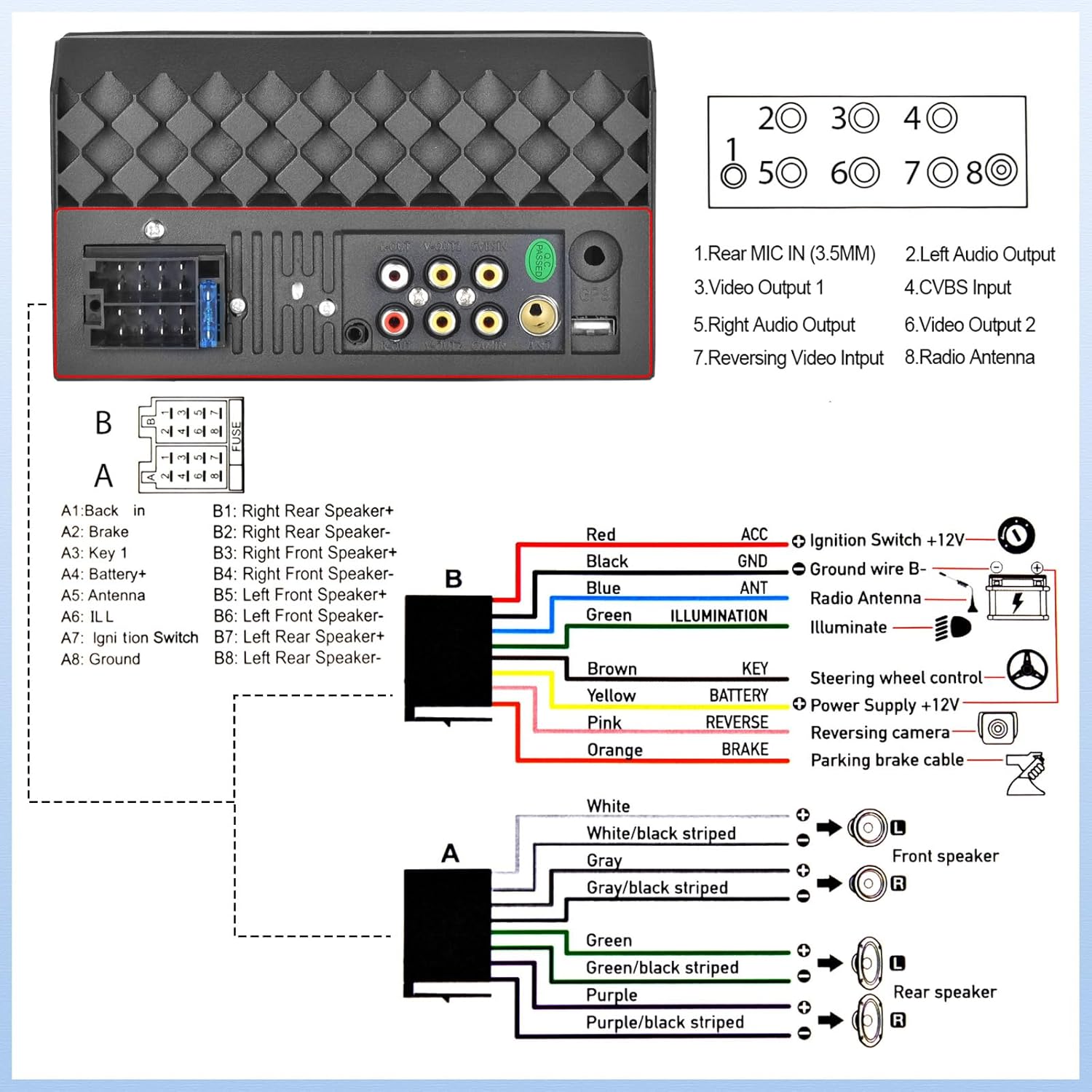
Figure 9: USB/AUX/TF Card Input
6. Техникалык тейлөө
Унаа стереоңуздун узак иштөөсүн жана оптималдуу иштешин камсыз кылуу үчүн, төмөнкү тейлөө көрсөтмөлөрүн аткарыңыз:
- Экранды жумшак, түксүз чүпүрөк менен таза кармаңыз. Абразивдүү тазалагычтардан алыс болуңуз.
- Ашыкча ысып кетүүнүн алдын алуу үчүн аппараттын айланасында туура желдетүүнү камсыз кылыңыз.
- Аппаратты экстремалдык температурага же түз күн нуруна узак убакытка калтыруудан сактаңыз.
- Regularly check wiring connections for looseness or corrosion.
7. Кыйынчылыктарды
Унаа стереоңузда көйгөйлөргө туш болсоңуз, төмөнкү жалпы көйгөйлөрдү жана чечимдерди караңыз:
- Кубат жок: Check all power connections, including the ACC (ignition switch) and B+ (battery) wires. Ensure the fuse is not blown.
- Үн жок: Verify speaker connections are secure and correctly polarized. Check the volume level and EQ settings.
- Bluetooth туташуу маселелери: Стерео системаңызда да, телефонуңузда да Bluetooth күйгүзүлгөнүн текшериңиз. Түзмөктөрдү ажыратып, кайра жупташтырып көрүңүз.
- Камдык камера көрүнбөйт: If the camera is powered on but the head unit does not switch to the reversing image, check the trigger wire for the backup camera connection. Ensure it is correctly connected to a positive power supply that activates when reverse gear is engaged.
- Сенсордук экран жооп бербейт: Try resetting the unit (refer to the main unit for a small reset button, if available, or disconnect power briefly).
8. Техникалык шарттар
| Өзгөчөлүк | Спецификация |
|---|---|
| Продукциянын өлчөмдөрү | 2.48 x 7 x 4 дюйм |
| Элемент Салмагы | 1.1 фунт |
| Элемент моделинин номери | L2 |
| Байланыш технологиясы | Bluetooth, көмөкчү, USB |
| Controller Type | Android |
| Өзгөчөлүктөр | Touchscreen, Backup Camera Input, Android Auto, Built-In Bluetooth, Apple CarPlay |
| Шайкеш түзмөктөр | Смартфон |
| Туташтыргыч түрү | USB 2.0 |
| Аудио чыгаруу режими | Моно |
| Көлөмдүү үн каналынын конфигурациясы | 4.0 |
| Видеону коддоо | H.264, H.265 |
| Өндүрүүчү | UNITOPSCI |
| Келип чыккан өлкө | Кытай |
9. Кепилдик жана колдоо
UNITOPSCI is committed to providing high-quality products and satisfactory services. Your product comes with the following support:
- Replacement Available within 24 Months
- 60-days No Worry to Return
- Lifetime After-Sales Consult and Technical Support
- 16 сааттын ичинде тез жооп
Суроолор же техникалык жардам алуу үчүн биз менен төмөнкү дарек боюнча байланышыңыз: UNITOPSCI@126.com