
GOOJODOQ M06 Bluetooth Keyboard and Mouse
User Manual
Introduction
Thank you for choosing the GOOJODOQ M06 Bluetooth Keyboard and Mouse. This 3-in-1 device is designed to enhance your productivity across multiple platforms. This manual provides detailed instructions on how to set up, operate, and maintain your new device. Please read this manual carefully before use and keep it for future reference.
Пакеттин мазмуну
- 1 х Bluetooth баскычтобу
- 1 x Bluetooth чычкан
- 1 x заряддоо кабели (USB Type-C)
- 1 x User Manual
Продукт бүттүview
The GOOJODOQ M06 is a versatile input solution featuring a 10-inch keyboard and a compact mouse, both utilizing Bluetooth connectivity. The keyboard supports simultaneous connection to up to three devices and is compatible with Android, iOS, and Windows operating systems. It features silent scissor-switch keys for a comfortable typing experience.
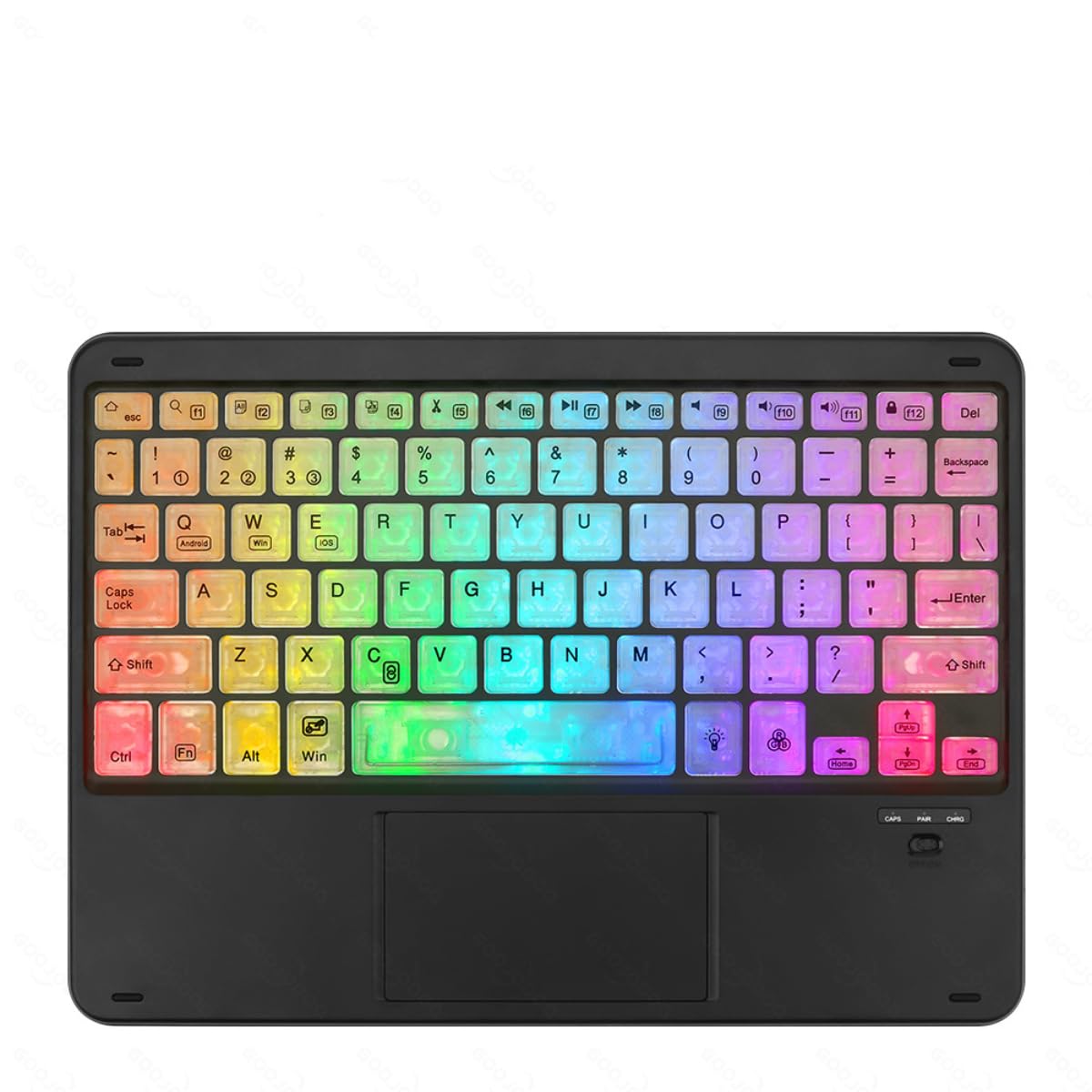
Image showing the GOOJODOQ M06 Bluetooth Keyboard and the accompanying mouse, both in black.
Setup: Bluetooth Connection
Follow these steps to connect your GOOJODOQ M06 Keyboard and Mouse via Bluetooth:
- Күйгүзүү: Turn on the power switch located on the keyboard and mouse. The Bluetooth indicator light on the keyboard will illuminate.
- Жупташтыруу режимине кирүү:
- For the first device, press FN + 1. The Bluetooth light will blink, indicating it's ready for pairing.
- For the second device, press FN + 2.
- For the third device, press FN + 3.
- Түзмөгүңүзгө туташыңыз: On your device (e.g., tablet, smartphone, computer), go to Bluetooth settings and search for available devices. Select "Bluetooth Keyboard" from the list to connect.
- Select Operating System: After successful connection, press the corresponding key combination to select your device's operating system:
- For Android devices, press FN + Q.
- For Windows devices, press FN + W.
- For iOS devices, press FN + E.
- Автоматтык кайра туташуу: Once successfully paired, the keyboard will automatically reconnect to the last used device when powered on.
Иштөө нускамалары
Туташкан түзмөктөрдүн ортосунда которулуу
If you have paired the keyboard with multiple devices, you can easily switch between them by pressing the corresponding FN key combination:
- Басыңыз FN + 1 биринчи жупташкан түзмөккө которулуу үчүн.
- Басыңыз FN + 2 экинчи жупташкан түзмөккө которулуу үчүн.
- Басыңыз FN + 3 үчүнчү жупташкан түзмөккө которулуу үчүн.
Ensure the target device's Bluetooth is enabled and within range for a successful switch.
Жалпы колдонуу
The keyboard features a standard QWERTY layout. The mouse operates like a conventional Bluetooth mouse. Ensure both devices are charged for optimal performance.
Техникалык тейлөө
- Тазалоо: Клавиатура менен чычкандын бетин тазалоо үчүн жумшак, кургак чүпүрөктү колдонуңуз. Өжөр кир үчүн бир аз сүртүңүзamp жумшак самын менен кездеме колдонсо болот, бул аппаратка суюктук кирбесин.
- Сактагыч: Аппаратты түз күн нурунан жана экстремалдык температурадан алыс салкын, кургак жерде сактаңыз.
- Заряддоо: Charge the devices using the provided USB Type-C cable. Avoid using damaged cables or chargers.
- Суюктуктардан алыс болуңуз: Do not expose the keyboard or mouse to water or other liquids.
Проблемаларды чечүү
- Түзмөк туташпай жатат:
- Баскычтоптун да, чычкандын да күйүп турганын жана толук заряддалганын текшериңиз.
- Make sure Bluetooth is enabled on your host device.
- Try re-entering pairing mode (FN + 1/2/3) and re-pairing with your device.
- Ensure the correct operating system mode is selected (FN + Q/W/E).
- Move the devices closer to each other to ensure they are within Bluetooth range.
- Ачкычтар жооп бербейт:
- Check if the keyboard is connected to the correct device (FN + 1/2/3).
- Баскычтопту кайра заряддаңыз.
- Хост түзмөгүңүздү өчүрүп күйгүзүңүз.
- Чычкан жооп бербейт:
- Чычканды кайра заряддаңыз.
- Чычкан күйгүзүлгөнүн текшериңиз.
- Re-pair the mouse with your device if necessary.
Техникалык шарттар
- Модел: M06
- Материал: ABS + металл
- Түсү: Кара
- Өлчөмү: 10 inches (Keyboard)
- Заряддоо порту: USB Type-C
- Байланыш: Bluetooth (supports 3 devices simultaneously)
- Шайкештик: Android, iOS, Windows
- Баскычтоптун өзгөчөлүктөрү: Scissor-switch keys, Silent operation
Кепилдик жана колдоо
GOOJODOQ products are designed for reliability and performance. For warranty information, please refer to the warranty card included with your purchase or visit the official GOOJODOQ website. For technical support or further assistance, please contact GOOJODOQ customer service through the contact information provided on our webсайт же сатып алуу платформаңыз.