
Introduction
Сатып алганыңыз үчүн рахматasing the Volkano Griffin Series Dual Party Speaker. This manual provides essential information for the safe and optimal use of your speaker. Please read these instructions thoroughly before operating the device and retain them for future reference.
Коопсуздук нускамалары
- Динамикти сууга, нымдуулукка же экстремалдык температурага дуушар кылбаңыз.
- Динамикти жылуулук булактарынын жанына же күндүн түз тийген жерине койбоңуз.
- Агрегатты өз алдынча бөлүүгө же оңдоого аракет кылбаңыз. Бардык тейлөөлөрдү квалификациялуу кызматкерлерге тапшырыңыз.
- Ашыкча ысып кетүүнүн алдын алуу үчүн динамиктин айланасында жакшы желдетүүнү камсыз кылыңыз.
- Динамикти балдардан жана үй жаныбарларынан алыс кармаңыз.
- Берилген кубат адаптерин жана аксессуарларын гана колдонуңуз.
Пакеттин мазмуну
Пакетте бардык буюмдар бар экенин текшериңиз:
- Volkano Griffin Series Dual Party Speaker
- Кубаттуу адаптер
- Instruction Manual
- Көмөкчү кабель (3.5 мм)
- Алыстан башкаруу (эгер камтылган болсо)
- Wired Microphone (if included)

Image: The Volkano Griffin Series Dual Party Speaker shown with its instruction manual and auxiliary cable, illustrating the typical package contents.
Баяндамачы бүттүview
Жогорку панелдин башкаруу элементтери
Сүрөт: деталдуу view of the speaker's top control panel, featuring various buttons, knobs, and sliders for audio adjustments and mode selection.
- Кубат баскычы: Динамикти күйгүзөт/өчүрөт.
- Режим баскычы: Switches between Bluetooth, FM Radio, USB, SD, and AUX modes.
- Үндү көзөмөлдөө: Негизги үндү тууралайт.
- Бас/Жогору жыштыктарды башкаруу элементтери: Бас жана жогорку деңгээлдерди тууралайт.
- Микрофондун үнү/Жаңырык: Controls microphone input volume and echo effect.
- USB порт: USB флэш-дискти ойнотуу үчүн.
- SD карта уячасы: SD карта ойнотуу үчүн.
- Ойнотуу/тындыруу баскычы: Медианы ойнотууну көзөмөлдөйт.
- Мурунку/Кийинки трек баскычтары: Тректер аркылуу багыт алат.
- LED Light Mode Button: Changes or turns off the LED lighting effects.
Арткы панелдик байланыштар

Image: The back panel of the speaker, displaying the power input, auxiliary input, and other connection ports.
- Туруктуу кубат киргизүү: Кубат адаптерин бул жерге туташтырыңыз.
- AUX киргизүү: Connect external audio devices using a 3.5mm auxiliary cable.
- Микрофон киргизүү (6.35 мм): Зымдуу микрофонду туташтырыңыз.
Жайгашуу
Динамикти күйгүзүү
- Connect the provided power adapter to the DC Power Input port on the rear of the speaker.
- Кубат адаптерин стандарттуу розеткага сайыңыз.
- басып, кармап туруңуз Кубат баскычы on the top panel for a few seconds until the speaker powers on and the LED lights illuminate.
Алгачкы Bluetooth жупташтыруу
- Динамик күйгүзүлгөнүн текшериңиз.
- басыңыз Режим баскычы until "Bluetooth" mode is announced or displayed. The speaker will enter pairing mode, indicated by a flashing Bluetooth indicator light.
- Мобилдик түзмөгүңүздө (смартфон, планшет ж.б.) Bluetooth иштетип, жеткиликтүү түзмөктөрдү издеңиз.
- Select "Volkano Griffin" (or similar name) from the list of found devices.
- Once paired, the speaker will confirm with an audible prompt, and the Bluetooth indicator light will become solid.
- Эми сиз түзмөгүңүздөн аудиону динамик аркылуу ойной аласыз.
Иштөө нускамалары
Changing Playback Modes
басыңыз Режим баскычы repeatedly to cycle through available input sources: Bluetooth, FM Radio, USB, SD Card, and AUX Input.
Adjusting Volume and Audio
- Негизги том: Негизги бөлүгүн айландыруу Үндү көзөмөлдөө жалпы үн деңгээлин жогорулатуу же төмөндөтүү үчүн баскычты басыңыз.
- Бас/жогорку: арналганын колдонуңуз Бас жана Үч эсе knobs to fine-tune the audio equalization.
USB/SD карта ойнотуу
- USB флэш-дискти же SD картаны салыңыз (MP3 аудио менен files) into the respective port/slot on the top panel.
- The speaker will automatically switch to USB or SD mode and begin playing the first compatible track. If not, press the Режим баскычы туура булагын тандоо үчүн.
- колдонуу Ойнотуу/Тыныгуу, Мурунку трек, жана Кийинки трек ойнотууну башкаруу үчүн баскычтар.
FM радиосунун иштеши
- басыңыз Режим баскычы to select FM Radio mode.
- басып, кармап туруңуз Ойнотуу/тындыруу баскычы to initiate an automatic scan for available FM stations. The speaker will save all found stations.
- колдонуу Мурунку трек жана Кийинки трек баскычтар сакталган станциялардын ортосунда чабыттоо.
AUX киргизүү
- Connect one end of the 3.5mm auxiliary cable to the AUX Input port on the rear of the speaker.
- Экинчи учун тышкы аспабыңыздын гарнитура уячасына же аудио чыгышына туташтырыңыз.
- басыңыз Режим баскычы AUX режимин тандоо үчүн.
- Тышкы түзмөгүңүздөн ойнотууну жана үнүн башкарыңыз.
Микрофонду колдонуу
- Plug a wired microphone into the 6.35mm Microphone Input port on the rear panel.
- Микрофондун үнүн атайын функция менен тууралаңыз Микрофондун үнү knob on the top panel.
- колдонуу Эхо үнүңүзгө жаңырык эффектин кошуу үчүн баскычын басыңыз.
LED жарык эффекттери

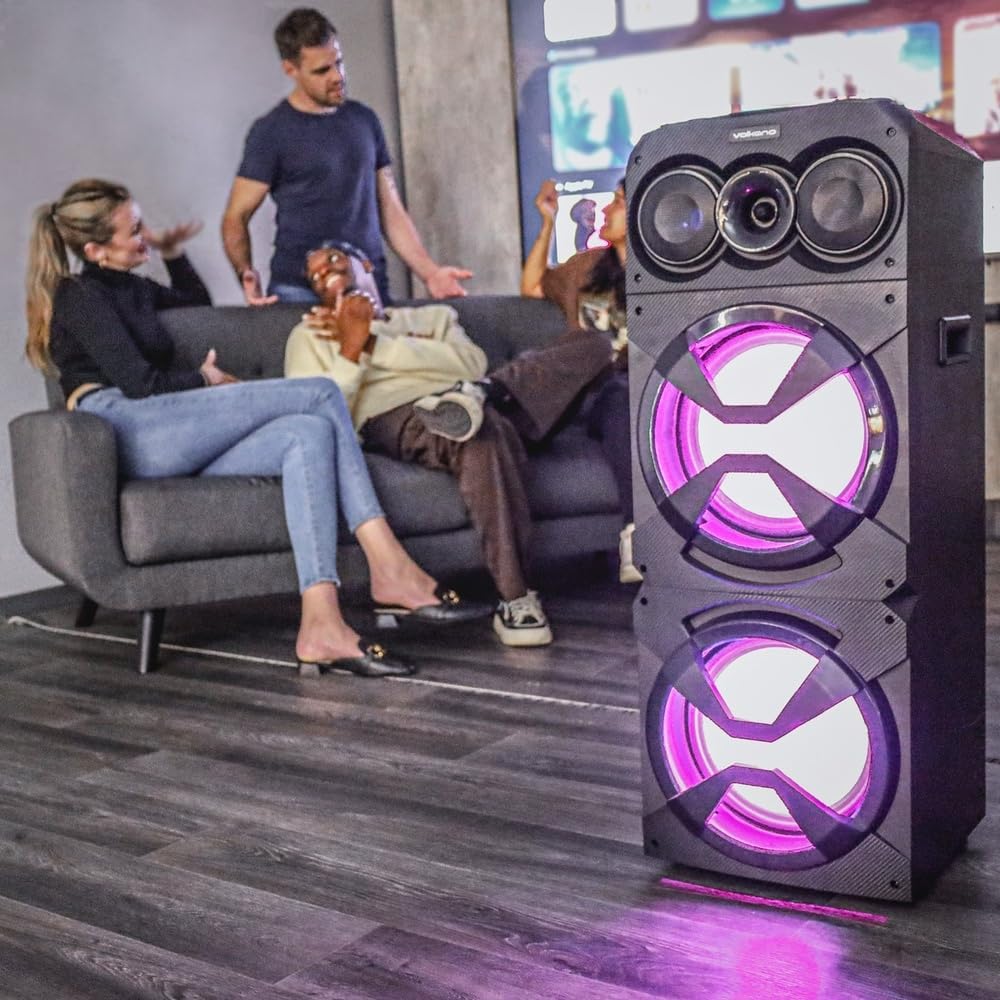
Image: The Volkano Griffin Series Dual Party Speaker in a social setting, showcasing its dynamic LED lighting effects in purple.

Image: The front of the speaker with its woofers illuminated by vibrant red LED lights, demonstrating another lighting option.
басыңыз LED жарык режиминин баскычы to cycle through different lighting patterns or to turn the lights off.
Техникалык тейлөө
- Тазалоо: Динамиктин сыртын сүртүү үчүн жумшак, кургак чүпүрөктү колдонуңуз. Абразивдүү тазалоочу каражаттарды, момдорду же эриткичтерди колдонбоңуз.
- Сактагыч: Узак мөөнөткө колдонулбаганда, динамикти салкын, кургак жерде, тике күн нурунан жана экстремалдык температурадан алыс сактаңыз.
- Вентиляция: Динамиктин желдетүү тешиктери ысып кетпеши үчүн бүтөлүп калбаганын текшериңиз.
Проблемаларды чечүү
| Көйгөй | Мүмкүн себеп | Чечим |
|---|---|---|
| Динамик күйбөйт. | Электр тармагына туташуу жок же кубат адаптери бузук. | Ensure the power adapter is securely connected to both the speaker and a working power outlet. Try a different outlet. |
| Динамиктен үн чыкпайт. | Volume too low, incorrect input mode, or device not connected properly. | Increase the master volume. Press the Mode Button to select the correct input source. Re-pair Bluetooth or re-connect AUX cable. Check volume on the connected device. |
| Bluetooth түзмөгү жупташа албайт. | Динамик жупташтыруу режиминде эмес, түзмөк өтө алыс же тоскоолдук жаратып жатат. | Ensure the speaker is in Bluetooth pairing mode (flashing indicator). Move your device closer to the speaker. Turn off other Bluetooth devices to reduce interference. Try restarting both the speaker and your device. |
| USB/SD карта ойнобой жатат. | Туура эмес file format, card/drive not inserted correctly, or corrupted media. | аудиону камсыз кылуу files are in a compatible format (e.g., MP3). Re-insert the USB drive or SD card. Try a different USB drive or SD card. |
Техникалык шарттар
| Модель аты: | Griffin Series Dual Party Speaker |
| Бренд: | Volkano |
| Динамик өлчөмү: | Кош 12 дюймдук вуферлер |
| Байланыш: | Bluetooth, USB, SD Card, AUX Input, FM Radio, Microphone Input |
| Чыгуу кубаттуулугу: | (Typical for similar speakers, e.g., 80W RMS) |
| Жыштык жообу: | (Typical for similar speakers, e.g., 40Hz - 20kHz) |
| Электр камсыздоо: | AC 100-240V, 50/60Hz |
| Өлчөмдөрү: | (Approximate, based on dual 12-inch design) |
| Салмагы: | (Болжолдуу) |
Note: Specifications are subject to change without prior notice. Values marked with (Typical...) are estimates for general guidance.
Кепилдик маалымат
Volkano products are backed by a 1 жылдык чектелген камтуу from the date of purchase, reflecting our commitment to quality and dependable performance.
You may be eligible for an additional 12-month extension, for a total of 24 months coverage, by registering your product. Please visit the official Volkano webкаттоонун чоо-жайы жана шарттары менен таанышуу үчүн сайт.
This warranty covers manufacturing defects and workmanship under normal use. It does not cover damage caused by misuse, accidents, unauthorized modifications, or normal wear and tear.
Кардарларды колдоо
Your satisfaction is important to us. If you have any questions, require assistance with your Volkano Griffin Series Dual Party Speaker, or need to claim warranty service, please contact us:
- Онлайн: Message us via the official Volkano Page on Amazon or visit the Volkano webсайт.
- Webсайт: Visit the Volkano Store on Amazon
Please have your product model name (Griffin Series Dual Party Speaker) and purchase details ready when contacting support.