
1. Киришүү
This manual provides detailed instructions for the installation, operation, maintenance, and troubleshooting of your maXpeedingrods 7" Portable Car Stereo. Please read this manual thoroughly before using the device to ensure proper functionality and safety.
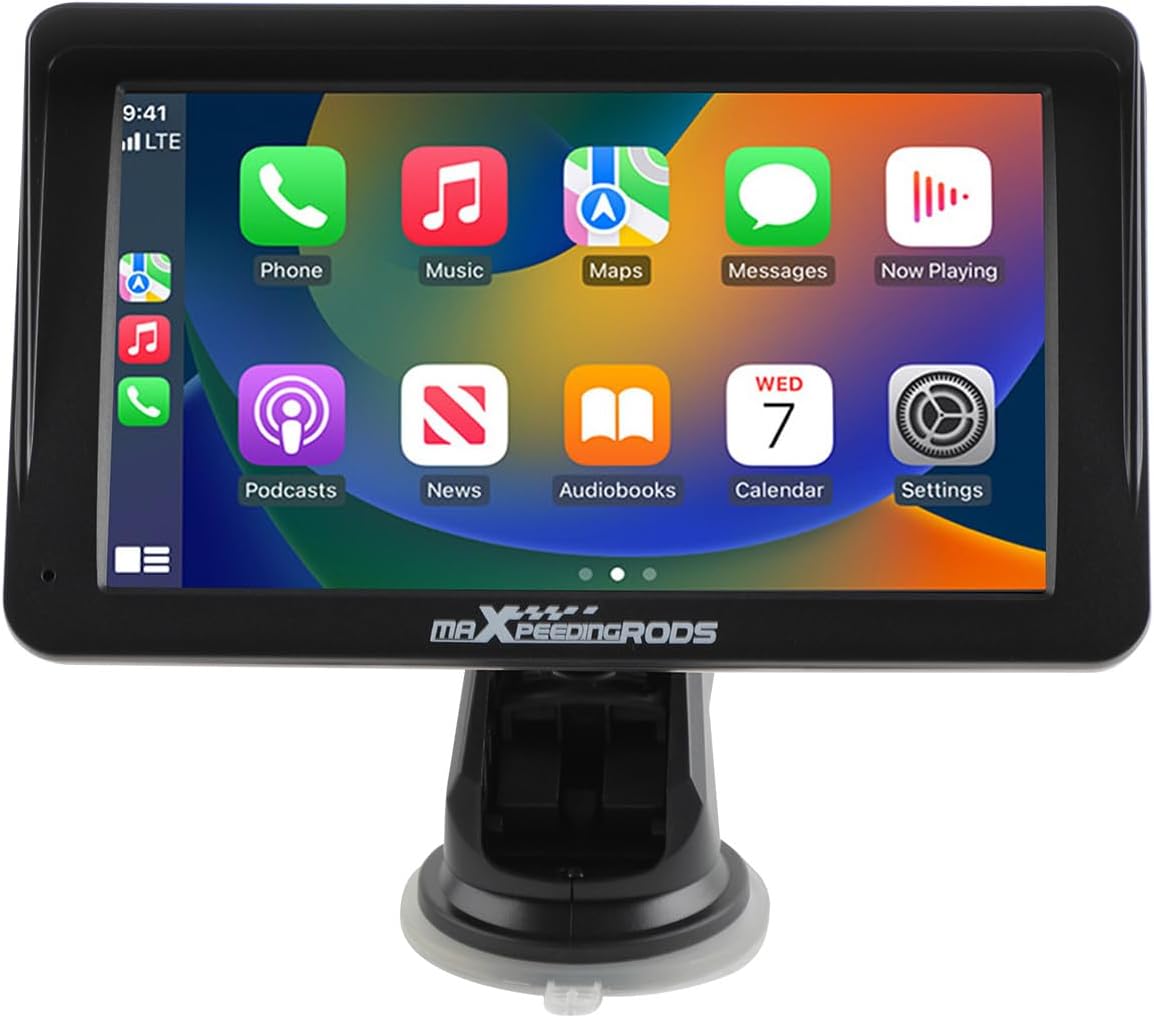
Figure 1.1: maXpeedingrods 7" Portable Car Stereo
Негизги өзгөчөлүктөрү:
- 7" HD IPS Display (1024*600 resolution)
- Зымсыз Apple CarPlay & Android Auto
- AHD камдык камерасын колдоо
- GPS Navigation & Voice Control (Siri/Google Assistant)
- Bluetooth connectivity and Mirror Link functionality
- Easy, non-invasive installation
2. Пакеттин мазмуну
Төмөндө тизмеленген нерселердин баары пакетиңизге камтылганын текшериңиз. Эгерде кандайдыр бир нерселер жок болсо же бузулса, кардарларды колдоо менен байланышыңыз.

2.1-сүрөт: кутуда эмне бар
- Portable Car Stereo Device
- Backup Camera + Camera Cable
- GPS кабели
- Монтаждык кронштейн (соргуч менен)
- Power Cable (cigarette lighter adapter)
- AUX кабели
3. Орнотуу жана орнотуу
3.1 Аппаратты орнотуу
The portable car stereo is designed for easy, non-permanent installation on your dashboard or windshield.
- Таза бети: Ensure the dashboard or windshield surface is clean and dry where you intend to mount the device.
- Кронштейнди тиркөө: Secure the mounting bracket to the device.
- Аппараттын орду: Peel off the protective film from the suction cup and firmly press the bracket onto the chosen surface. Engage the locking mechanism on the suction cup for a secure hold.

3.1-сүрөт: Орнотуунун оңой кадамдары
3.2 Кубат туташтыруу
Connect the provided power cable to the device and then plug the cigarette lighter adapter into your vehicle's 12V-24V power socket.
3.3 Тышкы байланыштар
The device features various ports for connectivity:

3.2-сүрөт: Түзмөктүн порттору
- Кубат кабели: For connecting to the vehicle's power supply.
- TF карта розетка: For inserting a TF (MicroSD) card for media playback.
- USB: USB түзмөктөрүн туташтыруу же кубаттоо үчүн.
- AVIN: For connecting the AHD backup camera.
- АУДИО: For AUX audio output.
3.4 Камдык камераны орнотуу (милдеттүү эмес)
If you choose to install the AHD backup camera, connect its cable to the AVIN port on the main unit. Route the camera cable carefully to the rear of your vehicle and mount the camera in a suitable position, typically near the license plate. Ensure the camera is connected to your vehicle's reverse light power for automatic activation when reversing.

Figure 3.3: AHD Backup Camera Features
3.5 Унаа шайкештиги
The device is compatible with a wide range of vehicles supporting 12V-24V power systems.

Сүрөт 3.4: Унаанын кеңири шайкештиги
4. Иштөө нускамалары
4.1 Күйгүзүү/өчүрүү
The device will power on automatically when your vehicle's ignition is turned on and power is supplied to the cigarette lighter socket. To power off, simply turn off your vehicle's ignition or unplug the power cable.
4.2 Сенсордук экрандын иштеши
The device features a responsive 7-inch HD IPS touchscreen with 1024x600 resolution and adjustable brightness for clear visibility.

Figure 4.1: Touchscreen Features
4.3 Зымсыз Apple CarPlay & Android Auto
Connect your smartphone wirelessly via Bluetooth to access Apple CarPlay or Android Auto. This allows you to use your phone's navigation, music, messaging, and other compatible apps directly on the car stereo display.
- Bluetooth иштетүү: Смартфонуңузда Bluetooth функциясын иштетиңиз.
- Түзмөктү жупташтыруу: On the car stereo, navigate to the Bluetooth settings and pair with your smartphone.
- CarPlay/Android Auto'ну иштетүү: Once paired, the device should prompt you to activate Apple CarPlay or Android Auto. Follow the on-screen instructions.

Figure 4.2: Wireless CarPlay & Android Auto Connectivity
4.4 GPS Navigation & Voice Control
Utilize your preferred navigation apps (e.g., Google Maps, Apple Maps) through Apple CarPlay or Android Auto. Voice control features (Siri or Google Assistant) are supported for hands-free operation, allowing you to manage calls, music, and navigation commands safely while driving.

Figure 4.3: GPS Navigation and Voice Control
4.5 Mirror Link
The Mirror Link function allows you to mirror your smartphone's screen directly onto the car stereo display. This is useful for apps not natively supported by CarPlay or Android Auto.
4.6 Аудио чыгаруу режимдери
The car stereo offers multiple ways to output audio to your vehicle's sound system:

4.4-сүрөт: Аудио чыгаруу параметрлери
- Bluetooth: Stream audio wirelessly to your vehicle's Bluetooth-enabled stereo (if available).
- AUX Cable Input: Connect the provided AUX cable from the stereo's AUDIO port to your vehicle's AUX input for a wired audio connection.
- FM тараткыч: Broadcast audio from the portable stereo to your vehicle's FM radio by tuning both to the same unused FM frequency.
- Камтылган динамик: Түзмөктүн ичинде түз аудио чыгаруу үчүн орнотулган динамик бар.
5. Техникалык тейлөө
5.1 Тазалоо
To clean the device, use a soft, dry, lint-free cloth. For stubborn smudges on the screen, lightly dampen the cloth with water or a screen-safe cleaning solution. Avoid using harsh chemicals, abrasive cleaners, or solvents, as these can damage the screen and casing.
5.2 Сактоо
Аппаратты узак убакытка сактасаңыз, аны электр кубатынан ажыратып, күн нурунан жана өтө температурадан алыс салкын, кургак жерде сактаңыз.
6. Кыйынчылыктарды
If you encounter issues with your maXpeedingrods car stereo, please refer to the following common problems and solutions:
| Көйгөй | Мүмкүн себеп | Чечим |
|---|---|---|
| Түзмөк күйбөйт. | No power supply; faulty cable; vehicle socket issue. | Check power cable connection. Ensure vehicle's cigarette lighter socket is functional. Try a different power source if available. |
| Зымсыз CarPlay/Android Auto туташпай жатат. | Bluetooth not enabled; incorrect pairing; software glitch. | Ensure Bluetooth is active on your phone and the stereo. Delete previous pairings and re-pair. Restart both the stereo and your phone. |
| Үн жок же үн сапаты начар. | Incorrect audio output mode; volume too low; loose cable. | Verify the selected audio output mode (Bluetooth, AUX, FM). Adjust volume on both the stereo and your vehicle's system. Check AUX cable connections. Ensure FM frequency is clear if using FM transmitter. |
| Сенсордук экран жооп бербейт. | Temporary software issue; screen protector interference. | Restart the device. Ensure no debris or liquid is on the screen. If a screen protector is installed, ensure it is properly applied and not interfering with touch sensitivity. |
| Камдык камера көрсөтүлбөй жатат. | Camera cable loose; incorrect wiring; camera malfunction. | Check the AVIN cable connection. Ensure the camera is receiving power and correctly wired to the reverse light circuit. |
If the problem persists after trying these solutions, please contact maXpeedingrods customer support for further assistance.
7. Техникалык шарттар
Detailed technical specifications for the maXpeedingrods 7" Portable Car Stereo:
| Өзгөчөлүк | Деталь |
|---|---|
| Продукциянын өлчөмдөрү | 9.06 x 5.51 x 4.72 дюйм |
| Элемент Салмагы | 1.87 фунт |
| Модель номери | 7001 |
| Бренд | maXpeedingrods |
| Унаа кызматынын түрү | Машина |
| Screen Size | 7 дюйм |
| Өзгөчө өзгөчөлүк | Сенсордук экран |
| Байланыш технологиясы | Bluetooth |
| Карта түрү | Road (via connected smartphone) |
| Аудио чыгаруу режими | Стерео |
| Монтаж түрү | Куралдар тактасы |
| Резолюция | 1024 x 600 |
| Операция системасы | Android (underlying system for CarPlay/Android Auto functionality) |
8. Кепилдик жана колдоо
8.1 Продукциянын кепилдиги
maXpeedingrods warrants its products against manufacturing defects in materials and workmanship for 1 жыл from the date of purchase. This warranty covers defects that arise under normal use of the product.
8.2 Technical Support & Customer Service
maXpeedingrods provides unlimited technical support and customer service. If you have any questions, require assistance with installation, operation, or troubleshooting, or need to make a warranty claim, please contact our customer support team. Refer to your purchase documentation or the official maXpeedingrods webбайланыш маалыматы үчүн сайт.