1. Киришүү
The RUGGARD EDC-80LC Electronic Dry Cabinet is engineered to safeguard your valuable equipment, such as cameras, lenses, photographic and optical devices, and mobile electronics, from the detrimental effects of excessive moisture, dirt, and dust. Utilizing a fast-acting TE Cooling Wafer, this cabinet precisely regulates the interior's relative humidity within a range of 35% to 60%, effectively preventing corrosion and mold growth. Its silent, dripless operation and secure combination lock make it an ideal storage solution.

Image 1.1: The RUGGARD EDC-80LC Electronic Dry Cabinet, showing its exterior and key dimensions (21.3"W x 20.3"H x 14.3"D).
2. Коопсуздук маалыматы
- Түздөө: Ensure the cabinet is placed on a stable, level surface to prevent tipping and ensure proper operation. Adjust the leveling feet as needed.
- Кыймыл: Do not move the cabinet while it is in operation or contains items, as this may damage the unit or its contents.
- Электр камсыздоо: Use only the included multi-voltage power supply. Do not attempt to use other power adapters.
- Вентиляция: Ensure adequate air circulation around the cabinet to allow for efficient heat dissipation from the dehumidifying unit.
- Ички температура: The cabinet regulates humidity, not temperature. Avoid placing it in areas with extreme temperature fluctuations.
3. Орнотуу
- Пакеттен чыгаруу: Carefully remove the dry cabinet from its packaging. Inspect for any signs of damage during transit.
- Орнотуу туткасы: The door handle is typically installed on the inside for shipping protection. Remove the handle from the inside of the door and securely attach it to the outside using the provided screws.
- Түздөө: Place the cabinet in its desired location. Adjust the four feet, especially the two leveling feet, to ensure the cabinet is stable and level on uneven surfaces.

Сүрөт 3.1: Төмөнкү view of the dry cabinet, highlighting the adjustable leveling feet for stability.
- Текче орнотуу: The cabinet includes an adjustable metal shelf and two padded shelf liners. Insert the shelf brackets into the desired slots on the interior sides of the cabinet. Place the metal shelf on the brackets, then lay the padded liners on the shelf and the cabinet base.

Image 3.2: The dry cabinet interior with the door open and shelf removed, demonstrating shelf adjustability.
- Кубат туташуу: Көп томдукту туташтырууtage power supply to the cabinet and then plug it into a suitable power outlet.
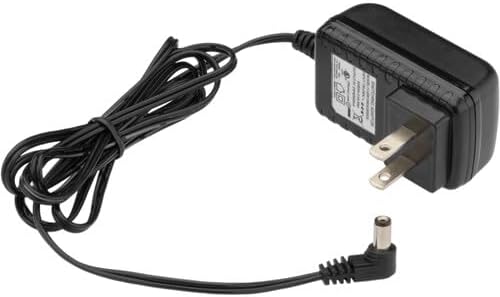
Image 3.3: The included multi-voltage power supply for the dry cabinet.
- Initial Dehumidification: After plugging in, keep the cabinet door open for 3 to 5 hours to allow the internal air to circulate and stabilize before adjusting the humidity settings.
Видеону орнотуу
Video 3.1: This video demonstrates the initial setup steps, including handle installation and shelf adjustment for the dry cabinet.
4. Иштөө нускамалары
4.1 Башкаруу панелинин үстүнөview
The top of the cabinet features an LCD display and control buttons for monitoring and adjusting settings.
- LCD дисплей: Shows the current internal temperature (in Fahrenheit or Celsius) and relative humidity (%RH).
- Өйдө/Төмөн жебелери (▲/▼): Used to adjust the target humidity level.
- SET баскычы: Confirms the desired humidity setting.
- Жарык баскычы (💡): Toggles the interior LED lights on and off.
- F/C Set Button: Switches the temperature display between Fahrenheit (°F) and Celsius (°C).
4.2 Adjusting Humidity
- басыңыз SET button once. The humidity percentage on the display will begin to flash.
- колдонуу Өйдө (▲) or Төмөн (▼) arrow buttons to set your desired relative humidity level (between 35% and 60%).
- басыңыз SET button again to confirm your selection. The display will stop flashing, and the cabinet will begin to adjust to the new humidity level. This process typically takes 1 to 3 hours.
4.3 Using the Interior LED Lights
басыңыз Light (💡) button on the control panel to illuminate the interior of the cabinet, making it easier to view and access your stored items. Press it again to turn the lights off.
4.4 Комбинацияланган кулпу
The cabinet door is equipped with a three-digit combination lock for added security. To set your combination:
- With the lock in the unlocked position, locate the small reset button on the side or bottom of the lock mechanism.
- Use a pen or a pointed object to press and hold the reset button.
- While holding the reset button, set your desired three-digit combination by rotating the dials.
- Release the reset button. Your new combination is now set. Test the combination before closing the door.
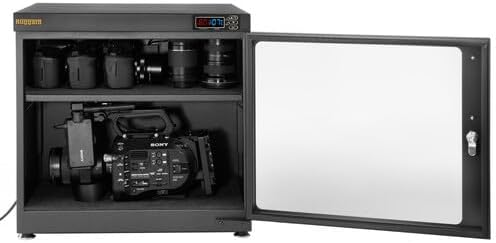
Image 4.1: The dry cabinet interior, showcasing stored camera equipment and the interior LED lighting.
5. Техникалык тейлөө
- Тазалоо: Шкафтын сыртын жумшак менен сүртүңүз, гamp cloth. For the glass door, use a glass cleaner. Avoid abrasive cleaners that could scratch surfaces.
- Ички тазалоо: Мезгил-мезгили менен буюмдарды алып салыңыз жана ички беттерди жана текчелерди кургак же бир аз сүртүңүзamp cloth. Ensure the interior is completely dry before placing items back inside.
- Gasket Seal: Check the door's gasket seal regularly for any signs of wear or damage. A proper seal is crucial for maintaining consistent humidity levels.
- Электр кабели: Электр шнурунда кандайдыр бир бузулуулар бар экенин текшериңиз. Эгерде бузулса, колдонууну токтотуп, кардарларды колдоо кызматына кайрылыңыз.
6. Кыйынчылыктарды
- Humidity Not Changing:
- Ensure the door is fully closed and the gasket seal is intact.
- Verify the power supply is connected and the unit is powered on.
- Allow sufficient time (1-3 hours) for the humidity to adjust after setting.
- Avoid frequent opening of the door, which can disrupt internal humidity.
- Дисплей иштебейт:
- Электр байланышын текшериңиз.
- Электр розеткасынын иштешин текшериңиз.
- адаттан тыш үндөр: The cabinet operates silently. If you hear unusual noises, disconnect power and contact customer support.
7. Техникалык шарттар
| Өзгөчөлүк | Деталь |
|---|---|
| Volume Capacity | 2.8 ft³ / 80 L |
| Нымдуулукту көзөмөлдөө диапазону | 35% - 60% RH |
| Коопсуздук | 3 орундуу айкалышкан кулпу |
| Control Interface | LCD Display (Temperature & Humidity) |
| AC киргизүү күчү | 110 to 240 VAC, 50 / 60 Hz |
| Энергияны керектөө | 8 Вт |
| Курулуш материалы | Айнек, Болот |
| Ички өлчөмдөрү (туурасы x бийиктиги x тереңдиги) | 21.1 x 17.7 x 13" / 53.6 x 45 x 33 cm |
| Сырткы өлчөмдөрү (W x Y x D) | 21.3 x 20.3 x 14.3" / 54.1 x 51.6 x 36.3 cm |
| Салмагы | 29.5 фунт / 13.4 кг |
| Өзгөчөлүктөр | Virtually Silent Operation, Dripless Design, Interior LED Lighting, Padded Base and Shelves, User-selectable °F/°C Display |
8. Кепилдик жана колдоо
For warranty information, please refer to the documentation included with your purchase or visit the official RUGGARD website. If you encounter any issues or require technical assistance, please contact RUGGARD customer support. Keep your purchase receipt and model number (EDC-80LC) handy for faster service.