
1. Киришүү
The FLIPSKY 75200 Pro V2.0 is an advanced electronic speed controller (ESC) designed for high-performance electric vehicles such as skateboards, scooters, and ebikes. It features an aluminum PCB for enhanced heat dissipation and an integrated power button for convenient operation. This manual provides essential information for setup, operation, and maintenance of your FLIPSKY 75200 Pro V2.0 ESC.

Figure 1: FLIPSKY 75200 Pro V2.0 Electronic Speed Controller.
2. Продукциянын өзгөчөлүктөрү
- Микропрограмма: Version 6.02, with support for future firmware updates.
- Тtage диапазону: 14-84V (4-20S battery configurations).
- Учурдагы кубаттуулугу: 100A continuous, with burst capabilities (values depend on mounting, ambient temperature, and air circulation).
- BEC: 5V@1.5A output.
- Motor Control Modes: Supports BLDC square wave mode and FOC sine wave mode.
- ERPM: 150,000ге чейин.
- Байланыш интерфейстери: USB, CAN, UART.
- Колдоого алынган сенсорлор: ABI, HALL, AS5047, AS5048A.
- Input Set Support: PPM, ADC, NRF, UART.
- Зым өлчөмү: 10AWG for main power wires.
- Программалануучу: Yes, via VESC_TOOL.
- Калыбына келтирүү жөндөмдүүлүгү: Ооба.
- Phase Filter: Included for stable operation.
- Кубатты которуу баскычы: Integrated red power switch button.
- Integrated Bluetooth Module: Allows convenient connection to Bluetooth parameters and real-time data reading without external modules.
- Advanced Protections: Includes low voltage, жогорку тtage, over current, temperature, MOSFET, and motor over-temperature protection.
- Башкаруу режимдери: Supports Current / Duty cycle / Speed / PID control modes.
- IMU Module Support: Compatible with IMU modules like MPU9250, MPU6050, LSM6DS3, BMI160 via IIC interface for balancing car functions.
- CPU: 32F405 with 168MHz frequency.
- Жылуулук таркатылышы: Aluminum PCB and aluminum case design provide good heat dissipation for extended lifespan.
3. Техникалык шарттар
| Спецификация | Нарк |
|---|---|
| Микропрограмма | 6.02 (firmware update supported) |
| Тtage Диапазон | 14-84V (4-20S) |
| Үзгүлтүксүз ток | 100A |
| BEC чыгаруу | 5V@1.5A |
| ERPM | 150,000 |
| Control Interface Ports | USB, CAN, UART |
| Колдоого алынган сенсорлор | ABI, HALL, AS5047, AS5048A |
| Input Set Support | PPM, ADC, NRF, UART |
| Зым өлчөмү | 10AWG |
| Өлчөмдөрү (L x W x Y) | 130мм x 67.7мм x 39.4мм |
| Материал | Алюминий |
| Түс | Кара |

Сүрөт 2: Продукциянын өлчөмдөрү.

Figure 3: Internal PCB dimensions.
4. Орнотуу
Proper connection of the FLIPSKY 75200 Pro V2.0 is crucial for safe and optimal performance. Refer to the diagram below for connection points.

Figure 4: Connection Diagram.
4.1. Электр байланыштары
- Батарея: Connect your battery pack to the main red (+) and black (-) terminals. Ensure correct polarity. The ESC supports 4-20S battery configurations.
- Мотор: Connect the three phase wires (blue, green, yellow) from your motor to the corresponding terminals on the ESC.
- Кубат которгучу: Connect the integrated power switch to the designated port.
4.2. Sensor and Communication Connections
- Холл сенсору: If your motor has Hall sensors, connect the Hall sensor cable to the HALL port on the ESC. Ensure the pinout matches.
- PPM (Pulse Position Modulation): For throttle input from a remote receiver, connect the PPM signal wire to the PPM port.
- CAN (Controller Area Network): Use the CAN bus for communication between multiple ESCs (e.g., in a dual motor setup) or other CAN-enabled devices.
- USB: Connect the ESC to a computer via the USB port for configuration and firmware updates using the VESC_TOOL software.
- UART (Universal Asynchronous Receiver-Transmitter): For serial communication with external modules like Bluetooth modules (though this ESC has integrated Bluetooth) or other accessories.
- COMM: This port provides additional communication lines for various sensors or peripherals.
4.3. Initial Configuration (VESC_TOOL)
After physical connections, the ESC requires configuration using the VESC_TOOL software. This software allows you to set motor parameters, battery limits, control modes, and perform motor detection. It is highly recommended to follow the official VESC_TOOL documentation for detailed configuration steps to prevent damage to the ESC or motor.
- Download the latest VESC_TOOL from the official VESC project webсайт.
- Connect the ESC to your computer via USB.
- Launch VESC_TOOL and perform motor detection.
- Configure battery voltage limits, current limits, and other safety parameters according to your setup.
- Utilize the integrated Bluetooth module to connect to the VESC_TOOL mobile application for real-time data monitoring and parameter adjustments.
Video 1: Demonstration of the 75200 Pro V2.0 ESC features and operation.
5. Иштөө нускамалары
Once properly configured, the FLIPSKY 75200 Pro V2.0 ESC is ready for operation. The ESC supports various control modes to suit different applications and user preferences.
5.1. Күйгүзүү / Өчүрүү
- Press the integrated red power button to turn the ESC on or off.
- Күйгүзүүдөн мурун бардык туташуулар коопсуз экенин текшериңиз.
5.2. Башкаруу режимдери
The ESC can be configured for the following control modes via VESC_TOOL:
- Учурдагы башкаруу: Motor current is directly controlled by the input signal.
- Duty Cycle Control: Мотор томtage is controlled as a percentage of the battery voltage.
- Speed Control (RPM): The ESC attempts to maintain a target motor RPM.
- PID башкаруу: Advanced control loop for precise speed or position control, often used with IMU modules for balancing applications.
5.3. Regenerative Braking
The ESC supports regenerative braking, which converts kinetic energy back into electrical energy to recharge the battery during braking. Ensure that regenerative current limits are set appropriately in VESC_TOOL to avoid overcharging your battery.
Video 2: Short demonstration of the FLIPSKY 75100/75200 series ESC.
6. Техникалык тейлөө
Regular maintenance helps ensure the longevity and reliable performance of your FLIPSKY 75200 Pro V2.0 ESC.
- Тазалыкты сактоо: Periodically clean the exterior of the ESC to prevent dust and debris buildup, especially on the heatsink fins. Use a soft, dry cloth.
- Байланыштарды текшерүү: Regularly inspect all wire connections (battery, motor, sensors, communication) for looseness, corrosion, or damage. Secure any loose connections.
- Температура мониторинги: While the ESC has built-in temperature protection, it is good practice to monitor its temperature during heavy use, especially in enclosed spaces. Ensure adequate airflow around the unit.
- Программалык камсыздоонун жаңыртуулары: Check for official firmware updates periodically using VESC_TOOL. Updates can provide performance improvements, bug fixes, and new features.
- Сактагыч: When not in use for extended periods, store the ESC in a dry, cool environment away from direct sunlight and extreme temperatures.
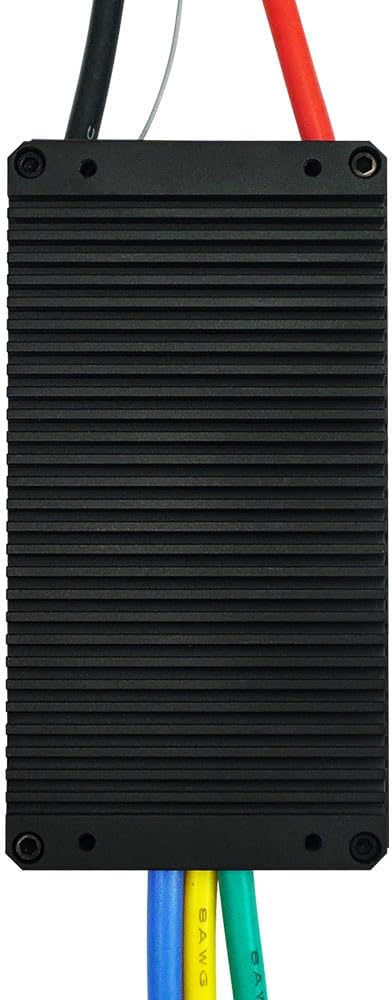
5-сүрөт: Төмөнкү view highlighting the heatsink for good heat dissipation.
7. Кыйынчылыктарды
If you encounter issues with your FLIPSKY 75200 Pro V2.0 ESC, consider the following troubleshooting steps:
| Көйгөй | Мүмкүн себеп | Чечим |
|---|---|---|
| ESC күйбөйт. | Loose battery connection, faulty power button, dead battery. | Батареянын көлөмүн текшериңизtage and connections. Ensure the power button is correctly connected and functioning. |
| Motor not spinning or erratic behavior. | Incorrect motor phase wire connection, incorrect Hall sensor connection, improper VESC_TOOL configuration. | Verify motor and Hall sensor wiring. Re-run motor detection in VESC_TOOL. Check motor and battery current limits. |
| ESC overheating. | Insufficient airflow, excessive current draw, incorrect motor parameters. | Ensure proper ventilation. Reduce load or adjust current limits in VESC_TOOL. Check motor resistance and inductance values. |
| Bluetooth байланышы көйгөйлөрү. | Interference, incorrect pairing procedure, outdated VESC_TOOL app. | Ensure no strong interference sources. Follow the pairing instructions for the VESC_TOOL app. Update the app to the latest version. |
For more detailed diagnostics and advanced troubleshooting, refer to the comprehensive documentation available for VESC-based ESCs and the FLIPSKY support resources.
Видео 3: Бүттүview of the VESC 75200 Pro.
8. Кепилдик жана колдоо
8.1. Кепилдик маалыматы
The FLIPSKY 75200 Pro V2.0 ESC comes with a 2 айлык кепилдик from the date of purchase. This warranty covers manufacturing defects under normal use conditions. Please retain your proof of purchase for warranty claims.
8.2. Кардарларды колдоо кызматы
For technical assistance, troubleshooting beyond this manual, or warranty inquiries, please contact FLIPSKY customer support through their official website or the retailer from whom you purchased the product. Provide your product model, serial number (if applicable), and a detailed description of the issue to expedite support.