
1. Киришүү
The TAXNELE KWS-302WF is a multi-functional smart power meter designed to monitor various electrical parameters and provide protection against over/under voltage, over current, and over power. It integrates WiFi connectivity for remote monitoring and control via the Tuya Smart Life application, offering comprehensive energy management and safety features for residential and commercial applications.

Сүрөт 1.1: Алдыңкы view of the KWS-302WF Smart Power Meter with its digital display and a smartphone showing the monitoring app.
2. Продукциянын өзгөчөлүктөрү
This device offers a wide range of features for advanced power monitoring and protection:
- 8-in-1 Multimeter Display: Бир эле учурда Көлөмдү көрсөтөтtage, Current, Power, Timing, Electric Energy (kWh), Temperature, Frequency, and Power Factor.
- Кеңири өлчөө диапазону: Тtage (AC 100-290V), Current (0-63A), Power (0-17KW), Timing (0-999 Hours), Energy (0-99,999 kWh), Temperature (-20-150°C), Frequency (50-60Hz), Power Factor (0.00-1.00PF).
- Energy Value Storage: Retains Kwh, overvoltage, undervolvoltage, and overcurrent values in memory during power outages.
- Алыстан башкаруу жана мониторинг: Control and monitor home devices via smartphone using the Tuya Smart Life App, without time or distance limitations.
- Комплекстүү коргоо функциялары: Ашыкча томду камтыйтtage, томдун астындаtage, over-current, over-power, and over-temperature protection.
- Оңой орнотуу: Designed for straightforward installation in various indoor or outdoor settings.

Image 2.1: Visual representation of the KWS-302WF's key features and capabilities.
3. Техникалык шарттар
Detailed technical specifications for the KWS-302WF Smart Power Meter:
| Параметр | Нарк |
|---|---|
| Модел | KWS-302WF |
| Тtage Өлчөө диапазону | AC 100-290V |
| Учурдагы өлчөө диапазону | 0-63A |
| Power өлчөө диапазону | 0-17 кВт |
| Убакытты өлчөө диапазону | 0-999 саат |
| Электр энергиясын өлчөө диапазону | 0-99999 кВт/саат |
| Температура диапазону | -20°Cден 150°Cге чейин |
| Жыштыктарды өлчөө диапазону | 50-60 Гц |
| Power Factor | 0.00-1.00PF |
| Өлчөмдөрү (L*W*H) | 66mm * 66mm * 82mm (approx.) |
| Материал | ABS+PC |
| Өндүрүүчү бөлүгүнүн номери | 8451263523021569 |
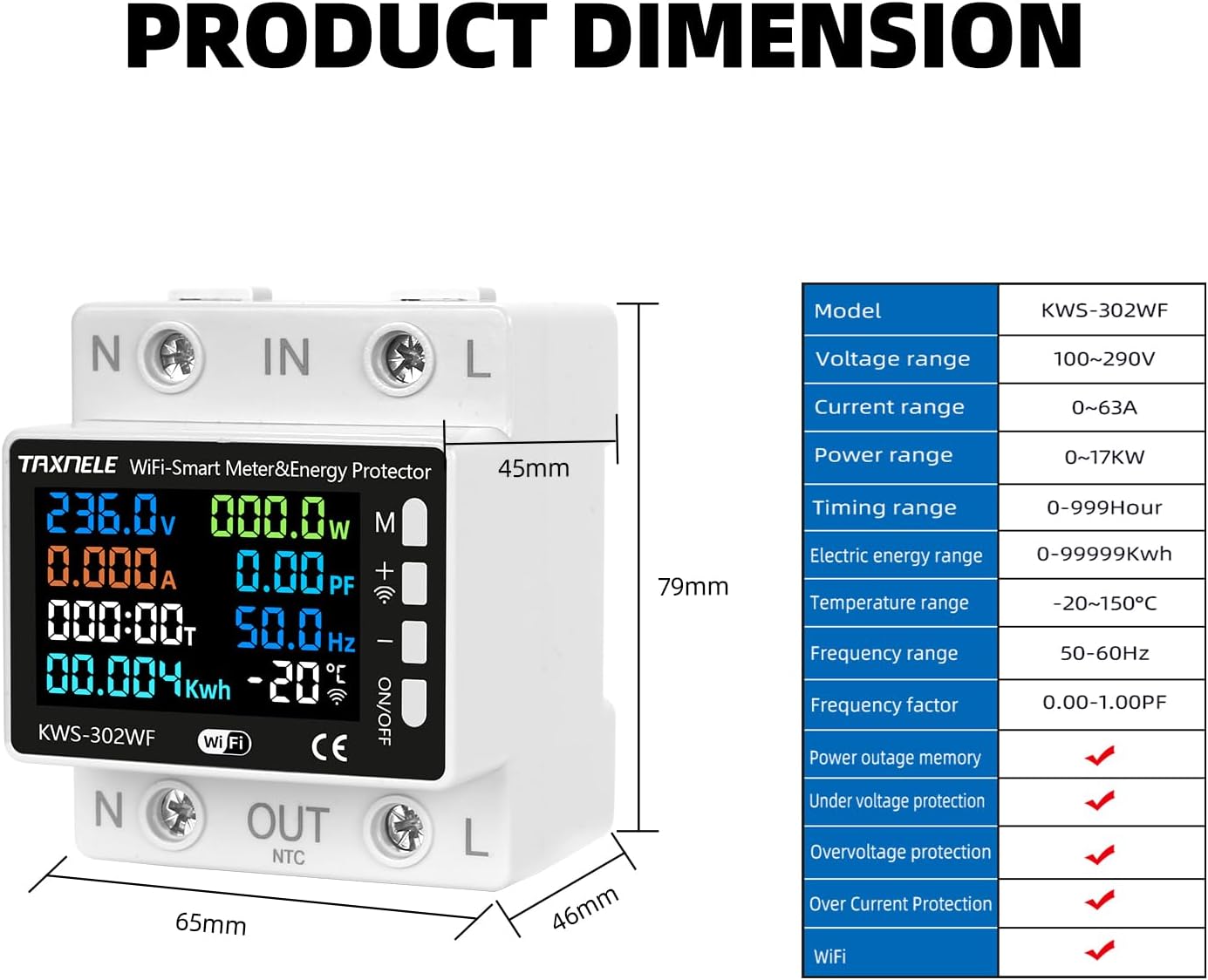
Image 3.1: Product dimensions and a summary of key specifications.
4. Коопсуздук маалыматы
Сураныч, орнотуудан жана иштетүүдөн мурун бардык коопсуздук нускамаларын окуп, түшүнүңүз. Бул нускамаларды аткарбоо электр шокуна, өрткө же олуттуу жаракатка алып келиши мүмкүн.
- Кесиптик орнотуу сунушталат: Орнотуу квалификациялуу электрик же адис тарабынан жүргүзүлүшү керек.
- Электр энергиясын өчүрүү: Аппаратты орнотуудан же тейлөөдөн мурун ар дайым негизги өчүргүчтөн электр кубатын ажыратыңыз.
- Тtage Шайкештик: Түзмөктүн үнүн текшериңизtage рейтинги сиздин электр системаңызга дал келет.
- Туура зымдар: Follow the wiring diagram precisely. Incorrect wiring can damage the device or cause hazards.
- Экологиялык шарттар: Түзмөктү көрсөтүлгөн иштөө диапазонунан тышкары ашыкча нымдуулукка, чаңга же өтө жогорку температурага дуушар кылбаңыз.
- Тейлөө: Аппаратты оңдоого же өзгөртүүгө аракет кылбаңыз. Бардык тейлөөлөрдү квалификациялуу кызматкерлерге тапшырыңыз.
5. Орнотуу жана орнотуу
This section outlines the steps for physically installing and connecting your KWS-302WF Smart Power Meter.
5.1 Пакеттин мазмуну
Бардык компоненттер бар экендигин текшериңиз:
- KWS-302WF Smart Power Meter
- Температура сенсору (NTC)
- Колдонуучунун Колдонмосу (бул документ)
5.2 Электр өткөргүч схемасы
Follow the wiring diagram carefully for correct installation. Ensure power is OFF before proceeding.
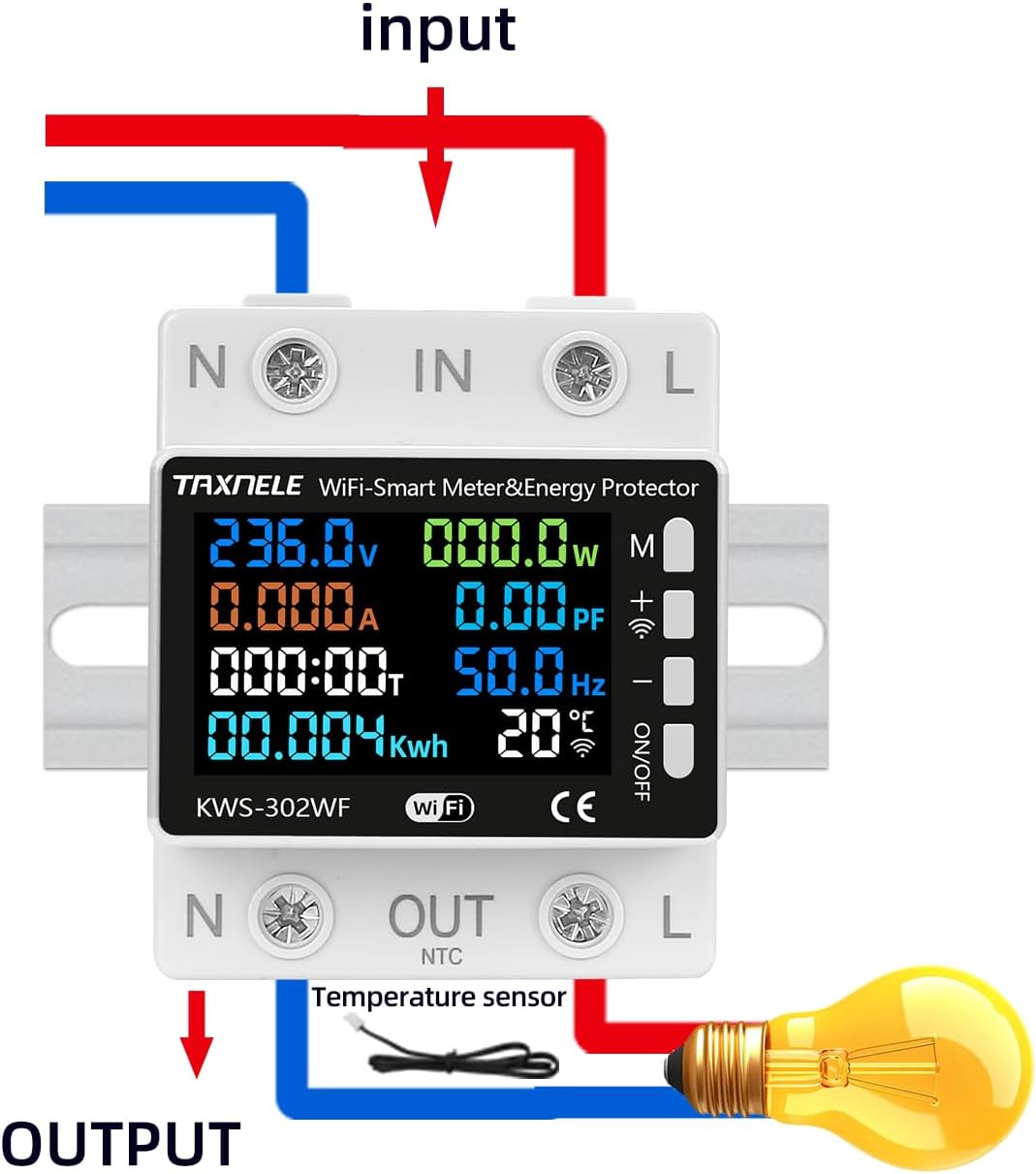
Image 5.1: Wiring connections for the KWS-302WF meter.
- Кубатты өчүрүү: Автоматтык өчүргүчтөгү негизги кубат менен камсыздоону өчүрүңүз.
- Аппаратты орнотуу: Install the KWS-302WF meter in a suitable electrical enclosure or DIN rail.
- Киргизүү зымдарын туташтырыңыз: Connect the incoming Neutral (N) and Live (L) wires to the 'N IN' and 'L IN' terminals respectively.
- Чыгаруу зымдарын туташтырыңыз: Connect the load's Neutral (N) and Live (L) wires to the 'N OUT' and 'L OUT' terminals respectively.
- Температура сенсорун туташтыруу: Plug the NTC temperature sensor into the designated port labeled 'NTC' on the bottom of the device.
- Байланыштарды текшерүү: Double-check all wiring for secure and correct connections.
- Күчтү калыбына келтирүү: Turn on the main power supply. The device display should illuminate.
6. Иштөө нускамалары
Once powered on, the KWS-302WF will display various parameters on its colorful screen.
6.1 Дисплейview
The main display shows real-time readings for:
- Тtage (V)
- Учурдагы (A)
- Күч (Вт)
- Кубат фактору (PF)
- Жыштык (Гц)
- Timing (Hours)
- Electric Energy (kWh)
- Температура (°C)
6.2 Баскыч функциялары
The device features control buttons on the side:
- 'M' баскычы: Used to enter and navigate through the settings menu. Press and hold for 3 seconds to enter settings.
- '+' баскычы: Used to increase values or move up in menu options.
- '-' баскычы: Used to decrease values or move down in menu options.
- ON/OFF баскычы: Manually switches the output relay ON or OFF.
7. Параметрлердин Орнотуулары
To configure protection thresholds and other settings, press and hold the 'M' key for 3 seconds to enter the settings display.

Сүрөт 7.1: Бүттүview of adjustable parameters on the device display.
Use the '+' and '-' buttons to adjust values and the 'M' button to confirm and move to the next setting. Available settings include:
- Voltage Setting (130-290VAC): Set the maximum allowable voltage.
- Томдун астындаtage Setting (100-220VAC): Set the minimum allowable voltage.
- Over Current Setting (0.001-63A): Set the maximum allowable current.
- Timed Power Off Settings: Configure a timer for automatic power disconnection.
- Energy Prepaid: (If applicable) Set a kWh limit.
- Over Power Protection: Set the maximum allowable power (0-17kW).
- Температурадан ашыкча коргоо: Set the maximum allowable temperature (-20-150°C).
- Screen Sleep Setting: Configure the display's backlight timeout.
8. Ойготкуч орнотуулары
The alarm function is automatically activated once thresholds are set. When a parameter exceeds its set limit, the device will trip the relay, disconnecting power to the load, and may display an alarm indicator.

Image 8.1: Alarm threshold settings as seen in the mobile application.
Key alarm thresholds and their tripping functions:
- Over-Current: Set threshold (0-63A). Triggers relay trip.
- Ашык-томtage: Set threshold (130-290V). Triggers relay trip.
- Томдун астындаtage: Set threshold (100-220V). Triggers relay trip.
- High Power (Overload): Set threshold (1-17KW). Triggers relay trip.
- Ашыкча температура: Set threshold (-20-150°C). Triggers relay trip.
9. Remote Control (App Integration)
The KWS-302WF integrates with the Tuya Smart or Smart Life application for remote monitoring and control.
9.1 Колдонмону орнотуу жана жупташтыруу
- Колдонмону жүктөп алуу: Издөө 'Tuya Smart' or 'Smart Life' in your smartphone's app store (iOS/Android) and install it.
- Катталуу/Кирүү: Каттоо эсебин түзүү же учурдагы каттоо эсебиңизге кириңиз.
- Түзмөк кошуу: In the app, tap '+' to add a new device. Select 'Electrical' > 'Power Strip (Wi-Fi)' or 'Circuit Breaker (Wi-Fi)' (or similar, depending on app version).
- Wi-Fi туташуусу: Follow the in-app instructions to connect the device to your 2.4GHz Wi-Fi network. This usually involves putting the device into pairing mode (refer to device display or app for specific instructions, often by holding a button).
- Түзмөктүн аталышын өзгөртүү: Once paired, you can rename the device for easy identification.
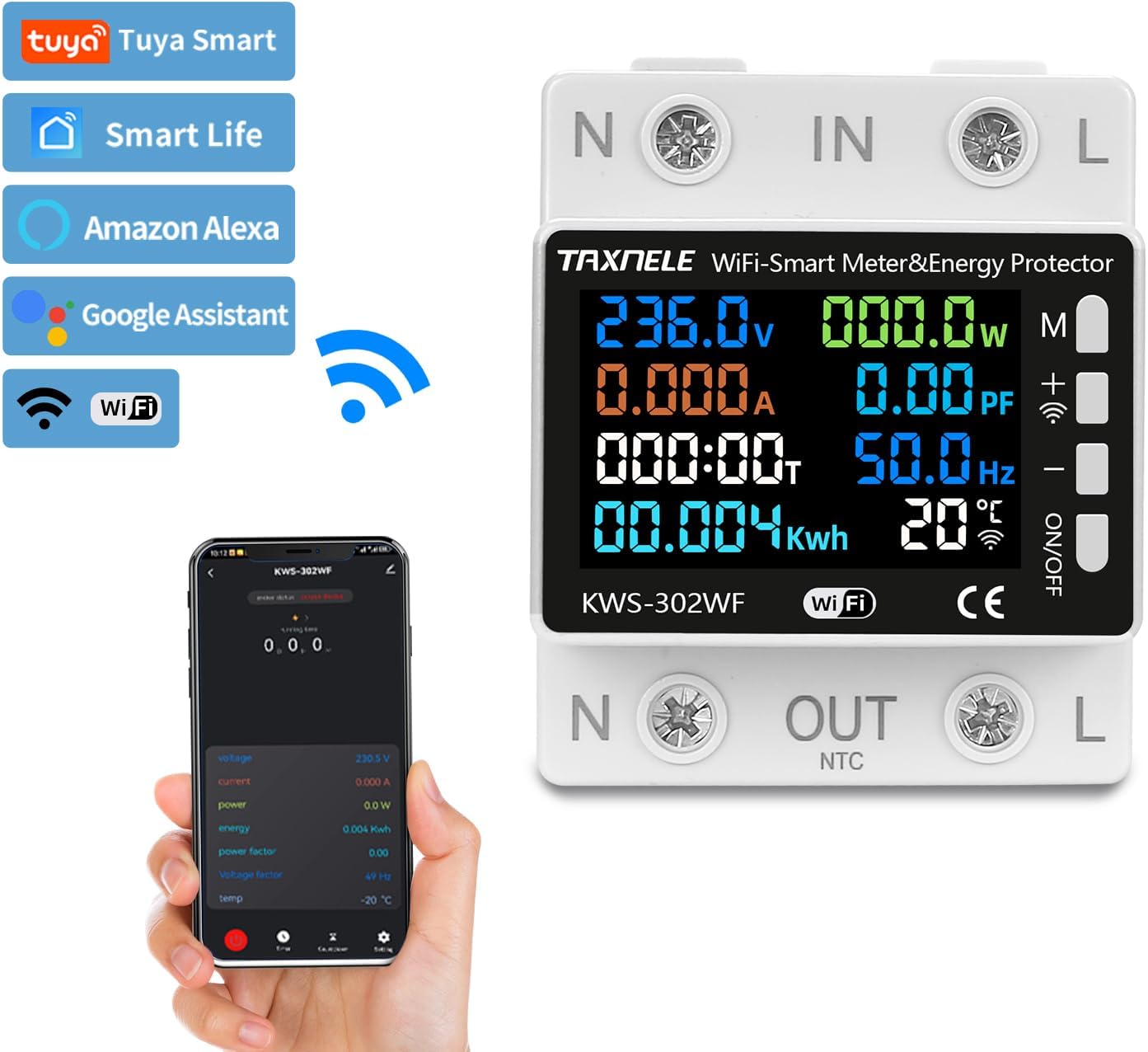
Image 9.1: App compatibility and integration with smart home platforms.
9.2 Алыстан байкоо жана башкаруу
Колдонмо аркылуу сиз:
- View реалдуу убакыттагы көлөмtagд, ток, кубаттуулук жана энергия керектөө.
- Remotely switch the power output ON/OFF.
- Set and adjust protection thresholds (over-voltage, томдун астындаtage, over-current, etc.).
- Access historical energy consumption data.
- Set schedules and timers for power control.

Image 9.2: Real-time monitoring and remote control capabilities via the app.
10. Температураны өлчөө
The KWS-302WF includes an external NTC temperature sensor for accurate temperature monitoring within a range of -20°C to 150°C. This allows for over-temperature protection, tripping the relay if the monitored temperature exceeds the set threshold.
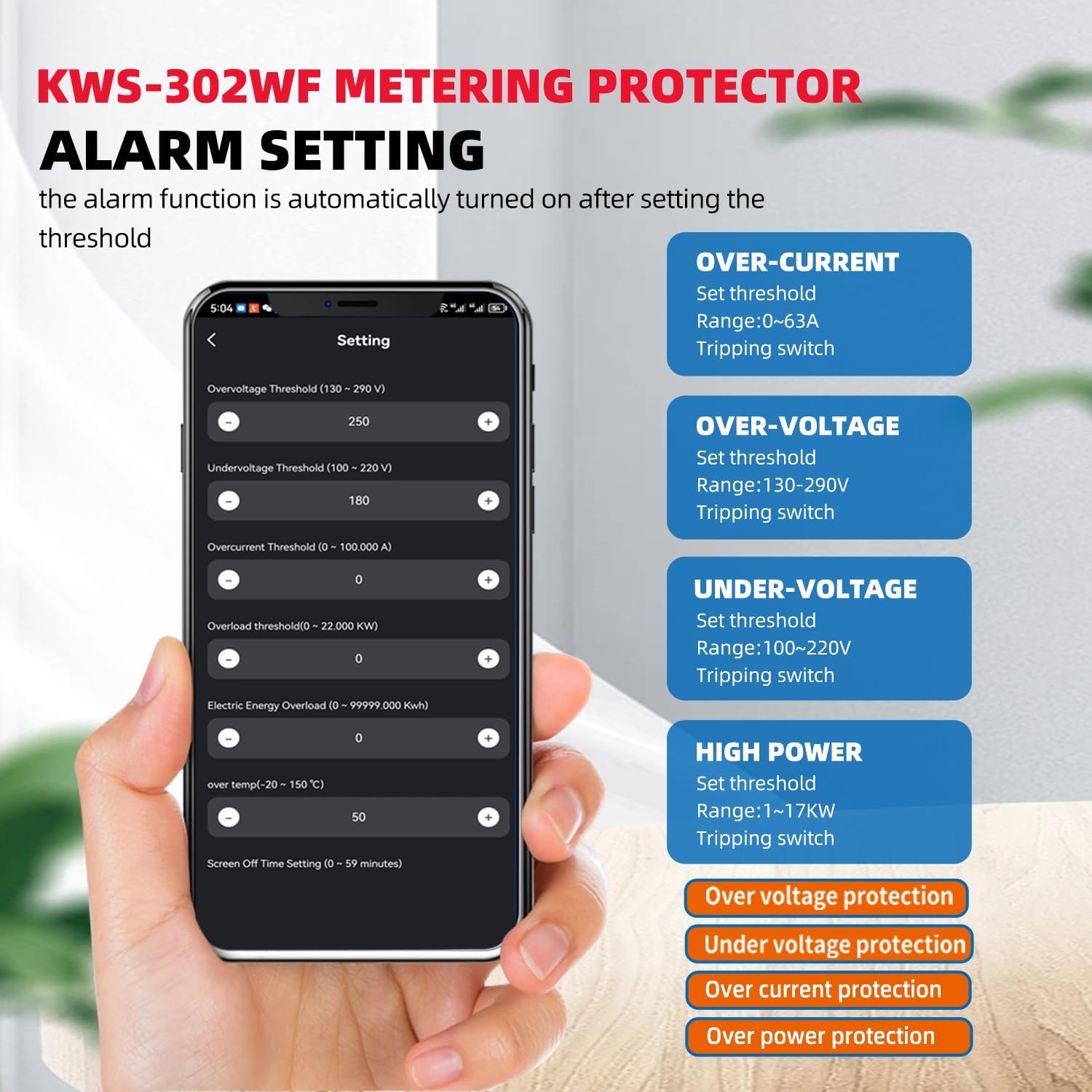
Image 10.1: Location of the NTC temperature sensor port.
11. Техникалык тейлөө
To ensure optimal performance and longevity of your KWS-302WF Smart Power Meter, follow these maintenance guidelines:
- Тазалоо: Gently wipe the device with a dry, soft cloth. Do not use abrasive cleaners, solvents, or liquids that could damage the casing же ички компоненттер.
- Экологиялык текшерүү: Periodically inspect the installation environment to ensure it remains free from excessive dust, moisture, and extreme temperatures.
- Туташуу текшерүү: Occasionally check the wiring connections to ensure they remain secure.
- Программалык камсыздоонун жаңыртуулары: Check the Tuya Smart Life app periodically for any available firmware updates for the device. Follow in-app instructions for safe updating.
12. Кыйынчылыктарды
This section addresses common issues you might encounter with your KWS-302WF Smart Power Meter.
| Көйгөй | Мүмкүн себеп | Чечим |
|---|---|---|
| Device display is off. | No power supply; Incorrect wiring. | Check main circuit breaker. Verify wiring connections according to the diagram. |
| Device not connecting to Wi-Fi/App. | Incorrect Wi-Fi password; 5GHz Wi-Fi network; Device not in pairing mode; Weak Wi-Fi signal. | Ensure correct 2.4GHz Wi-Fi password. Confirm your router supports 2.4GHz. Put device into pairing mode (refer to app instructions). Move device closer to router or use a Wi-Fi extender. |
| Output power is off (relay tripped). | Көлөмүtage, томдун астындаtage, over-current, or over-power protection activated; Manual OFF. | Check display for alarm indicators. Reduce load or rectify voltage issue. Reset manually via ON/OFF button or app after resolving the cause. |
| Temperature reading is inaccurate or '---'. | Температура сенсору туташкан эмес же туура эмес. | Ensure the NTC temperature sensor is securely plugged into its port. If issue persists, the sensor may be faulty. |
| Readings appear incorrect. | Incorrect wiring; Device malfunction. | Double-check all wiring. If wiring is correct, contact support. |
13. Кепилдик жана колдоо
For warranty information, please refer to the terms and conditions provided at the time of purchase or contact your retailer. For technical support, troubleshooting assistance beyond this manual, or inquiries regarding product functionality, please contact TAXNELE customer service or your authorized distributor. Please have your product model (KWS-302WF) and purchase details ready when contacting support.