Introduction
Сатып алганыңыз үчүн рахматasing the WS-575 Portable Wireless Speaker. This manual provides essential information for the safe and efficient use of your device. Please read it thoroughly before operating the speaker and retain it for future reference.
Продукт бүттүview
The WS-575 is a versatile portable wireless speaker designed for high-quality audio playback from various sources. It features multiple connectivity options including Bluetooth, USB, TF card, and AUX input, making it compatible with smartphones, tablets, laptops, and desktop computers.
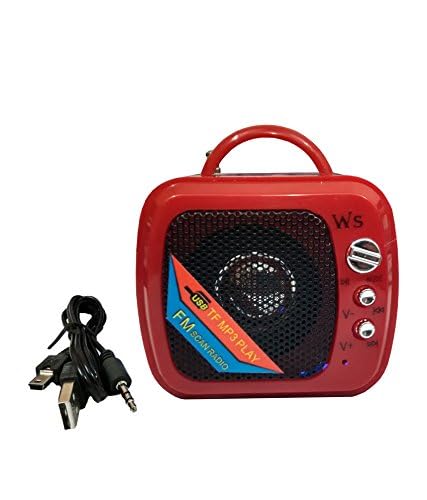
Сүрөт 1: Алдыңкы view of the WS-575 Portable Wireless Speaker. This image shows the speaker grille, control buttons, and the integrated handle.
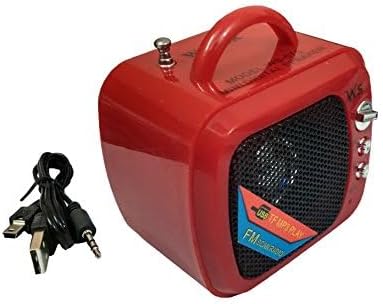
Figure 2: WS-575 Portable Wireless Speaker shown with its included USB charging cable. This illustrates the speaker's compact size and the essential accessory for power.
Негизги өзгөчөлүктөрү:
- Зымсыз Bluetooth туташуусу
- Медиа ойнотуу үчүн USB порту
- TF (MicroSD) card slot for direct audio playback
- AUX input for wired connections
- Portable design with integrated handle
- Tabletop mounting type
Жайгашуу
Динамикти заряддоо:
- Берилген USB кубаттоочу кабелдин кичинекей учун динамиктеги кубаттоо портуна туташтырыңыз.
- USB кабелинин чоңураак учун стандарттуу USB кубат адаптерине (кошумча эмес) же компьютердин USB портуна туташтырыңыз.
- Кубаттоо учурунда кубаттоо индикатору, адатта, кызыл түстө күйөт.
- Once fully charged, the indicator light may change color (e.g., turn off or turn blue/green) or remain red. A full charge usually takes 2-3 hours.
Күйгүзүү/өчүрүү:
- To power on, locate the power switch (usually a toggle switch or a long press button) and switch it to the "ON" position or press and hold for a few seconds.
- To power off, switch it to the "OFF" position or press and hold the power button again.
Иштөө нускамалары
Bluetooth режими:
- Power on the speaker. It will typically enter Bluetooth pairing mode automatically, indicated by a flashing LED light and an audible prompt.
- Түзмөгүңүздө (смартфон, планшет, ноутбук) Bluetooth иштетиңиз жана жеткиликтүү түзмөктөрдү издеңиз.
- Select "WS-575" from the list of found devices.
- Жупташтырылгандан кийин, динамик үн чыгарат жана LED жарыгы күйүп-өчүүнү токтотот.
- Эми сиз түзмөгүңүздөн аудиону динамик аркылуу ойной аласыз.
TF картанын режими:
- MP3 аудиосу бар TF (MicroSD) картасын салыңыз fileдинамиктеги TF картасынын уясына.
- The speaker should automatically switch to TF card mode and begin playing music. If not, press the "Mode" button to cycle through modes until TF card mode is activated.
- Use the playback control buttons (Play/Pause, Next/Previous Track) on the speaker to manage your music.
USB режими:
- MP3 аудиосу бар USB флеш-дискти салыңыз fileсту динамиктин USB портуна сайыңыз.
- The speaker should automatically switch to USB mode and begin playing music. If not, press the "Mode" button to cycle through modes until USB mode is activated.
- Use the playback control buttons (Play/Pause, Next/Previous Track) on the speaker to manage your music.
AUX режими:
- 3.5 мм аудио кабелинин бир учун (киргизилген эмес) динамиктеги AUX киргизүү портуна туташтырыңыз.
- Connect the other end of the audio cable to the headphone jack or audio output port of your device (e.g., laptop, desktop computer).
- Press the "Mode" button on the speaker to switch to AUX mode.
- Play audio from your connected device. Volume control may be managed by both the speaker and the connected device.
Үндү көзөмөлдөө:
- Typically, volume is controlled by dedicated volume buttons (+/-) on the speaker.
- Long press the '+' button to increase volume, and long press the '-' button to decrease volume.
- Short press the '+' or '-' buttons to skip tracks in Bluetooth, TF, or USB modes.
Техникалык тейлөө
Тазалоо:
- Динамиктин сыртын жумшак, кургак, мамыксыз чүпүрөк менен сүртүңүз.
- Абразивдүү тазалагычтарды, момдорду же эриткичтерди колдонбоңуз.
- Ар кандай тешиктерге ным кирүүдөн сактаңыз.
Сактагыч:
- Динамикти түз күн нурунан жана өтө температурадан алыс салкын, кургак жерде сактаңыз.
- Эгер батарейканы узак убакытка сактасаңыз, анын иштөө мөөнөтүн сактоо үчүн аны мезгил-мезгили менен (мисалы, ар бир 3 ай сайын) кубаттап туруңуз.
Батареяга кам көрүү:
- Do not expose the battery to excessive heat or direct flame.
- Батареяны бат-баттан толук кубаттап калуудан алыс болуңуз.
- Берилген кубаттоочу кабелди же шайкеш келген USB кубаттагычты гана колдонуңуз.
Проблемаларды чечүү
| Көйгөй | Мүмкүн себеп | Чечим |
|---|---|---|
| Динамик күйбөйт. | Батарея заряды түгөнгөн. | Динамикти кеминде 30 мүнөткө заряддаңыз. |
| Динамиктен үн жок. | Үн өтө төмөн; туура эмес режим тандалган; түзмөк туташкан эмес. | Increase speaker and device volume. Ensure correct mode (Bluetooth, TF, USB, AUX) is selected. Re-pair Bluetooth or check cable connection. |
| Bluetooth аркылуу жупташтыруу мүмкүн эмес. | Динамик жупташтыруу режиминде эмес; түзмөк Bluetooth өчүк; спикерден өтө алыс. | Ensure speaker is in Bluetooth pairing mode (flashing LED). Turn Bluetooth on your device. Move device closer to speaker (within 10 meters). |
| TF картасы/USB ойнотуусу иштебей жатат. | Карта/диск туура эмес салынган; колдоого алынбайт file format; speaker not in correct mode. | Re-insert TF card/USB drive. Ensure files are in MP3 format. Press "Mode" button to select TF/USB mode. |
Техникалык шарттар
| Бренд аты | Жалпы |
| Модель номери | WS-575 |
| Байланыш технологиясы | Bluetooth, USB, AUX, TF картасы |
| Монтаж түрү | Стол үстү |
| Өзгөчөлүктөр | Portable |
| Шайкеш түзмөктөр | Tablet, Laptop, Smartphone, Desktop Computer |
| Power Source | Батарея менен иштейт (USB аркылуу кайра заряддоого болот) |
Кепилдик жана колдоо
Specific warranty information for the WS-575 Portable Wireless Speaker is not available in this manual. Please refer to the retailer's return policy or contact the seller directly for details regarding warranty coverage and customer support.
For further assistance or inquiries, please reach out to your point of purchase.


