
1. Продукт бүтүп калдыview
This manual provides instructions for the CHUNGHOP ASK-STI6220 Voice Remote Control. This remote is designed as a replacement for specific Verizon Stream TV Box models, offering intelligent voice control and responsive button functionality for an enhanced entertainment experience.
2. Шайкештик жөнүндө маалымат
The ASK-STI6220 Voice Remote Control is specifically designed to work ONLY with Verizon Stream TV Box voice remote control V2 ARRIS CCAM21LP1890T2, 2AGOFRC451A, RC451A, STI6220-D315, ASK-STI6220. It is NOT a universal remote for Verizon FiOS and is NOT compatible with Verizon Stream TV JS8V, Verizon FiOS TV 2019 - MG3-R32140B VRC4100 BLE Remote, or any Verizon remote with a "LAST" button. Please ensure your original remote's design and button layout match this model for proper functionality.
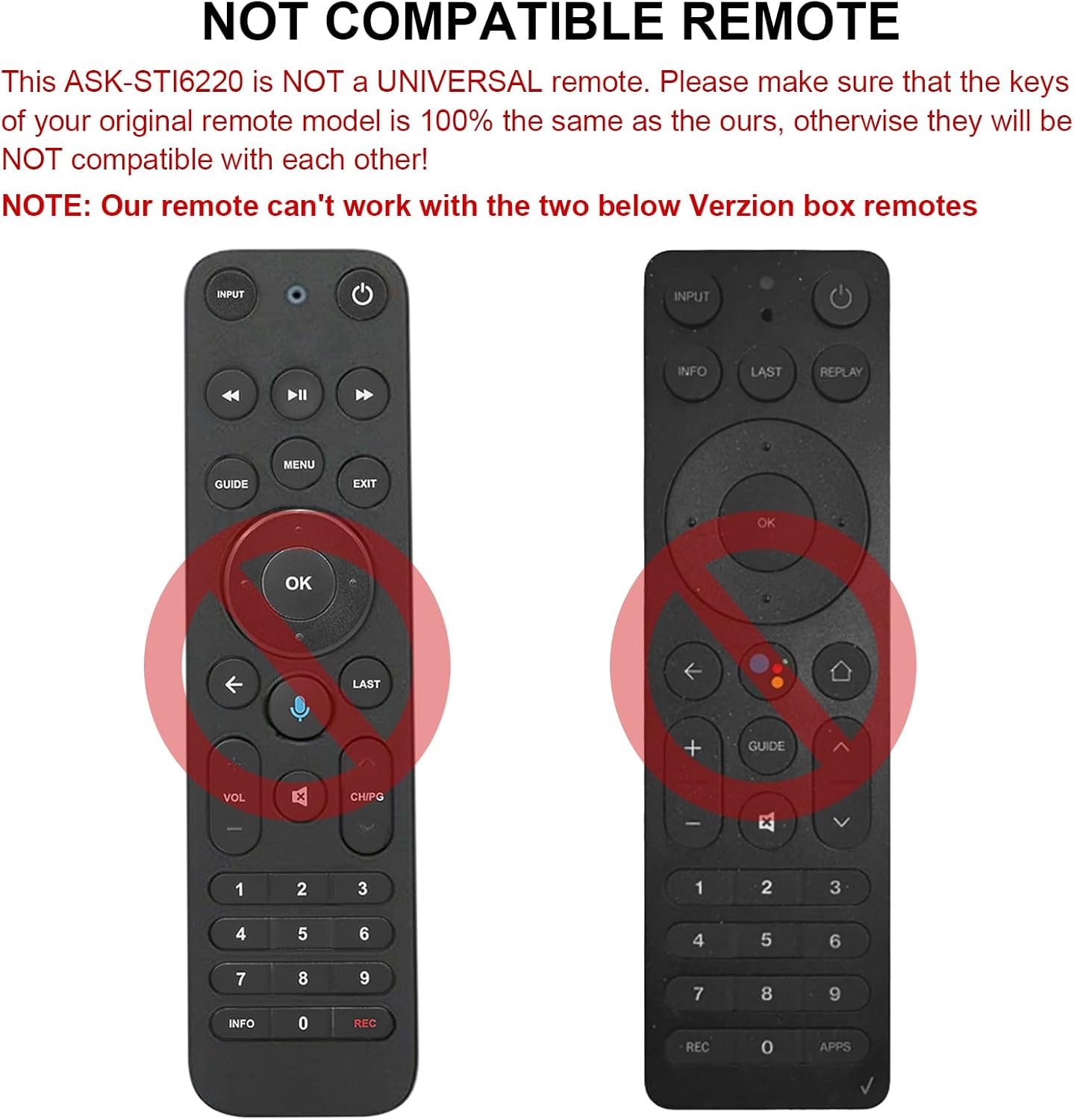
2.1-сүрөт: Мисamples of incompatible Verizon remotes. Ensure your original remote's buttons match the ASK-STI6220 model.

Figure 2.2: The ASK-STI6220 Voice Remote Control, compatible with Verizon Stream TV Box.
3. Орнотуу жана орнотуу
3.1 Батареяны орнотуу
Алыстан башкарууга эки AAA батарейкасы керек (киргизилген эмес). Батареяларды орнотуу үчүн:
- Пульттун артындагы батареянын капкагын алып салыңыз.
- Insert two AAA batteries, ensuring correct polarity (+ and - ends match the markings inside the compartment).
- Батареянын капкагын бекем орнотуңуз.

3.1-сүрөт: Эки AAA батарейкасы үчүн батарея бөлүмү.
Video 3.1: Demonstration of battery installation and initial setup for the ASK-STI6220 Voice Remote.
3.2 Жупташтыруу боюнча көрсөтмөлөр
To use the voice remote, it must first be paired with your Verizon Stream TV Box. Follow one of the methods below:
- Метод 1: басыңыз "Кайтуу"жана"pkplXNUMXjp-XNUMX" buttons simultaneously to initiate pairing.
- Метод 2: Alternatively, press the "OK"жана"ҮЙ" buttons simultaneously to initiate pairing.
Маанилүү эскертүү:
- A device can only be paired with one voice remote at a time. Before pairing this new remote, please disconnect your old remote control (e.g., by removing its batteries).
- If pairing fails on the first attempt, try turning your TV Box off and then back on. If you continue to experience issues, clear any existing remote settings on your TV Box before attempting to pair again.

Figure 3.2: Visual guide for pairing the remote control.
4. Иштөө нускамалары
4.1 Баскычтын жалпы функциялары
The ASK-STI6220 remote features a standard layout for easy navigation and control of your Verizon Stream TV Box:
- Кубат баскычы: Turns the TV Box on or off.
- Киргизүү баскычы: Switches input sources on your TV.
- Навигация тактасы (өйдө/төмөн/сол/оң/ОК): Менюда навигация жана тандоо үчүн колдонулат.
- Үнүн жогорулатуу/төмөндөтүү: Үнүн тууралайт.
- Канал өйдө/төмөн: Каналдарды өзгөртөт.
- Ойнотуу/тындыруу, алдыга жылдыруу, артка түрүү: Медиа ойнотууну башкаруу.
- Үй баскычы: Негизги үй экранына кайтып келет.
- Жетектөө баскычы: Программанын көрсөтмөсүнө кирет.
- Сандар тактасы (0-9): Түздөн-түз каналга кирүү.
- Маалымат баскычы: Программа жөнүндө маалыматты көрсөтөт.
- APPs Button: Accesses applications.
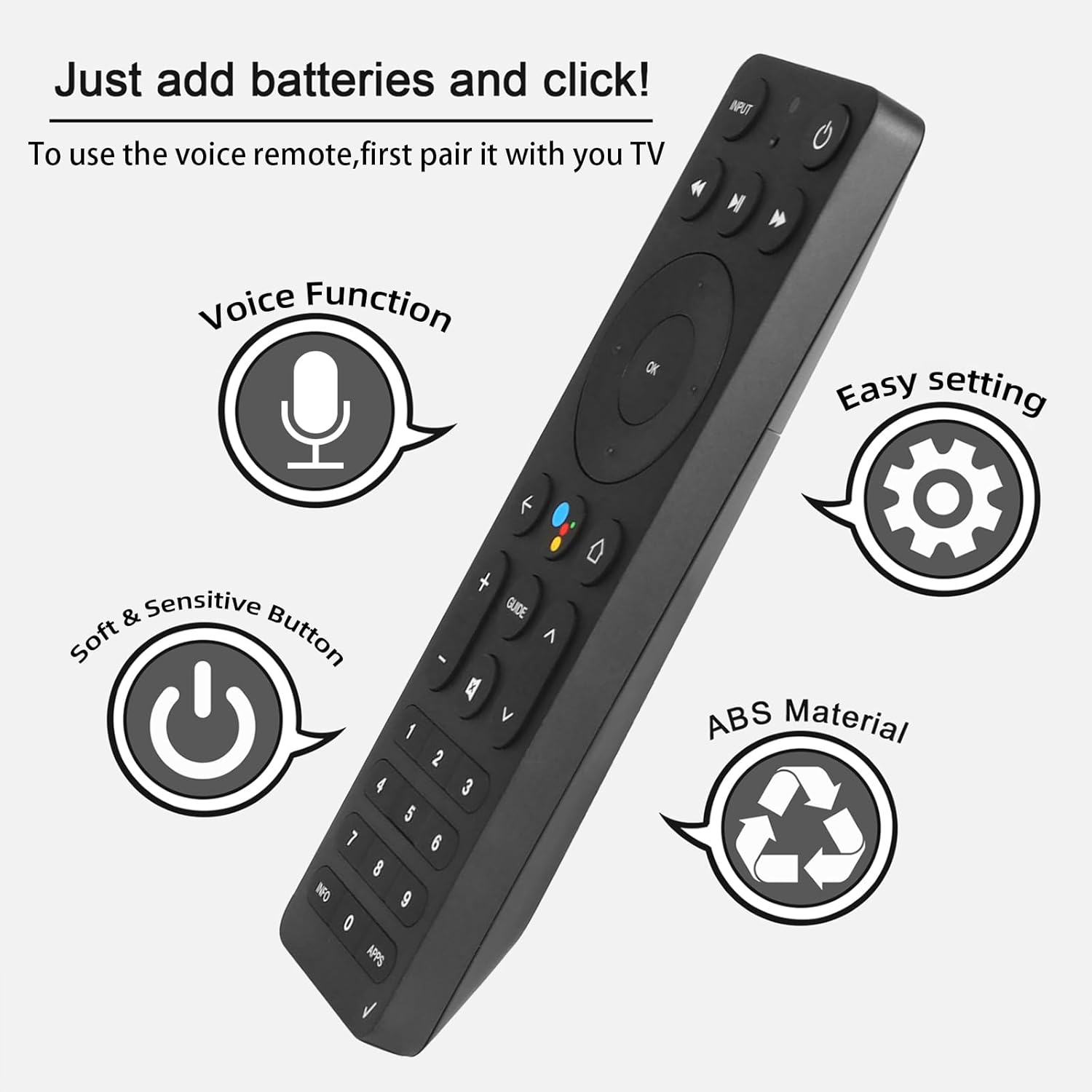
Figure 4.1: Key features and button layout of the remote control.
4.2 Акылдуу үн менен башкаруу
The remote features an intelligent voice function, allowing you to control your TV Box with voice commands. Press the dedicated voice button (often represented by a microphone icon) and speak clearly into the remote.
Exampүн буйруктары:
- "Launch channels"
- "Lower the volume"
- "Play action movie"
If the voice function does not work correctly, follow these steps:
- Go to the home page of your TV Box.
- Press the "Settings" button on the remote control.
- Select "Remote Controls and Accessories" and then "Remote Controls."
- Select to add a new remote control and follow the on-screen steps to complete the setup.

Figure 4.2: Using intelligent voice search and control.

Figure 4.3: The remote offers a 0.2-second fast response and a 33-foot transmitting distance for accurate control.
5. Техникалык тейлөө
Алыстан башкаруу пультуңуздун узак мөөнөттүү иштешин жана оптималдуу иштешин камсыз кылуу үчүн:
- Пультту жумшак, кургак чүпүрөк менен сүртүп, таза кармаңыз. Суюк тазалоочу каражаттарды же абразивдүү материалдарды колдонуудан алыс болуңуз.
- Replace batteries promptly when the remote's responsiveness decreases. Always use fresh AAA batteries.
- Пультту өтө жогорку температурага, түз күн нуруна же нымдуулукка дуушар кылбаңыз.
- Пультту түшүрүп албаңыз же катуу соккуга дуушар кылбаңыз.
6. Кыйынчылыктарды
If you encounter issues with your ASK-STI6220 remote control, please refer to the following common solutions:
- Пульт жооп бербей жатат:
- Батареялардын туура орнотулганын жана түгөнүп калбагандыгын текшериңиз. Зарыл болсо, жаңы AAA батарейкалары менен алмаштырыңыз.
- Verify that the remote is properly paired with your Verizon Stream TV Box (refer to Section 3.2).
- Пульт менен сыналгы кутусунун ортосунда эч кандай тоскоолдук жок экенин текшериңиз.
- Жупташуу маселелери:
- Confirm that your original remote is disconnected (e.g., by removing its batteries) as only one Bluetooth remote can be paired at a time.
- If pairing fails, try turning the TV Box off and on again, then re-attempt the pairing process.
- Clear existing remote settings on your TV Box before trying to pair again.
- Үн менен башкаруу иштебей жатат:
- Ensure the remote is successfully paired and the voice function is enabled on your TV Box.
- Follow the voice control setup steps outlined in Section 4.2.
- Пульттун микрофонуна так жана түз сүйлөңүз.
- Remote not compatible with my device:
- This remote is specifically designed for Verizon Stream TV Box voice remote control V2 ARRIS CCAM21LP1890T2, 2AGOFRC451A, RC451A, STI6220-D315, ASK-STI6220. It is not a universal remote. Please verify your device's model number and compare your original remote's buttons with the ASK-STI6220.

Figure 6.1: Common questions and answers regarding the remote's functionality and compatibility.
7. Техникалык шарттар
| Өзгөчөлүк | Деталь |
|---|---|
| Бренд | CHUNGHOP |
| Модель номери | ASK-STI6220 |
| Шайкеш түзмөктөр | Verizon Stream TV Box (specific models as listed in Section 2) |
| Колдоого алынган түзмөктөрдүн максималдуу саны | 1 |
| Өзгөчө өзгөчөлүк | Эргономикалык, Үн менен башкаруу |
| Түс | As Shown (typically black) |
| Батареялар талап кылынат | 2 AAA батарейка |
| Элемент Салмагы | 3.2 унция |
| Пакеттин өлчөмдөрү | 8.19 x 3.54 x 0.94 дюйм |
8. Кепилдик жана колдоо
For any questions or concerns regarding your CHUNGHOP ASK-STI6220 Voice Remote Control, including pairing, setup, or functionality, please contact the seller directly. Refer to your purchase documentation for specific warranty details, as these may vary.
The manufacturer, CHUNGHOP, is committed to providing support for their products.