
1. Киришүү
Сатып алганыңыз үчүн рахматasing the TNICER T5Plus Headset. This headset is designed to be used with the TNICER T5Plus motorcycle intercom system, providing clear audio communication and entertainment while riding. It includes both an arm microphone and a cord microphone to suit various helmet types and user preferences. Please read this manual thoroughly before installation and use to ensure proper operation and safety.
2. Коопсуздук маалыматы
- Always prioritize road safety. Do not operate the intercom or headset in a way that distracts you from riding.
- Ensure the headset is securely installed in your helmet to prevent detachment during operation.
- Avoid prolonged exposure to loud sounds, which can cause hearing damage. Adjust volume to a safe level.
- Гарнитураны бөлүктөргө бөлүүгө же өзгөртүүгө аракет кылбаңыз. Бул кепилдикти жокко чыгарып, зыян келтириши мүмкүн.
- Аппаратты суудан жана экстремалдык температурадан алыс кармаңыз.
3. Пакеттин мазмуну
Сураныч, пакетте төмөнкү нерселерди текшериңиз:
- T5Plus Headset Speakers (L/R)
- Кол микрофон
- Cord Microphone
- Спикерлер үчүн липучка
- Velcro Pad for Microphone
- USB Type-C Cable (for charging the intercom unit, not included with headset)
- Колдонуучунун Колдонмосу (бул документ)
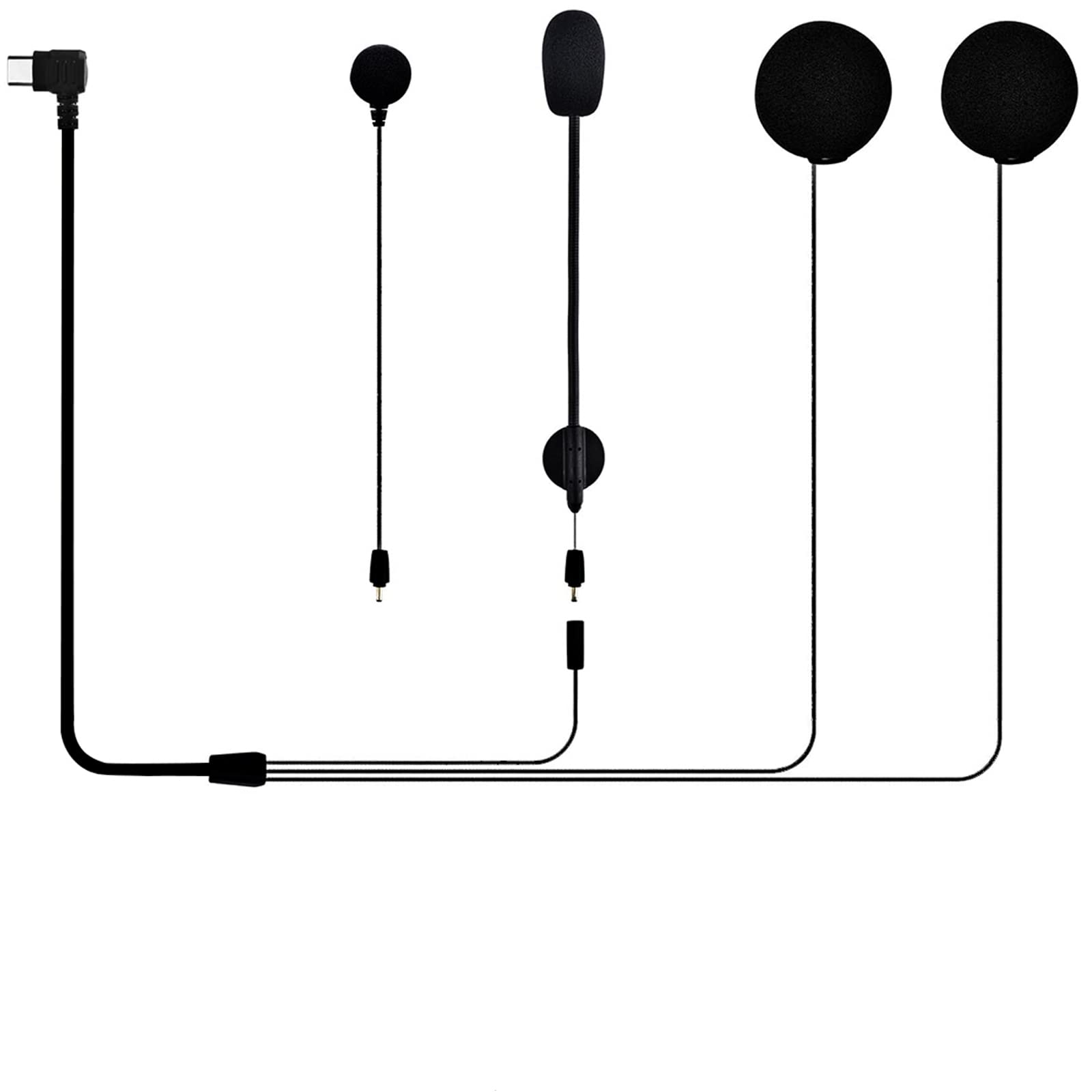
Image 1: Contents of the TNICER T5Plus Headset package. This image displays the two speaker units, the flexible arm microphone, and the wired cord microphone, along with various mounting accessories like Velcro pads.
4. Продукт бүтүп калдыview
The TNICER T5Plus Headset is designed for seamless integration with your T5Plus intercom unit. It features high-quality speakers for clear audio and two microphone options for different helmet styles.
4.1. Компоненттер
- Баяндамачылар: Two slim speakers designed to fit comfortably inside helmet ear pockets.
- Arm Microphone: A flexible boom microphone suitable for open-face or modular helmets.
- Cord Microphone: A wired microphone with a small profile, ideal for full-face helmets where the microphone can be placed near the mouth.
- Туташтыргыч: A Type-C connector for connecting to the T5Plus intercom unit.
5. Орнотуу жана орнотуу
Follow these steps to install the headset components into your motorcycle helmet.
5.1. Динамик орнотуу
- Туулгаңыздын ичиндеги кулак чөнтөктөрүн аныктаңыз.
- Attach the Velcro pads to the back of each speaker.
- Peel off the protective film from the Velcro pads and firmly press the speakers into the helmet's ear pockets. Ensure they are positioned comfortably over your ears.
- Route the speaker wires neatly under the helmet's padding towards the left side where the intercom unit will be mounted.
5.2. Микрофонду орнотуу
Choose either the arm microphone or the cord microphone based on your helmet type.
5.2.1. Arm Microphone (for Open-Face/Modular Helmets)
- Attach a Velcro pad to the base of the arm microphone.
- Mount the arm microphone inside the helmet, ensuring the microphone tip is positioned close to your mouth when the helmet is worn.
- Route the microphone cable along the helmet's edge to the left side.
5.2.2. Cord Microphone (for Full-Face Helmets)
- Attach a Velcro pad to the back of the cord microphone.
- Mount the cord microphone inside the chin bar of your full-face helmet, positioning it directly in front of your mouth.
- Route the microphone cable neatly along the helmet's interior to the left side.
5.3. Connecting to the T5Plus Intercom Unit
- Ensure your T5Plus intercom unit (sold separately) is securely mounted to the side of your helmet.
- Locate the Type-C port on your T5Plus intercom unit.
- Connect the Type-C connector from the headset (which combines speaker and microphone wires) firmly into the intercom unit's Type-C port.
- Verify all cables are tucked away and do not interfere with helmet operation or comfort.
6. Иштөө нускамалары
This headset functions as an audio input/output device for your TNICER T5Plus intercom unit. Refer to your T5Plus intercom unit's manual for detailed instructions on power, pairing, volume control, and specific feature usage.
6.1. Basic Functionality (via T5Plus Intercom Unit)
- Күйгүзүү/өчүрүү: Controlled by the T5Plus intercom unit.
- Үндү тууралоо: Controlled by the T5Plus intercom unit's buttons.
- Домофондук байланыш: Initiated and managed through the T5Plus intercom unit.
- Музыка ойнотуу: Audio from a paired smartphone (via T5Plus unit) will be routed to the headset speakers.
- Телефон чалуулар: Incoming and outgoing calls (via T5Plus unit) will use the headset's microphone and speakers.
7. Техникалык тейлөө
- Тазалоо: Use a soft, dry cloth to wipe the speakers and microphones. Do not use harsh chemicals or abrasive cleaners.
- Сактагыч: Колдонулбай турган учурда, гарнитураны салкын, кургак жерде, күн нуру түз тийген жерден жана өтө жогорку температурадан алыс сактаңыз.
- Кабельге кам көрүү: Зыян келтирбөө үчүн кабелдерди кескин ийүүдөн же ашыкча тартуудан алыс болуңуз.
8. Кыйынчылыктарды
| Көйгөй | Мүмкүн себеп | Чечим |
|---|---|---|
| Динамиктерден үн жок. | Headset not properly connected to intercom unit. Үн өтө төмөн. Intercom unit not powered on. | Ensure the Type-C connector is fully inserted into the T5Plus intercom unit. Increase volume on the T5Plus intercom unit. Power on the T5Plus intercom unit. |
| Микрофон үндү кабыл албай жатат. | Микрофон туташкан жок. Микрофон туура эмес жайгаштырылган. Incorrect microphone selected (if applicable on intercom unit). | Ensure the headset's Type-C connector is fully inserted. Микрофондун абалын оозуңузга жакыныраак коюңуз. Refer to your T5Plus intercom manual for microphone selection settings. |
| Үн сапаты начар. | Speakers not positioned correctly. Тышкы кийлигишүү. | Adjust speaker position in ear pockets for optimal sound. Күчтүү электромагниттик кийлигишүү булактарынан алыс болуңуз. |
If you encounter issues not listed here, please refer to the TNICER T5Plus intercom unit's manual or contact customer support.
9. Техникалык шарттар
- Модел: T5Plus Headset
- Шайкештик: TNICER T5Plus Motorcycle Intercom System
- Микрофон түрү: Arm Microphone, Cord Microphone
- Туташтыргыч түрү: USB Type-C
- ASIN: B0CNPR813F
10. Кепилдик жана колдоо
TNICER products are designed for quality and reliability. For warranty information, please refer to the documentation included with your TNICER T5Plus intercom unit or visit the official TNICER website. For technical support or inquiries, please contact TNICER customer service through their official channels or the retailer where you purchased the product.
Official TNICER Store: Visit TNICER Store on Amazon.co.jp