
1. Киришүү
This manual provides detailed instructions for the installation, operation, and maintenance of the YUHANUS Electric Drop Bolt Lock. This lock is designed for use in door access control systems, featuring a fail-safe (NC) mode and an adjustable time delay function. Please read this manual thoroughly before installation and use to ensure proper function and safety.
2. Продукциянын өзгөчөлүктөрү
- NC Mode (Fail-Safe): The lock is in a locked state when power is applied. It unlocks when power is removed or when activated by a push button or remote controller.
- Убакытты кечиктирүү функциясы: Adjustable delay settings of 0s, 3s, or 6s for unlocking.
- Ар тараптуу колдонмо: Suitable for various door types including wooden, metal, and fireproof doors.
- Surface Mounted Design: Facilitates straightforward installation.
- Туруктуу курулуш: Made from aluminum for reliability.
3. Пакеттин мазмуну
Орнотууну баштоодон мурун бардык компоненттер бар экендигин текшериңиз:
- Electric Drop Bolt Lock Unit
- Faceplate/Panel Cover
- Монтаждоо бурамалар
- Көрсөтмө (бул документ)

Image 3.1: Contents of the YUHANUS Electric Drop Bolt Lock package, showing the main lock unit, mounting screws, and a printed instruction manual.
4. Техникалык шарттар
| Спецификация | Нарк |
|---|---|
| Бренд | ЮХАНУС |
| Модель аты | Electric-Bolt-Lock01-NC |
| Модель номери | 769894490594 |
| Кулпу түрү | joldar, |
| Operating Voltage | DC 12V |
| Учурдагы | 200мА |
| Материал | Алюминий |
| Элементтин өлчөмдөрү (L x W x Y) | 6 x 1.3 x 1 дюйм (150 мм x 33 мм x 27 мм) |
| Өзгөчө өзгөчөлүк | Auto-Lock, Time Delay (0s/3s/6s) |
| Башкаруу ыкмасы | Push Button, Remote (via access control system) |

Image 4.1: Detailed dimensions of the electric drop bolt lock, indicating measurements for length (150mm/5.91"), width (33mm/1.30"), and height (27mm/1.06").
5. Коопсуздук маалыматы
- Орнотуудан же тейлөөдөн мурун электр энергиясы өчүрүлгөнүн текшериңиз.
- This device operates on DC 12V. Incorrect voltagал түзмөккө зыян келтириши мүмкүн.
- All wiring should be performed by a qualified professional to prevent electrical hazards.
- Do not expose the lock to excessive moisture or extreme temperatures.
- Балдар жетпеген жерде сактаңыз.
6. Орнотуу
6.1 Кулпуну орнотуу
- Identify the desired mounting location on the door frame and the corresponding strike plate location on the door. The lock is surface-mounted.
- Ensure sufficient clearance for the bolt to extend and retract freely.
- Mark the screw holes for the main lock unit and the strike plate.
- Drill pilot holes as necessary.
- Securely attach the main lock unit to the door frame and the strike plate to the door using the provided screws.
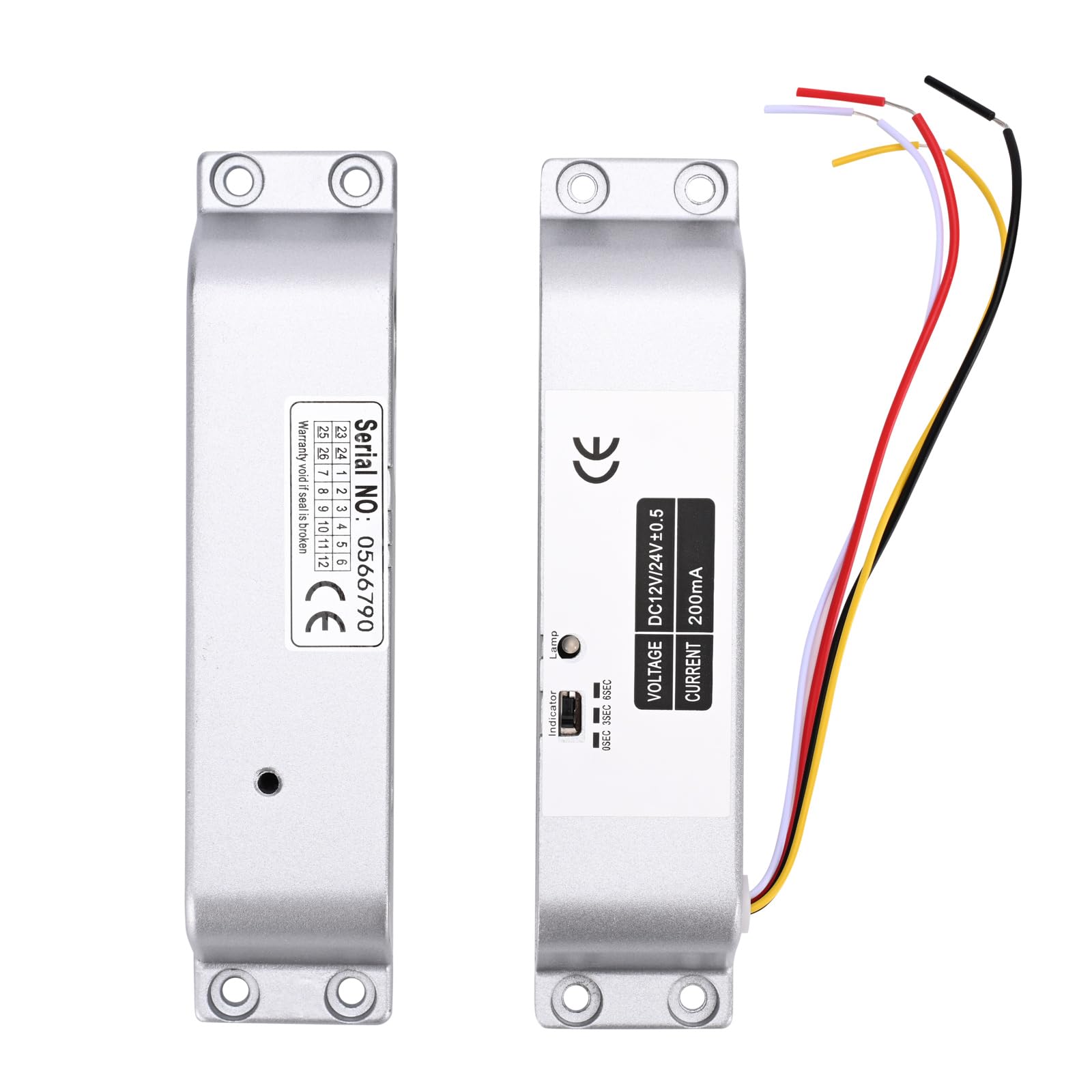
Image 6.1: The main electric drop bolt lock unit and its corresponding strike plate, ready for installation.

Сүрөт 6.2: Мурункуample installation of the electric drop bolt lock on a glass door, demonstrating its integration with an access control keypad and exit button.
6.2 Электр өткөргүч схемасы
Connect the lock to your access control system according to the following diagram. Pay close attention to polarity.
- Кызыл кабель: Connect to +12V (positive power supply).
- Кара кабель: Connect to GND (ground/negative power supply).

Image 6.3: Detailed wiring diagram illustrating how to connect the electric bolt lock to an access control keypad, power supply, and exit switch button. The red cable connects to +12V and the black cable to GND.
7. Иштөө нускамалары
7.1 NC Mode (Fail-Safe) Operation
In NC (Normally Closed) mode, the lock is engaged and secures the door when power is supplied. To unlock the door, the power to the lock must be temporarily interrupted or a signal from an access control device (e.g., push button, remote controller, keypad) must be received to release the bolt.
7.2 Time Delay Function
The lock features an adjustable time delay for unlocking. This delay can be set to 0 seconds, 3 seconds, or 6 seconds. This function allows for a brief period before the door can be opened after an unlock signal is received, which can be useful in certain access control scenarios.
To adjust the time delay:
- Locate the small switch or jumper settings on the side of the lock unit, typically labeled '0SEC', '3SEC', '6SEC'.
- Use a small tool (e.g., screwdriver) to set the switch to the desired delay time.

Сүрөт 7.1: деталдуу view of the lock's indicator and time delay setting switch, allowing selection between 0, 3, and 6 seconds.
8. Техникалык тейлөө
- Regularly inspect the lock and strike plate for any signs of wear or damage.
- Keep the lock mechanism clean and free from dust and debris.
- Бардык зым туташууларынын коопсуз экенине ынаныңыз.
- Өндүрүүчү тарабынан атайын көрсөтмө берилбесе, ички механизмди майлабаңыз.
9. Кыйынчылыктарды
| Көйгөй | Мүмкүн себеп | Чечим |
|---|---|---|
| Lock does not engage (stay locked) | No power or insufficient power supply. Incorrect wiring. Faulty lock unit. | Check power supply (DC 12V). Verify wiring connections (Red to +12V, Black to GND). Test with a known good power supply. If problem persists, contact support. |
| Lock does not disengage (unlock) | No unlock signal from access control. Incorrect wiring. Mechanical obstruction. | Ensure access control system is sending an unlock signal. Check wiring for the unlock signal. Inspect for any physical obstructions preventing the bolt from retracting. |
| Time delay not functioning correctly | Incorrect time delay setting. | Verify the time delay switch setting on the lock unit (0s, 3s, or 6s). |
10. Кепилдик жана колдоо
For warranty information or technical support, please contact YUHANUS customer service through your purchase platform or the official YUHANUS website. Please have your model number (Electric-Bolt-Lock01-NC) and purchase date available when contacting support.